Majority Darwin Bluetooth Alarm Clock with 10W Wireless Charging
Model: Darwin | Brand: Majority
Introducere
This manual provides detailed instructions for the operation and maintenance of your Majority Darwin Bluetooth Alarm Clock. This device integrates an FM radio, dual alarm clock, 10W wireless charging, and ambient lighting to enhance your bedside experience.
Informații de siguranță
- Citiți cu atenție toate instrucțiunile înainte de utilizare.
- Țineți aparatul departe de apă și umiditate.
- Nu expuneți la temperaturi extreme.
- Nu încercați să dezasamblați sau să reparați unitatea singur. Adresați-vă personalului de service calificat.
- Asigurați o ventilație adecvată atunci când utilizați funcția de încărcare wireless.
Conținutul pachetului
Verificați dacă toate articolele sunt prezente în cutie:
- Majority Darwin Bedside Clock
- Adaptor de alimentare
- Manual de utilizare

Image: Package contents of the Majority Darwin alarm clock, including the clock, power adapter, and user manual.
Produs terminatview
Familiarize yourself with the main components and control buttons of your Darwin alarm clock.
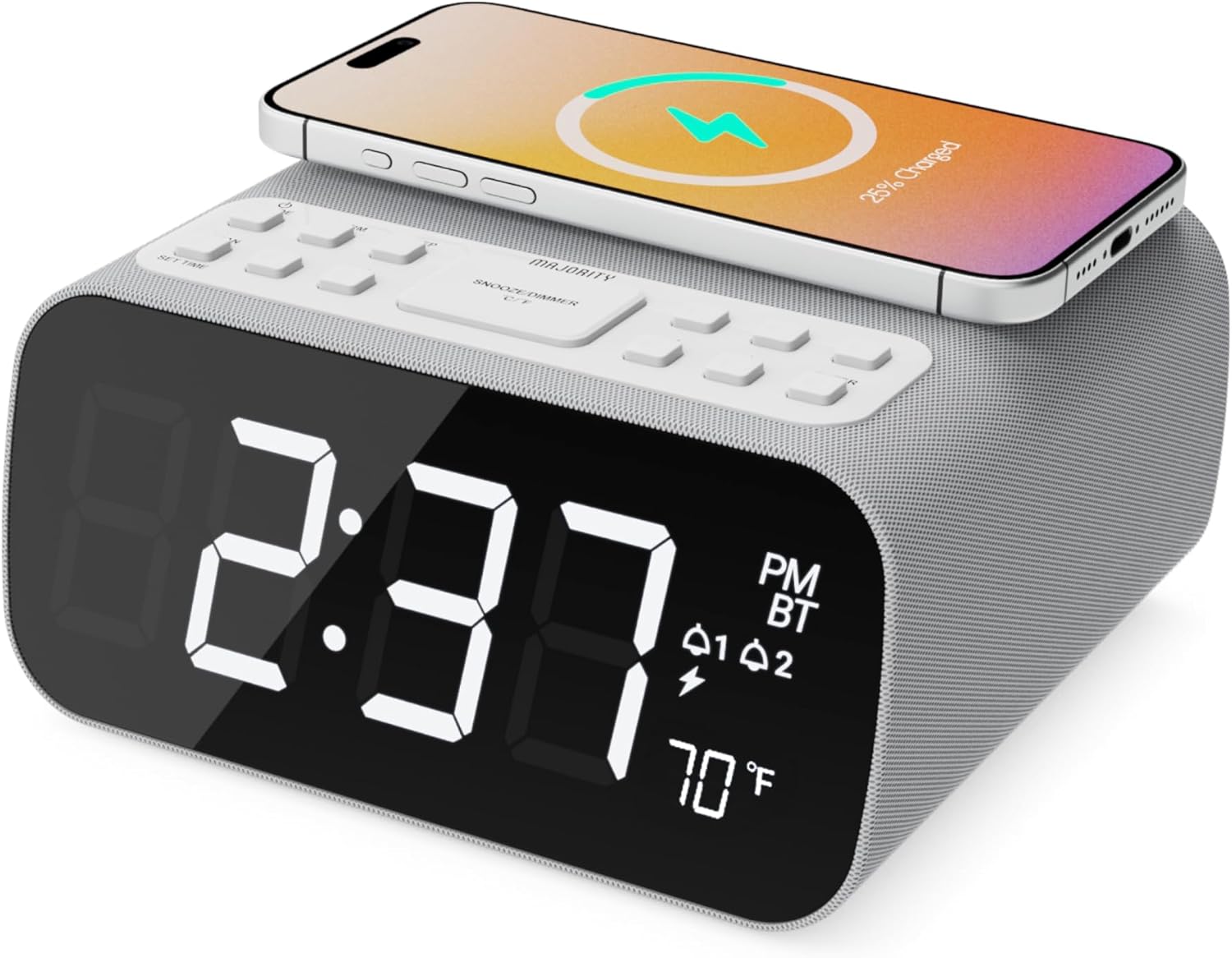
Imagine: față view of the Majority Darwin alarm clock showing the large digital display, wireless charging pad on top, and control buttons.

Imagine: Laterală view of the Majority Darwin alarm clock highlighting the control panel with buttons for time, alarm, volume, and light settings.
Comenzile panoului superior
- Pad de încărcare fără fir: Place compatible devices here for 10W wireless charging.
- Butonul Amânare/Luminare: Short press to snooze alarm; long press to adjust display brightness or cycle through ambient light colors.
- Time/Date Set Button: Press to enter time/date setting mode.
- Butoane Alarmă 1/2: Press to activate/deactivate Alarm 1 or Alarm 2. Long press to set alarm time.
- Volume/Tune Buttons: Adjust volume or tune FM radio stations.
- Butonul de mod: Switch between FM Radio, Bluetooth, and White Noise modes.
Rear Panel Controls & Ports
- Intrare DC 12V: Connect the mains power adapter here.
- Port de încărcare USB: For charging additional devices via USB cable.
- Compartiment baterie: For backup batteries (not for primary power).
- Display Dimmer Slider: Manually adjust the brightness of the main time display.
- Diminuator lumină nocturnă: Adjust brightness of the ambient light.
Înființat
Conexiune de alimentare
Connect the provided mains power adapter to the DC 12V input port on the rear of the alarm clock and plug it into a wall outlet. The display will light up.
For battery backup, open the battery compartment on the bottom and insert 2 x AAA batteries (not included). This will retain time settings during a power outage but will not power the display or charging functions.
Imagine: Spate view of the Majority Darwin alarm clock with the power adapter connected to the DC 12V input.
Setarea inițială a orei
- Apăsați lung pe Setat ora/data button on the top panel. The hour digits will start flashing.
- Utilizați Volume/Tune butoane pentru a regla ora.
- Apăsați tasta Setat ora/data Apăsați din nou butonul pentru a confirma ora și a trece la setarea minutelor.
- Utilizați Volume/Tune butoane pentru reglarea minutelor.
- Repeat this process for setting the year, month, and day.
- Apăsați tasta Setat ora/data button one last time to save all settings.
Instrucțiuni de operare
Time Display & Dimmer
The large LED display shows the current time.
Reglare manuală: Utilizați Display Dimmer Slider on the rear panel to manually adjust the brightness of the time display.
Dimmare automată: The device features an auto-dimming function that adjusts display brightness at fixed time intervals (e.g., dimming at night, brightening during the day).

Imagine: față view of the Majority Darwin alarm clock displaying time, AM/PM, and temperature, highlighting the dual alarm icons.
Setarea alarmei
The Darwin alarm clock supports two independent alarms (Alarm 1 and Alarm 2).
- Long press either the Alarma 1 or Alarma 2 button. The hour digits for that alarm will flash.
- Utilizați Volume/Tune butoane pentru a seta ora dorită a alarmei.
- Apăsați butonul corespunzător Alarma Apăsați din nou butonul pentru a confirma ora și a trece la setarea minutelor.
- Utilizați Volume/Tune butoane pentru a seta minutele dorite ale alarmei.
- Apăsați tasta Alarma button again to select the alarm source (FM radio or built-in tone). Use Volume/Tune butoane pentru a selecta.
- Apăsați tasta Alarma button again to set the alarm volume.
- Apăsați tasta Alarma button one last time to activate the alarm. An alarm icon will appear on the display.
Deactivating an Alarm: Short press the corresponding Alarma 1 or Alarma 2 button to turn it off. The alarm icon will disappear.
Funcția de amânare
When an alarm sounds, short press the Amânare/Luminare button on the top panel to temporarily silence the alarm for 9 minutes. The alarm will sound again after the snooze period.
Funcționare radio FM
- Apăsați tasta Modul apăsați butonul până când pe afișaj apare „FM”.
- Utilizați Volume/Tune buttons to manually tune to your desired FM station.
- Auto Scan & Store Presets: Apăsați lung pe Modul button to automatically scan and save available FM stations as presets.
- Apăsați scurt pe Modul button to cycle through saved presets.
Bluetooth Pairing & Playback
- Apăsați tasta Modul button until "BT" appears on the display and the Bluetooth indicator starts flashing.
- On your smartphone or other Bluetooth device, enable Bluetooth and search for "Majority Darwin".
- Select the device to pair. Once connected, the Bluetooth indicator on the alarm clock will stop flashing.
- You can now play audio from your device through the alarm clock's speaker. Use the Volume/Tune buttons on the alarm clock or your device to adjust volume.

Image: A smartphone displaying music playback, connected via Bluetooth to the Majority Darwin alarm clock.
Încărcare fără fir
The top surface of the alarm clock features a 10W wireless charging pad.
- Așezați smartphone-ul compatibil Qi direct pe suportul de încărcare wireless.
- Ensure the phone is centered on the charging symbol for optimal charging.
- A charging indicator (e.g., a lightning bolt icon) may appear on your phone's screen or the alarm clock's display to confirm charging.
Port de încărcare USB: An additional USB port on the rear allows you to charge other devices using a USB cable.
Image: The Majority Darwin alarm clock with a smartphone placed on top, indicating active wireless charging.
Night Light / Ambient Light
The alarm clock features an ambient light ring around its base.
- Apăsați lung pe Amânare/Luminare button to turn the ambient light on/off.
- Apăsați scurt pe Amânare/Luminare button to cycle through different color modes (e.g., red, green, blue, purple, white, color cycle).
- Utilizați Dimmer pentru lumină de noapte on the rear panel to adjust the brightness of the ambient light.

Image: The Majority Darwin alarm clock illuminated with a vibrant ambient light from its base.
White Noise Function
The device includes various white noise sounds to aid relaxation and sleep.
- Apăsați tasta Modul button until the white noise mode is activated (indicated by a specific icon or text on the display).
- Utilizați Volume/Tune buttons to adjust the volume of the white noise.
- Apăsați scurt pe Modul button again to cycle through different white noise sounds (e.g., nature sounds, fan noise).
Întreţinere
- Curățați dispozitivul cu o lavetă moale și uscată. Nu utilizați substanțe de curățare abrazive sau solvenți.
- Păstrați orificiile de ventilație libere.
- If not in use for an extended period, disconnect from power and remove backup batteries.
Depanare
Fără alimentare / Afișaj oprit
- Asigurați-vă că adaptorul de alimentare este conectat corect atât la dispozitiv, cât și la o priză funcțională.
- Verificați dacă priza este funcțională.
Încărcarea fără fir nu funcționează
- Asigurați-vă că dispozitivul dvs. este compatibil Qi.
- Make sure your phone is centered on the charging pad.
- Îndepărtați orice huse groase de telefon sau obiecte metalice dintre telefon și suportul de încărcare.
Probleme de asociere Bluetooth
- Ensure the alarm clock is in Bluetooth pairing mode (BT flashing).
- Make sure your device's Bluetooth is enabled and searching.
- Încercați să anulați asocierea și să reasociați dispozitivul.
- Ensure no other devices are currently connected to the alarm clock via Bluetooth.
Alarma nu sună
- Verificați dacă alarma este activată (pictograma alarmei este vizibilă pe afișaj).
- Verificați setarea volumului alarmei.
- Ensure the correct alarm time is set.
Specificații
| Caracteristică | Detaliu |
|---|---|
| Marca | Majoritate |
| Numele modelului | Darwin |
| Ieșire de încărcare wireless | 10W |
| Putere de ieșire difuzor | 12 wați |
| Tehnologia de conectivitate | Bluetooth |
| Sursa de alimentare | Mains Power (Battery Backup) |
| Dimensiunile produsului | 13.07 x 8.22 x 6.09 inci |
| Greutatea articolului | 1.42 lire sterline (645 grame) |
| Caracteristici speciale | Adjustable Volume, Dual Alarm, Bluetooth, Wireless Charging, FM Radio, Dimmable Display, Ambient Night Light, White Noise |
Garanție și asistență
The Majority Darwin Bluetooth Alarm Clock comes with a standard manufacturer's warranty. Please refer to the warranty card included in your package for specific terms and conditions.
For technical support, troubleshooting, or warranty claims, please visit the official Majority website-ul sau contactați serviciul pentru clienți.
Online resources and FAQs may also be available on the product support page.


