1. Produs terminatview
The Pyle 4K USB Video Conference Room Camera System is an integrated solution designed for high-quality video conferencing. It features a 4K camera with a 120° field of view, 5X digital zoom, and AI-powered auto-framing. The system includes an 8-meter microphone pickup range with echo cancellation and noise reduction for clear audio. It is compatible with various platforms such as Zoom, Skype, and Microsoft Teams, and supports PC, Mac, phone, and tablet devices.

Imaginea 1: Față view of the Pyle 4K USB Video Conference Room Camera System.
2. Ce se află în cutie
Verificați dacă toate componentele sunt prezente în pachet:
- Pyle 4K USB Video Conference Room Camera System (Main Unit)
- Cablu USB
- Peeping Cover (Privacy Cover)
- Wall-mounted Components (Bracket and Screws)
- Power Adapter (12VDC 3.0A)
- Telecomanda
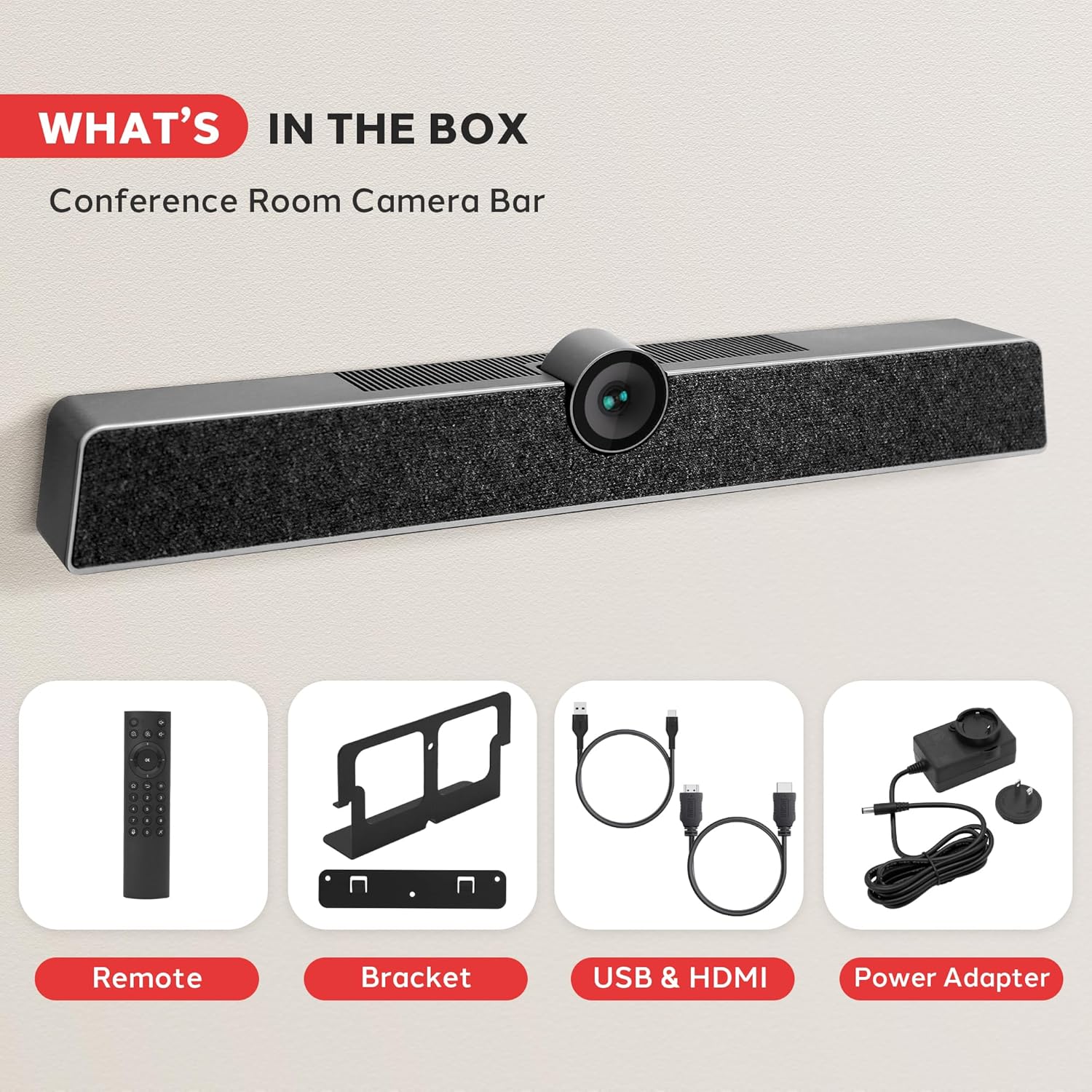
Image 2: All components included in the product package. This includes the main camera unit, remote control, mounting bracket, USB and HDMI cables, and power adapter.
3. Configurare și instalare
The Pyle 4K USB Video Conference Room Camera System offers flexible installation options for various meeting environments.
3.1 Amplasarea pe desktop
For desktop use, simply place the camera system on a flat, stable surface in front of your display. Ensure the camera lens is unobstructed and positioned to capture the desired area.
3.2 Montare pe perete
To wall-mount the system, use the provided wall-mounted components. Secure the bracket to the wall using appropriate screws, then attach the camera system to the bracket. Ensure the mounting location provides a clear line of sight for the camera and is at an optimal height for participants.

Image 3: Illustration of multiple installation methods, including wall mounting above a display and desktop placement.
3.3 Conectivitate
Connect the camera system to your computer or display using the appropriate cables:
- Conexiune USB: Use the provided USB cable to connect the camera system to your computer. This enables video, audio, and control functions.
- Conexiune de alimentare: Connect the power adapter to the camera system and a power outlet.
- HDMI Output (Optional): If desired, connect an HDMI cable from the camera system's HDMI OUT port to a display for direct video output.
- Aux In/Out (Optional): For external audio devices, use the Aux In/Out ports.
- LAN Port (Optional): Connect an Ethernet cable for network connectivity if required by your setup.

Imaginea 4: Detaliată view of the multi-port connectivity options on the rear of the device.
4. Instrucțiuni de utilizare
Once connected, the system is generally plug-and-play. Your operating system should automatically recognize the device.
4.1 Starting a Conference
Open your preferred video conferencing application (e.g., Zoom, Microsoft Teams, Skype). In the application's settings, select the Pyle camera system as your primary video and audio input device.
4.2 Caracteristicile camerei
- 4K Video Quality: The camera captures video in 4K resolution, providing clear and detailed visuals.
- Câmp de 120° de View: The wide-angle lens ensures that all participants in a room are visible.
- Zoom digital 5X: Use the remote control to zoom in or out, focusing on specific individuals or areas.
- AI Auto-Framing: The system automatically adjusts the camera's view to keep all participants centered and optimally framed within the video feed.
- Detectare facială: Advanced AI identifies and tracks faces for improved framing and focus.
- Voice Localization: The system can detect the direction of speech, enhancing audio clarity for the active speaker.

Image 5: Visual representation of key features including wide viewing angle, face detection, voice localization, and clear audio output.
4.3 Caracteristici audio
- 8-Meter Voice Pickup: The integrated MEMS microphone array can capture voices clearly from up to 8 meters away.
- Anularea ecoului: Reduces echo effects for clearer communication.
- Reducerea zgomotului: Filters out background distractions, ensuring the speaker's voice is prominent.
4.4 Funcții de control de la distanță
The included remote control allows for convenient adjustment of camera settings, including zoom, volume, and other functions. Refer to the remote control's button layout for specific operations.
5. Întreținere
To ensure optimal performance and longevity of your Pyle 4K USB Video Conference Room Camera System, follow these maintenance guidelines:
- curatenie: Use a soft, dry cloth to clean the exterior of the device. For the camera lens, use a lens cleaning cloth and solution specifically designed for optical surfaces. Avoid abrasive cleaners or solvents.
- Depozitare: Când nu este utilizat pentru perioade lungi de timp, depozitați dispozitivul într-un loc răcoros și uscat, ferit de lumina directă a soarelui și de temperaturi extreme.
- Organizare de cabluri: Asigurați-vă că toate cablurile sunt organizate ordonat și nu sunt tensionate pentru a preveni deteriorarea.
- Actualizări firmware: Periodically check the Pyle official webpentru orice actualizări de firmware disponibile pentru a îmbunătăți performanța și a adăuga noi funcții.
6. Depanare
If you encounter issues with your camera system, refer to the following common problems and solutions:
- Fără ieșire video:
- Ensure the USB cable is securely connected to both the camera system and your computer.
- Verificați dacă adaptorul de alimentare este conectat și dacă dispozitivul este pornit.
- Check your video conferencing application settings to confirm the Pyle camera is selected as the video source.
- Încercați să vă conectați la un alt port USB de pe computer.
- Fără intrare/ieșire audio:
- Confirm the Pyle camera system is selected as both the microphone and speaker in your computer's sound settings and your conferencing application.
- Check the volume levels on the device, your computer, and the application.
- Ensure the microphone is not muted (check the remote control or application settings).
- Calitate video slabă:
- Ensure sufficient lighting in the room.
- Curăţaţi obiectivul camerei cu o cârpă moale şi uscată.
- Verify your internet connection speed is adequate for 4K video streaming.
- Închideți alte aplicații care ar putea consuma resurse de sistem.
- Telecomanda nu răspunde:
- Verificați și înlocuiți bateriile din telecomandă.
- Ensure there are no obstructions between the remote control and the camera system.
7. Specificații
| Caracteristică | Caietul de sarcini |
|---|---|
| Marca | Pyle |
| Numărul de model | SQOCULICAMERA.6 |
| Rezoluție captură video | 4K |
| Câmpul de View (FOV) | 120 de grade |
| Zoom digital | 5X |
| Interval de captare a microfonului | 8 metri |
| Tehnologia de conectivitate | USB |
| Caracteristici speciale | AI Auto-Framing, Face Detection, Remote Control, Speakers, Wind Noise Reduction, Echo Cancellation |
| Greutatea articolului | 2.27 lire sterline |
| Dimensiuni pachet | 21.3 x 7.8 x 6.61 inci |
8. Garanție și asistență
Pentru informații despre garanție și asistență tehnică, vă rugăm să consultați site-ul oficial Pyle. website-ul lor web sau contactați departamentul de asistență pentru clienți. Păstrați bonul fiscal pentru reclamații în garanție.
Asistență clienți Pyle:
Vizita www.pyleusa.com for product registration, support, and contact information.


