Introducere
Thank you for choosing the BACKWIN B800-T USB-C Wired Headphones. This manual provides detailed instructions for the proper use, setup, and maintenance of your new headphones. Please read this manual thoroughly before using the product to ensure optimal performance and longevity.
Conținutul pachetului
Asigurați-vă că toate articolele sunt prezente în colet:
- BACKWIN B800-T USB-C Wired Headphones
- Ear Cushions (various sizes: large, medium, small)

Image: The BACKWIN B800-T USB-C Wired Headphones, showing the earbuds, inline control, and USB-C connector. Also included are additional ear cushions.
Produs terminatview
Caracteristici cheie
- Four-Unit Driver Design: Each earbud features a dynamic bass unit and a high-definition decoding iron coil unit for powerful subwoofer sound and clear high-pitched audio.
- Integrated DAC Chip: Equipped with a 24-bit/96Khz DAC decoding chip for high-fidelity audio.
- Universal USB-C Compatibility: Designed for devices with a Type-C interface, especially those without a 3.5mm audio jack.
- Inline Control with Microphone: Features volume control and a high-definition microphone for convenient call management and music playback.
- Anulare pasivă a zgomotului: The earbud design and included silicone ear caps provide passive noise isolation.
- Construcție durabilă: Metal back shell of the headphones is CNC machined for precise workmanship.
Componente

Image: An exploded diagram illustrating the internal components of the earbud, including the dynamic coil, composite vibration film, sound processor with physical noise reduction, and the iron ring. This combination delivers rich bass, full midrange, and clear treble.
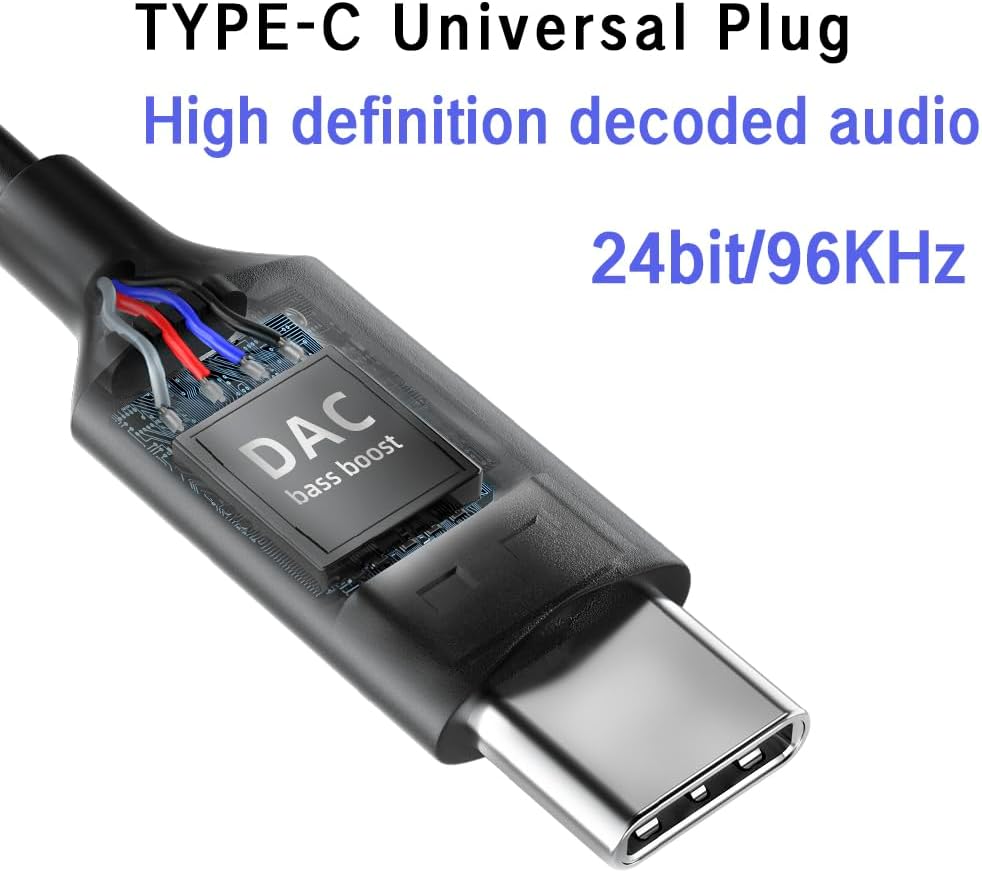
Imagine: Un prim-plan view of the USB-C plug, highlighting the integrated DAC (Digital-to-Analog Converter) chip, which supports 24-bit/96KHz high-definition audio decoding.

Imagine: O imagine detaliată view of the earbud's metal back shell, showcasing the CNC precision machining and overall craftsmanship.
Înființat
1. Selecting Ear Cushions
The headphones come with large, medium, and small soundproof silicone ear caps. Choose the size that provides the most comfortable and secure fit for your ears. A proper fit is crucial for optimal sound quality and passive noise cancellation.
2. Conectarea la dispozitivul dvs
- Locate the USB-C port on your compatible device (e.g., smartphone, tablet, laptop).
- Insert the USB-C plug of the headphones firmly into the device's USB-C port.
- Your device should automatically recognize the headphones. No additional drivers are typically required.
Nota: These headphones are designed for devices with a Type-C interface, especially those without a 3.5mm audio jack. Compatibility may vary with some devices; ensure your device supports audio output via its USB-C port.

Image: A person wearing the BACKWIN B800-T USB-C Wired Headphones, demonstrating proper ear placement and fit.
Instrucțiuni de operare
Inline Remote Control Functions
The inline remote control allows you to manage audio playback and calls without needing to access your device directly.

Image: A diagram detailing the functions of the inline remote control, including volume up, volume down, microphone, and multi-function button for calls and music playback.
- Buton de creștere a volumului (+): Apăsați pentru a crește volumul audio.
- Buton de reducere a volumului (-): Apăsați pentru a reduce volumul audio.
- Multi-function Button (Center Button):
- For Calls:
- Un click: Answer an incoming call or end an active call.
- Apasare prelungită: Respingeți un apel primit.
- Pentru muzică:
- Un click: Play or Pause music.
- Faceți clic de două ori: Treci la următoarea piesă.
- Click Three Times: Reveniți la piesa anterioară.
- For Calls:
- Microfon: The built-in microphone allows for hands-free communication during calls.
Întreţinere
- curatenie: Ștergeți ușor căștile și cablul cu o lavetă moale și uscată. Nu utilizați substanțe chimice dure sau materiale abrazive.
- Perne de urechi: Remove and clean the silicone ear cushions regularly with mild soap and water. Ensure they are completely dry before reattaching.
- Depozitare: Store the headphones in a clean, dry place when not in use. Avoid extreme temperatures and direct sunlight.
- Îngrijirea cablului: Evitați curburile bruște sau tragerea excesivă a cablului pentru a preveni deteriorarea.
- Expunerea la apă: Aceste căști nu sunt impermeabile. Evitați expunerea la apă sau umiditate excesivă.
Depanare
| Problemă | Cauza posibila | Soluţie |
|---|---|---|
| Fără sunet sau volum redus |
|
|
| Microfonul nu funcționează |
|
|
| Distorsiunea sunetului sau calitate slabă |
|
|
Specificații
| Numele modelului | B800-T |
| Marca | BACKWIN |
| Tehnologia de conectivitate | Cablat |
| Mufă pentru căști | Tip C (USB-C) |
| Tip de driver audio | Hybrid Driver (Dynamic bass unit + high-definition decoding iron coil unit) |
| Raspuns in frecventa | Up to 96 KHz (24bit/96Khz Decoding chip) |
| Sensibilitate | 96 dB |
| Impedanta | 32 ohmi |
| Controlul zgomotului | Anularea pasivă a zgomotului |
| Tip control | Volume Control, Push Button (for calls/music) |
| Material | Metal (earbud back shell) |
| Greutatea articolului | 3.17 uncii |
| Componente incluse | Perne de urechi |
Garanție și suport
For warranty information or technical support, please refer to the documentation provided with your purchase or contact BACKWIN customer service through the retailer where the product was purchased. Keep your proof of purchase for warranty claims.
Pentru asistență suplimentară, puteți vizita BACKWIN Store on Amazon.


