1. Introducere
The ATTACK SHARK X68 HE is a high-performance 60% mechanical gaming keyboard designed for speed, precision, and customization. Featuring magnetic switches with Hall Effect triggering technology, it offers an 8000Hz polling rate for ultra-low latency and adjustable actuation points from 0.1mm to 3.4mm. Its robust design includes PBT keycaps and full RGB backlighting, making it suitable for both intense gaming and efficient typing across Windows and Mac systems.

Figure 1: Key features of the ATTACK SHARK X68 HE keyboard.
2. Conținutul pachetului
Vă rugăm să verificați dacă toate articolele sunt prezente în coletul dumneavoastră:
- ATTACK SHARK X68 HE Gaming Keyboard
- USB-C Coiled Cable
- Manual de utilizare
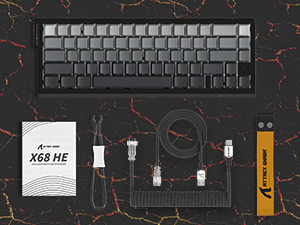
Figura 2: Articole incluse în pachetul produsului.
3. Configurare
To set up your ATTACK SHARK X68 HE keyboard, follow these simple steps:
- Conectați cablul USB-C: Locate the USB-C port on the back of the keyboard. Insert the smaller end of the provided coiled USB-C cable into this port.
- Conectare la computer: Insert the standard USB-A end of the cable into an available USB port on your computer (PC or Mac).
- Instalare driver: The keyboard is plug-and-play for basic functionality. For advanced customization, including DKS, macros, and RGB settings, download the dedicated web driver software from the official ATTACK SHARK website-ul.
- Plasare: Place the keyboard on a stable, flat surface. Consider using a wrist rest for ergonomic comfort during extended use.
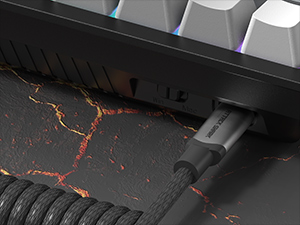
Figura 3: Conectarea cablului USB-C la tastatură.
4. Instrucțiuni de utilizare
The ATTACK SHARK X68 HE is a 60% layout keyboard, meaning some functions are accessed via a function (Fn) layer. Familiarize yourself with the key legends and the Fn key combinations for full functionality.
Funcții de bază ale tastelor
- Tastare standard: All alphanumeric keys, symbols, and modifiers (Shift, Ctrl, Alt, Win/Cmd) function as standard.
- Tasta funcțională (Fn): Press and hold the Fn key to access secondary functions printed on the front or side of certain keycaps. For example, arrow keys, F-keys, and multimedia controls are typically accessed this way.
Polling Rate and Latency
The keyboard operates at an 8000Hz polling rate, providing a rapid 0.125ms response time. This ensures minimal input lag for competitive gaming and fast-paced tasks.

Figure 4: 8000Hz Polling Rate for ultra-fast response.
5. Personalizare
The ATTACK SHARK X68 HE offers extensive customization options through its web driver software and on-board controls.
Adjustable Actuation Points & Rapid Trigger
Utilizing magnetic switches, the keyboard allows you to customize the actuation point of each key from 0.1mm to 3.4mm with 0.01mm precision. This feature, combined with Rapid Trigger technology, enables faster resets and re-presses, providing a significant advantage in gaming by allowing dynamic keystrokes (DKS), Snap Tap, and Mod-Tap functions.

Figure 5: Adjustable Actuation Point mechanism.
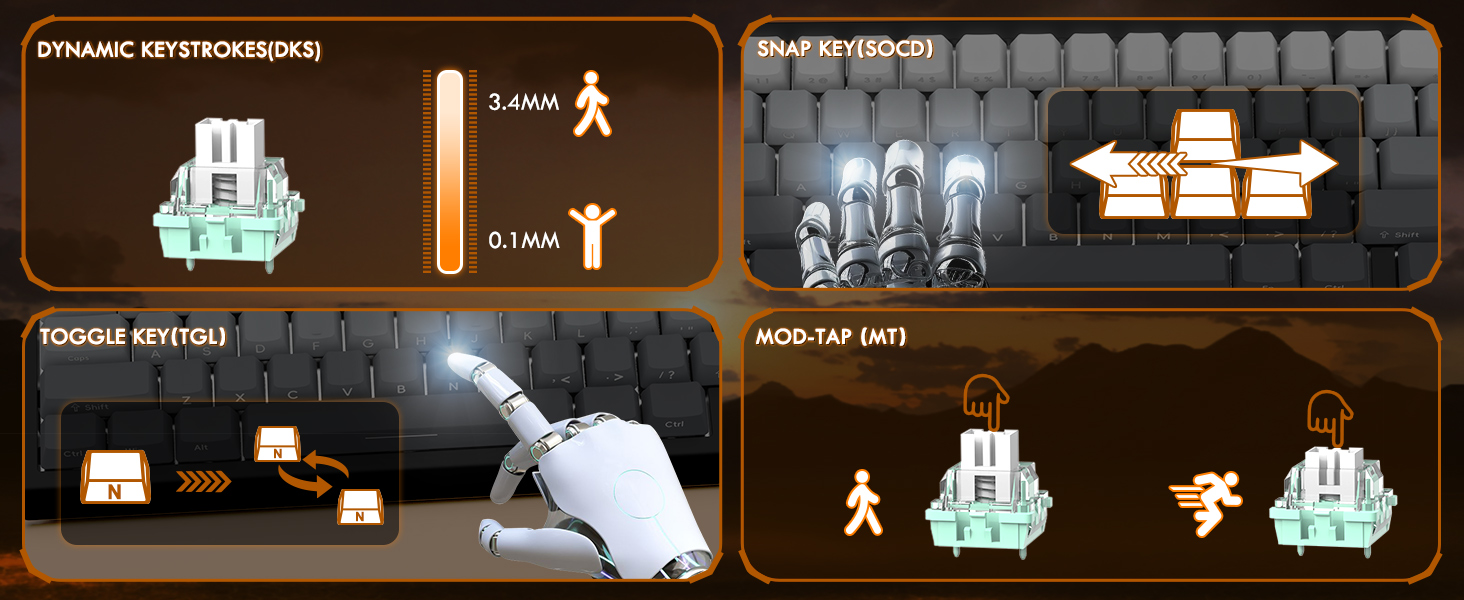
Figure 6: Explanation of DKS, Snap Tap, Toggle Key, and Mod-Tap features.
Iluminare de fundal RGB
The keyboard features 16 million-color RGB lighting with over 20 preset light effects and multiple dynamic modes. You can adjust backlight brightness, speed, and switch between different lighting modes and colors using Fn key combinations or the web software-ul driverului.
- Fn + Săgeată sus/jos: Reglați luminozitatea iluminării de fundal.
- Fn + Săgeată stânga/dreapta: Reglați viteza iluminării de fundal.
- Fn + \|: Comutare mod lumină.
- Fn + Enter: Comutare culoare lumină.
- Fn + Backspace: Lumină aprinsă/oprită.

Figure 7: Full RGB light effects.
Web Software de driver
The professional customized web software allows for comprehensive customization on both Windows and Mac. You can easily configure DKS, key combinations, macros, key remapping, and detailed RGB lighting settings. This enables a truly personalized experience for various user needs and gaming styles.

Figura 8: Web driver software interface for customization.
6. Întreținere
Întreținerea corectă asigură longevitatea și performanța optimă a tastaturii dumneavoastră.
Curatenie
- Curatenie generala: Use a soft, dry cloth to wipe down the keyboard surface regularly.
- Îndepărtarea prafului: Folosește aer comprimat pentru a îndepărta praful și resturile dintre capacele tastelor.
- Curațare profundă: For deeper cleaning, you may carefully remove the PBT keycaps using a keycap puller (not included unless specified in package contents). Clean the keycaps with mild soap and water, ensuring they are completely dry before reattaching.
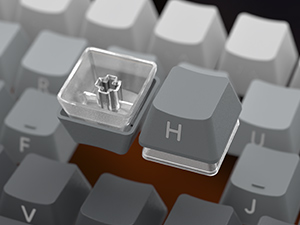
Figure 9: Keycap removal for cleaning.
Depozitare
Când nu este utilizată pentru perioade lungi de timp, depozitați tastatura într-un loc răcoros și uscat, ferit de lumina directă a soarelui și de temperaturi extreme.
7. Depanare
If you encounter issues with your ATTACK SHARK X68 HE keyboard, please refer to the following common solutions:
- Tastatura nu răspunde:
- Asigurați-vă că este conectat corect cablul USB-C atât la tastatură, cât și la computer.
- Încercați să conectați tastatura la un alt port USB al computerului.
- Testați tastatura pe un alt computer pentru a exclude probleme specifice sistemului.
- Luminile RGB nu funcționează:
- Check if the RGB lighting is turned off using the Fn + Backspace shortcut.
- Asigurați web driver software is installed and updated, and check lighting settings within the software.
- Verificați dacă tastatura primește suficientă energie de la portul USB.
- Cheile nu se înregistrează sau tastează de două ori:
- Clean under the affected keycaps to remove any debris.
- Adjust the actuation point settings in the web driver software. Sometimes, a very low actuation point can lead to unintended presses or misfires.
- Ensure the keyboard firmware is up to date via the web software-ul driverului.
- Software Issues / Customization Not Applying:
- Ensure you are using the correct and latest version of the ATTACK SHARK web driver software for the X68 HE model.
- Run the software as an administrator (on Windows).
- Temporarily disable any antivirus or firewall software that might be interfering with the web şofer.
If the problem persists after trying these steps, please contact ATTACK SHARK customer support for further assistance.
8. Specificații
| Caracteristică | Descriere |
|---|---|
| Model | X68 EL |
| Marca | ATACA RECHINUL |
| Tehnologia de conectivitate | USB-C (cu fir) |
| Descrierea tastaturii | Tastatură mecanică pentru jocuri |
| Tip comutator | Magnetic Switches (Hall Effect) |
| Rata de sondare | 8000 Hz |
| Timp de răspuns | 0.125 ms |
| Actuation Point Range | 0.1mm to 3.4mm (0.01mm accuracy) |
| keycaps | PBT Keycaps (Contour Line 3.0 version) |
| Iluminare din spate | Full RGB (16 million colors, 20+ preset effects) |
| Anti-Ghosting | Anti-ghosting cu cheie completă |
| Dispozitive compatibile | Laptop, PC, Tablet (Windows/Mac) |
| Dimensiunile produsului | 14.25 x 6.18 x 0.79 inci |
| Greutatea articolului | 2.01 lire sterline |
| Numărul de chei | 66 |
9. Garanție și asistență
ATTACK SHARK products are designed for durability and performance. For specific warranty information, please refer to the warranty card included with your product or visit the official ATTACK SHARK website. If you require technical support, have questions about product functionality, or need assistance with troubleshooting, please contact ATTACK SHARK customer service through their official channels.
Suport online: Visit the ATTACK SHARK official website pentru întrebări frecvente, descărcări de drivere și informații de contact pentru asistență.
Asistență prin e-mail: Consultați ambalajul produsului sau instrucțiunile oficiale website pentru adresa de e-mail a serviciului de asistență pentru clienți.


