1. Produs terminatview
The ZIHNIC S12A Clip-on Earbuds are advanced open-ear wireless headphones designed for comfort and high-quality audio. Featuring Bluetooth 5.4 connectivity, a smart LED touch screen for intuitive control, and a non-in-ear design, these earbuds are suitable for extended wear during various activities including workouts, commuting, and daily use. They offer superior audio performance with noise cancellation and extended battery life.

Image: ZIHNIC S12A Clip-on Earbuds shown in their charging case, highlighting the sleek design and integrated display.
2. Ghid de instalare
2.1. Încărcarea inițială
Before first use, fully charge your ZIHNIC S12A earbuds and their charging case. Connect the provided charging cable to the case and a compatible USB power source. The LED screen on the case will indicate the charging status. A full charge takes approximately 1.5 hours.

Image: Visual representation of the earbuds' battery life, showing 1.5 hours for quick charge, 9 hours of play time, and 36 hours of standby in the case.
2.2. Asociere Bluetooth
- Deschideți carcasa de încărcare. Căștile vor intra automat în modul de asociere.
- Pe dispozitivul dvs. (smartphone, tabletă etc.), activați Bluetooth.
- Caută available Bluetooth devices and select "ZIHNIC S12A" from the list.
- Once connected, a voice prompt will confirm successful pairing. The earbuds will automatically reconnect to the last paired device when taken out of the case.
3. Instrucțiuni de utilizare
3.1. Purtarea căștilor
The ZIHNIC S12A earbuds feature an open-ear clip-on design for comfortable and secure fit without entering the ear canal. Gently clip the earbuds onto your ear, ensuring the audio output is positioned correctly for optimal sound. This design allows for environmental awareness while enjoying audio.

Image: A person demonstrating the comfortable and secure fit of the ZIHNIC S12A Open-Ear Clip-on Earbuds.
3.2. Smart LED Touch Screen Controls
The charging case features an intuitive LED touch screen for easy control and customization. Double-tap the screen to unlock and access various functions. These functions include:
- Control redare: Redare/pauză, sări peste melodii.
- Reglarea volumului: Măriți sau micșorați volumul.
- Setări egalizator: Personalizați sunetul profesionalfiles (de exemplu, normal, amplificare bas).
- Blocarea ecranului: Preveniți atingerile accidentale.
- Comutare limbă: Schimbați limba de afișare.
- Nivel de lumină: Reglați luminozitatea ecranului.
- Lost Earphone Finder: Locate misplaced earbuds (see Troubleshooting section).
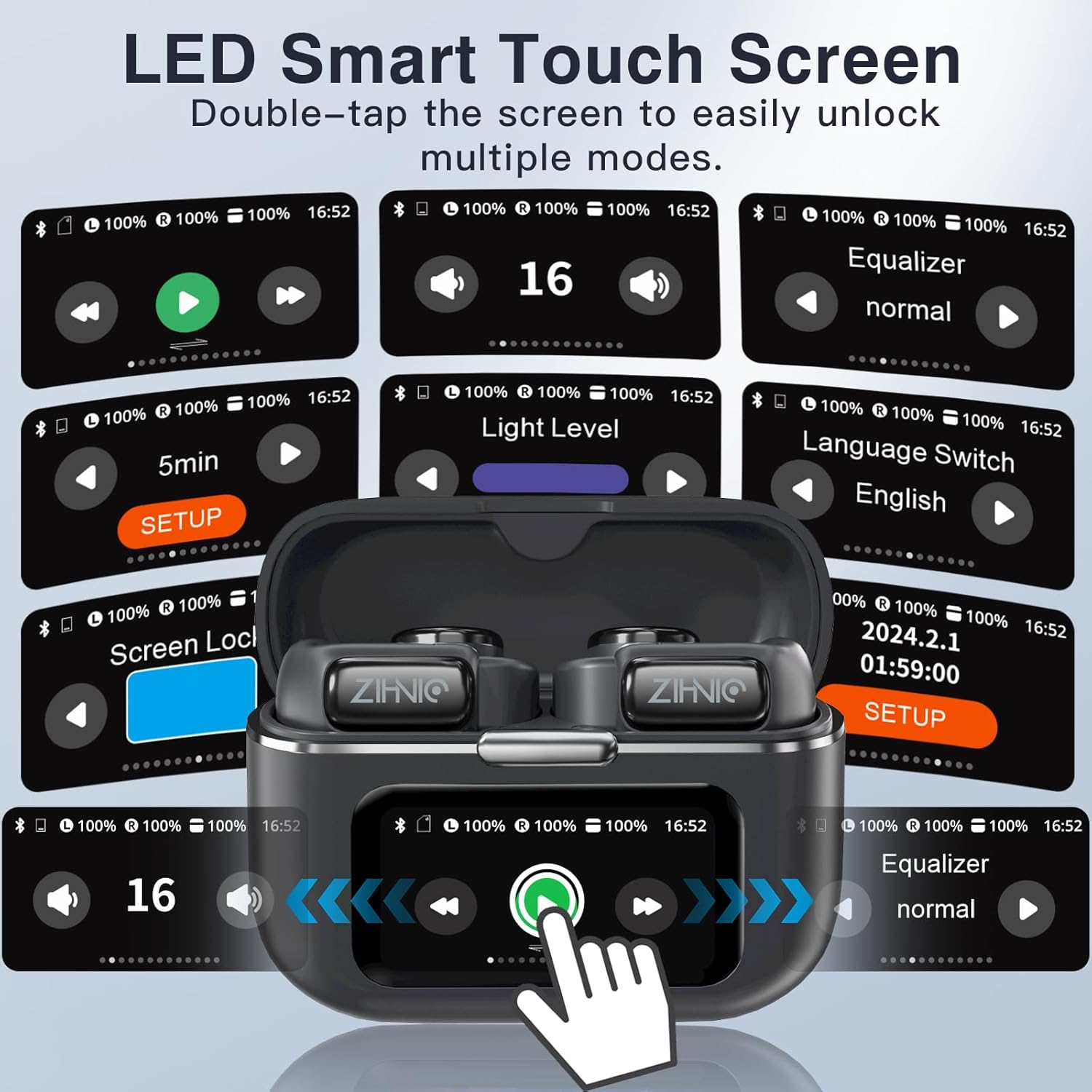
Image: A collage of the ZIHNIC S12A's LED Smart Touch Screen interface, showing various control options like playback, volume, equalizer, screen lock, and language settings.
3.3. Audio Playback and Storage
The earbuds deliver superior HiFi stereo sound with optimized amplitude and sensitivity, ensuring crystal-clear audio and dynamic sound reproduction. They are designed to minimize sound leakage for a private listening experience. The earbuds also feature 4GB of internal storage, allowing you to store up to 1000 songs directly on the device for offline listening.

Image: An exploded diagram illustrating the components responsible for HiFi Stereo Sound within the ZIHNIC S12A earbuds, emphasizing immersive audio quality.

Image: A graphic illustrating the 4GB internal storage capacity of the ZIHNIC S12A earbuds, capable of holding up to 1000 songs for music on the go.
3.4. Managementul apelurilor
The built-in microphone with advanced noise-cancellation technology ensures clear, hands-free communication. To answer or end calls, use the touch controls on the earbuds as indicated in the Smart LED Touch Screen Controls section. For optimal call quality, ensure the microphone is not obstructed.
4. Întreținere și îngrijire
- curatenie: Ștergeți regulat căștile și carcasa de încărcare cu o lavetă moale, uscată și fără scame. Evitați utilizarea materialelor abrazive sau a substanțelor chimice dure.
- Rezistenta la apa: The earbuds are waterproof, making them suitable for workouts and light rain. However, avoid submerging them in water or exposing them to high-pressure water jets. Dry them thoroughly if they get wet.
- Depozitare: Când nu le utilizați, depozitați căștile în carcasa lor de încărcare pentru a le proteja de praf și deteriorări. Depozitați într-un loc răcoros și uscat, ferit de temperaturi extreme.
- Îngrijirea bateriei: To prolong battery life, avoid fully discharging the earbuds and case frequently. Charge them regularly, even if not in daily use.
5. Depanare
If you encounter issues with your ZIHNIC S12A earbuds, refer to the common problems and solutions below:
| Problemă | Soluție posibilă |
|---|---|
| Căștile nu se împerechează/nu se conectează. |
|
| Niciun sunet sau volum redus. |
|
| Microphone issues (e.g., screeching sounds for others). |
|
| Internal music storage not working. |
|
| Lost one earbud. |
|

Image: The ZIHNIC S12A charging case display showing the "Find My Earphone" feature, which assists in locating misplaced earbuds.
6. Specificații
| Caracteristică | Detaliu |
|---|---|
| Numele modelului | S12A |
| Marca | ZIHNIC |
| Tehnologia de conectivitate | Fără fir (Bluetooth 5.4) |
| Plasarea urechii | Ureche deschisă (cu clipsare) |
| Controlul zgomotului | Anularea activă a zgomotului |
| Metoda de control | Touch (Smart LED Screen) |
| Durata de viață a bateriei (redare) | Până la 9 ore (căști), 36 de ore (cu carcasă de încărcare) |
| Timp de încărcare | Aproximativ. 1.5 ore |
| Stocare internă | 4GB (up to 1000 songs) |
| Greutatea articolului | 50 de grame (1.76 uncii) |
| Gama de frecvente | 20 Hz - 20,000 Hz |
| Impedanta | 16 ohmi |
| Componente incluse | Cablu, Manual de utilizare |
7. Garanție și asistență
ZIHNIC S12A Clip-on Earbuds come with a 12 luni garantie from the date of purchase, covering manufacturing defects. For any product inquiries, technical support, or warranty claims, please contact ZIHNIC customer support through the official channels provided at the time of purchase or visit the ZIHNIC brand store on Amazon.


