1. Introducere
This user manual provides detailed instructions for the installation, operation, and maintenance of your BoyKeep D112-10 Light Bulb Security Camera. Please read this manual thoroughly before using the product to ensure proper functionality and safety.

Figure 1.1.1: BoyKeep D112-10 Light Bulb Security Camera (10-pack). This image displays the product as a bundle of ten light bulb-shaped security cameras.
2. Produs terminatview
2.1. Conținutul pachetului
The package for the BoyKeep D112-10 Light Bulb Security Camera (10-pack) includes:
- 10 x BoyKeep D112-10 Light Bulb Security Camera bodies
- Manual de utilizare (acest document)
2.2. Caracteristici cheie
- 1080P High-Resolution Video: Oferă imagini clare și detaliate.
- Vedere de noapte color: Vizibilitate îmbunătățită în condiții de lumină slabă.
- 24/7 Real-time Motion Alerts: Notifies your device upon motion detection.
- Discuție în două sensuri: Microfon și difuzor încorporate pentru comunicare.
- One-Touch Connection: Simplifies pairing with your device.
- Multi-dispozitiv ViewÎnregistrare și partajare: Monitor multiple cameras and share access.
- Cloud & Memory Card Storage: Flexible recording options (memory card not included).
- Rotație panoramică la 360° și înclinare la 95°: Wide area coverage with remote control.
- Instalare ușoară: Designed for standard E27 light sockets.
2.3. Componentele camerei

Figure 2.3.1: Camera Component Diagram. This image illustrates the various parts of the BoyKeep D112-10 camera, including the E27 light socket base, enhanced WiFi module, microphone, 4 array LEDs, HD lens, 4 white LEDs, light sensor, memory card slot, and reset button. Dimensions are also shown: 6 cm (2.35 in) width and 15 cm (5.9 in) height.
3. Configurare
3.1. Instalare
The BoyKeep D112-10 camera is designed for easy installation into a standard E27 light bulb socket.
- Oprire: Ensure the power to the light socket is turned off before installation to prevent electrical shock.
- Înșurubați: Carefully screw the camera into a standard E27 light socket until it is securely fastened.
- Pornire: Reconectați priza de lumină. Camera se va porni și va iniția secvența de pornire.
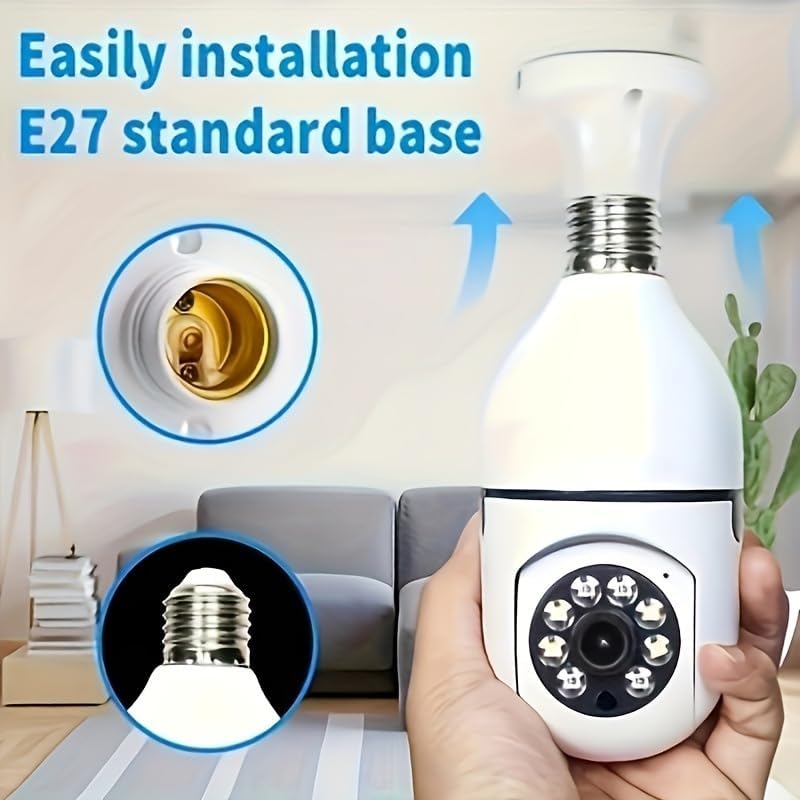
Figure 3.1.1: Easy Installation. This image demonstrates the simple process of screwing the camera into a standard E27 light bulb socket for quick setup.
3.2. Descărcarea aplicației și conectarea
To operate the camera, you need to download the dedicated mobile application.
- Descărcați aplicația: Caută the "BoyKeep" app (or specified app name in product packaging) on your smartphone's app store (Google Play Store for Android or Apple App Store for iOS).
- Înregistrare/Autentificare: Deschide aplicația și urmează instrucțiunile de pe ecran pentru a înregistra un cont nou sau pentru a te conecta dacă ai deja unul.
- Adăugați dispozitiv: In the app, select "Add Device" or the '+' icon. Choose the camera type (e.g., "Smart Camera" or "Light Bulb Camera").
- Conectați-vă la Wi-Fi: Ensure your smartphone is connected to a 2.4GHz Wi-Fi network. The camera only supports 2.4GHz Wi-Fi. Follow the app's instructions to connect the camera to your Wi-Fi network. This usually involves scanning a QR code generated by the app with the camera, or entering Wi-Fi credentials.
- Finalizare: Once connected, the camera will appear in your device list within the app.
Nota: Ensure your Wi-Fi router supports 2.4GHz and that your phone is connected to the 2.4GHz band during setup. 5GHz networks are not supported by this device.
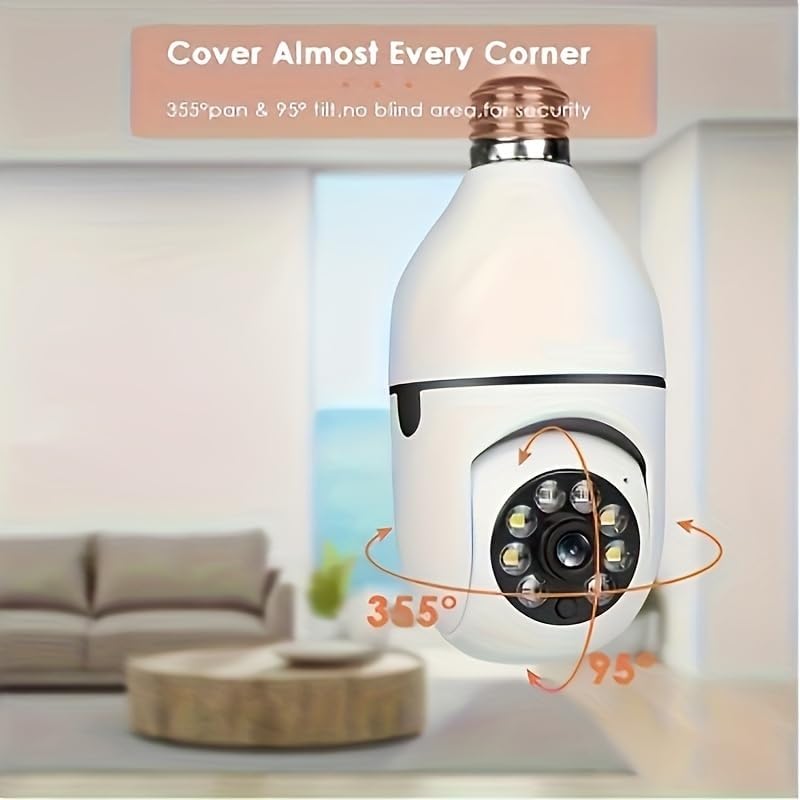
Figure 3.2.1: Wi-Fi Connection and Two-Way Talk. This diagram illustrates how the camera connects to a 2.4GHz Wi-Fi network and enables two-way communication between the camera and a smartphone or computer via the internet, allowing for interactions like speaking to a delivery person.
4. Instrucțiuni de utilizare
4.1. în direct View și Redare
- Trăi View: Open the app and select the camera from your device list to view fluxul live.
- Redare: Acces înregistrat footage by selecting the "Playback" option within the camera's interface in the app. You can navigate through the timeline to view specific events.
4.2. Controlul panoramic și înclinării
The camera offers 360° horizontal pan and 95° vertical tilt capabilities.
- Controla: În live view interface of the app, use the directional controls (usually a joystick or arrow icons) to remotely adjust the camera's viewunghiul de ing.
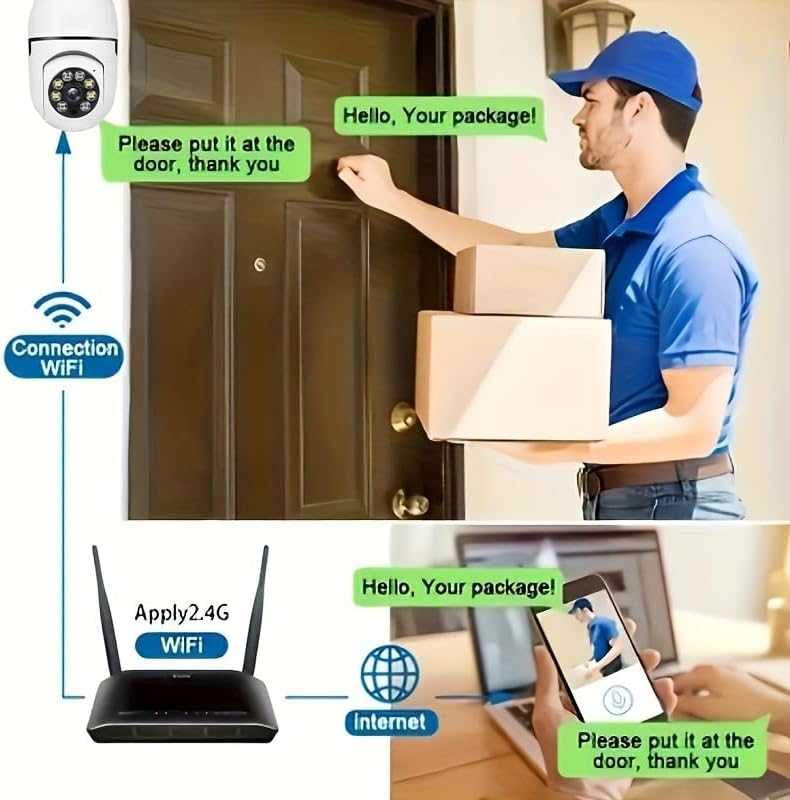
Figure 4.2.1: Pan and Tilt Coverage. This image demonstrates the camera's ability to cover almost every corner with its 355° pan and 95° tilt functions, eliminating blind spots for comprehensive security.
4.3. Detectarea mișcării și alertele
- Activare/Dezactivare: Navigate to the camera settings in the app to enable or disable motion detection.
- Sensibilitate: Adjust the motion detection sensitivity level to minimize false alarms.
- Alerte: When motion is detected, the camera will send push notifications to your smartphone. Recorded events will be stored in the cloud (if subscribed) or on the inserted memory card.
4.4. Sunet bidirecțional
- Activa: În live view, tap the microphone icon to speak through the camera's speaker. Tap it again to mute.
- Asculta: The camera's microphone is active during live view, allowing you to hear audio from the camera's vicinity.
- Apel cu o singură atingere: If available, press the physical one-touch call button on the camera (if present) to initiate a call to your linked smartphone.
4.5. Moduri de vedere nocturnă
The camera supports both infrared and full-color night vision.
- Modul automat: The camera automatically switches between day and night vision based on ambient light.
- Viziune de noapte în infraroșu: Oferă imagini alb-negru clare în întuneric complet.
- Viziune nocturnă full-color: Utilizes built-in white LEDs to provide color images in low light, similar to daytime viewing. This mode can be activated manually or set to trigger upon motion detection.

Figure 4.5.1: Smart Dual Light LED Night Vision. This image compares the visual output of infrared night vision (top, black and white) and full-color night vision (bottom, color) provided by the camera's smart dual light LEDs, showcasing improved visibility in low-light conditions.
4.6. Opțiuni de stocare
- Memory Card (MicroSD): Insert a compatible MicroSD card (up to 128GB, Class 10 or higher recommended, not included) into the camera's memory card slot for local storage of recordings. The camera supports 24/7 continuous recording to the memory card.
- Stocare în cloud: The camera offers cloud storage services (e.g., a 30-day trial may be included). Refer to the app for subscription details and management.
5. Întreținere
- curatenie: Use a soft, dry cloth to clean the camera lens and body. Do not use liquid cleaners or abrasive materials.
- Actualizări firmware: Regularly check the app for firmware updates. Keeping the firmware updated ensures optimal performance and security.
- Stabilitatea rețelei: Asigurați-vă că rețeaua Wi-Fi este stabilă și puternică în locația camerei pentru o funcționare neîntreruptă.
- Conditii de mediu: The camera is designed for indoor use. Avoid exposing it to extreme temperatures, direct sunlight, or high humidity.
6. Depanare
| Problemă | Cauza posibila | Soluţie |
|---|---|---|
| Camera nu pornește. | Nu există curent la priza de lumină; camera nu este înșurubată corect. | Ensure the light socket has power. Re-screw the camera firmly into the socket. |
| Nu se poate conecta la Wi-Fi. | Incorrect Wi-Fi password; connecting to 5GHz network; weak Wi-Fi signal. | Verify Wi-Fi password. Ensure you are connecting to a 2.4GHz network. Move camera closer to router or use a Wi-Fi extender. Reset camera and try again. |
| Nu s-au primit alerte de mișcare. | Motion detection disabled; app notifications turned off; low sensitivity. | Enable motion detection in app settings. Check phone's notification settings for the app. Increase motion detection sensitivity. |
| Calitate video slabă. | Semnal Wi-Fi slab; lentilă murdară. | Improve Wi-Fi signal strength. Clean the camera lens with a soft, dry cloth. |
| Sunetul bidirecțional nu funcționează. | Microphone/speaker muted in app; network issues. | Verificați setările audio din aplicație. Asigurați o conexiune stabilă la rețea. |
7. Specificații
| Caracteristică | Detaliu |
|---|---|
| Numele modelului | D112-10 |
| Rezoluție video | 1080P |
| Conectivitate | Wi-Fi de 2.4 GHz (IEEE 802.11b/g/n) |
| Sursa de alimentare | Corded Electric (E27 Light Socket) |
| Interval Pan/Tilt | 355° orizontală, 95° verticală |
| Vedere de noapte | Infrared & Full-Color Night Vision |
| Opțiuni de stocare | Card MicroSD (până la 128 GB, nu este inclus), Stocare în cloud |
| Audio | Conversație bidirecțională (microfon și difuzor încorporate) |
| Utilizare în interior/exterior | De interior |
| Dimensions (Camera Body) | Approx. 6 cm (2.35 in) diameter, 15 cm (5.9 in) height |
| Componente incluse | Corpul camerei |
8. Informații despre garanție
BoyKeep products are manufactured to the highest quality standards. This product comes with a standard manufacturer's warranty. Please refer to the product packaging or the official BoyKeep webpentru termenii și condițiile specifice ale garanției, inclusiv detalii despre durată și acoperire.
9. Asistență pentru clienți
For technical support, troubleshooting assistance, or any inquiries regarding your BoyKeep D112-10 Light Bulb Security Camera, please contact our customer support team:
- Suport online: Visit the official BoyKeep store on Amazon: BoyKeep Store
- Asistență prin e-mail: Refer to the contact information provided in your product packaging or on the BoyKeep website-ul.
When contacting support, please have your product model number (D112-10) and purchase details ready.


