1. Introducere
The MiBOXER WL-SW1 Smart Switch is designed to integrate traditional lighting and electrical appliances into a smart home system. It offers control via WiFi and 2.4G wireless technologies, enabling remote operation through a smartphone application, voice commands, and traditional manual switches. This manual provides essential information for the safe installation, setup, and operation of your WL-SW1 Smart Switch.
2. Informații de siguranță
- Siguranta electrica: Installation must be performed by a qualified electrician or service personnel in accordance with all local and national electrical codes.
- Deconectare de la curent: Deconectați întotdeauna alimentarea cu energie de la întrerupătorul de circuit înainte de instalarea sau service-ul dispozitivului.
- Voltage Compatibilitate: Asigurați-vă că volumul de intraretage (100-240V AC, 50/60Hz) and maximum load (10A) are compatible with your electrical system and connected appliances.
- Numai pentru utilizare în interior: Acest dispozitiv este destinat utilizării în interior, în medii uscate. Evitați expunerea la umiditate sau temperaturi extreme.
- Conexiuni sigure: Ensure all wire connections are secure and properly insulated to prevent short circuits.
3. Conținutul pachetului
Verificați dacă toate articolele sunt prezente în colet:
- MiBOXER WL-SW1 Smart Switch
- Manual de utilizare (acest document)

Figure 3.1: The MiBOXER WL-SW1 Smart Switch alongside its retail packaging and a small instruction leaflet, indicating typical package contents.
4. Produs terminatview
The WL-SW1 Smart Switch is a compact device designed for seamless integration into your electrical system. It features multiple connection points for input power, output to appliances, and connections for external manual switches.

Figura 4.1: Față view of the MiBOXER WL-SW1 Smart Switch, showing input and output terminals, model number, and basic electrical specifications.
Caracteristici cheie:
- Conectivitate duală: Supports both WiFi and 2.4G wireless protocols for flexible control.
- Control inteligent al aplicației: Compatible with the 'Tuya Smart' app for remote management.
- Integrarea asistentului vocal: Works with third-party voice control systems like Alexa and Google Assistant.
- Funcție multi-timer: Allows scheduling of operations.
- Operare manuala: Retains compatibility with traditional push or rocker switches.
- Funcția de memorie: Remembers the last state after a power interruption.
- Compatibilitate largă: Suitable for various electrical equipment.

Figure 4.2: Detailed diagram highlighting the various interfaces of the WL-SW1 Smart Switch, including input/output terminals, wire preparation guidelines, and construction features like screw lock terminals and a fire-resistant PC shell.
5. Specificații
| Atribut | Valoare |
|---|---|
| Numărul de model | WL-SW1 |
| Vol. De intraretage | 100-240V~, 50/60Hz |
| Ieșire Voltage | 100-240V~, 50/60Hz |
| Curent maxim | 10A |
| Temperatura de lucru | -10~40°C |
| Conectivitate wireless | WiFi + 2.4G |
| Dimensiuni pachet | 3 x 3 x 1.5 inci |
| Greutatea articolului | 2.24 uncii |
6. Instalare
Important: Ensure power is disconnected at the circuit breaker before beginning installation.
- Pregătiți locația de instalare: The WL-SW1 Smart Switch is designed to fit into standard bottom boxes with a depth greater than 50mm.
- Pregătirea firului: Strip approximately 7mm of insulation from the ends of your wires.
- Conectați puterea de intrare: Connect the Live (L) and Neutral (N) wires from your power supply to the 'L' and 'N' terminals under the 'INPUT' section of the switch.
- Connect Output to Appliance: Connect the Live (L1) and Neutral (N) wires leading to your electrical appliance (e.g., light, fan) to the 'L1' and 'N' terminals under the 'OUTPUT' section.
- Connect Manual Switch (Optional): If using a traditional push or rocker switch, connect its terminals to 'S1' and 'S2' on the WL-SW1. This allows for manual control in addition to smart control.
- Securizarea dispozitivului: Carefully place the WL-SW1 into the electrical box, ensuring no wires are pinched. Secure it in place.
- Restabiliți puterea: Once all connections are secure and the device is properly installed, restore power at the circuit breaker.

Figure 6.1: Step-by-step installation diagram for the WL-SW1 Smart Switch, detailing how it fits into standard electrical boxes (depth > 50mm) and connects to a push or rocker switch.
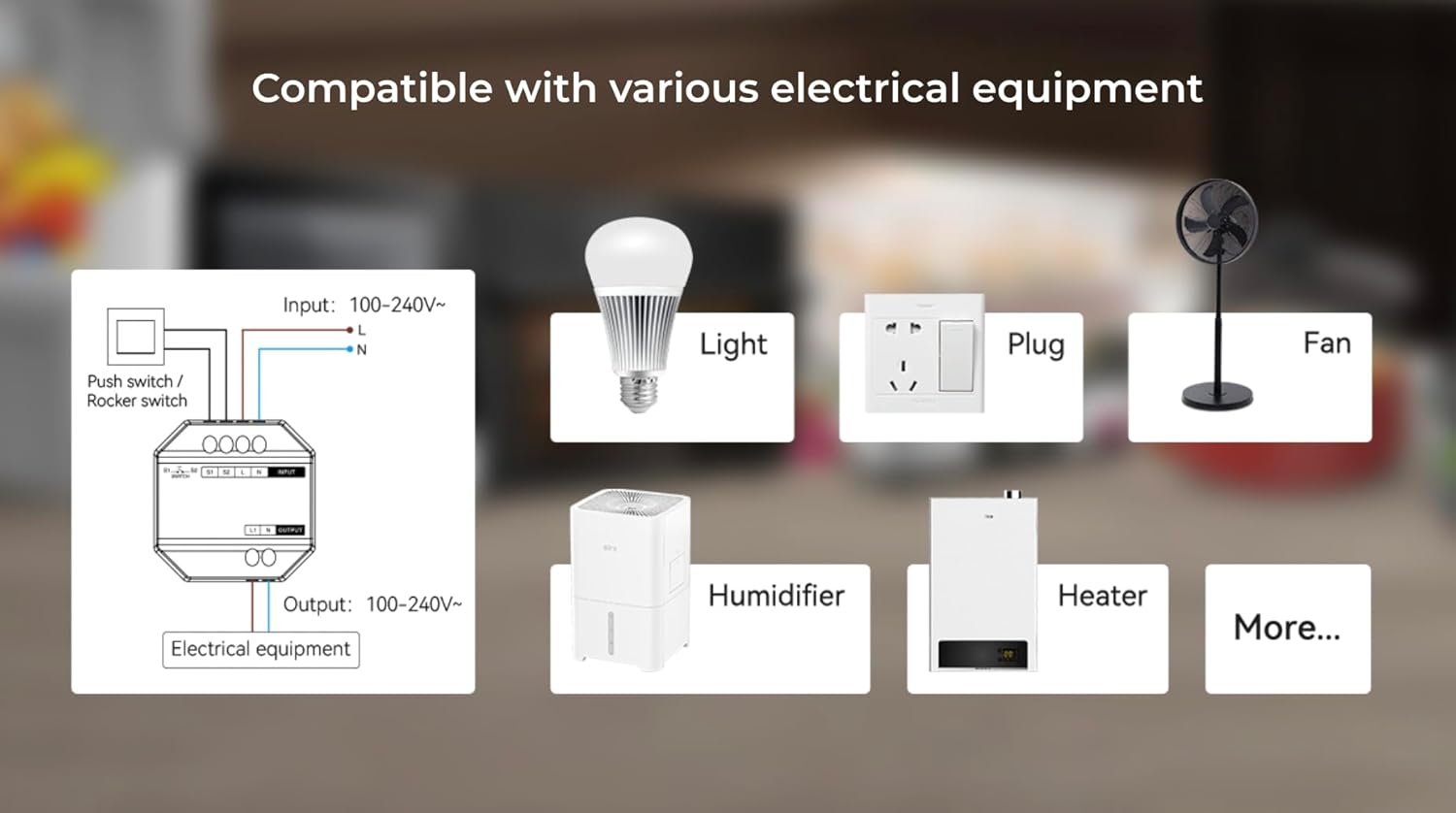
Figure 6.2: An illustrative diagram demonstrating the broad compatibility of the WL-SW1 Smart Switch with diverse electrical appliances, including lighting, fans, and heating devices.
7. Configurare
7.1. App Pairing (Tuya Smart)
- Descărcați aplicația: Descărcați aplicația „Tuya Smart” din magazinul de aplicații al smartphone-ului dvs. (iOS sau Android).
- Înregistrare/Autentificare: Deschide aplicația și creează un cont nou sau conectează-te cu unul existent.
- Adăugați dispozitiv: Follow the in-app instructions to add a new device. The WL-SW1 typically enters pairing mode automatically upon first power-up or after a reset.
- Conectați-vă la WiFi: Select your 2.4GHz WiFi network and enter the password. The app will guide you through the connection process.
- Redenumirea dispozitivului: Once connected, you can rename the switch for easier identification.

Figure 7.1: An illustration of the MiBOXER WL-SW1 Smart Switch being controlled via a smartphone application, demonstrating remote operation.

Figura 7.2: O pesteview of the 'Tuya Smart' application features compatible with the WL-SW1 Smart Switch, such as timing settings, device sharing, automation, and child lock functionality.
7.2. Integrarea asistenței vocale
To enable voice control with platforms like Amazon Alexa or Google Assistant:
- Ensure your WL-SW1 is successfully paired with the 'Tuya Smart' app.
- Open your Alexa or Google Home app.
- Navigați la secțiunea „Competențe” sau „Funcționează cu Google”.
- Caută and enable the 'Tuya Smart' skill/service.
- Conectează-ți contul Tuya Smart când ți se solicită.
- Discover devices. Your WL-SW1 Smart Switch should now appear and be controllable via voice commands.
8. Instrucțiuni de utilizare
8.1. Controlul aplicației
Once paired, you can control your WL-SW1 Smart Switch from the 'Tuya Smart' app:
- Pornit/Oprit: Tap the switch icon in the app to toggle the connected appliance on or off.
- Timing Settings: Use the app's timing function to set schedules for automatic on/off operations.
- Partajarea dispozitivului: Share control of the switch with other family members through the app.
- Automatizare: Create smart scenes and automations based on conditions like time, weather, or other device states.
8.2. Control manual
If an external push or rocker switch is connected to the 'S1' and 'S2' terminals, you can operate the connected appliance manually by pressing the physical switch. This functionality works independently of the smart control system.

Figure 8.1: The MiBOXER WL-SW1 Smart Switch shown installed behind a conventional wall switch, illustrating its compatibility with existing manual controls.
8.3. Funcția de memorie
The WL-SW1 Smart Switch features a memory function. In the event of a power outage, the switch will return to its last known state (on or off) once power is restored.
9. Întreținere
- curatenie: Disconnect power before cleaning. Wipe the device with a soft, dry cloth. Do not use liquid cleaners or aerosols.
- Actualizări firmware: Periodically check the 'Tuya Smart' app for available firmware updates to ensure optimal performance and security.
- Conditii de mediu: Ensure the device is kept within its specified working temperature range (-10~40°C) and away from excessive moisture.
10. Depanare
- Dispozitivul nu răspunde: Check if the power supply is connected correctly. Verify the WiFi connection in the 'Tuya Smart' app. Ensure the device is within range of your WiFi router.
- Nu se poate asocia cu aplicația: Ensure your smartphone is connected to a 2.4GHz WiFi network (5GHz networks are not supported for initial pairing). Reset the device (refer to app instructions for reset procedure, typically involves holding a button or cycling power).
- Controlul vocal nu funcționează: Confirm that the 'Tuya Smart' skill/service is enabled and linked in your Alexa or Google Home app. Ensure the device is discovered and named appropriately.
- Manual Switch Not Working: Verify that the 'S1' and 'S2' terminals are correctly wired to your physical switch.
11. Garanție și asistență
For warranty information and technical support, please refer to the documentation provided with your purchase or visit the official MiBOXER webPăstrați dovada achiziției pentru reclamații în garanție.


