Produs terminatview
The NESTOUT Outdoor Camping Fan with Tripod is designed for portable cooling in outdoor environments. This versatile device combines a powerful fan with a built-in 10000mAh power bank, ensuring extended operation and the ability to charge other devices. It features multiple speed settings, oscillation, adjustable tilt, and a timer function, making it an ideal companion for campdrumeții și alte activități în aer liber.

Image: The NESTOUT Outdoor Camping Fan shown alongside its 10000mAh power bank, highlighting the compact and portable design of both components.
Componente
- NESTOUT Outdoor Camping Fan: The main fan unit with integrated controls and a tripod mount.
- Baterie externă de 10000mAh: A detachable, high-capacity battery that powers the fan and can charge external devices.
- Trepied integrat: Provides stable support for the fan on various surfaces.
- Cablu de încărcare USB-C: Pentru reîncărcarea bateriei externe.
Înființat
1. Instalarea bateriei
The NESTOUT fan is designed to work seamlessly with the included 10000mAh power bank. To install the battery, align the power bank with the designated slot on the fan unit and firmly push it into place until it clicks securely. Ensure a snug fit for proper electrical connection.

Image: A hand demonstrating the insertion of the NESTOUT power bank into the base of the fan unit, showing the secure connection point.
2. Încărcarea inițială
Before first use, fully charge the 10000mAh power bank. Connect the provided USB-C cable to the power bank's USB-C port and the other end to a compatible USB power adapter (not included) or a power source. The charging indicator lights will illuminate to show charging progress. A full charge ensures maximum operating time.

Image: The 10000mAh power bank highlighting its rapid charge capabilities via USB-C and USB-A, its ability to be used while charging, and its flight-safe design.
3. Positioning the Fan
The fan comes with an integrated tripod for stable placement on flat surfaces. Extend the tripod legs as needed. For elevated cooling, utilize the metal hanging hook located on the top of the fan. This hook allows for quick and easy mounting on lantern holders, tent poles, or other suitable structures.

Image: The NESTOUT fan suspended from a metal hook, demonstrating its versatility for overhead cooling in a camping mediu.
Instrucțiuni de operare
The NESTOUT fan features intuitive tactile knob controls for easy adjustment of settings.

Imagine: Un prim-plan view of the fan's control panel, showing the textured knobs for precise and satisfying adjustments.
1. Power and Fan Speed Control
Locate the fan speed knob. Rotate the knob clockwise to cycle through the four available fan speeds: Briză, Slab, Mediu, și Puternic. The Breeze mode is designed to mimic natural wind flow for a more comfortable experience. Rotate the knob counter-clockwise to turn the fan off.

Imagine: O imagine detaliată view of the fan's control panel, specifically highlighting the knob used to select between the four fan speeds and the natural breeze mode.
2. Controlul oscilației
The fan offers automatic oscillation to distribute air across a wider area. Use the oscillation knob to select from three angles: 40°, 70°, and 100°. Rotate the knob to your desired oscillation range. To stop oscillation, turn the knob to the "OFF" position.
3. Funcția Timer
Set the fan to automatically turn off after a specified period using the timer knob. Available timer settings are 30 minutes, 60 minutes, and 90 minutes. Rotate the knob to select the desired duration. The fan will operate for the set time and then power down.

Image: A close-up of the fan's control panel, showing both the oscillation angle selection knob (40°, 70°, 100°) and the timer setting knob (30, 60, 90 minutes).
4. Adjustable Tilt
Manually adjust the fan head's vertical angle up to 90° to direct airflow precisely where needed. Gently tilt the fan head to the desired position.
5. Utilizarea ca încărcător portabil
The 10000mAh power bank can be used independently to charge other USB-powered devices. Connect your device's charging cable to the appropriate USB-A or USB-C output port on the power bank. The power bank supports rapid charging.
Întreţinere
- curatenie: Ensure the fan is turned off and disconnected from any power source before cleaning. Use a soft, dry cloth to wipe down the exterior of the fan and power bank. Do not use abrasive cleaners or immerse the unit in water.
- Lamele ventilatorului: Periodically check the fan blades for dust accumulation. If necessary, carefully wipe the blades with a dry or slightly damp pânză.
- Depozitare: When not in use for extended periods, store the fan and power bank in a cool, dry place, away from direct sunlight and extreme temperatures. Ensure the power bank is partially charged (around 50%) before storage to prolong battery life.
- Îngrijirea bateriei: To maintain optimal battery health, avoid fully discharging the power bank frequently. Recharge it regularly, even if not in constant use.
Depanare
| Problemă | Cauza posibila | Soluţie |
|---|---|---|
| Ventilatorul nu pornește. | Bateria este descărcată sau nu este instalată corect. | Ensure the power bank is fully charged and securely inserted into the fan unit. |
| Flux de aer slab. | Fan speed set too low; obstructions around fan blades. | Increase fan speed setting. Check for and remove any obstructions from the fan grille or blades. |
| Oscilația nu funcționează. | Oscillation function is turned off or stuck. | Ensure the oscillation knob is set to a desired angle (40°, 70°, or 100°). Gently check for any physical obstructions. |
| Power bank not charging external devices. | Power bank is depleted; incorrect cable or port used. | Recharge the power bank. Ensure you are using a compatible charging cable and the correct output port on the power bank. |
Specificații
| Caracteristică | Detaliu |
|---|---|
| Marca | ELECOM |
| Numele modelului | NESTOUT |
| Numărul de model | 8b8aa7c6-91fd-4b23-ac0a-3a849fa1bca4 |
| Sursa de alimentare | Alimentat cu baterie |
| Vitezele ventilatorului | 4 (Breeze, Weak, Medium, Strong) |
| Unghiuri de oscilație | 40°, 70°, 100° (Automatic) |
| Înclinare reglabilă | Până la 90° |
| Setări temporizator | 30, 60, 90 minute |
| Capacitatea bateriei | 10000mAh (included power bank) |
| Port de încărcare | USB-C |
| Metoda de control | Tactile Knobs |
| Mediul de utilizare | În aer liber |
| Caracteristici speciale | Integrated Tripod, Metal Hanging Hook, Portable Charger Function, IP67 Waterproof & Dustproof, MIL-STD-810G 516.7 Shock Absorption |
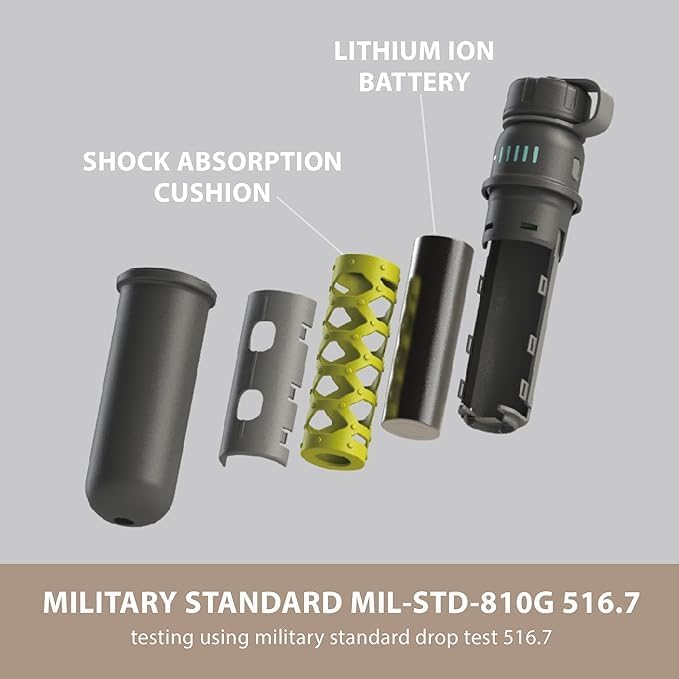
Image: The NESTOUT power bank submerged in water, illustrating its IP67 waterproof and dustproof rating, designed for rugged outdoor use.
Imagine: O explozie view of the NESTOUT power bank's internal components, highlighting the lithium-ion battery, shock absorption cushion, and robust casing, indicating MIL-STD-810G 516.7 drop test compliance.
Garanție și suport
For information regarding warranty coverage, product registration, or technical support, please refer to the official ELECOM website-ul lor web sau contactați direct serviciul lor de asistență pentru clienți. Păstrați bonul fiscal ca dovadă a achiziției pentru orice reclamații în garanție.
ELECOM Official Website: Visit ELECOM Store on Amazon


