Introducere
This manual provides comprehensive instructions for the setup, operation, maintenance, and troubleshooting of your Bloody AT98 Alpha Optical Switch Performance Keyboard. Please read this manual thoroughly before using the product to ensure proper function and longevity.
Înființat
Conținutul pachetului
- Bloody AT98 Alpha Optical Switch Performance Keyboard
- Cablu USB-C
- Extractor pentru chei
- Capac de praf
- Additional Keycaps (for customization)
Conectarea tastaturii
- Locate the USB-C port on the back of the keyboard. The port is recessed for cable management.
- Conectați cablul USB-C furnizat la portul USB-C al tastaturii.
- Route the cable through the integrated cable management channels on the underside of the keyboard (left, right, or center) as desired.
- Conectați celălalt capăt al cablului USB-C (USB-A) la un port USB disponibil de pe computer.
- Tastatura va fi recunoscută automat de sistemul dumneavoastră de operare.

Image: The Bloody AT98 keyboard with its USB-C cable connected, showcasing the cable management options on the underside.
Reglarea înălțimii tastaturii
The keyboard features dual-height adjustable feet on the underside. Flip out the feet to achieve your preferred typing angle and ergonomic comfort.

Imagine: Partea inferioară view of the Bloody AT98 keyboard, illustrating the dual-height adjustable feet for ergonomic positioning.
Operațiunea
Alpha Optical Switches
The Bloody AT98 keyboard is equipped with Alpha Optical Switches, which offer a fast response and high durability (up to 100 million keystrokes). These linear switches have a total travel distance of 3.8 mm ± 0.2 mm and an initial force of 48 ± 3 cN.

Image: Detailed diagram illustrating the specifications of the Alpha Optical Switch, including switch type, durability, initial force, total travel distance, and actuation point customization range.
Customizable Actuation Points
The keyboard allows for customization of actuation points, ranging from 0.8mm to 3.0mm. This feature enables users to fine-tune key responsiveness to their preference. There are 4 customizable variable speed profileeste disponibil.
To adjust actuation points, use the dedicated function keys (often marked 'LT' or similar, refer to keyboard layout) in combination with other keys as specified in the software or quick guide.

Image: Visual representation of the customizable actuation points and the eXact Reset System, detailing downward key travel, Z-Force Rapid Trigger, and X-Force Rapid Trigger.
eXact Reset System
The eXact Reset System provides enhanced key reset functionality:
- Hyper Z-Force Mode: Ultra-fast reset at 0.3mm for peak precision.
- Extreme X-Force Mode: Enhanced reset at 0.8mm for superior control.
- Mod clasic: Cancels out the eXact Reset and reverts to the default key reset point for a traditional response.
Iluminare de fundal RGB
The keyboard features 7 preset RGB backlit effects. These can be adjusted using function key combinations. Refer to the keyboard's quick start guide or software for specific key combinations to change lighting patterns and brightness.
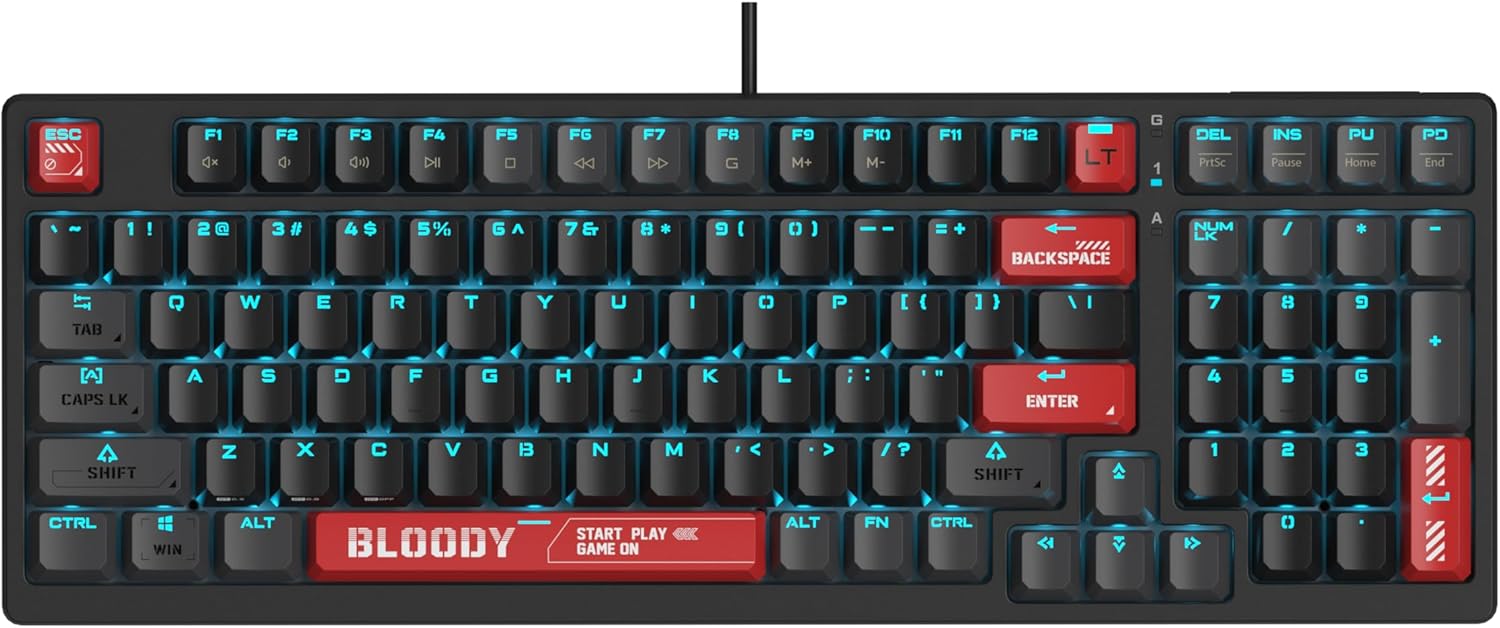
Image: The Bloody AT98 keyboard illuminated with its RGB backlighting, showcasing the key layout and design.
Funcții multimedia
Secondary multimedia functions are integrated into the F-key row. These functions are typically activated by pressing the FN key in combination with the corresponding F-key (e.g., FN + F1 for volume down, FN + F2 for volume up, FN + F3 for mute). Specific key assignments may vary; consult the keyboard's quick start guide for details.
Întreţinere
Curățarea tastaturii
- Deconectați tastatura de la computer înainte de curățare.
- Folosiți o cârpă moale, fără scame dampClătiți cu apă sau o soluție de curățare blândă pentru a șterge capacele tastelor și suprafața.
- Pentru praf și resturi între taste, folosiți aer comprimat.
- Evitați pulverizarea lichidelor direct pe tastatură.
- Nu utilizați substanțe chimice dure sau materiale abrazive.
Înlocuirea tastelor
The Bloody AT98 comes with additional keycaps and a keycap puller for customization. To replace keycaps:
- Gently attach the keycap puller to the keycap you wish to remove.
- Pull upwards with steady, even pressure until the keycap detaches from the switch.
- Align the new keycap with the switch stem and press down firmly until it clicks into place.
The PBT keycaps are designed for durability and a quick bounce-back feel.

Imagine: Prim-plan view of the Bloody AT98 keyboard highlighting the PBT keycaps, emphasizing their material and design.
Dust Cover Usage
Utilize the provided dust cover when the keyboard is not in use to protect it from dust and debris, which can affect performance and longevity.
Depanare
Tastatura nu răspunde
- Asigurați-vă că este conectat corect cablul USB-C atât la tastatură, cât și la computer.
- Încercați să conectați tastatura la un alt port USB al computerului.
- Testați tastatura pe un alt computer pentru a exclude o problemă specifică computerului.
- Reporniți computerul.
Iluminarea de fundal nu funcționează sau este incorectă
- Check if the backlighting is turned off. Use the designated FN key combinations to cycle through lighting effects and adjust brightness.
- Ensure any keyboard software is up to date and correctly configured.
Cheile nu se înregistrează sau tastează de două ori
- Curățați cheia (cheile) afectată(e) folosind aer comprimat pentru a îndepărta orice reziduuri.
- Verify that the keycap is properly seated on the switch.
- If using custom actuation points, try resetting them to default settings.
Probleme de software
- Download the latest software and drivers from the official Bloody website-ul.
- Asigurați-vă că sistemul de operare este actualizat.
Specificații
| Numele modelului | AT98-BloodyRed |
| Marca | Sângeros |
| Descrierea tastaturii | Alpha Optical Switch |
| Tip comutator | Linear Optical Switch |
| Număr de chei | 98 Chei |
| Actuation Point Customization | 0.8mm - 3.0mm (23 options) |
| Forța inițială | 48 ± 3 cN |
| Distanța totală de călătorie | 3.8 mm ± 0.2 mm |
| Durabilitate | Până la 100 milioane de apăsări de taste |
| Tehnologia de conectivitate | USB-C |
| Dispozitive compatibile | PC |
| Dimensiunile produsului | 5.43 x 15.16 x 1.61 inchi (13.79 x 38.51 x 4.09 cm) |
| Greutatea articolului | 1.65 lire (0.75 kg) |
| Caracteristica specială | eXact Reset System, RGB Backlit, PBT Keycaps, Dual-Height Feet |
Garanție și suport
Informații despre garanție
For detailed warranty information, please refer to the warranty card included with your product or visit the official Bloody webPăstrați dovada achiziției pentru reclamații în garanție.
Asistență pentru clienți
If you encounter any issues not covered in this manual or require further assistance, please contact Bloody customer support through their official website-ul sau informațiile de contact furnizate pe ambalajul produsului.
Oficial Sângeros Website: www.bloody.com


