1. Produs terminatview
The MiBOXER Y3 RGB+CCT Vertical Remote provides comprehensive control over compatible RGB+CCT LED lighting systems. This remote allows for precise adjustments of RGB colors, color temperature (CCT), and brightness. Utilizing 2.4GHz wireless technology, it ensures reliable communication with your lighting devices. Its ergonomic vertical design and intuitive interface are designed for ease of use, enabling users to effortlessly customize lighting for various environments.
Caracteristici cheie:
- RGB, CCT, and Brightness Control: Adjust colors, color temperature, and brightness with ease.
- Tehnologie wireless de 2.4 GHz: Asigură conectivitate fiabilă, pe rază lungă de acțiune.
- Vertical Design: Ergonomic and easy-to-use layout for quick adjustments.
- Multi-Color and Dimmable: Create customized lighting scenes with vibrant colors and dimming options.
- Compatibilitate versatilă: Works with MiBOXER RGB+CCT lighting products.
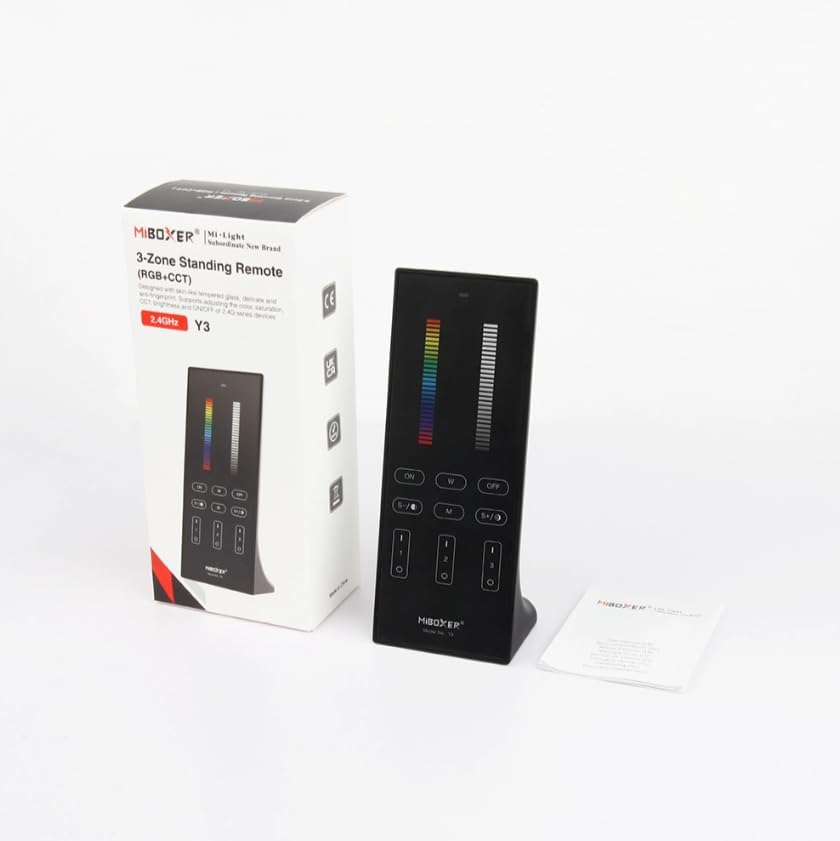
Figure 1: MiBOXER Y3 RGB+CCT Vertical Remote with its retail packaging.
2. Instrucțiuni de configurare
2.1 Instalarea bateriei
The MiBOXER Y3 remote requires two AAA batteries (not included). To install:
- Localizați capacul compartimentului bateriilor pe spatele telecomenzii.
- Glisați capacul în jos pentru a-l deschide.
- Introduceți două baterii AAA, asigurându-vă că polaritatea este corectă (+ și -).
- Glisați capacul înapoi în poziție până când se fixează cu un clic.
2.2 Linking the Remote to Lighting Devices
To control your MiBOXER RGB+CCT lighting devices, the remote must be linked to them. This process typically involves a specific sequence of actions on both the remote and the lighting device. Refer to your specific MiBOXER lighting product's manual for detailed linking instructions, as the procedure may vary slightly between different light models. A common linking procedure is as follows:
- Ensure the lighting device is powered off.
- Power on the lighting device.
- Within 3 seconds of powering on the light, press the "Zone ON" button (labeled "I" or "1") on the remote for the desired zone.
- The light should flash several times, indicating successful linking.
- If linking fails, repeat the process.
To unlink a device from a zone, power on the light and within 3 seconds, press the "Zone ON" button (labeled "I" or "1") five times rapidly for the corresponding zone. The light should flash multiple times to confirm unlinking.
3. Instrucțiuni de utilizare
The MiBOXER Y3 remote features an intuitive layout for controlling various lighting parameters. Familiarize yourself with the buttons and sliders as shown in Figure 2.

Figure 2: MiBOXER Y3 Remote Control button layout and functions.
3.1 Funcțiile butoanelor:
| Buton/Control | Funcţie |
|---|---|
| Indicator luminos | Flashes to confirm button presses. |
| Glisor RGB | Slide to select desired RGB color. |
| Glisor de luminozitate | Slide to adjust light brightness (0-100%). |
| Master ON (I/ON) | Aprinde toate luminile conectate. |
| Master OFF (O/OFF) | Stinge toate luminile conectate. |
| White Light (W) | Activează modul lumină albă pură. |
| Speed-/CCT-/Saturation- | Decreases speed in dynamic mode, decreases color temperature (warmer white), or decreases color saturation. |
| Speed+/CCT+/Saturation+ | Increases speed in dynamic mode, increases color temperature (cooler white), or increases color saturation. |
| Dynamic Mode (M) | Cycles through various dynamic lighting effects. Press repeatedly to change effects. |
| Zone ON (1, 2, 3 - "I") | Turns ON lights linked to the specific zone. Used for linking/unlinking. |
| Zone OFF (1, 2, 3 - "O") | Turns OFF lights linked to the specific zone. |
3.2 Funcționare generală:
- Aprinderea/Stingerea luminilor: Use the "Master ON" or "Master OFF" buttons for all lights, or "Zone ON" / "Zone OFF" for specific zones.
- Adjusting Color: Slide your finger along the "RGB Slider" to select your desired color.
- Reglarea luminozității: Slide your finger along the "Brightness Slider" to increase or decrease the light intensity.
- Reglarea temperaturii de culoare (CCT): In white light mode, use the "CCT-" and "CCT+" buttons to make the white light warmer or cooler.
- Moduri dinamice: Press the "M" button to activate dynamic lighting modes. Use "Speed-" and "Speed+" to adjust the speed of the current dynamic effect.
- Ajustarea saturației: In RGB mode, use "Saturation-" and "Saturation+" to adjust the intensity of the color.
4. Întreținere
Proper maintenance ensures the longevity and optimal performance of your MiBOXER Y3 remote.
- curatenie: Wipe the remote with a soft, dry cloth. Do not use abrasive cleaners, solvents, or wet cloths, as these can damage the surface or internal components.
- Înlocuire baterie: Replace batteries when the indicator light becomes dim or the remote's response becomes inconsistent. Always use new AAA batteries and dispose of old batteries responsibly.
- Depozitare: Depozitați telecomanda într-un loc răcoros și uscat, ferit de lumina directă a soarelui și de temperaturi extreme. Dacă o depozitați pentru perioade lungi de timp, scoateți bateriile pentru a preveni scurgerile.
- Evitați umezeala: This remote is not waterproof. Keep it away from water and high humidity environments.
5. Depanare
If you encounter issues with your MiBOXER Y3 remote, refer to the following troubleshooting steps:
| Problemă | Cauza posibila | Soluţie |
|---|---|---|
| Remote not responding to button presses. | Baterii descărcate sau descărcate. Remote not linked to lights. În afara razei de acțiune. | Înlocuiți bateriile. Re-link the remote to the lighting devices (refer to Section 2.2). Move closer to the lighting devices. |
| Lights not changing color/brightness. | Modul selectat greșit. Remote not linked to the specific zone. | Ensure you are in the correct mode (e.g., RGB for color, CCT for white temperature). Verify the remote is linked to the correct zone. |
| Indicator light not flashing. | Baterii descărcate. Defecțiune internă. | Înlocuiți bateriile. Dacă problema persistă după înlocuirea bateriei, contactați serviciul de asistență pentru clienți. |
| Interference with other 2.4GHz devices. | Proximity to other wireless devices. | Move the remote or other 2.4GHz devices further apart. |
6. Specificații
Technical specifications for the MiBOXER Y3 RGB+CCT Vertical Remote.
| Caracteristică | Detaliu |
|---|---|
| Numărul de model | Y3 |
| Marca | MiBOXER |
| Tip control | RGB+CCT Vertical Remote |
| Tehnologia fără fir | 2.4GHz |
| Alimentare electrică | 2x baterii AAA (nu sunt incluse) |
| Caracteristica specială | RGB/CCT/brightness dimmable |
| Greutatea articolului | 4.8 uncii (aproximativ 136 grame) |
| Dimensiuni pachet | 6.5 x 3 x 2 inci (aprox. 16.5 x 7.6 x 5.1 cm) |


Figure 3: Dimensions of the MiBOXER Y3 Remote Control and its packaging.
7. Garanție și asistență
For warranty information, please refer to the documentation provided with your specific MiBOXER lighting product or contact the retailer where the product was purchased. MiBOXER products typically come with a manufacturer's warranty covering defects in materials and workmanship.
For technical support or further assistance, please visit the official MiBOXER website or contact their customer service department. Contact details are usually available on the product packaging or the brand's official online presence.


