Introducere
This manual provides detailed instructions for the SONRU Bluetooth 5.3 FM Transmitter, a versatile device designed to enhance your in-car or home audio experience. It combines a Bluetooth audio adapter, an FM transmitter, and a fast car charger, offering seamless music streaming, hands-free calling, and efficient device charging.

Image: The SONRU Bluetooth 5.3 FM Transmitter, which plugs into a car's cigarette lighter, shown alongside its accompanying portable Bluetooth receiver with a 3.5mm audio jack.
Caracteristicile produsului
- Bluetooth avansat 5.3: Provides faster pairing, more stable signal, and improved anti-interference performance compared to older Bluetooth versions, ensuring CD-like sound quality.
- Dual Connection & Wide Compatibility: Connects to two Bluetooth devices simultaneously with a range of up to 33ft. Compatible with smartphones (iPhone, Android), MP3 players, CD players, tablets, and ideal for home or vehicle audio systems.
- PD 30W & QC 3.0 18W Fast Charging: Equipped with a Type-C (PD 30W) and a USB (QC3.0 18W) charging port for 4X faster charging. An additional 5V/1A USB port can also be used as a U disk port to play music. Allows simultaneous charging of up to three devices.
- Apeluri hands-free clare: Built-in microphone supports hands-free calls, allowing you to answer, end, reject, or redial calls easily while driving.
- Anulare inteligentă a zgomotului: Features independent multi-hole microphone CVC noise reduction technology for clearer call quality.
- Multi-color Ambient LED Light: Offers 3 modes of ambient lighting: 7-color LED light, 7-color LED breathing light, and dark mode. Easily switch colors with one click.
- Long Play Time (Receiver): The portable Bluetooth receiver offers up to 12.8 hours of non-stop music streaming, radio, GPS, or hands-free phone calls, with 250 hours standby time.

Image: A visual comparison highlighting the faster pairing speed and more stable signal of Bluetooth 5.3 (4Mbps) over Bluetooth 5.0 (2Mbps), with the SONRU FM transmitter in the foreground.
Instrucțiuni de configurare
1. Initial Power On and FM Frequency Setting
- Insert the SONRU FM Transmitter into your car's cigarette lighter socket. The LED display will light up, showing the current battery voltage and then the FM frequency.
- Tune your car's FM radio to an empty frequency (one with no static or existing radio station).
- Press and hold the "CH" button on the transmitter until the frequency display flashes.
- Rotate the multi-function knob (or use the track buttons if available) to adjust the transmitter's frequency to match your car's empty FM frequency.
- Once matched, the audio from the transmitter will be broadcast through your car's speakers.
2. Asociere Bluetooth
- After setting the FM frequency, the transmitter will automatically enter Bluetooth pairing mode. The Bluetooth icon on the display will flash.
- Pe dispozitivul mobil (smartphone, tabletă), activați Bluetooth și căutați dispozitivele disponibile.
- Select "SONRU" (or similar name) from the list of found devices to connect.
- Once successfully paired, the Bluetooth icon on the transmitter's display will stop flashing and remain solid. You can now stream audio from your device to your car stereo.
3. Using the Portable Bluetooth Receiver (for AUX/RCA input)
The included portable Bluetooth receiver allows you to connect the device to home stereo systems or car stereos that have an AUX or RCA input.
- Ensure the portable receiver is charged. Press and hold its central button to turn it on. The LED indicator will light up.
- Plug the 3.5mm audio jack of the receiver into the AUX input of your car stereo or home audio system. If using RCA, use the appropriate adapter (not included) to connect.
- On your mobile device, enable Bluetooth and search for available devices. Select the receiver's Bluetooth name (e.g., "SONRU Receiver") to connect.
- Once connected, audio from your mobile device will play through the connected stereo system.

Image: A three-step visual guide showing how to turn on the receiver, plug it into a stereo system (speakers or car audio), and connect a Bluetooth device for wireless music and hands-free calling.
Instrucțiuni de operare
Redare muzică
- Streaming prin Bluetooth: Once paired, open your music app on your mobile device and start playing. The audio will transmit to your car stereo via the set FM frequency or directly via the portable receiver's AUX connection.
- U Disk Playback: Insert a USB flash drive (U disk) containing MP3/WMA/WAV/FLAC audio files into the 5V/1A USB port. The transmitter will automatically detect and play music from the U disk.
- Controlul pistei: Use the "Previous Track" (◀) and "Next Track" (▶) buttons on the transmitter to navigate through songs.
- Reglarea volumului: Rotate the multi-function knob to adjust the volume of the transmitter. It is recommended to set the transmitter volume to a moderate level and control the main volume via your car stereo.
Apeluri fără mâini
- Răspunde la apel: Short press the multi-function knob (phone icon) to answer an incoming call.
- Terminare apel: Short press the multi-function knob (phone icon) during a call to end it.
- Respinge apelul: Long press the multi-function knob (phone icon) to reject an incoming call.
- Reapelează ultimul număr: Double-press the multi-function knob (phone icon) to redial the last dialed number.
- Comutare sursă apel: During a call, long press the multi-function knob to switch the call between the transmitter and your phone.
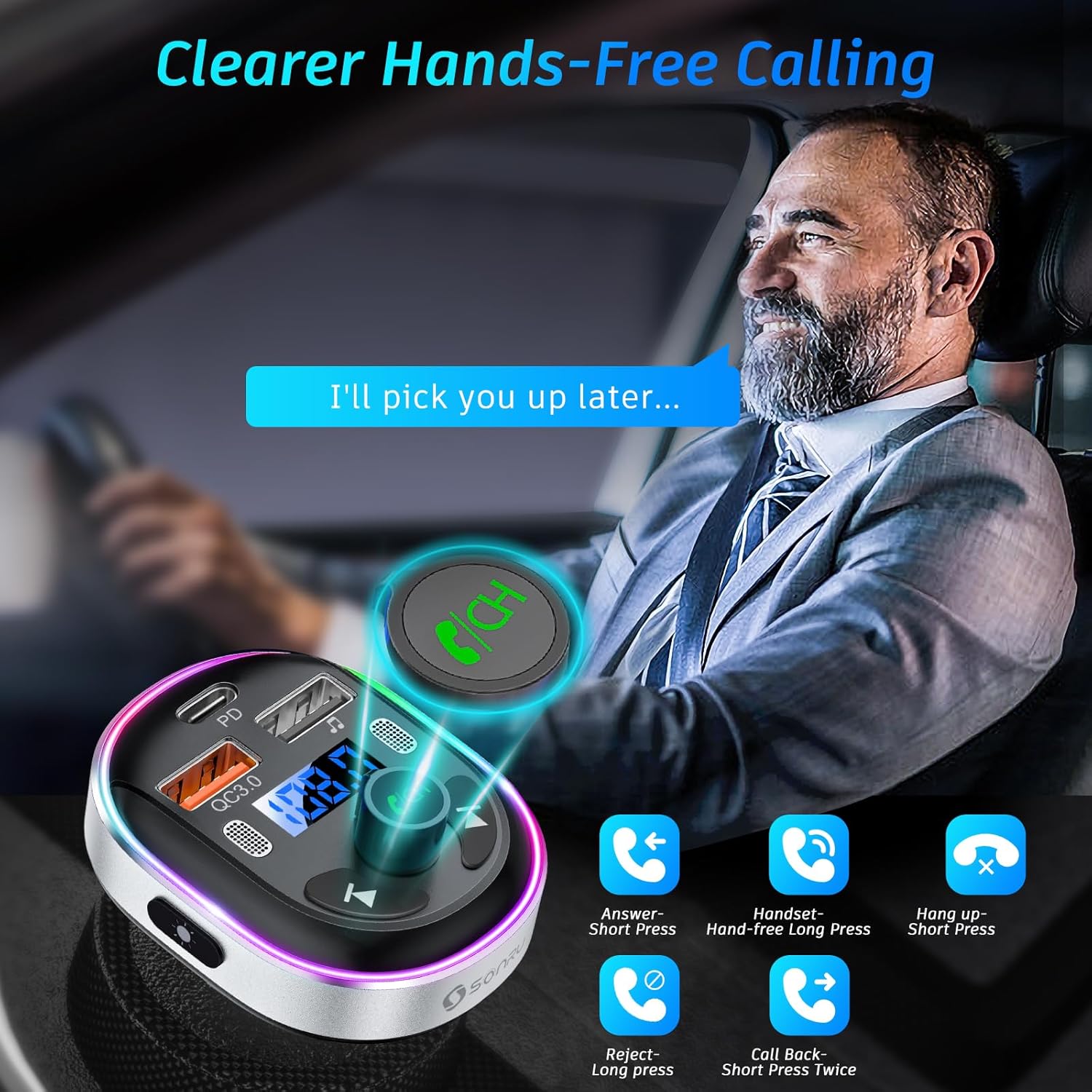
Image: An illustration demonstrating the various hands-free calling functions of the SONRU FM transmitter, including answering, ending, rejecting, and redialing calls, with a driver in the background.
Dispozitive de încărcare
- Connect your device's charging cable to the PD 30W Type-C port or the QC3.0 18W USB port for fast charging.
- The additional 5V/1A USB port can also be used for standard charging.
Ambient LED Light Control
- Press the dedicated LED light button on the side of the transmitter to cycle through the ambient light modes: 7-color static, 7-color breathing, and dark mode (lights off).

Image: A diagram illustrating the three modes of the multi-color ambient LED light on the SONRU FM transmitter: 7-color light, 7-color breathing light, and dark mode, with a button indicating "One-click to change color."
Întreţinere
- Keep the device dry. Moisture, minerals, and corrosive materials can damage the circuits.
- Do not use harsh chemicals, cleaning solvents, or strong detergents to clean the device. Wipe it with a soft, dry cloth.
- Do not expose the device to extreme temperatures (hot or cold), as this can shorten the life of electronic devices, damage batteries, and warp or melt plastic parts.
- Avoid dropping, knocking, or shaking the device. Rough handling can break internal circuit boards and fine mechanics.
- Depozitați dispozitivul într-un mediu curat și fără praf atunci când nu îl utilizați.
Depanare
| Problemă | Cauza posibila | Soluţie |
|---|---|---|
| Nu există alimentare/dispozitivul nu pornește. | Loose connection in cigarette lighter socket; car's power outlet is off or fuse blown. | Ensure the transmitter is firmly inserted. Check if the car's power outlet is active. Test with another device or check car's fuse box. |
| Calitate audio statică sau slabă. | FM frequency interference; transmitter/receiver too far from audio source; low volume settings. | Change to a clearer FM frequency on both the transmitter and car radio. Ensure Bluetooth devices are within 33ft. Increase volume on both the transmitter and car stereo/audio system. |
| Nu se poate asocia cu dispozitivul Bluetooth. | Bluetooth not enabled on device; device already paired with another unit; transmitter not in pairing mode. | Ensure Bluetooth is enabled on your phone/tablet. Disconnect from other Bluetooth devices. Restart the transmitter and try pairing again. |
| Calitatea apelurilor hands-free este slabă. | Microphone obstruction; background noise; low signal. | Ensure the microphone on the transmitter is not blocked. Reduce background noise in the car. Ensure strong Bluetooth connection. |
| Încărcarea rapidă nu funcționează. | Device not compatible with fast charging; cable not supporting fast charging; multiple devices charging simultaneously. | Ensure your device supports PD or QC3.0. Use a high-quality cable designed for fast charging. Try charging one device at a time. |
Specificații
- Model: B0DL315G28
- Versiune Bluetooth: 5.3
- Gama Bluetooth: Până la 10 de metri fără obstacole
- Interval de frecvență FM: 87.5-108.0 MHz (typical for FM transmitters)
- Vol. De intraretage: DC 12V-24V
- USB-C Output (PD): 30 W (maximum)
- Ieșire USB-A (QC3.0): 18 W (maximum)
- USB-A Output (Standard): 5V/1A (for U disk playback and charging)
- Audio Formats (U Disk): MP3, WMA, WAV, FLAC
- Portable Receiver Play Time: Până la 12.8 ore
- Portable Receiver Standby Time: 250 de ore
- Compatibilitate: Smartphones (iPhone, Android), MP3 players, CD players, tablets, home/car stereo systems with AUX/RCA input.

Image: A visual representation of the wide compatibility of the SONRU Bluetooth receiver, showing connections to cellphones, tablets, laptops, home audio systems, car audio systems, and wired headphones, all within a 33 ft wireless range.
Garanție și suport
SONRU provides a 12 luni garantie de calitate for this product, ensuring peace of mind regarding its performance and durability. Additionally, a one-month money-back guarantee is offered for any reason.
For technical support, warranty claims, or any inquiries regarding your SONRU Bluetooth 5.3 FM Transmitter, please contact our customer service team. Refer to the contact information provided with your product packaging or visit the official SONRU website-ul pentru cele mai recente detalii de asistență.
Resurse online:
- Pentru mai multe informații și actualizări de produs, vizitați SONRU Store on Amazon.


