Introducere
This manual provides detailed instructions for the operation and maintenance of your WIITHINK WTB-795S Portable Cassette Player Recorder. This device combines classic audio playback with modern features, including AM/FM/SW radio, Bluetooth connectivity, USB/SD card playback, and MP3 conversion capabilities. Please read this manual thoroughly before using the product to ensure proper function and longevity.
Informații de siguranță
- Nu expuneți unitatea la ploaie sau umezeală pentru a preveni incendiul sau electrocutarea.
- Nu deschideți c.asing. Apelați la service doar personalului calificat.
- Evitați amplasarea unității în apropierea surselor de căldură sau în lumina directă a soarelui.
- Asigurați o ventilație corespunzătoare; nu blocați orificiile de ventilație.
- Folosiți doar adaptorul de alimentare sau bateriile specificate.
- A nu se lăsa la îndemâna copiilor.
Conținutul pachetului
Verificați dacă toate articolele sunt prezente în colet:
- WIITHINK WTB-795S Portable Cassette Player Recorder
- Cablu de alimentare CA.
- Manual de utilizare (acest document)
Produs terminatview
The WIITHINK WTB-795S is a versatile audio device designed for both classic and modern listening experiences. It features a cassette player and recorder, AM/FM/SW radio, Bluetooth connectivity, and USB/SD card playback with MP3 conversion capabilities.

Imagine: față view of the WIITHINK WTB-795S Portable Cassette Player Recorder, showing the cassette deck, radio tuner, and speakers.
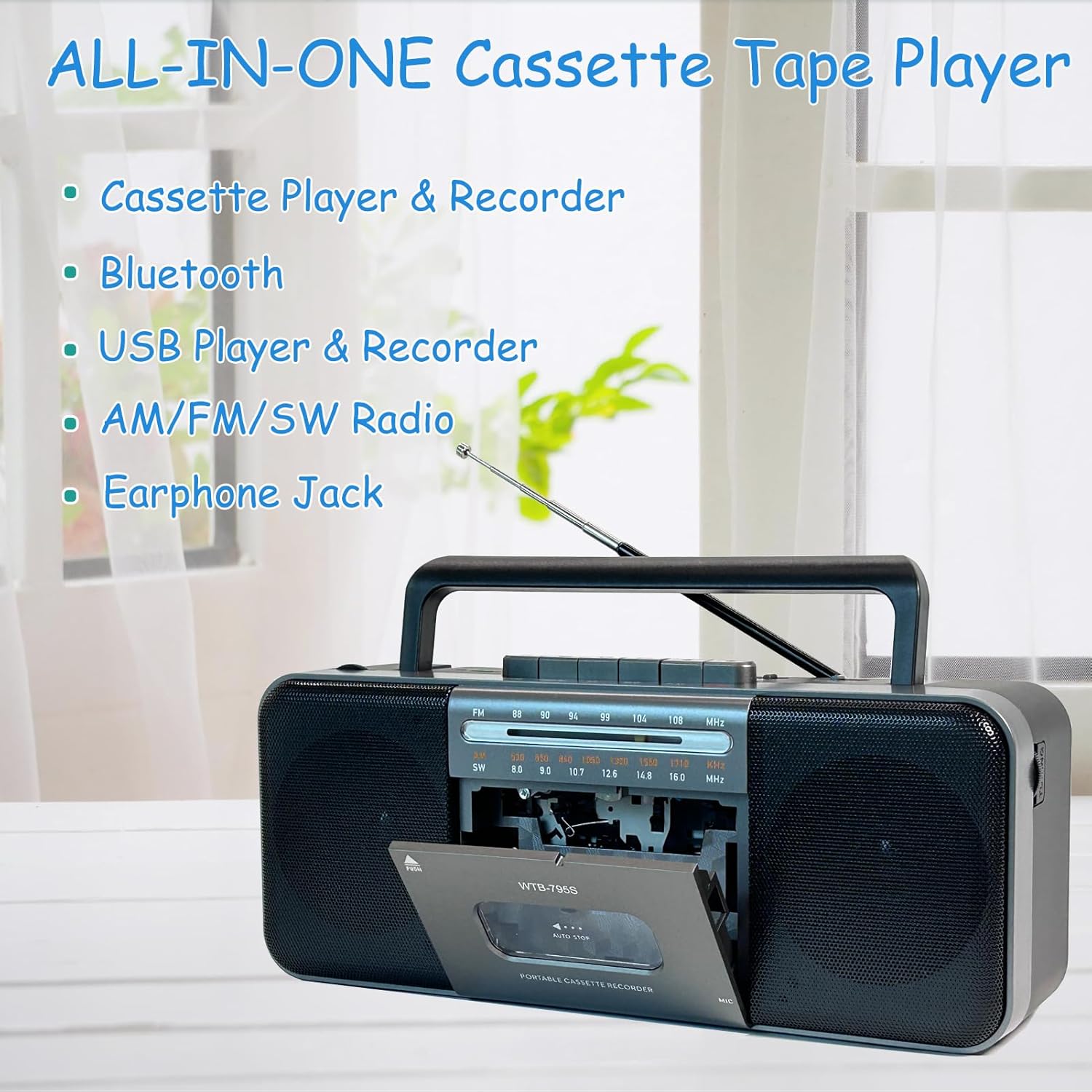
Image: Diagram highlighting the all-in-one features of the WTB-795S, including Cassette Player & Recorder, Bluetooth, USB Player & Recorder, AM/FM/SW Radio, and Earphone Jack.
Caracteristici cheie:
- Cassette Player & Recorder: Play and record audio to cassette tapes.
- AM/FM/SW Radio: Built-in tuner for receiving various radio bands.
- Conectivitate Bluetooth: Streaming audio wireless de pe dispozitive compatibile.
- USB/SD Card Playback & Recording: Redați audio files from USB drives and SD cards, and record to them.
- MP3 Converter: Convert cassette audio to MP3 format on USB/SD.
- Microfon încorporat: For direct voice recording.
- 10W Dual Speakers: Provides clear and powerful stereo sound (radio is mono).
- Mufă pentru căști: Pentru ascultare privată.
- Alimentare AC/DC: Operates with AC power cable or batteries for portability.
Înființat
Alimentarea dispozitivului:
The WTB-795S can be powered by either AC electricity or batteries.
Putere AC:
- Asigurați-vă că unitatea este oprită.
- Connect the supplied AC power cable to the AC input jack on the back of the unit.
- Conectați celălalt capăt al cablului de alimentare CA la o priză standard de perete.
Putere baterie:
For portable use, the unit requires 4 x D-size batteries (not included) or 2 x 18650 button-top rechargeable batteries (not included).

Imagine: Spate view of the WTB-795S showing the battery compartments for 4 D-size batteries and 2 18650 button-top rechargeable batteries, along with the AC power input. Note: Only button-top 18650 batteries are compatible.
- Deschideți capacul compartimentului bateriilor din spatele unității.
- Insert 4 D-size batteries or 2 18650 button-top rechargeable batteries, observing the correct polarity (+/-) as indicated inside the compartment.
- Închideți bine capacul compartimentului bateriei.
- Nota: The 18650 battery compartment only accommodates button-top battery models. Flat-top battery models cannot be used.
Antenă:
Extend the telescopic antenna for optimal FM and SW radio reception. For AM reception, rotate the unit for best signal.
Instrucțiuni de operare
1. Cassette Playback and Recording

Image: A person holding a cassette tape, with the WTB-795S in the foreground showing the open cassette deck, illustrating its cassette playback and recording function.
Playing a Cassette:
- Apăsați tasta STOP/EJECT butonul pentru a deschide ușa casetei.
- Introduceți o casetă audio cu marginea deschisă în sus.
- Închideți ușa casetei.
- Apăsați tasta JUCA pentru a porni redarea.
- Reglați VOLUM knob to your desired level.
- Utilizare FAST FORWARD (FF) or REWIND (REW) butoane pentru a naviga pe bandă.
- Presa STOP/EJECT pentru a opri redarea.
Recording to Cassette:
You can record from the built-in microphone, radio, or external sources (via Bluetooth/USB/SD).
- Insert a blank or recordable cassette tape.
- Select the desired source (e.g., Radio, Bluetooth, USB/SD).
- Apăsați tasta ÎNREGISTRA button (usually red) simultaneously with the JUCA butonul. Înregistrarea va începe.
- For microphone recording, ensure the microphone is unobstructed.
- Presa STOP/EJECT pentru a termina înregistrarea.
2. Radio Operation (AM/FM/SW)

Image: An elderly man smiling while listening to the WTB-795S, which has its telescopic antenna extended, demonstrating its radio function.
- Setați comutatorul de funcții la RADIO.
- Select the desired band: AM, FM, sau SW using the band selector switch.
- Extend the telescopic antenna for FM and SW reception. Rotate the unit for optimal AM reception.
- Rotiți TUNING knob to find your desired station.
- Reglați VOLUM butonul.
3. Mod Bluetooth

Image: A hand holding a smartphone displaying a music app, with the WTB-795S on a table in the background, indicating Bluetooth connectivity.
- Setați comutatorul de funcții la Bluetooth. The unit will enter pairing mode, indicated by an audible prompt or flashing indicator.
- Pe dispozitivul compatibil Bluetooth (smartphone, tabletă etc.), căutați dispozitivele disponibile.
- Select "WTB-795S" from the list to pair.
- Once paired, you can stream audio from your device to the WTB-795S.
- Adjust volume on both the unit and your connected device.
4. USB/SD Card Playback and Recording

Image: The WTB-795S with a red USB flash drive inserted into its USB port, demonstrating its USB playback and recording capabilities.
Playing from USB/SD:
- Introduceți o unitate flash USB în portul USB sau un card SD în slotul pentru card SD.
- Setați comutatorul de funcții la USB/SD.
- Unitatea va detecta automat și va începe să redea sunete compatibile files (MP3 format).
- Use the playback control buttons (Play/Pause, Next, Previous) to manage your audio.
- Nota: Compatible with FAT32 file systems only. NTFS is not supported.
Recording to USB/SD (MP3 Conversion):
You can convert audio from cassette tapes to MP3 format on a USB drive or SD card.
- Insert a USB flash drive or SD card.
- Insert the cassette tape you wish to convert.
- Apăsați tasta JUCA button on the cassette deck.
- Apăsați tasta ÎNREGISTRA button (often labeled 'USB/SD Record' or similar, refer to unit markings) to start converting the cassette audio to MP3 on the inserted USB/SD media.
- Presa STOP to end the conversion.
5. Mufă pentru căști

Image: A woman wearing headphones and listening to the WTB-795S, illustrating the use of the earphone jack for private listening.
Plug standard 3.5mm headphones into the earphone jack for private listening. The main speakers will be muted when headphones are connected.
Întreţinere
Curățarea unității:
- Ștergeți exteriorul cu o cârpă moale și uscată.
- Nu utilizați agenți de curățare abrazivi sau solvenți.
- For the cassette head and pinch roller, use a cotton swab lightly dampened with isopropyl alcohol. Clean gently to remove tape residue.
Cassette Tape Care:
- Store tapes away from direct sunlight and extreme temperatures.
- Evitați să atingeți suprafața benzii.
- Periodically fast forward and rewind tapes to prevent sticking.
Depanare
| Problemă | Cauza posibila | Soluţie |
|---|---|---|
| Fără putere | Cablul de curent alternativ nu este conectat; Bateriile sunt descărcate sau introduse incorect. | Check AC cable connection; Replace or correctly insert batteries. |
| Nici un sunet | Volum prea mic; Căști conectate; Mod selectat incorect. | Increase volume; Disconnect headphones; Select correct function mode. |
| Recepție radio slabă | Antena nu este extinsă; Semnal slab. | Extend telescopic antenna; Rotate unit for better signal. |
| Cassette playback distorted/slow | Tape head dirty; Tape worn out; Batteries low. | Clean tape head; Try a different tape; Replace batteries. |
| Nu se redă pe USB/SD | Incorect file format; Incompatible file system (NTFS); Media not inserted correctly. | Asigura files are MP3; Format media to FAT32; Reinsert USB/SD card. |
| Bluetooth nu se conectează | Unit not in pairing mode; Device too far; Bluetooth off on source device. | Ensure unit is in Bluetooth mode; Bring devices closer; Enable Bluetooth on source device. |
Specificații
| Caracteristică | Detaliu |
|---|---|
| Model | WTB-795S |
| Dimensiuni produs (L x l x H) | 11 x 5 x 2 inchi (27.9 x 12.7 x 5.1 cm) |
| Greutatea articolului | 3.41 lire (1.55 kg) |
| Tehnologia de conectivitate | Bluetooth, USB |
| Tip difuzor | Stereo (2 x 5W) |
| Sursa de alimentare | AC Power (included adapter) or DC Battery (4 x D-size or 2 x 18650 button-top, not included) |
| Frecvențe radio | AM: 530-1710kHz, FM: 88-108MHz, SW: 8.0-16.0MHz |
| Compatibilitate USB/SD | FAT32 file system, MP3 format |
Garanție și suport
WIITHINK is committed to customer satisfaction. This product comes with an 18-month replacement policy and lifetime technical support.
Contactarea asistenței:
For any inquiries or issues, please contact WIITHINK customer support through your purchase platform (e.g., Amazon Buyer-Seller Message) or refer to the contact information provided with your product packaging.
Planuri de protecție opționale:
Planurile de protecție extinsă pot fi disponibile pentru achiziționare separat:
- Plan de protecție pe 2 ani
- Plan de protecție pe 3 ani
- Complete Protect (abonament lunar care acoperă achizițiile eligibile)
Please refer to the specific terms and conditions of these plans at the time of purchase.


