Produs terminatview
The Mesqool CR1025 is a versatile alarm clock radio designed to provide multiple functionalities in a compact form factor. It integrates an alarm clock, Bluetooth speaker, FM radio, LED night light, and dual USB charging ports for convenience.
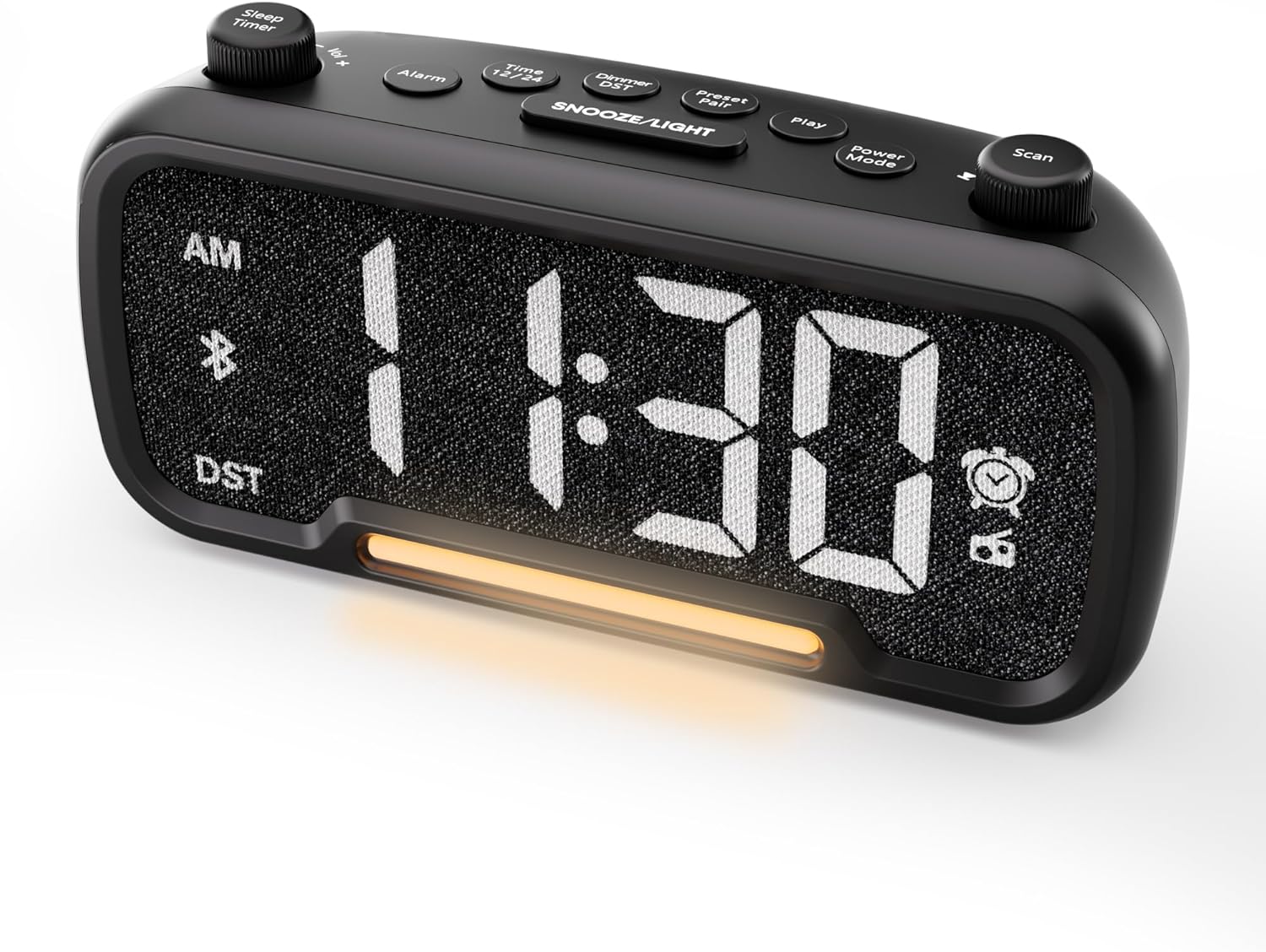
Figura 1: Față view of the Mesqool CR1025 Alarm Clock Radio, displaying the digital time and control layout.

Figure 2: Key features of the Mesqool CR1025, highlighting its multi-functional design.
Ghid de instalare
1. Conexiune la alimentare
- Conectați adaptorul de alimentare furnizat la portul DC IN de pe spatele ceasului deșteptător.
- Plug the adapter into a standard electrical outlet. The clock will power on and the display will illuminate.

Figure 3: The alarm clock radio connected to power, ready for use.
2. Instalarea bateriei de rezervă
- The unit includes a CR2032 lithium battery for backup. This battery retains alarm settings and time during a power outage, but the display will not show the time and the alarm will not sound until power is restored.
- Localizați compartimentul bateriilor în partea de jos a unității.
- Insert the CR2032 battery with the correct polarity (+ side up).
- Închideți bine compartimentul bateriei.
3. Setarea inițială a orei
- Apăsați tasta Ora 12/24 buton. Cifrele orelor vor clipi.
- Rotiți Scanează knob (right knob) to adjust the hour.
- Apăsați tasta Ora 12/24 Apăsați din nou butonul. Cifrele minutelor vor clipi.
- Rotiți Scanează butonul pentru reglarea minutelor.
- Apăsați tasta Ora 12/24 button once more to confirm and exit time setting.
4. Format oră 12/24 ore
- To switch between 12-hour and 24-hour time formats, press and hold the Ora 12/24 butonul pentru 2 secunde.
- In 12-hour format, 'AM' or 'PM' indicators will appear on the display.

Figure 4: Display options for 12-hour and 24-hour time formats.
5. Daylight Saving Time (DST) Mode
- To activate or deactivate Daylight Saving Time, press and hold the Dimmer DST butonul pentru 2 secunde.
- The time will adjust by one hour forward or backward, and the 'DST' indicator will appear or disappear.
Instrucțiuni de operare
1. Setare alarmă
- Țineți apăsat butonul Alarma button for 2 seconds. The hour digits will flash.
- Rotiți Vol -/+ knob (left knob) to adjust the alarm hour.
- Apăsați tasta Alarma Apăsați din nou butonul. Cifrele minutelor vor clipi.
- Rotiți Vol -/+ knob to adjust the alarm minute.
- Apăsați tasta Alarma button again. The alarm source icon will flash. Rotate the Vol -/+ knob to select between buzzer or FM radio as the alarm sound.
- Apăsați tasta Alarma button again. The volume level will flash. Rotate the Vol -/+ knob to adjust the alarm volume (L01-L16).
- Apăsați tasta Alarma button once more to confirm and activate the alarm. The alarm icon will appear on the display.
Anularea alarmei
- To cancel the alarm, press the Alarma button. The alarm icon will turn off, indicating the alarm has been deactivated.
Funcția de amânare
- Când alarma sună, apăsați tasta SNOOZE / LUMINĂ pentru a activa funcția de amânare. Alarma se va întrerupe timp de 9 minute, apoi va suna din nou.
- This can be repeated up to 9 times. To stop the alarm for the day, press the Alarma buton.

Figure 5: The alarm clock radio offers two alarm sound options: radio or buzzer.
2. Bluetooth Speaker Operation
- Apăsați tasta Modul Power button repeatedly until 'bt' appears on the display and the Bluetooth icon starts flashing. This indicates the clock is in Bluetooth pairing mode.
- On your mobile device, enable Bluetooth and search for available devices. Select 'CR1025' from the list.
- Once connected, the Bluetooth icon on the clock's display will stop flashing and remain solid. You can now play audio from your device through the clock's speaker.

Figure 6: Bluetooth 5.0 connectivity for wireless audio streaming.
3. Funcționare radio FM
- Apăsați tasta Modul Power button repeatedly until the radio icon lights up on the display, indicating FM radio mode.
- Scanare automată: Apăsați tasta Scanează button to automatically search for and store up to 20 FM radio stations. The clock will cycle through frequencies and save strong signals as presets (P01, P02, etc.).
- Căutare manuală: Rotiți Scanează knob to manually browse FM frequencies.
- Salvați presetarea: To save a manually found station, press and hold the Preset Pair button for 2 seconds. The preset number will flash. Rotate the Scanează knob to select a preset slot, then press Preset Pair din nou pentru a salva.
- Recall presetare: În modul FM, apăsați scurt butonul Preset Pair pentru a parcurge posturile salvate.
- Reglați volumul: Rotiți Vol -/+ knob to adjust the radio volume (16 levels).

Figure 7: Enjoying FM radio with a wide frequency range and 20 presets.
4. Night Light and Brightness Dimmer
- The clock features a built-in LED night light.
- Apăsați tasta SNOOZE / LUMINĂ button to cycle through 5 adjustable brightness levels for the main display and the night light.
- The lowest setting is suitable for sleeping, while the brightest is for daytime visibility.

Figure 8: The 5-level brightness dimmer allows customization for various lighting conditions.
5. Phone Charging Ports
- The Mesqool CR1025 is equipped with two USB charging ports: one USB-C and one USB-A.
- Connect your devices (e.g., smartphone, smartwatch) to these ports using appropriate charging cables.
- The clock must be powered via its AC adapter for the charging ports to function.
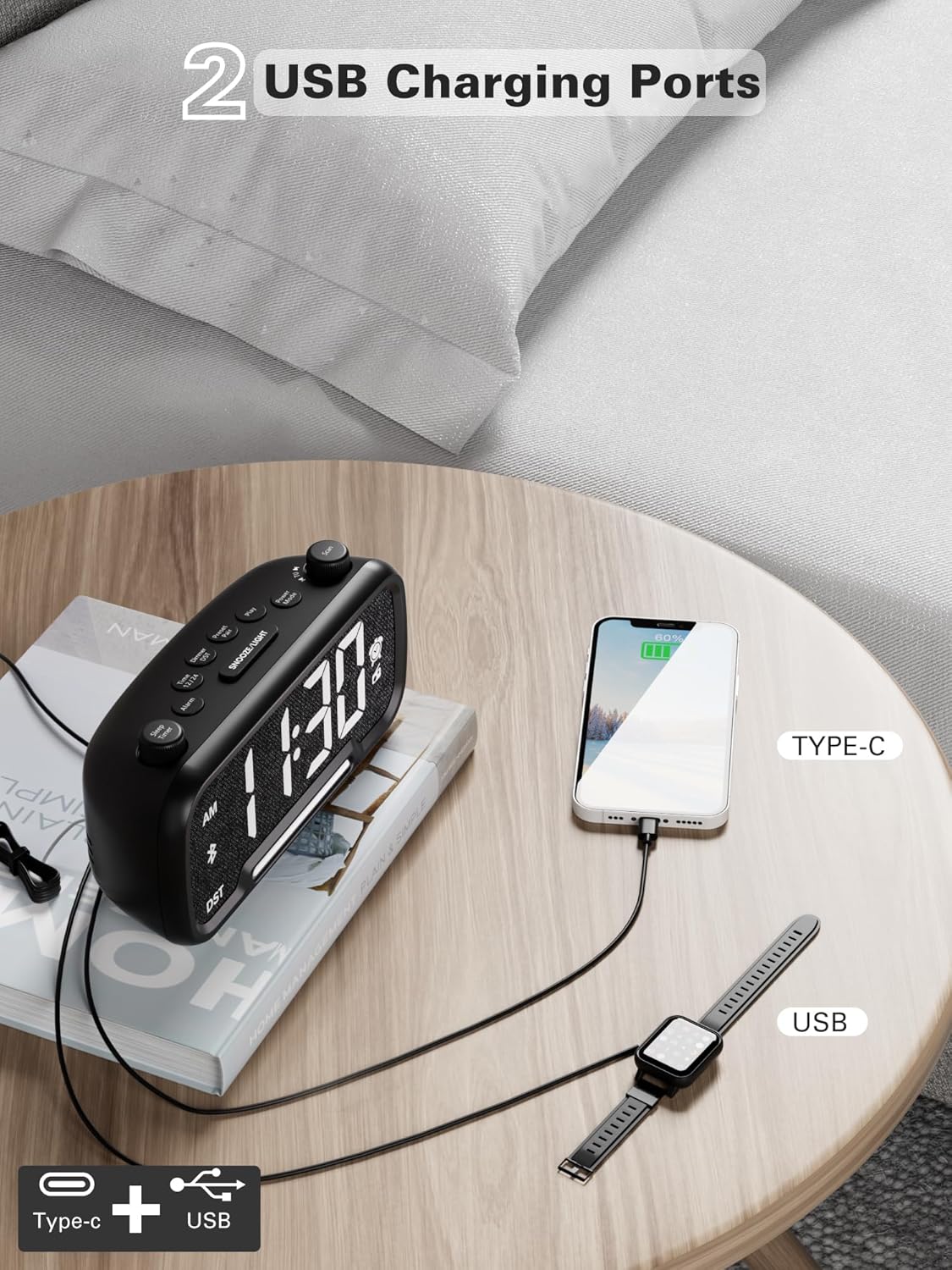
Figure 9: Dual USB charging ports for convenient device power.
6. Sleep Timer Setting
- When using the FM radio or Bluetooth speaker, you can set a sleep timer to automatically turn off playback after a set duration.
- Apăsați tasta Sleep Timer button (left knob) to access the settings.
- Rotiți Sleep Timer knob to select the desired duration: 15, 30, 60, 90, or 120 minutes, or OFF.
- The display will show the selected duration, and then return to the current time. The music/radio will play for the set time and then automatically turn off.
Video instructiv
Video 1: This instructional video demonstrates various settings for the Mesqool CR1025, including alarm setting, time setting, 12/24H format, DST mode, dimmer setting, Bluetooth pairing, FM radio operation, and sleep timer. Refer to the specific sections above for detailed steps.
Întreţinere
- curatenie: Folosiți o lavetă moale și uscată pentru a curăța suprafața ceasului deșteptător. Nu utilizați agenți de curățare lichizi sau materiale abrazive.
- Înlocuire baterie: If the battery backup is no longer retaining settings during power outages, replace the CR2032 battery in the compartment on the bottom of the unit. Ensure correct polarity.
- Depozitare: Dacă depozitați unitatea pentru o perioadă lungă de timp, deconectați-o de la alimentare și scoateți bateria de rezervă.
Depanare
- Fără alimentare/Afișaj oprit: Ensure the power adapter is securely connected to both the clock and a working electrical outlet. Check if the outlet has power.
- Alarma nu sună: Verify that the alarm is set correctly (time, source, volume) and that the alarm icon is visible on the display. Ensure the alarm volume is not set to L00.
- Recepție radio FM slabă: Extend the FM antenna fully. Try repositioning the clock to improve signal reception. Perform an auto-scan to find stronger stations.
- Bluetooth nu se conectează: Ensure the clock is in Bluetooth pairing mode (flashing 'bt' icon). Make sure your device's Bluetooth is enabled and within range. Forget the device on your phone and try pairing again.
- Încărcarea prin USB nu funcționează: Confirm the clock is connected to AC power. Check if the charging cable is functional and properly connected to both the clock and your device.
- Afișaj prea luminos/întunecat: Apăsați tasta SNOOZE / LUMINĂ buton pentru a regla nivelul luminozității.
Specificații
| Caracteristică | Caietul de sarcini |
|---|---|
| Marca | Mesqool |
| Numărul de model | CR1025 |
| Dimensiunile produsului | 5.9 x 3.81 x 8.4 cm |
| Greutatea articolului | 216 g |
| Material | Țesătură |
| Tip de afișare | LED digital |
| Caracteristici speciale | Radio Clock, LED Display, Bluetooth Speaker, Night Light, Phone Charger |
| Frecvența radio FM | 87.5 MHz - 108.0 MHz |
| Niveluri de volum al alarmei | 16 (L01-L16) |
| Niveluri de luminozitate ale afișajului | 5 |
| Ieșire de încărcare USB | USB-C and USB-A ports |
| Bateria de rezervă | CR2032 (for settings retention) |
Garanție și suport
For warranty information, technical support, or further assistance, please refer to the contact details provided with your product packaging or visit the official Mesqool website-ul.


