1. Introducere
Thank you for choosing the Mesqool CR1025 Clock Radio. This device combines an alarm clock, Bluetooth speaker, FM radio, night light, and phone charger into one compact unit. This manual provides detailed instructions for setup, operation, and maintenance to ensure optimal performance and user experience.

Figure 1: Mesqool CR1025 Clock Radio
2. Produs terminatview
2.1 Caracteristici cheie
- Design multifuncțional: Alarm Clock, Bluetooth Speaker, FM Radio, Night Light, and Phone Charger.
- Bluetooth 5.0: For stable and quick wireless audio streaming.
- Radio FM: 87.5MHz-108.0MHz frequency range with 20 preset stations.
- Luminozitate reglabilă: 5 levels for the LED display.
- Volum reglabil: 16 levels (45dB to 116dB).
- Temporizator de somn: Allows automatic shutdown of audio playback.
- Funcție de amânare: 9-minute delay for alarms.
- Baterie de rezerva: Păstrează setările de oră și alarmă în timpul întreruperii alimentăriitages.
- Porturi duble de încărcare USB: Type-C and USB-A for device charging.
- Format oră: 12-hour and 24-hour display options.
- Ora de vară (DST): Quick adjustment feature.

Figura 2: Funcționalitate 5 în 1
2.2 Conținutul pachetului
- Mesqool CR1025 Clock Radio
- Adaptor de alimentare
- Cablu USB
- CR2032 Lithium Battery (pre-installed or separate for backup)
- Manual de utilizare (acest document)

Figura 3: Conținutul pachetului
3. Comenzi și afișaj
Familiarize yourself with the buttons and ports on your Mesqool CR1025 Clock Radio.
3.1 Comenzile panoului superior
- Sleep Timer Knob: Rotate to set sleep timer duration. Press to confirm.
- Buton alarmă: Press to set or activate/deactivate alarms.
- Time/12/24 Button: Press to set time. Hold to switch between 12/24-hour format.
- Dimmer/DST Button: Press to adjust display brightness. Hold to activate/deactivate Daylight Saving Time.
- Buton AMÂNARE/LUMINĂ: Press to snooze alarm or turn night light on/off.
- Preset/Pair Button: Press to cycle through FM presets. Hold to enter Bluetooth pairing mode.
- Play/Mode Button: Press to play/pause in Bluetooth mode. Hold to switch between FM/Bluetooth modes.
- Power/Scan Knob: Rotate to adjust volume. Press to power on/off. Hold to auto-scan FM stations.
3.2 Porturi pe panoul din spate
- DC IN: Port de intrare pentru alimentare.
- Ieșire USB-A: Pentru încărcarea dispozitivelor externe.
- Ieșire tip C: Pentru încărcarea dispozitivelor externe.
4. Configurare
4.1 Conexiune la alimentare
- Conectați adaptorul de alimentare la portul DC IN din spatele radioului cu ceas.
- Conectați adaptorul de alimentare la o priză standard de perete. Afișajul se va aprinde.

Figura 4: Conexiune la alimentare
4.2 Baterie de rezervă
The CR2032 battery provides backup for time and alarm settings during a power outage. The display will not show time, and alarms will not sound until power is restored.
- Ensure the battery insulator tab is removed if the battery was pre-installed.
- If replacing, open the battery compartment on the bottom and insert a new CR2032 battery with the correct polarity.
4.3 Setarea orei
- Țineți apăsat butonul Time/12/24 apăsați butonul până când cifrele orei clipesc.
- Rotiți Alimentare/Scanare butonul pentru a regla ora.
- Apăsați tasta Time/12/24 button again to confirm the hour, and the minute digits will flash.
- Rotiți Alimentare/Scanare knob to adjust the minutes.
- Apăsați tasta Time/12/24 button to save the time setting.
4.4 Format 12/24 de ore
Pentru a comuta între formatul de oră de 12 ore și cel de 24 de ore, apăsați butonul Time/12/24 button briefly while the time is displayed.

Figure 5: 12H/24H and DST Display
4.5 Ora de vară (DST)
To activate or deactivate DST, press and hold the Dimmer/DST button. The 'DST' indicator will appear or disappear on the display.
5. Instrucțiuni de utilizare
5.1 Setarea alarmei
- Țineți apăsat butonul Alarma apăsați butonul până când cifrele orei alarmei clipesc.
- Rotiți Alimentare/Scanare knob to adjust the alarm hour.
- Apăsați tasta Alarma button again to confirm the hour, and the minute digits will flash.
- Rotiți Alimentare/Scanare knob to adjust the alarm minutes.
- Apăsați tasta Alarma buton pentru a salva ora alarmei.
- Pentru a activa/dezactiva alarma, apăsați butonul Alarma scurt butonul. O pictogramă de alarmă va apărea/dispăre de pe afișaj.
5.2 Funcția Snooze
Când alarma sună, apăsați tasta SNOOZE / LUMINĂ button to activate the 9-minute snooze function. The alarm will sound again after 9 minutes. This can be repeated up to 9 times. To stop the alarm completely, press the Alarma buton.

Figure 6: Snooze Function
5.3 Funcționarea radioului FM
- Apăsați tasta Play/Mode buton pentru a comuta la modul Radio FM.
- Scanare automată: Țineți apăsat butonul Alimentare/Scanare knob to automatically scan and save available FM stations (up to 20 presets).
- Reglare manuală: Briefly rotate the Alimentare/Scanare buton pentru reglarea fină a frecvenței.
- Selectați presetări: Apăsați tasta Preset/Pair pentru a parcurge posturile salvate.
- Reglarea volumului: Rotiți Alimentare/Scanare knob to adjust the volume (16 levels).

Figura 7: Caracteristici radio FM
5.4 Funcționarea difuzorului Bluetooth
- Apăsați tasta Play/Mode button to switch to Bluetooth mode. The 'BT' icon will flash on the display.
- On your mobile device, enable Bluetooth and search for 'CR1025'.
- Select 'CR1025' to pair. Once connected, the 'BT' icon will stop flashing.
- Redați sunet de pe dispozitiv. Folosiți Play/Mode buton pentru redare / pauză.
- Reglarea volumului: Rotiți Alimentare/Scanare butonul pentru a regla volumul.

Figura 8: Conectivitate Bluetooth 5.0
5.5 Funcționarea luminii de noapte
Apăsați tasta SNOOZE / LUMINĂ button to turn the night light on or off. The night light provides a soft, warm glow.

Figure 9: Warm Night Light
5.6 Reglarea luminozității afișajului
Apăsați tasta Dimmer/DST button repeatedly to cycle through 5 levels of display brightness, from off to brightest.
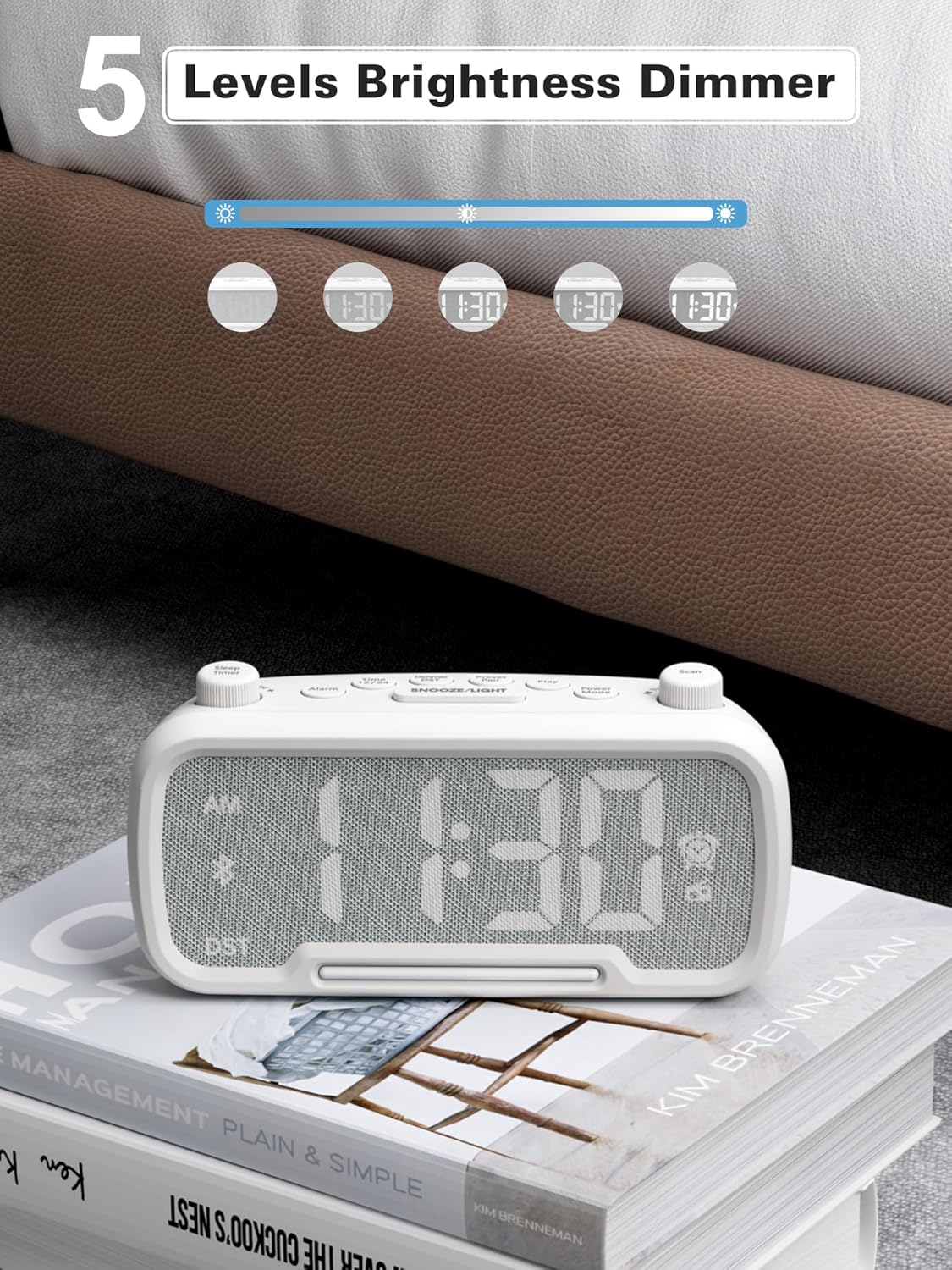
Figure 10: 5 Levels Brightness Dimmer
5.7 Temporizator de repaus
The sleep timer allows you to set a duration after which the radio or Bluetooth audio will automatically turn off.
- While playing FM radio or Bluetooth audio, rotate the Sleep Timer knob to select the desired sleep duration (e.g., 15, 30, 60, 90 minutes).
- The display will show the remaining sleep time. The audio will turn off automatically when the timer expires.
5.8 Încărcarea telefonului
The clock radio features two USB charging ports (Type-C and USB-A) for convenient charging of your mobile devices.
- Connect your device's charging cable to either the USB-A or Type-C port on the back of the clock radio.
- Conectați celălalt capăt al cablului la dispozitivul mobil. Încărcarea va începe automat.

Figura 11: Porturi USB duale de încărcare
6. Întreținere
- Curățați unitatea cu o lavetă moale și uscată. Nu utilizați substanțe de curățare abrazive sau solvenți.
- Păstrați unitatea departe de lumina directă a soarelui, surse de căldură și umiditate.
- Asigurați o ventilație adecvată în jurul unității.
- Dacă unitatea nu va fi utilizată pentru o perioadă lungă de timp, deconectați-o de la priză.
7. Depanare
| Problemă | Cauza posibila | Soluţie |
|---|---|---|
| Fără alimentare/Afișaj oprit | Adaptorul de alimentare nu este conectat sau este defect. | Ensure power adapter is securely plugged into the unit and wall outlet. Check outlet functionality. |
| Alarma nu sună | Alarma nu este activată sau este setată incorect. | Verify alarm time is set and the alarm icon is visible on the display. Check alarm volume. |
| Recepție radio FM slabă | Semnal slab sau interferențe. | Adjust the unit's position. Try auto-scanning again. |
| Bluetooth nu se asociază | Dispozitivul nu este în modul de asociere sau este prea departe. | Ensure the clock radio is in Bluetooth mode (BT icon flashing). Move device closer. Forget device on phone and re-pair. |
| Încărcarea USB nu funcționează | Cable faulty or device incompatible. | Try a different USB cable. Ensure the clock radio is powered on. |
8. Specificații
- Model: CR1025
- Putere de intrare: AC 100-240V, 50/60Hz
- Baterie de rezerva: 1 x CR2032 (inclus)
- Frecvență FM: 87.5 - 108.0 MHz
- Versiune Bluetooth: 5.0
- Ieșire USB: USB-A, Type-C (Charging only)
- Luminozitatea afișajului: 5 nivele
- Niveluri de volum: 16 niveluri (45dB - 116dB)
- Dimensiuni: 5.9 x 3.81 x 8.4 cm (2.32 x 1.5 x 3.31 țoli)
- Greutate: 216 g (0.48 lbs)
Figura 12: Dimensiunile produsului
9. Garanție și asistență
Mesqool products are designed and manufactured to the highest quality standards. For warranty information, technical support, or customer service inquiries, please refer to the contact information provided on the product packaging or visit the official Mesqool website-ul.
Website: Mesqool Official Store


