Introducere
This manual provides detailed instructions for the Fantech Tamago WHG01 Wireless Headphones. It covers product features, setup, operation, maintenance, and troubleshooting to ensure optimal performance and user experience. The WHG01 offers tri-mode connectivity (StrikeSpeed 2.4GHz wireless, Bluetooth 5.2, and wired Type-C) and a detachable microphone, designed for versatile audio needs.
Ce este în cutie
Verificați dacă toate articolele enumerate mai jos sunt incluse în pachetul dumneavoastră:
- Fantech Tamago WHG01 Headset
- USB Receiver (for StrikeSpeed 2.4GHz wireless)
- Cablu de încărcare de tip C
- Microfon omnidirecțional detașabil
- Manual de utilizare

Produs terminatview
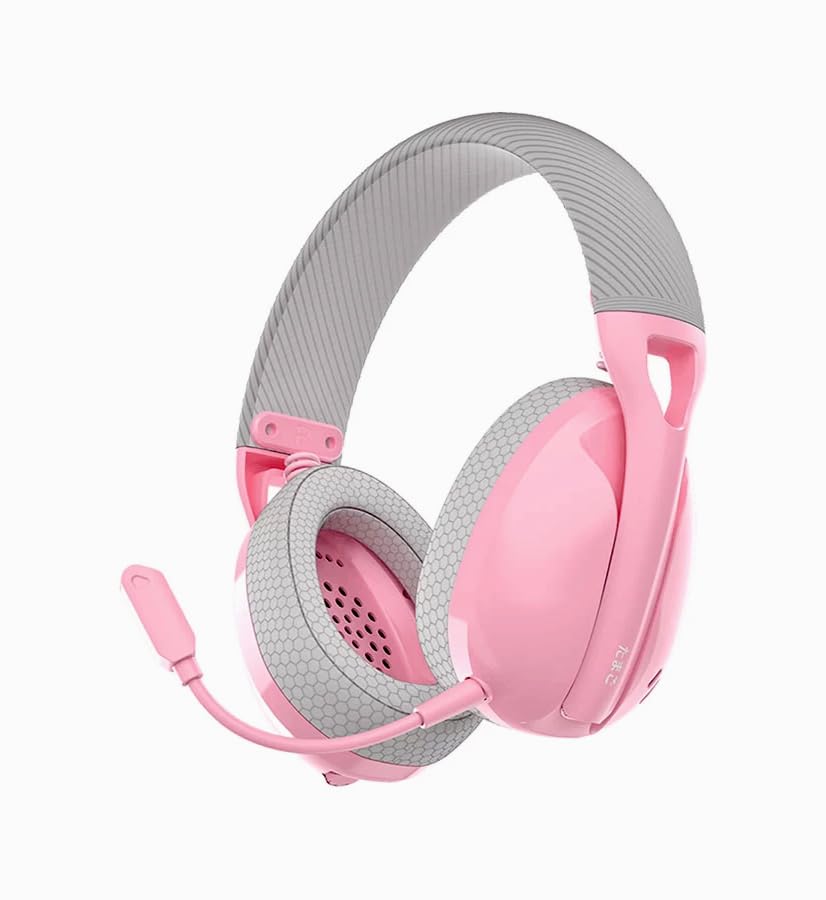
The Fantech Tamago WHG01 headphones are designed for comfort and versatility. Key features include:
- Design ultra-ușor: Weighing approximately 168g (172g with microphone), ensuring comfort during extended use.
- Pernițe respirabile pentru urechi: Fabric-covered ear cushions for enhanced comfort and airflow.
- Microfon detasabil: A flexible omnidirectional microphone for clear communication, which can be removed when not needed.
- Comenzi supraauriculare: Integrated buttons for power, volume adjustment, and microphone mute.

Înființat
1. Încărcarea setului cu cască
Before first use, fully charge the headset. A built-in 400mAh battery provides up to 18 hours of playtime.
- Connect the supplied Type-C charging cable to the charging port on the headset.
- Conectați celălalt capăt al cablului la o sursă de alimentare USB (de exemplu, portul USB al computerului, adaptorul USB de perete).
- The LED indicator on the headset will show charging status (refer to LED indicator section for details).
- Odată încărcată complet, deconectați cablul de încărcare.

2. Atașarea microfonului
The WHG01 features a detachable omnidirectional microphone.
- Locate the microphone port on the left ear cup.
- Aliniați conectorul microfonului cu portul și împingeți-l ușor până când se fixează în poziție cu un clic.
- To detach, gently pull the microphone out of the port.
3. Moduri de conectivitate
The headset supports three connectivity modes: StrikeSpeed 2.4GHz Wireless, Bluetooth 5.2, and Wired Type-C.

StrikeSpeed 2.4GHz Wireless Connection
This mode provides low-latency wireless audio, ideal for gaming.
- Insert the USB receiver into an available USB port on your device (PC, laptop, compatible console).
- Power on the headset. The headset will automatically attempt to connect to the USB receiver.
- The LED indicator will confirm successful connection (refer to LED indicator section).
- Asigurați-vă că este selectată casca ca dispozitiv de intrare/ieșire audio în setările sistemului.
Conexiune Bluetooth 5.2
For wireless connection to Bluetooth-enabled devices like smartphones, tablets, or laptops.
- Porniți setul cu cască.
- Press and hold the mode button (or power button, depending on model specifics - refer to physical controls diagram if available) to enter Bluetooth pairing mode. The LED indicator will flash, indicating it's discoverable.
- On your device, go to Bluetooth settings and search for "Fantech Tamago WHG01" (or similar).
- Select the headset to pair. The LED indicator will change to a solid light upon successful pairing.
Conexiune prin cablu de tip C
For a direct, stable connection and simultaneous charging.
- Conectați cablul de încărcare Type-C la portul Type-C al căștilor.
- Connect the other end of the cable to a compatible Type-C port on your device.
- Căștile vor funcționa ca un dispozitiv audio cu fir.
Instrucțiuni de operare
Pornire/Oprire
- Pentru a porni: Press and hold the Power button (usually located on the ear cup) for approximately 3 seconds until the LED indicator lights up.
- Pentru a opri: Apăsați și mențineți apăsat butonul de pornire timp de aproximativ 5 secunde, până când indicatorul LED se stinge.
Controlul volumului
- Creșteți volumul: Press the '+' button on the ear cup.
- Reduceți volumul: Press the '-' button on the ear cup.
Microfon Mute / Unmute
- Dezactivare microfon: Press the dedicated microphone mute button (or a specific combination, refer to product diagram) on the ear cup.
- Activare microfon: Press the microphone mute button again.
Switching Connectivity Modes
The headset allows seamless switching between its tri-modes.
- Press the Mode button (if available) to cycle through StrikeSpeed Wireless, Bluetooth, and Wired modes.
- The LED indicator will change to reflect the active mode.
Întreţinere
Curatenie
- Folosiți o lavetă moale și uscată pentru a șterge suprafețele căștilor.
- Pentru pernițele pentru urechi, ștergeți ușor cu o cârpă ușor damp cârpă și lăsați să se usuce complet la aer.
- Nu utilizați substanțe chimice dure, solvenți sau agenți de curățare abrazivi.
Depozitare
- Depozitați setul cu cască într-un loc răcoros și uscat, ferit de lumina directă a soarelui și de temperaturi extreme.
- Evitați să așezați obiecte grele pe căști.
- Dacă depozitați produsul pentru o perioadă lungă de timp, asigurați-vă că bateria este parțial încărcată (aproximativ 50%) pentru a-i prelungi durata de viață.
Depanare
- Fără putere: Ensure the headset is charged. Connect the Type-C cable and check if the charging indicator lights up.
- Fără sunet (fără fir):
- Check if the headset is powered on and connected to the correct device.
- For StrikeSpeed, ensure the USB receiver is properly inserted and recognized by your device.
- For Bluetooth, ensure the headset is paired and selected as the audio output in your device's settings.
- Măriți volumul atât pe căști, cât și pe dispozitivul conectat.
- Microfonul nu funcționează:
- Asigurați-vă că microfonul este fixat în siguranță la căști.
- Check if the microphone is muted using the headset's controls.
- Verify that the correct microphone input device is selected in your computer's or device's sound settings.
- Probleme de conectare:
- Încercați să reporniți atât setul cu cască, cât și dispozitivul conectat.
- Pentru Bluetooth, încercați să anulați asocierea și să reasociați setul cu cască.
- Ensure there are no significant obstructions or interference sources between the headset and the wireless receiver/device.
Specificații
| Model | WHG01 |
| Conectivitate | Tri-mode (StrikeSpeed 2.4GHz Wireless, Bluetooth 5.2, Wired Type-C) |
| Greutate | 168g (172g with microphone) |
| Driver difuzor | 40mm |
| Sensibilitatea difuzorului | 106dB±3dB |
| Tip microfon | Detachable Omnidirectional |
| Dimensiunea microfonului | ø6mm*2.7mm |
| Sensibilitatea microfonului | -42±3 dB |
| Capacitatea bateriei | 400mAh |
| Timp de joacă | Până la 18 ore |
| Port de încărcare | USB tip C |
| Core Construction | ABS |
| Dispozitive compatibile | PC, Laptop, Mobile devices |
Garanție și suport
For warranty information and technical support, please refer to the official Fantech website-ul web sau contactați distribuitorul local. Păstrați dovada achiziției pentru solicitările de garanție.
Producător: Fantech
Importator/Ambalator: MRJ Electronics Ahmedabad Gujarat. electronicsmrj@gmail.com. Contact: 9023265213
Data primului disponibil: 25 septembrie 2024


