Introducere
Thank you for choosing the Mesqool CR1025 Digital Alarm Clock Radio. This device combines multiple functions including a digital alarm clock, Bluetooth 5.0 speaker, FM radio, night light, and dual USB charging ports. This manual provides detailed instructions to help you set up and operate your new device effectively.
Conținutul pachetului
- Mesqool CR1025 Digital Alarm Clock Radio
- Adaptor de alimentare
- Manual de utilizare
- C Battery (for backup)
Produs terminatview
Familiarize yourself with the components and controls of your Mesqool CR1025 Digital Alarm Clock Radio.
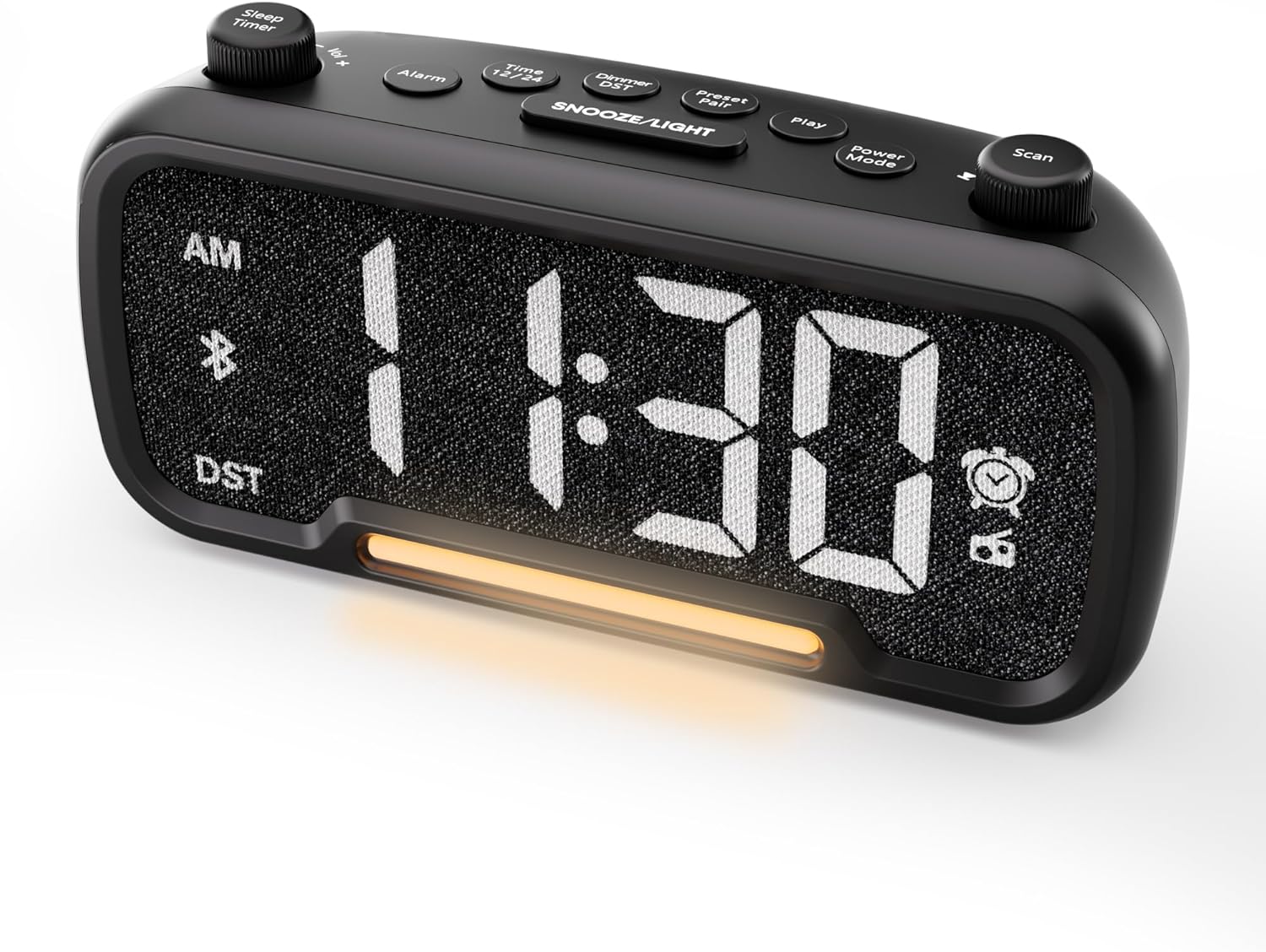

Control Buttons and Knobs:
- Sleep Timer / Vol +/- Knob (Left): Adjusts volume, sets sleep timer duration.
- Buton alarmă: Sets and activates/deactivates alarms.
- Time 12/24 Button: Switches between 12-hour and 24-hour time formats.
- Dimmer / DST Button: Adjusts display brightness, activates/deactivates Daylight Saving Time (DST).
- Preset / Pair Button: Saves FM radio presets, initiates Bluetooth pairing.
- Buton de redare: Plays/pauses media in Bluetooth mode.
- Butonul modului de alimentare: Cycles through operating modes (FM, Bluetooth, AUX).
- Scan / TU +/- Knob (Right): Scans FM radio stations, manually tunes FM frequency.
- Buton AMÂNARE/LUMINĂ: Activates snooze function, turns night light on/off.

Înființat
1. Pornirea inițială
Connect the provided power adapter to the DC 5V IN port on the back of the alarm clock and plug it into a standard wall outlet. The display will light up. Ensure the C battery is installed for backup in case of power outage.

2. Setarea orei
- Țineți apăsat butonul Ora 12/24 timp de 2 secunde. Cifrele orei vor începe să clipească.
- Rotiți Vol +/- knob (left knob) to adjust the hour.
- Apăsați tasta Ora 12/24 Apăsați din nou butonul. Cifrele minutelor vor începe să clipească.
- Rotiți Vol +/- butonul pentru reglarea minutelor.
- Apăsați tasta Ora 12/24 button once more to confirm the time setting.
Video demonstrating how to set the time on the Mesqool Digital Alarm Clock Radio.
3. Format oră 12/24 ore
Pentru a comuta între formatul de 12 ore și cel de 24 de ore, apăsați scurt butonul Ora 12/24 button. The display will change accordingly.
4. Reglarea orei de vară (DST)
To activate or deactivate DST, press and hold the Dimmer / DST button for 2 seconds. The time will adjust by one hour forward or backward, and the DST indicator will appear or disappear on the display.
Instrucțiuni de operare
1. Setare alarmă
- Țineți apăsat butonul Alarma button for 2 seconds. The hour digits will flash.
- Rotiți Vol +/- knob to adjust the desired alarm hour.
- Apăsați tasta Alarma Apăsați din nou butonul. Cifrele minutelor vor clipi.
- Rotiți Vol +/- knob to adjust the desired alarm minute.
- Apăsați tasta Alarma button again. The alarm sound selection will flash (bell icon for buzzer, radio icon for FM radio). Rotate the Vol +/- knob to choose between buzzer or FM radio as the alarm sound.
- If FM radio is selected, press the Alarma button again. The volume level will flash (L01-L16). Rotate the Vol +/- knob to set the desired alarm volume.
- Apăsați tasta Alarma button once more to confirm and activate the alarm. The alarm icon will appear on the display.
To deactivate the alarm, short press the Alarma Pictograma alarmei va dispărea de pe afișaj.

Funcție de amânare:
Când alarma sună, apăsați tasta SNOOZE / LUMINĂ button to activate the snooze function for 9 minutes. The alarm will sound again after 9 minutes. To turn off the alarm completely, press any other button except SNOOZE / LUMINĂ.

2. Funcționare radio FM
- Apăsați tasta Modul Power button repeatedly until the radio icon lights up on the display, indicating FM radio mode.
- Auto-Scan and Save Presets: Apăsați tasta Scan / TU +/- knob (right knob) to automatically search for available FM stations and save them as presets (up to 20 stations). The display will show "P01", "P02", etc., as stations are saved.
- Reglare manuală: Rotiți Scan / TU +/- knob to manually browse frequencies.
- Recall presetări: Apăsați scurt pe Presetat / Pereche pentru a parcurge posturile presetate salvate.
- Reglați volumul: Rotiți Vol +/- knob (left knob) to adjust the radio volume (L01-L16).

Video demonstrating how to set the FM radio alarm on the Mesqool Digital Alarm Clock Radio.
3. Bluetooth Speaker Operation
- Apăsați tasta Modul Power button repeatedly until the Bluetooth icon (bt) starts flashing on the display, indicating pairing mode.
- On your mobile device, enable Bluetooth and search for "CR1025" in the list of available devices.
- Select "CR1025" to pair. Once connected, the Bluetooth icon will stop flashing and remain solid.
- You can now play audio from your device through the alarm clock's speaker.
- Utilizați Vol +/- knob on the alarm clock or your mobile device to adjust the volume.
- Apăsați tasta Juca butonul pentru a reda sau întrerupe audio.

Video demonstrating how to set up Bluetooth on the Mesqool Digital Alarm Clock Radio.
4. Funcționarea luminii de noapte
The alarm clock features a gentle night light. To turn the night light on or off, short press the SNOOZE / LUMINĂ buton.

5. Dimmer Setting
The display brightness can be adjusted to 5 levels. Short press the Dimmer / DST button to cycle through the brightness levels (L01-L05). Select the level that best suits your environment.

6. Sleep Timer Setting
The sleep timer allows you to set a duration for the FM radio or Bluetooth speaker to play before automatically turning off. This is useful for falling asleep to music or podcasts.
- While in FM radio or Bluetooth mode, press the Sleep Timer button. The display will show the current sleep timer duration (e.g., "30" for 30 minutes).
- Rotiți Sleep Timer / Vol +/- knob to select the desired duration: 15, 30, 60, 90, or 120 minutes. You can also select "OFF" to disable the sleep timer.
- The timer will start counting down, and the device will automatically turn off after the selected duration.
7. Porturi de încărcare USB
The alarm clock is equipped with two USB charging ports (Type-C and USB-A) on the back, each providing 5V/1A output. These ports can be used to conveniently charge your smartphone, tablet, or other USB-powered devices.

Depanare
| Problemă | Soluție posibilă |
|---|---|
| Afișajul ceasului este gol. | Ensure the power adapter is securely connected to both the clock and a working power outlet. Check if the power outlet is functional. |
| Alarma nu sună. | Verify that the alarm is set and activated (alarm icon visible on display). Check the alarm volume level. Ensure the correct alarm sound (buzzer or FM radio) is selected. |
| Recepție radio FM slabă. | Extend the FM antenna fully. Try repositioning the antenna or the clock for better signal. Perform an auto-scan again to find stronger stations. |
| Nu se poate conecta dispozitivul Bluetooth. | Ensure the clock is in Bluetooth pairing mode (flashing 'bt' icon). Make sure Bluetooth is enabled on your mobile device and it is within range. Forget "CR1025" from your device's Bluetooth list and try pairing again. |
| Porturile de încărcare USB nu funcționează. | Confirm the alarm clock is powered on. Ensure the charging cables are properly connected to both the clock and your device. Try a different USB cable or device to rule out cable/device issues. |
Specificații
| Caracteristică | Detaliu |
|---|---|
| Marca | Mesqool |
| Numărul de model | CR1025 |
| Culoare | Negru |
| Tip de afișare | LED digital |
| Dimensiunile produsului | 6.61 cm L x 3.31 cm l x 2.32 cm Î |
| Sursa de alimentare | Electric cu fir (adaptor CA inclus) |
| Bateria de rezervă | 1 baterie C (inclusă) |
| Versiune Bluetooth | V5.0 |
| Frecvența radio FM | 87.5-108MHz |
| Presetări FM | Până la 20 de stații |
| Afișaj Dimmer | 5 nivele |
| Sunete de alarmă | Buzzer, Radio FM |
| Durata amânării | 9 minute |
| Ieșire de încărcare USB | Type-C & USB-A, 5V/1A each |
| Material | Plastic |
| Greutatea articolului | 0.48 livre (aproximativ 7.7 uncii) |
Întreţinere
- Curățați dispozitivul cu o lavetă moale și uscată. Nu utilizați agenți de curățare lichizi sau materiale abrazive.
- Keep the device away from direct sunlight, extreme temperatures, and high humidity.
- Asigurați o ventilație adecvată în jurul dispozitivului pentru a preveni supraîncălzirea.
- If the device will not be used for an extended period, remove the backup battery.
Informații de siguranță
- Nu expuneți dispozitivul la apă sau umezeală.
- Nu încercați să dezasamblați sau să reparați dispozitivul singur. Adresați-vă personalului de service calificat.
- Nu lăsați dispozitivul la îndemâna copiilor.
- Folosiți doar adaptorul de alimentare furnizat. Utilizarea adaptoarelor neautorizate poate deteriora dispozitivul și anula garanția.
- Avoid placing the device near heat sources or open flames.
Garanție și suport
Specific warranty details are not provided in the product information. For warranty claims, technical support, or further assistance, please contact Mesqool customer service through their official website or the retailer where the product was purchased. Please retain your proof of purchase for any warranty-related inquiries.
Visit the Mesqool Store for more information: Mesqool Official Store


