1. Introducere
This manual provides detailed instructions for the installation, operation, and maintenance of your JVC KW-M595BT Digital Car Stereo. Please read this manual thoroughly before using the product to ensure proper and safe operation. Keep this manual for future reference.
2. Ce se află în cutie
Verificați dacă toate elementele sunt prezente înainte de a începe instalarea:
- Receptor JVC KW-M595BT
- Antena GPS
- Cablu de alimentare
- Cablu de parcare extensibil
- Set șuruburi
- Manual de utilizare și card de garanție
3. Configurare și instalare
Instalarea corectă este crucială pentru performanță și siguranță optime. Se recomandă ca instalarea să fie efectuată de către un profesionist calificat.
Dimensiuni 3.1 unitate
Ensure adequate space for installation. Refer to the diagram below for precise measurements.

Imagine: Față și laterală view of the JVC KW-M595BT showing its dimensions in inches and millimeters.
3.2 Conexiuni de cablare
Carefully connect all necessary cables. Incorrect wiring can cause damage to the unit or vehicle. Consult your vehicle's wiring diagram and the included installation guide for specific connections.

Imagine: Spate view of the JVC KW-M595BT showing various input/output ports including USB, GPS antenna, iDatalink Maestro connector, audio preouts, and power connections.
- Cablu de alimentare: Conectați la firele de alimentare, masă și accesorii ale vehiculului.
- Antena GPS: Connect the GPS antenna for navigation features.
- USB Terminal (1.0 m): Pentru conectarea la smartphone și redarea fișierelor media.
- Audio Preouts: Front, Rear, and Subwoofer preouts for external ampliificatori.
- iDatalink Maestro Connector: For advanced vehicle integration (Maestro RR/RR2 sold separately).
- Spate View Intrare cameră: Conectați un dispozitiv spate compatibilview aparat de fotografiat.
- Intrare antenă FM/AM: Conectați antena radio a vehiculului dumneavoastră.
3.3 Pornirea inițială
After installation, turn on your vehicle's ignition. The unit should power on. Follow any on-screen prompts for initial setup, such as language selection and time zone.
4. Instrucțiuni de utilizare
Familiarize yourself with the unit's controls and features for an optimal user experience.
4.1 Controale panoului frontal
The 6.8-inch capacitive touchscreen display provides intuitive control over all functions. Physical buttons are located on the left side of the unit.

Imagine: față view of the JVC KW-M595BT display with labels pointing to various controls and screen elements, including power, volume, home, voice recognition, and source selection.
- Power/Home: Press to turn on/off or return to the home screen.
- Volum: Reglați nivelul de ieșire audio.
- Recunoaștere vocală: Activate voice commands for connected smartphones.
- Selectarea sursei: Switch between different audio/video sources.
- Microfon încorporat: Pentru apeluri hands-free și comenzi vocale.
4.2 Conectivitate Bluetooth
Pair your smartphone via Bluetooth for wireless audio streaming and hands-free calling.
- Activați Bluetooth pe smartphone-ul dvs.
- On the KW-M595BT, navigate to the Bluetooth settings.
- Select your device from the list of available devices and confirm pairing.

Image: A smartphone displaying a music player app connected via Bluetooth to the JVC KW-M595BT, which is showing music playback information.
4.3 Apple CarPlay
Connect your iPhone via USB to access Apple CarPlay features directly on the unit's display.
- Connect your iPhone to the USB port using a certified USB cable.
- Select the Apple CarPlay icon on the unit's home screen.
- Follow any on-screen prompts on both the unit and your iPhone.

Image: The JVC KW-M595BT display showing the Apple CarPlay interface with various app icons like Phone, Music, Maps, and Messages, with an iPhone connected via USB.
4.4 Android Auto
Connect your Android smartphone via USB to use Android Auto for navigation, communication, and entertainment.
- Connect your Android phone to the USB port using a certified USB cable.
- Select the Android Auto icon on the unit's home screen.
- Follow any on-screen prompts on both the unit and your Android phone.

Image: The JVC KW-M595BT display showing the Android Auto interface with app icons like Maps, Waze, Messages, and Phone, with an Android phone connected via USB.
4.5 USB Mirroring for Smartphone
Mirror your Android smartphone screen (OS 7.0+) to the KW-M595BT monitor via USB and Bluetooth using the Mirroring OA for JVC app.
- Download and install the Mirroring OA for JVC app on your Android smartphone.
- Connect your smartphone via USB and ensure Bluetooth is paired.
- Launch the Mirroring OA app and select the USB Mirroring function on the KW-M595BT.

Image: The JVC KW-M595BT display showing a navigation app mirrored from a smartphone, with icons for other popular apps below.
4.6 Audio Control (Equalizer & Time Alignment)
Customize your audio experience using the 13-band graphic equalizer and digital time alignment features.

Image: The JVC KW-M595BT display showing the graphic equalizer interface, allowing users to adjust frequency bands for sound customization.
- Egalizator grafic: Adjust specific frequency bands to tailor the sound to your preference. Access this feature through the audio settings menu.
- Aliniere digitală a timpului: Optimizează sunetultage prin ajustarea întârzierii pentru fiecare difuzor, asigurându-vă că sunetul ajunge simultan la urechi.
4.7 iDatalink Maestro Integration
The KW-M595BT is compatible with iDatalink Maestro RR/RR2 (sold separately) for advanced vehicle integration, retaining factory features and displaying vehicle information.
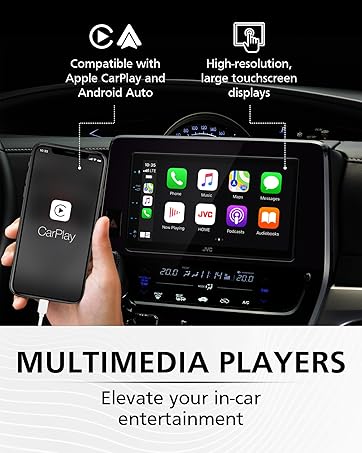
Image: The JVC KW-M595BT display showing various vehicle information screens (gauges, climate, parking assist, vehicle info) enabled by iDatalink Maestro, with the Maestro module shown next to the head unit.
5. Întreținere
Regular maintenance helps ensure the longevity and performance of your car stereo.
- Curățarea afișajului: Folosiți o cârpă moale și uscată pentru a șterge ușor ecranul tactil. Pentru petele persistente, ștergeți ușor.ampClătiți laveta cu apă sau cu un produs de curățare a ecranelor conceput pentru electronice. Evitați substanțele chimice dure sau materialele abrazive.
- Actualizări de software: Verificați periodic JVC-ul website pentru actualizări de firmware pentru a asigura performanțe optime și acces la funcții noi.
6. Depanare
If you encounter issues with your KW-M595BT, refer to the following common problems and solutions:
| Problemă | Cauza posibila | Soluţie |
|---|---|---|
| Fără putere | Cablare incorectă, siguranță arsă, problemă cu bateria vehiculului. | Check power connections, inspect the fuse (15A), ensure vehicle battery is charged. |
| Fără sunet | Volum prea mic, mut activat, cablare incorectă a difuzorului, ampproblema lifitorului. | Increase volume, check mute status, verify speaker connections, test external amplifier dacă este utilizat. |
| Bluetooth nu se conectează | Bluetooth dezactivat pe telefon/aparat, dispozitivul nu este în modul de asociere, interferențe. | Ensure Bluetooth is active on both devices, put unit in pairing mode, try re-pairing, move closer to the unit. |
| Apple CarPlay/Android Auto Not Launching | Faulty USB cable, app not installed/updated, phone settings. | Use a certified USB cable, ensure the respective app is installed and updated on your phone, check phone's USB connection settings. |
| Ecranul tactil nu răspunde | Eroare temporară de software, ecran murdar. | Perform a soft reset (refer to manual for reset button location), clean the screen. |
If the problem persists after trying these solutions, contact JVC customer support or a qualified service technician.
7. Specificații
Key technical specifications for the JVC KW-M595BT Digital Car Stereo:

Image: A visual comparison demonstrating the higher resolution and finer detail of the WSVGA (1024x600 pixel) display compared to a conventional WVGA (800x480 pixel) display.
- Număr de model: KW-M595BT
- Afişa: 6.8-inch WSVGA Capacitive LCD Touch Panel (1024x600 resolution)
- Dimensiuni (L x A x A): 7.06 x 3.38 x 3.94 inchi (178 mm x 100 mm x 86 mm)
- Greutatea articolului: 2.41 lire sterline
- Conectivitate: Bluetooth, USB
- Integrare smartphone: Apple CarPlay, Android Auto, USB Mirroring (for Android OS 7.0+)
- Caracteristici audio: 13-Band Graphic EQ, Digital Time Alignment, MP3/WMA/AAC/WAV/FLAC support
- Pre-out-uri: Front, Rear, Subwoofer (2.5V)
- Caracteristici speciale: iDatalink Maestro Ready, SiriusXM Ready, USB 2.1A Charging
- Codificare video: H.264, MPEG-4
- Configurația canalului de sunet surround: 5.1
8. Informații despre garanție
Your JVC KW-M595BT comes with a manufacturer's warranty. Please refer to the warranty card included in the product packaging for detailed terms, conditions, and registration information. Keep your proof of purchase for warranty claims.
9. Asistență pentru clienți
Pentru asistență suplimentară, asistență tehnică sau solicitări de service, vă rugăm să vizitați site-ul oficial JVC website-ul lor sau contactați departamentul lor de servicii pentru clienți:
- JVC Oficial Website: www.jvc.com
- Refer to the included documentation for specific contact numbers or email addresses for your region.


