1. Introducere
This manual provides detailed instructions for the installation, operation, and maintenance of your YESKAMO CX5 Dual-Lens Security Camera. Please read this manual thoroughly before using the product to ensure proper functionality and safety. Keep this manual for future reference.
2. Produs terminatview
2.1 Caracteristici cheie
- Dual-Lens Monitoring: Equipped with a fixed wide-angle lens and a PTZ (Pan-Tilt-Zoom) dome lens, providing two simultaneous monitoring views without blind spots. The fixed lens covers a broad area, while the PTZ lens tracks detected movement.
- Rezoluție înaltă: Each lens features 4 million pixels, combining for a total of 8 million pixels, delivering clear 2K video capture resolution (1920p).
- Advanced Wi-Fi Connectivity: Supports both 2.4GHz and high-speed 5GHz Wi-Fi 6 connections for stable and clear real-time video streaming.
- Audio bidirecțional: Built-in high-quality speaker and microphone enable real-time two-way communication.
- Rezistență la intemperii IP66: Excellent waterproof and dustproof performance, suitable for outdoor use in various weather conditions (operating temperature range: -10℃ to +55℃).
- Automatic Tracking & Alerts: Features human detection and automatic tracking. Triggers real-time alerts via the iCSee app to your smartphone, capturing images or videos of suspicious activity.
- Înregistrare continuă 24/7: Supports continuous recording and saves video footage to an SD card.
- Compatibilitate: Supports Onvif/NVR protocols and is compatible with Alexa.
- Partajarea familiei: Allows creation of multiple family accounts to share camera access.
2.2 Conținutul pachetului
- YESKAMO CX5 Camera Body (1)
- Adaptor de alimentare (1)
- Mounting Screws and Anchors (1 set)
- Manual de utilizare (1)
2.3 Diagrama camerei
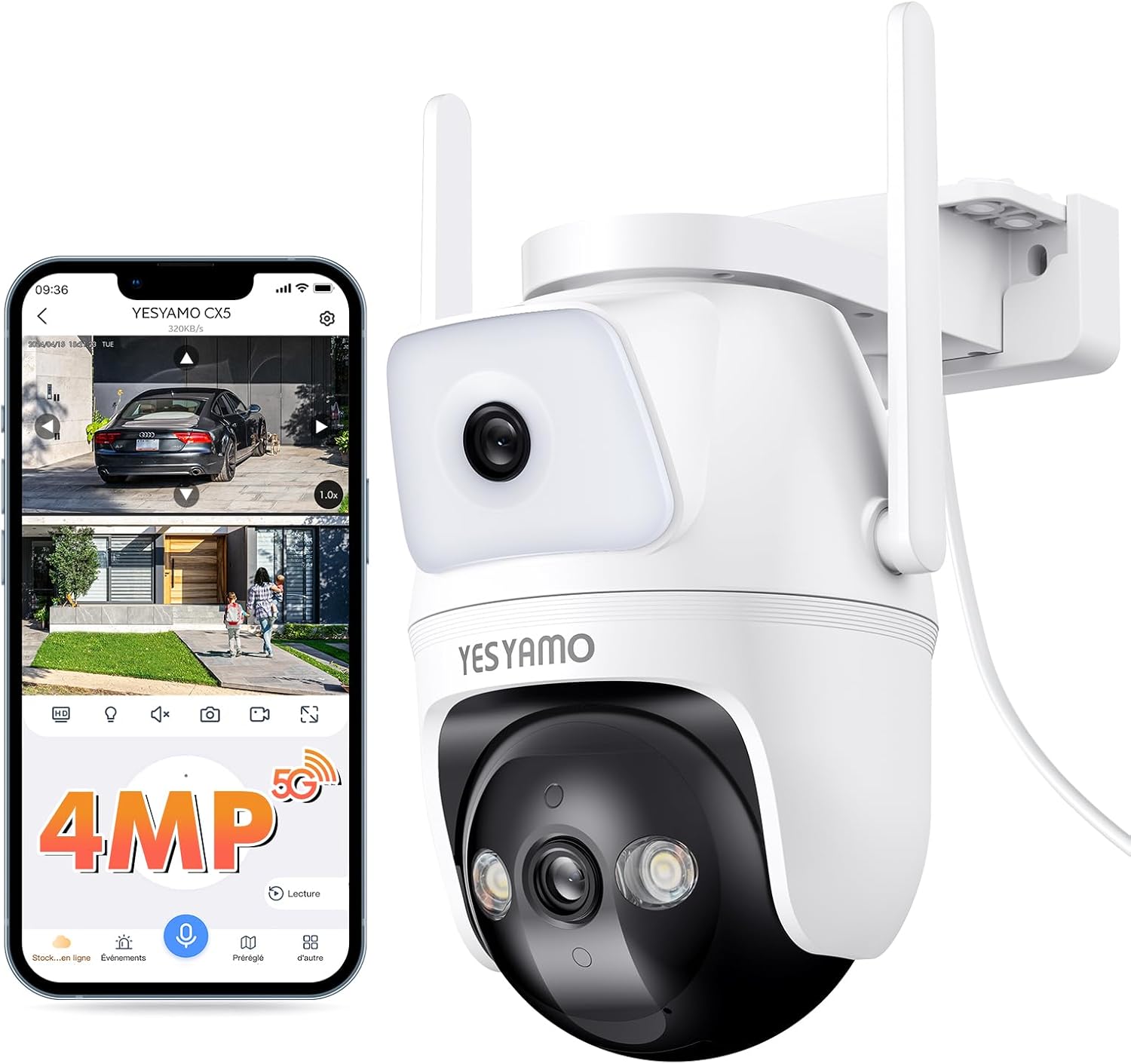
This image displays the YESKAMO CX5 dual-lens security camera alongside a smartphone screen showing its live monitoring interface. The camera features a fixed lens at the top and a PTZ (Pan-Tilt-Zoom) dome lens at the bottom, equipped with infrared LEDs for night vision. Two external antennas are visible for enhanced wireless connectivity. The smartphone screen illustrates the dual-view capability, showing a wide-angle fixed view and a zoomed-in or tracked view from the PTZ lens, along with controls for 4MP resolution, 5G/2.4G Wi-Fi, two-way audio, and recording options.
3. Configurare
3.1 Instalare fizică
- Alegeți o locație: Selectați o locație în aer liber care oferă calitatea dorită viewing angle and is within range of your Wi-Fi network. Ensure the camera is protected from direct impact and has access to a power outlet.
- Montare: The camera is designed for wall mounting. Use the provided screws and anchors to securely attach the camera to a stable surface. Ensure the mounting is firm to prevent accidental dislodgement.
- Conexiune de alimentare: Connect the camera to a power source using the provided power adapter. The camera operates on 5 Volts.
3.2 Network Connection (iCSee App)
- Descărcați aplicația: Download and install the 'iCSee' app from your smartphone's app store (iOS or Android).
- Creează cont: Open the iCSee app and register for a new account or log in if you already have one.
- Adăugați dispozitiv: Follow the in-app instructions to add your new camera. This typically involves scanning a QR code on the camera or selecting the camera model from a list.
- Conectați-vă la Wi-Fi: During the setup process, you will be prompted to connect the camera to your Wi-Fi network. The camera supports both 2.4GHz and 5GHz Wi-Fi bands. Ensure your smartphone is connected to the same Wi-Fi network during initial setup.
- Configurare: Once connected, you can configure camera settings such as recording preferences, motion detection zones, and alert notifications within the app.
4. Instrucțiuni de utilizare
4.1 În direct View and Camera Control
- Accesați Live View: Open the iCSee app and select your camera to view the live feed. The app will display both the fixed wide-angle view and the PTZ view simultan.
- Adjust PTZ Camera: Swipe your finger across the screen in the live view to pan (horizontal) and tilt (vertical) the PTZ dome camera.
- Zoom digital: Pinch to zoom in or out on the live feed for a closer look.
4.2 Sunet bidirecțional
To use the two-way audio feature, tap the microphone icon in the iCSee app's live view. You can then speak through your phone, and your voice will be broadcast through the camera's speaker. Similarly, you can hear audio from the camera's location through your phone.
4.3 Automatic Tracking and Alerts
- Enable Auto-Tracking: In the camera settings within the iCSee app, enable the human detection and auto-tracking features.
- Primiți alerte: When human movement is detected, the PTZ camera will automatically track the subject. The iCSee app will send real-time alert notifications to your smartphone, including captured images or video clips of the event.
4.4 Înregistrare și stocare
- Înregistrare continuă: The camera supports 24/7 continuous recording. Ensure an SD card (not included) is inserted into the camera for local storage.
- Înregistrare eveniment: Motion-triggered events are also recorded and saved to the SD card.
- Redare: Acces înregistrat footage through the iCSee app's playback function.
4.5 Partajare familială
The iCSee app allows you to create multiple family accounts and share access to your camera with trusted family members or friends. This enables multiple users to monitor the live feed and receive alerts.
5. Întreținere
- curatenie: Regularly clean the camera lenses with a soft, dry cloth to ensure clear image quality. Avoid using harsh chemicals or abrasive materials.
- Verificați conexiunile: Periodically inspect all cable connections for security and integrity, especially the power cable.
- Actualizări firmware: Check the iCSee app for available firmware updates to ensure your camera has the latest features and security enhancements.
- Protecția mediului: While the camera is IP66 weatherproof, ensure it is not submerged in water or exposed to extreme conditions beyond its operating temperature range.
6. Depanare
6.1 Probleme comune și soluții
- Aparat foto offline:
- Verificați dacă camera este pornită și dacă adaptorul de alimentare este conectat corect.
- Verificați dacă rețeaua Wi-Fi este activă și dacă camera se află în raza de acțiune.
- Ensure the camera is connected to the correct 2.4GHz or 5GHz Wi-Fi band.
- Reporniți camera și routerul Wi-Fi.
- Calitate video slabă:
- Curățați lentilele camerei.
- Ensure a strong Wi-Fi signal. Move the camera closer to the router or use a Wi-Fi extender.
- Verificați viteza conexiunii la internet.
- Fără alerte de detectare a mișcării:
- Ensure motion detection and alert notifications are enabled in the iCSee app settings.
- Check the sensitivity settings for motion detection.
- Verify that the app has permission to send notifications on your smartphone.
- Audio bidirecțional nu funcționează:
- Asigurați-vă că funcțiile microfonului și difuzorului sunt activate în aplicație.
- Check the volume settings on your smartphone and within the app.
- Asigurați-vă că nu există niciun obstacol care blochează microfonul sau difuzorul camerei.
7. Specificații
| Caracteristică | Detaliu |
|---|---|
| Model de produs | CX5 |
| Marca | YESKAMO |
| Rezoluție captură video | 1920p (2K, 4MP per lens) |
| Tehnologia de conectivitate | Wireless (Wi-Fi 6, 2.4GHz/5GHz) |
| Caracteristica specială | PTZ Technology, Dual-Lens, Human Detection, Auto-Tracking, Two-Way Audio, Night Color Recording |
| Utilizare în interior/exterior | În aer liber |
| Tip de montare | Suport de perete (cu înșurubare) |
| Evaluare rezistentă la apă | IP66 |
| Temperatura de operare | -10℃ până la +55℃ |
| Voltage | 5 volți |
| Dimensiunile produsului (Lxlxh) | 16 x 17 x 10 cm |
| Greutatea produsului | 620 g |
| Culoare | Alb |
| Componente incluse | Corpul camerei |
8. Garanție și asistență
For warranty information, technical support, or any inquiries regarding your YESKAMO CX5 camera, please refer to the official YESKAMO website-ul web sau contactați direct serviciul lor de asistență pentru clienți. Datele de contact sunt de obicei furnizate pe ambalajul produsului sau pe marca oficială. website-ul.


