1. Introducere
Mulțumesc pentru achizițieasing the AFK Portable Bluetooth Wireless Speaker. This manual provides detailed instructions on how to set up, operate, and maintain your speaker to ensure optimal performance and longevity. Please read this manual thoroughly before using the product.

Image: The AFK Portable Bluetooth Wireless Speaker, showcasing its sleek black cylindrical design and top-mounted control panel.
2. Produs terminatview
2.1 Conținutul pachetului
Vă rugăm să verificați conținutul pachetului la despachetare:
- AFK Portable Bluetooth Wireless Speaker (Model: BT528) with built-in microphone
- Cablu de încărcare USB-C
- Manual de utilizare (acest document)
2.2 Caracteristici cheie
- Audio puternic: Dual speaker drivers and a powerful amplifier module deliver up to 15W room-filling sound with punchy bass, strong midranges, and crisp highs.
- Conectivitate Bluetooth 5.3: Offers fast and stable wireless connections up to 100 feet (30 meters).
- Iluminare dinamică: Features 5 colorful light colors and 6 light modes, including mixed color flashes that sync with the beat, creating an immersive audio-visual experience.
- Timp de redare extins: Enjoy up to 18 hours of non-stop playback at 50% volume, or up to 4 hours at 100% volume. Lights can be turned off to conserve battery.
- Opțiuni de redare multiple: Supports wireless playback via Bluetooth, TF card, or USB.
- Microfon încorporat: Allows for clear hands-free calls within the Bluetooth range.
- Design portabil: Lightweight and easy to carry for indoor and outdoor use.
- Încărcare USB-C: Convenient and modern USB-C port for charging.
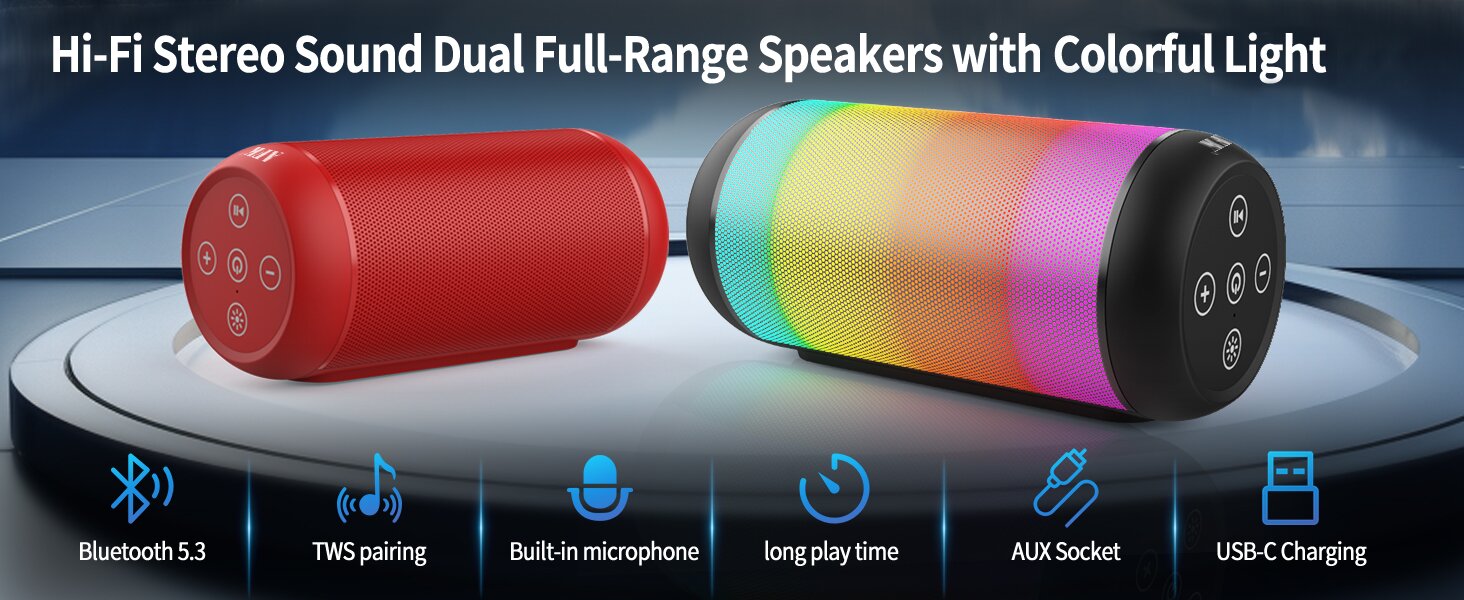
Image: An illustration highlighting key features such as Bluetooth 5.3, TWS pairing, built-in microphone, long playtime, AUX socket, and USB-C charging.

Imagine: O secțiune view illustrating the dual speaker drivers responsible for deep bass stereo sound.

Image: The speaker positioned on a table, demonstrating its 360-degree stereo surround sound capability.
3. Configurare
3.1 Încărcarea difuzorului
Before first use, fully charge the speaker. Connect the provided USB-C charging cable to the speaker's USB-C port and the other end to a compatible USB power adapter (not included) or a computer's USB port. The charging indicator light will show the charging status and turn off when fully charged.
3.2 Pornire/Oprire
- Pentru a porni: Apăsați și mențineți apăsat butonul de pornire (⏻) for a few seconds until you hear an audible prompt and the indicator lights turn on.
- Pentru a opri: Apăsați și mențineți apăsat butonul de pornire (⏻) again for a few seconds until you hear an audible prompt and the indicator lights turn off.
4. Instrucțiuni de utilizare
4.1 Asociere Bluetooth
Pentru a conecta difuzorul la un dispozitiv compatibil Bluetooth:
- Ensure the speaker is powered on and in Bluetooth pairing mode (indicated by a flashing blue light, or similar).
- Pe dispozitivul dvs. (smartphone, tabletă, computer), activați Bluetooth și căutați dispozitivele disponibile.
- Select "AFK Speaker" (or similar name) from the list of found devices.
- După conectare, difuzorul va indica o conexiune reușită (de exemplu, o lumină albastră continuă sau un mesaj sonor).
The speaker will automatically attempt to reconnect to the last paired device when powered on, if the device is within range and Bluetooth is enabled.

Image: The speaker in an outdoor setting, demonstrating its stable Bluetooth connection range of up to 100 feet.
4.2 Redarea muzicii
- Mod Bluetooth: Once paired, play music from your connected device. Use the speaker's control buttons or your device to control playback (play/pause, next/previous track, volume).
- Card TF/Mod USB: Insert a TF card or USB drive containing audio files into the respective port on the speaker. The speaker will automatically switch to the corresponding mode and begin playback. Use the speaker's control buttons for navigation.
4.3 Controlling Lights
The speaker features dynamic lighting modes. Press the Light button (💡) to cycle through the available light modes:
- Tarry Sky Light
- Respiraţie
- Curgere
- Salt rapid
- Rhythm Jump
- Lumina stinsă

Imagine: Un pesteview of the six dynamic light modes available on the speaker, including options to turn the lights off.
4.4 Gestionarea apelurilor
Cu microfonul încorporat, puteți gestiona apelurile atunci când sunteți conectat prin Bluetooth:
- Răspundeți/Terminați apelul: Apăsați butonul Redare / Pauză (⏸) o dată.
- Respinge apelul: Apăsați și mențineți apăsat butonul Redare/Pauză (⏸) timp de 2 secunde.

Image: The speaker being used for a hands-free call, demonstrating the functionality of its built-in microphone.
5. Întreținere
5.1 Curățare
To clean your speaker, use a soft, dry, lint-free cloth. Do not use abrasive cleaners, alcohol, or chemical solvents, as these may damage the surface or internal components. Avoid getting moisture into any openings.
5.2 Depozitare
Store the speaker in a cool, dry place away from direct sunlight, extreme temperatures, and humidity. If storing for an extended period, charge the battery periodically (e.g., every 3 months) to maintain battery health.
6. Depanare
If you encounter issues with your AFK Portable Bluetooth Wireless Speaker, please refer to the following common problems and solutions:
| Problemă | Cauza posibila | Soluţie |
|---|---|---|
| Difuzorul nu pornește. | Baterie descărcată; Butonul de pornire nu este apăsat corect. | Încărcați complet difuzorul. Apăsați și mențineți apăsat butonul de pornire timp de câteva secunde. |
| Nici un sunet. | Volum prea mic; Dispozitiv neconectat; Mod de intrare incorect. | Increase speaker and device volume. Ensure Bluetooth is connected or TF/USB is inserted correctly. |
| Nu se poate conecta prin Bluetooth. | Difuzorul nu este în modul de asociere; Bluetooth-ul dispozitivului este dezactivat; Prea departe de difuzor; Interferență. | Ensure speaker is in pairing mode. Turn device Bluetooth off/on. Move device closer to speaker. Avoid strong electromagnetic interference. |
| Durată scurtă de viață a bateriei. | High volume usage; Lights constantly on; Battery degradation. | Reduce volume. Turn off lights when not needed. Battery life naturally decreases over time. |
7. Specificații
| Caracteristică | Detaliu |
|---|---|
| Numele modelului | BT528-BLK-US |
| Tip difuzor | Difuzor dual |
| Tehnologia de conectivitate | Bluetooth 5.3 |
| Tehnologia comunicațiilor fără fir | Bluetooth |
| Raza maximă | 30 metri (100 picioare) |
| Putere maximă de ieșire difuzor | 11 Watts (RMS) / 15 Watts (Peak) |
| Raspuns in frecventa | 20 KHz (Notă: Aceasta este probabil limita superioară, intervalul tipic este 20Hz-20kHz) |
| Mod ieșire audio | Stereo |
| Configurare canal de sunet surround | 2.0 |
| Caracteristica specială | Built-in Microphone, Dynamic LED Lights |
| Utilizări recomandate | Indoor/Outdoor, Sport, Outdoor Events, Parties, Camping, Drumeții |
| Dispozitive compatibile | Desktop, Smartphone, Tablet, Television |
| Sursa de alimentare | Alimentat cu baterie (1 baterie litiu-ion inclusă) |
| Metoda de control | Atingeți Butoanele |
| Culoare | Negru |
| Dimensiunile produsului | 6.6 cm adâncime x 15.5 cm lățime x 6.6 cm înălțime |
| Greutatea articolului | 1.26 lire sterline (0.57 kilograme) |
| Este rezistent la apă | FALS |
8. Garanție și asistență
8.1 Garanție limitată
This AFK Portable Bluetooth Wireless Speaker comes with a limited warranty. Please refer to the warranty card included in your package or contact AFK customer support for specific terms and conditions. The warranty typically covers manufacturing defects and malfunctions under normal use.
8.2 Asistență pentru clienți
For further assistance, technical support, or warranty claims, please contact AFK customer service. Contact information can usually be found on the product packaging, the official AFK website-ul web sau prin canalele de asistență ale comerciantului dumneavoastră.


