1. Introducere
Thank you for choosing the VEVOR SF-400D Analytical Lab Balance. This high-precision digital scale is designed for accurate and stable weighing results in various professional and personal settings. With a maximum capacity of 600g and a precision of 0.01g, it offers quick 3-second response times and multiple unit conversions. This manual provides essential information for the safe and efficient operation of your balance.

Image 1.1: VEVOR 0.01g High Precision Lab Scale, demonstrating its accuracy and quick response.
2. Instrucțiuni de siguranță
- Folosiți întotdeauna balanța pe o suprafață stabilă, plană și fără vibrații.
- Evitați amplasarea balanței în apropierea câmpurilor electromagnetice puternice, a surselor de căldură sau a luminii solare directe.
- Nu supraîncărcați balanța peste capacitatea maximă de 600 g.
- Keep the balance clean and dry. Avoid exposure to liquids or corrosive substances.
- Use only the provided power adapter or recommended batteries.
- Do not attempt to disassemble or repair the balance yourself. Contact qualified personnel for service.
3. Conținutul pachetului
Verificați dacă toate articolele sunt prezente în colet:
- 1 x VEVOR Analytical Lab Balance (SF-400D)
- 1 x Manual de utilizare
- 1 x adaptor de alimentare
- 1 x Metal Tray (Weighing Pan)
- 4 x Plastic Feet Pads
- 1 x USB to DC Cable (Note: May be included only for specific regions like AU)
4. Produs terminatview
Familiarize yourself with the main components and controls of your analytical balance.
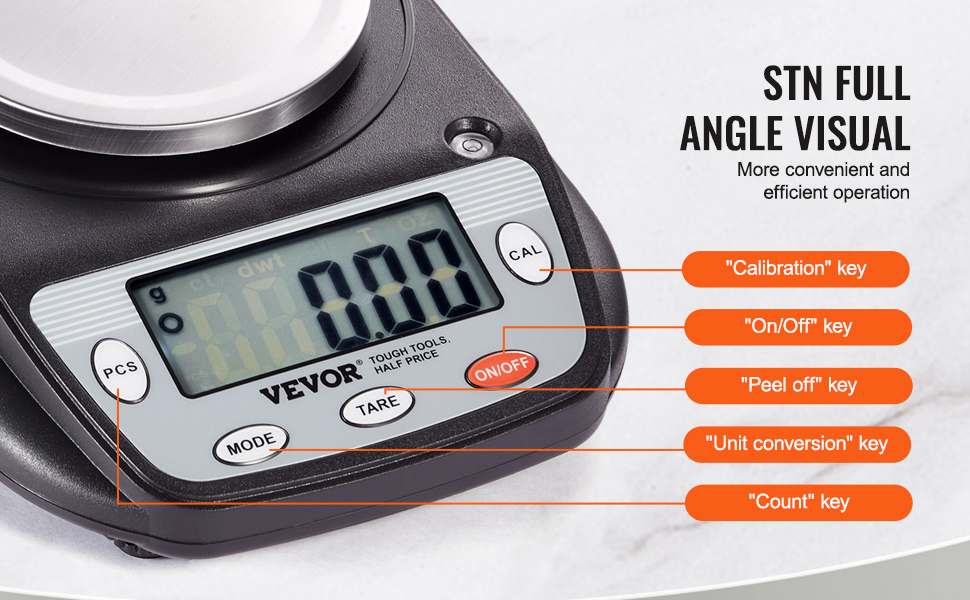
Image 4.1: LCD Display and Unit Conversion Options.
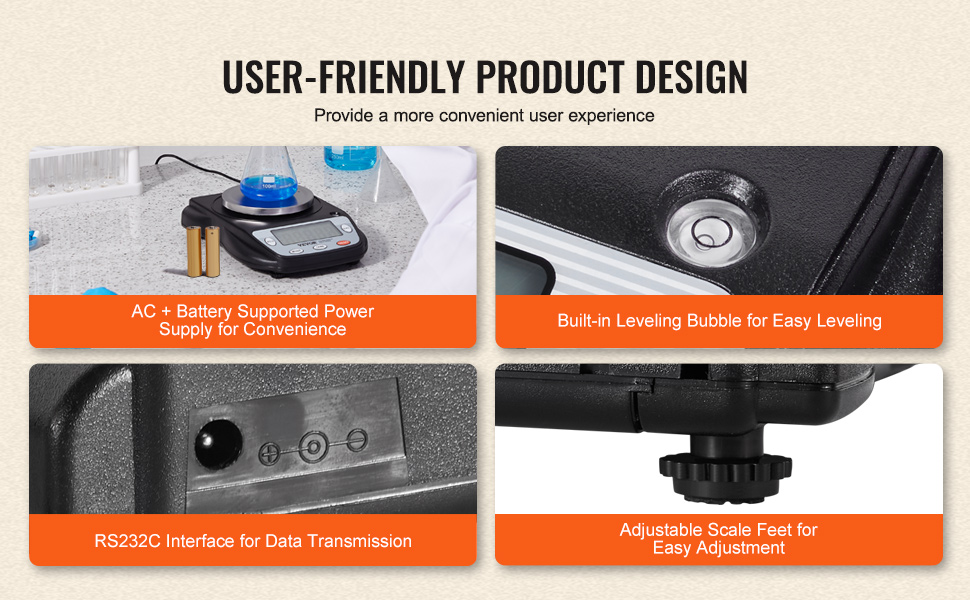
Image 4.2: Dual Power Modes and Key Features.
Panou de control:
- ON/OFF: Powers the balance on or off.
- Mod de administrare: Cycles through different weighing units (g, ct, dwt, GN, T, oz).
- RESPINGE: Zeros the display, typically used to subtract the weight of a container.
- PCS (Count): Activates the counting function for uniform items.
- CAL (Calibrare): Inițiază procesul de calibrare.
Alte caracteristici:
- Display LCD: Provides clear, easy-to-read weight data and unit indicators.
- 4.2" Round Weighing Pan: Made of stainless steel, designed to minimize airflow interference.
- Built-in Leveling Bubble: Helps ensure the balance is perfectly level for accurate readings.
- Adjustable Scale Feet: Used in conjunction with the leveling bubble to level the balance.
- RS232C Interface: For data transmission to printers or computers (cable not always included).
5. Configurare
5.1 Despachetarea
Scoateți cu grijă toate componentele din ambalaj. Păstrați ambalajul pentru depozitare sau transport ulterior.
5.2 Plasarea
Place the balance on a firm, level, and stable surface, away from drafts, vibrations, and direct heat or cold sources. Ensure adequate space around the balance for operation.
5.3 Echilibrarea
For accurate measurements, the balance must be perfectly level.
- Locate the built-in leveling bubble, usually found near the display or on the side of the balance.
- Adjust the four adjustable feet at the bottom of the balance until the air bubble is centered within the circle of the leveling bubble indicator.
Image 5.1: Leveling Bubble and Adjustable Feet for precise setup.
5.4 Conexiune la alimentare
The balance supports dual power modes: AC adapter or batteries.
- Putere AC: Connect the provided power adapter to the DC 5V input port on the balance and then plug it into a suitable wall outlet.
- Putere baterie: If using batteries (not included), open the battery compartment and insert the required batteries, ensuring correct polarity.
6. Instrucțiuni de utilizare
6.1 Pornire/Oprire
Apăsați tasta ON/OFF button to turn the balance on. Press and hold the ON/OFF apăsat butonul timp de câteva secunde pentru a-l opri.
6.2 Conversie de unități
Apăsați tasta MOD button repeatedly to cycle through the available weighing units: grams (g), carats (ct), pennyweights (dwt), grains (GN), taels (T), and ounces (oz).
6.3 Funcția de tara
Funcția de tară vă permite să scădeți greutatea unui recipient, astfel încât să fie afișată doar greutatea netă a conținutului.
- Puneți un recipient gol pe tava de cântărire.
- Așteptați ca lectura să se stabilească.
- Apăsați tasta TARĂ butonul. Afișajul se va reseta la zero.
- Adăugați articolele care urmează să fie cântărite în recipient. Afișajul va afișa greutatea netă a articolelor.

Image 6.1: Step-by-step guide for using the Tare Function.
6.4 Funcția de numărare (PCS)
This function is useful for counting a large number of uniform items.
- Loc caampcantitatea minimă de articole (de exemplu, 10, 20, 50 sau 100 de bucăți) de pe platforma de cântărire.
- Țineți apăsat butonul PCS buton până cândample size option appears (e.g., "10 PCS").
- Apăsați tasta MOD buton pentru a selecta sample size that matches the number of items you placed.
- Presa PCS din nou pentru a confirma. Afișajul va afișa acum numărul de secunde.ample.
- Adăugați mai multe articole în tavă, iar balanța va afișa numărul total.
6.5 Calibrare (CAL)
Regular calibration ensures the accuracy of your balance. A calibration weight (not included) is required.
- Ensure the balance is on a level surface and nothing is on the weighing pan.
- Țineți apăsat butonul CAL button until "CAL" appears on the display, followed by the required calibration weight (e.g., "600.00g").
- Carefully place the specified calibration weight onto the center of the weighing pan.
- The display will show "PASS" or a similar indication when calibration is complete. Remove the weight.
- The balance will return to normal weighing mode.
7. Întreținere
7.1 Curățare
Pentru a menține precizia și a prelungi durata de viață a balanței dumneavoastră:
- Ștergeți balanța cu o lavetă moale,amp Nu utilizați substanțe de curățare abrazive și nu scufundați unitatea în apă.
- The stainless steel weighing pan can be removed for separate cleaning. Ensure it is dry before reattaching.
- Keep the display and buttons free from dust and debris.

Image 7.1: High-Quality Materials for durability and easy cleaning.
7.2 Depozitare
When not in use, store the balance in a clean, dry, and stable environment. If storing for an extended period, remove batteries to prevent leakage.
8. Depanare
Dacă întâmpinați probleme cu echilibrul, consultați următoarele probleme frecvente și soluții:
- Fără afișaj/alimentare:
- Check if the power adapter is securely connected and the outlet is functional.
- Dacă folosiți baterii, asigurați-vă că sunt introduse corect și nu sunt descărcate. Înlocuiți-le dacă este necesar.
- Citiri inexacte:
- Ensure the balance is on a stable, level surface and properly leveled using the bubble indicator.
- Perform a calibration using a known calibration weight.
- Avoid drafts, vibrations, or sudden temperature changes during weighing.
- Ensure nothing is touching the weighing pan or the balance body during measurement.
- "EEEE" or Overload Indication:
- The balance is overloaded. Remove items immediately to prevent damage.
Dacă problema persistă după încercarea acestor soluții, vă rugăm să contactați serviciul de asistență pentru clienți VEVOR pentru asistență.
9. Specificații
Detailed technical specifications for the VEVOR SF-400D Analytical Lab Balance:

Image 9.1: VEVOR Lab Balance Specifications.
| Caracteristică | Caietul de sarcini |
|---|---|
| Numărul de model | SF-400D |
| Vol. Evaluattage | 5V |
| Sursa de alimentare | AC Adapter + Battery Supported |
| Tipuri de unități | 6 (g, ct, dwt, GN, T, oz) |
| Afişa | LCD |
| Error / Precision | ±0.01g |
| Timp de răspuns | 3 secunde |
| Capacitate maximă de cântărire | 0.6 kg (600 g) |
| Precizia afișajului | 0.01 g |
| Greutatea produsului | 1.26 lb / 0.57 kg |
| Dimensiuni produs (L x l x H) | 8.07 x 6.30 x 2.36 inchi / 205 x 160 x 60 mm |
| Material | Plastic, Stainless Steel, Metal |
10. Garanție și asistență
Pentru informații despre garanție, asistență tehnică sau solicitări de service, vă rugăm să consultați cardul de garanție inclus împreună cu produsul sau să vizitați site-ul oficial VEVOR. webPăstrați bonul fiscal ca dovadă a achiziției.


