Introducere
The Maxcom FW59 Kiddo is a 4G smartwatch specifically designed for children, offering a blend of safety features and communication capabilities. It allows parents to stay connected with their children and monitor their location, providing peace of mind. Key features include video and voice calls, GPS tracking with safe zone definition, an SOS button for emergencies, and a user-friendly interface.
This manual provides detailed instructions on how to set up, operate, and maintain your Maxcom FW59 Kiddo smartwatch to ensure optimal performance and safety.
Conținutul pachetului
Vă rugăm să bifați căsuța pentru următoarele elemente:
- Maxcom FW59 Kiddo Smartwatch
- Cablu de încărcare USB
- Manual de utilizare (acest document)
- SIM Card Ejector Tool (if applicable)
Ghid de instalare
1. Instalarea cartelei SIM
The Maxcom FW59 Kiddo requires a nano SIM card for 4G connectivity, enabling calls and GPS tracking. Ensure the SIM card is active and supports 4G LTE networks.
- Localizați slotul pentru cartela SIM pe lateralul ceasului inteligent.
- Using the provided SIM ejector tool or a small pin, gently press into the small hole next to the SIM slot to open the tray.
- Carefully place the nano SIM card into the tray with the gold contacts facing down, ensuring it is correctly oriented.
- Împingeți ușor tava SIM înapoi în slot până când se fixează în poziție cu un clic.
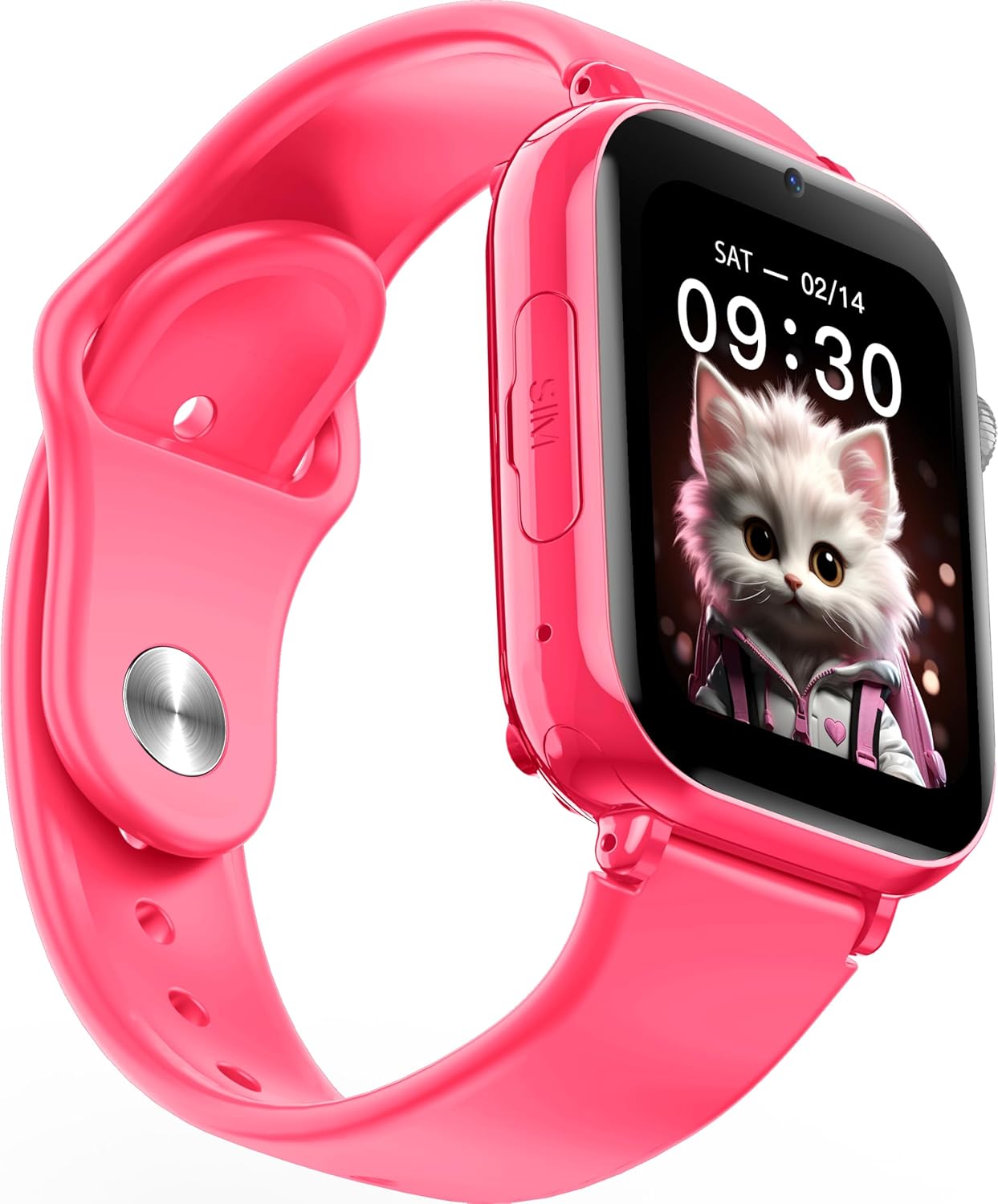
Imagine: Înclinată view of the Maxcom FW59 Kiddo smartwatch, highlighting the location of the SIM card slot on the side.
2. Încărcarea ceasului inteligent
Before first use, fully charge the smartwatch. The device is equipped with a 670 mAh Lithium Ion battery.
- Connect the USB charging cable to the charging port on the smartwatch.
- Conectați celălalt capăt al cablului USB la un adaptor de alimentare USB compatibil (nu este inclus) sau la portul USB al unui computer.
- Ecranul va indica starea de încărcare. O încărcare completă durează de obicei aproximativ 2-3 ore.
3. Instalarea și asocierea aplicației
To utilize all features, parents must install the "MAXCOM TRACKER" mobile application on their smartphone and pair it with the smartwatch.
- Download the "MAXCOM TRACKER" app from your smartphone's app store (Google Play Store for Android or Apple App Store for iOS).
- Deschideți aplicația și creați un cont sau conectați-vă dacă aveți deja unul.
- Follow the in-app instructions to add a new device. This usually involves scanning a QR code displayed on the smartwatch screen or manually entering the device ID.
- Once paired, you can configure settings, add contacts, define safe zones, and track the smartwatch's location from the app.
Operarea ceasului inteligent
Navigare de bază
The Maxcom FW59 Kiddo features a 1.85" IPS touchscreen display for easy interaction. Swipe left/right or up/down to navigate through menus and applications. Press the side button to return to the home screen or wake the device.

Imagine: față view of the Maxcom FW59 Kiddo smartwatch displaying the time and a cute cat wallpaper.
Video and Voice Calls
With a nano SIM card inserted, the smartwatch supports both video and voice calls to pre-approved contacts.
- Efectuarea unui apel: Navigate to the "Contacts" or "Phone" application, select the desired contact, and choose to initiate a voice or video call.
- Primirea unui apel: When a call comes in, the smartwatch will ring and display the caller ID. Tap the green icon to answer or the red icon to decline.
Funcția SOS
The dedicated SOS button provides an immediate way for the child to alert pre-set emergency contacts.
- Activarea SOS: Press and hold the SOS button (usually a prominent side button) for a few seconds.
- The smartwatch will automatically call the emergency contacts in a pre-defined sequence until one answers. It will also send an alert with the child's current location to the parent's app.
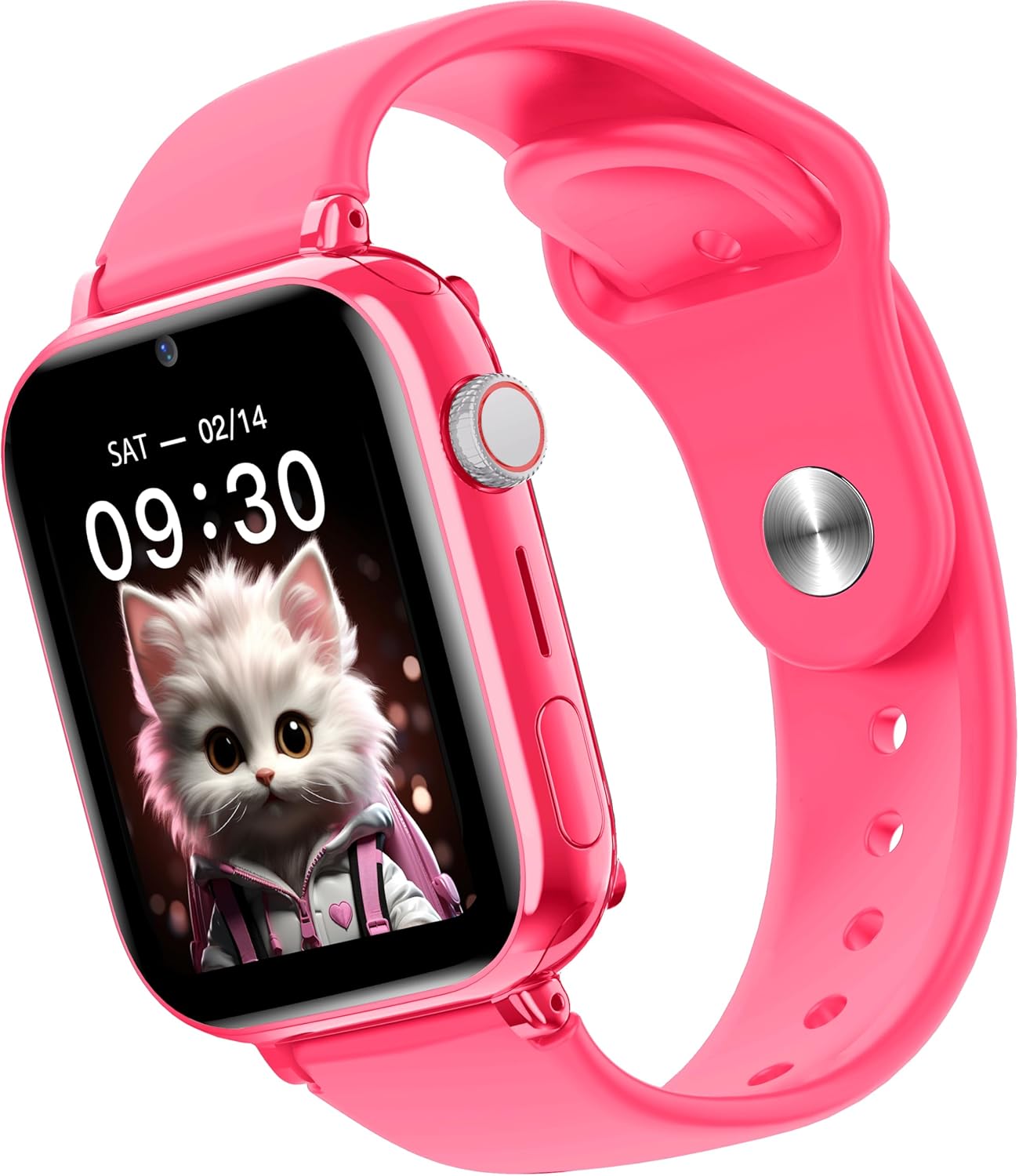
Imagine: Laterală view of the Maxcom FW59 Kiddo smartwatch, illustrating the physical buttons, including the SOS button.
GPS Tracking and Safe Zones
Parents can monitor the child's location in real-time via the MAXCOM TRACKER app.
- Urmărire în timp real: Open the MAXCOM TRACKER app on your smartphone to view the smartwatch's current location on a map.
- Zone sigure: In the app, you can define virtual geographic boundaries (e.g., home, school). You will receive notifications when the smartwatch enters or exits these designated safe zones.
- Istoricul rutei: The app also allows you to review the historical movement data of the smartwatch.
Funcția camerei
The smartwatch includes a built-in camera. Children can take photos directly from the watch, and parents can remotely activate the camera from the MAXCOM TRACKER app to capture images of the surroundings.
Phone Book Management
Contacts can only be added and managed through the MAXCOM TRACKER app by the parent. This ensures that the child can only communicate with pre-approved numbers.
Întreţinere
Curatenie
To keep your smartwatch clean and in good condition:
- Ștergeți ecranul și carcasa cu o lavetă moale, fără scame.
- Pentru pete persistente, d puținampClătiți cârpa cu apă. Evitați utilizarea substanțelor chimice dure sau a materialelor abrazive.
- Ensure the charging port and SIM slot are free of dust and debris.
Îngrijirea bateriei
Proper battery care extends the life of your device:
- Evitați temperaturile extreme, deoarece acestea pot afecta performanța bateriei.
- Încărcați dispozitivul în mod regulat, dar evitați să îl lăsați complet descărcat pentru perioade lungi de timp.
- Utilizați numai cablul de încărcare furnizat.
Depanare
If you encounter issues with your Maxcom FW59 Kiddo, refer to the following common solutions:
- Ceasul inteligent nu pornește: Asigurați-vă că bateria este încărcată. Conectați-o la încărcător și așteptați câteva minute înainte de a încerca să o porniți.
- No network signal/cannot make calls:
- Check if the nano SIM card is correctly inserted and active.
- Verify that the SIM card has sufficient credit or an active data plan.
- Ensure you are in an area with 4G network coverage.
- GPS location inaccurate:
- Asigurați-vă că ceasul inteligent are o vizibilitate clară view a cerului pentru recepția optimă a semnalului GPS.
- Location accuracy can be affected by dense buildings, underground areas, or poor network signal.
- Check the MAXCOM TRACKER app settings to ensure location services are enabled for the smartwatch.
- Nu se poate asocia cu aplicația:
- Ensure the smartwatch is powered on and has a network connection.
- Verify that the QR code or device ID is entered correctly in the app.
- Try restarting both the smartwatch and your smartphone.
- Durată scurtă de viață a bateriei:
- Frequent video calls, high screen brightness, and continuous GPS tracking can consume more battery.
- Adjust settings in the app to optimize battery usage (e.g., location update frequency).
If the issue persists, please contact Maxcom customer support for further assistance.
Specificații
| Caracteristică | Detaliu |
|---|---|
| Marca | Maxcom |
| Numele modelului | FW59 Kiddo |
| Dimensiunea ecranului | 1.85 inchi |
| Tip de afișare | IPS (240 x 280 resolution) |
| Sistem de operare | Closed OS |
| Capacitate de stocare a memoriei | 2 MB |
| Capacitatea bateriei | 670 mAh (Litiu Ion) |
| Tehnologia celulară | 4G |
| Tehnologia de conectivitate | Bluetooth, radiofrecvență |
| Caracteristici speciale | Kids Tracking, SOS Button, Video/Voice Calls |
| Greutatea articolului | 300 g |
Garanție și suport
For information regarding warranty coverage and terms for your Maxcom FW59 Kiddo smartwatch, please refer to the warranty card included with your purchase or visit the official Maxcom website. For technical support, troubleshooting beyond this manual, or service inquiries, please contact Maxcom customer support through their official channels.


