1. Introducere
This user manual provides detailed instructions for the installation, operation, and maintenance of your Ease Life 1080P Security Camera (Model: Y108). This camera is designed for outdoor home security, offering a 360° view with pan/tilt capabilities, color night vision, motion detection, and two-way audio communication. Please read this manual thoroughly before using the product to ensure proper functionality and safety.

Image: The Ease Life 1080P Security Camera shown alongside a smartphone displaying its live view interface. The camera is white with two antennas and a prominent lens array. The app shows a live feed of a child and an adult playing with a ball.
2. Informații de siguranță
- Ensure the power adapter used is compatible with the camera's specifications and local electrical standards.
- Nu expuneți camera la temperaturi extreme, umiditate sau medii corozive.
- Evitați amplasarea camerei în apropierea câmpurilor magnetice puternice sau a surselor de interferență.
- Nu încercați să dezasamblați sau să modificați camera. Apelați la personal calificat pentru orice service.
- Keep the camera and its accessories out of reach of children and pets.
- Clean the camera with a soft, dry cloth. Do not use harsh chemicals or abrasive cleaners.
- Ensure the camera is securely mounted to prevent accidental falls.
3. Conținutul pachetului
Vă rugăm să verificați conținutul pachetului la deschidere. Dacă lipsesc sau sunt deteriorate articolele, contactați serviciul de asistență pentru clienți.
- Ease Life 1080P Security Camera (Y108)
- Adaptor de alimentare
- Șuruburi de montare și dibluri de perete
- Manual de utilizare (acest document)
- Șablon de montare (poate fi inclus)
4. Produs terminatview
Familiarize yourself with the main components of your security camera.

Imagine: O imagine detaliată view of the camera's front, highlighting the lens, infrared LEDs, and visible light LEDs for color night vision.
4.1 Dimensiunile camerei
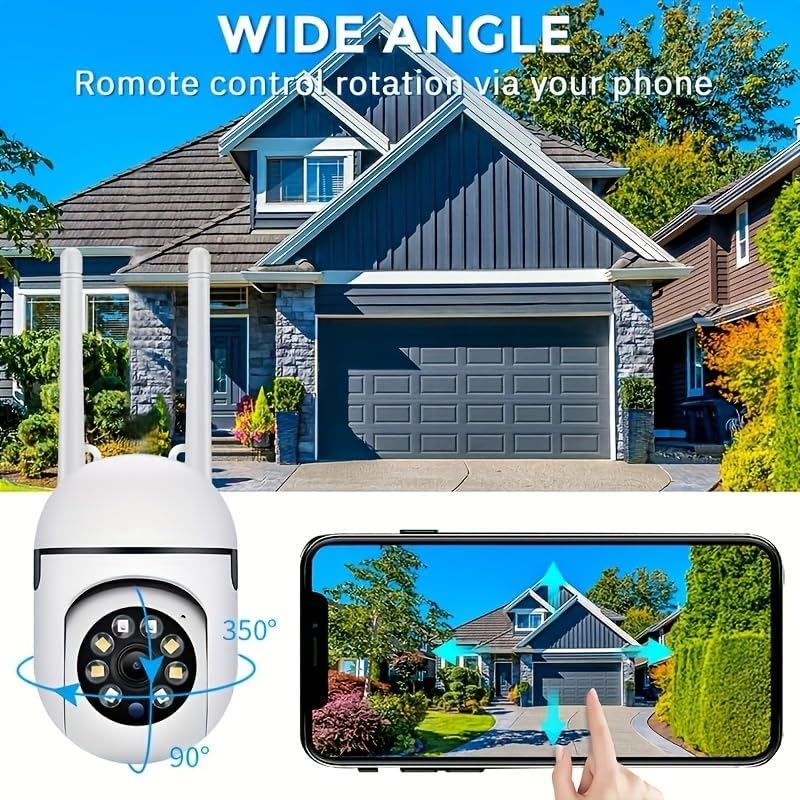
Image: Technical drawing showing the camera's dimensions: approximately 18cm (7.08 inches) in height, 7cm (2.76 inches) in width, and 8.8cm (3.46 inches) in depth from the wall mount.
4.2 componente cheie
- Obiectiv: Capturează videoclipuri Full HD 1080P.
- LED-uri cu infraroșu: Pentru vedere nocturnă alb-negru.
- LED-uri cu lumină albă: For color night vision and alarm illumination.
- Microfon: Pentru comunicare audio bidirecțională.
- Vorbitor: Pentru comunicare audio bidirecțională și sunete de alarmă.
- antene: For 2.4GHz Wi-Fi connectivity.
- Slot pentru card Micro SD: Pentru stocare video locală (cardul nu este inclus).
- Buton de resetare: Folosit pentru resetarea setărilor din fabrică.
- Port de alimentare: Pentru conectarea adaptorului de alimentare.

Image: The camera is shown with labels pointing to the microphone and speaker, illustrating its two-way audio capability. A delivery person is shown interacting with the camera.
5. Configurare
5.1 Instalarea aplicației
- Caută "EaseLife" in your smartphone's app store (App Store for iOS, Google Play Store for Android).
- Download and install the EaseLife app.
- Deschide aplicația și urmează instrucțiunile de pe ecran pentru a înregistra un cont nou sau pentru a te conecta dacă ai deja unul.
5.2 Camera Connection (Wi-Fi)
- Power on the camera by connecting the power adapter. The camera will perform a self-test and then enter pairing mode (indicated by a specific LED status or voice prompt).
- Open the EaseLife app, tap the "+" icon to add a new device.
- Select your camera model or scan the QR code on the camera (if available).
- Follow the in-app instructions to connect the camera to your 2.4GHz Wi-Fi network. Ensure your phone is connected to the same 2.4GHz Wi-Fi network during setup.
- După conectare, puteți denumi camera și puteți începe să transmiteți live-ul viewing.
5.3 Montarea camerei
Choose a suitable location for mounting, ensuring a clear view and access to a power outlet. The camera supports wall mounting.
- Use the provided mounting template (if included) or mark the drill holes on the desired surface.
- Drill holes and insert wall plugs if mounting on masonry or drywall.
- Secure the camera's mounting base to the surface using the provided screws.
- Ajustați unghiul camerei după cum este necesar după montare.

Image: The camera is depicted with arrows indicating its 360-degree horizontal pan and 90-degree vertical tilt rotation, demonstrating its wide coverage capabilities.
6. Instrucțiuni de utilizare
6.1 În direct View și control panoramic/înclinat
Open the EaseLife app and select your camera to access the live view. You can control the camera's pan (horizontal) and tilt (vertical) movements directly from the app interface to adjust the viewunghiul de ing.

Image: The camera is shown with a wide-angle view of a house, illustrating its ability to cover a large area. A smartphone screen demonstrates remote control of the camera's rotation.
6.2 Sunet bidirecțional
Tap the microphone icon in the app to speak through the camera's speaker. Tap the speaker icon to listen to audio from the camera's microphone. This feature allows for real-time communication with visitors or deterrence of intruders.
6.3 Detectarea mișcării și alertele
Enable motion detection in the app settings. When motion is detected, the camera will record video and send push notifications to your smartphone. You can adjust sensitivity levels and set detection zones.
6.4 Moduri de vedere nocturnă
The camera supports multiple night vision modes:
- Viziune de noapte în infraroșu: Provides clear black and white images in low light or complete darkness using infrared LEDs.
- Viziune nocturnă completă în culori: Activates the camera's white light LEDs to provide full-color video even in dark conditions.
- Alarmă sonoră și luminoasă, vedere nocturnă: Combines full-color night vision with an audible alarm and flashing lights upon motion detection to deter unwanted activity.

Image: Illustrations of the three night vision modes: Infrared (black and white), Full Color (illuminated by white light), and Sound and Light Alarm (with a red outline indicating an alarm trigger).
6.5 Înregistrare și redare
Recordings can be stored on a Micro SD card (up to 128GB, not included) or via cloud service (subscription required). Access recorded footage through the "Playback" or "Gallery" section in the EaseLife app.
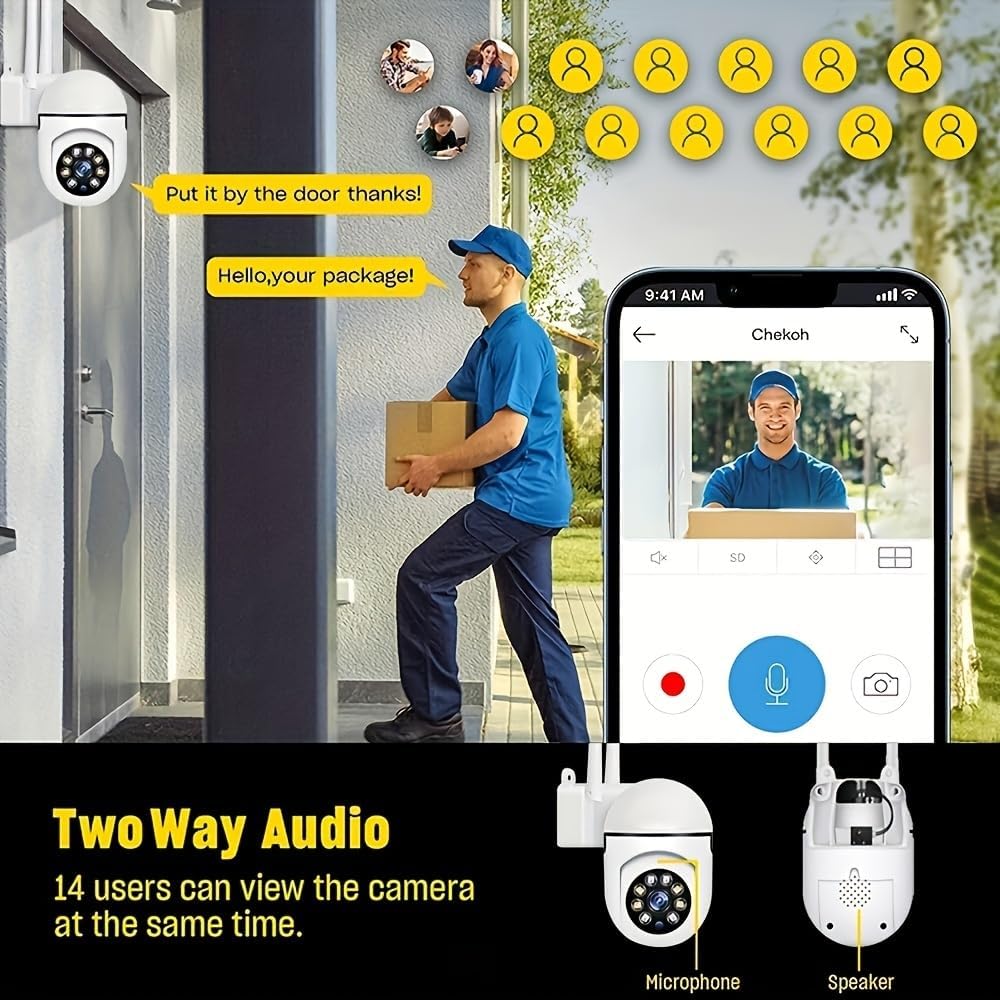
Image: A smartphone screen showing the replay function of the camera, with multiple thumbnail views of recorded events. Below, the camera is shown with its "Double light night vision" capability highlighted, indicating both infrared and white light LEDs.
7. Întreținere
- curatenie: Regularly wipe the camera lens and body with a soft, dry cloth to remove dust and dirt. Do not use liquid cleaners or sprays directly on the camera.
- Actualizări firmware: Check the EaseLife app periodically for firmware updates. Keeping your camera's firmware updated ensures optimal performance and access to new features.
- Ciclu de alimentare: Dacă întâmpină probleme cu camera, încercați să o deconectați de la sursa de alimentare timp de 10 secunde, apoi să o reconectați.
8. Depanare
| Problemă | Cauza posibila | Soluţie |
|---|---|---|
| Camera offline în aplicație | No power; Wi-Fi disconnected; Router issues. | Check power connection. Restart camera and router. Reconnect camera to Wi-Fi via app. |
| Nu se poate conecta la Wi-Fi | Incorrect Wi-Fi password; 5GHz Wi-Fi network; Weak signal. | Ensure correct 2.4GHz Wi-Fi password. Move camera closer to router. Reset camera and try pairing again. |
| Detectarea mișcării nu funcționează | Feature disabled; Sensitivity too low; Incorrect detection zone. | Enable motion detection in app. Adjust sensitivity. Define detection zones correctly. |
| Nu există sunet de la cameră | Microfonul/difuzorul este dezactivat în aplicație; Volumul este prea mic. | Check audio settings in app. Increase volume. |
| Calitate slabă a imaginii noaptea | Night vision mode not optimal; Obstruction in front of lens. | Switch night vision modes. Clean lens. Ensure no obstructions. |
9. Specificații
| Caracteristică | Detaliu |
|---|---|
| Rezoluție captură video | Full HD 1080p |
| Tehnologia de conectivitate | Wireless (Wi-Fi) |
| Frecvența Wi-Fi | 2.4GHz |
| Caracteristici speciale | Night Vision (Infrared, Full Color, Sound & Light Alarm), Pan/Tilt (360° horizontal, 90° vertical), Motion Detection, Two-Way Talk |
| Dispozitive compatibile | Tablet, Smartphone (iPhone, Android) |
| Sursa de alimentare | Electric cu fir |
| Tip de montare | Montare pe perete |
| Factor de formă | Dom |
| Greutatea articolului | 250 g |
| Producător | BoyKeep |
10. Garanție și asistență
Your Ease Life 1080P Security Camera comes with a standard manufacturer's warranty. Please refer to the product packaging or the official BoyKeep website-ul pentru termenii și condițiile specifice de garanție.
For technical support, troubleshooting assistance, or warranty claims, please contact BoyKeep customer service through the contact information provided on their official website sau prin intermediul platformei dvs. de achiziții.
Resurse online: For the latest FAQs, video tutorials, and software updates, please visit the official EaseLife or BoyKeep support page.


