Introducere
This manual provides essential information for setting up, operating, maintaining, and troubleshooting your Alienware X16 Gaming Laptop. Designed for high-performance gaming, this laptop features cutting-edge components and advanced cooling solutions to deliver an immersive experience.

Figure 1: Alienware X16 Gaming Laptop, showcasing its high-refresh-rate display and powerful graphics capabilities.
Ce este în cutie
Upon unboxing your Alienware X16 Gaming Laptop, verify that all components are present:
- Laptop Alienware X16 R2
- Power Adapter (330W Small Form Factor)
- Cablu de alimentare
- Documentație (inclusiv acest manual)
Înființat
Pornirea inițială
- Conectați adaptorul de alimentare: Plug the power adapter into the Power/DC-in Port on the rear of the laptop. Connect the power cord to the adapter and then to a wall outlet.
- Open the Laptop: Ridicați cu grijă capacul afișajului.
- Pornire: Apăsați butonul de pornire, situat de obicei pe tastatură.
- Urmați instrucțiunile de pe ecran: The laptop will guide you through the initial Windows 11 Pro setup process, including language selection, network connection, and user account creation.
Conectarea perifericelor
The Alienware X16 offers a variety of ports for connecting external devices:
- Porturi USB 3.2 Gen 1 (x2): Pentru dispozitive USB standard, cum ar fi mouse-uri, tastaturi sau unități externe.
- USB-C 3.2 Gen 2 Port with DisplayPort: For modern USB-C devices and external displays.
- Thunderbolt 4 Port with Power Delivery and DisplayPort: High-speed connectivity for advanced peripherals, external GPUs, and charging.
- Port HDMI 2.1: Pentru conectarea la monitoare externe sau televizoare.
- Headset (Headphone and Microphone Combo) Port: Pentru intrare/ieșire audio.
- Slot pentru card microSD: Pentru extinderea spațiului de stocare sau transfer files de pe cardurile de memorie.

Figure 2: Rear port configuration of the Alienware X16, detailing connectivity options.
Operarea laptopului
Afișaj și elemente vizuale
The Alienware X16 features a 16.0" QHD+ (2560 x 1600) display with a 240Hz refresh rate and 3ms response time, ensuring smooth and vibrant visuals. It supports 100% DCI-P3 color gamut, ComfortView Plus for reduced blue light, and NVIDIA G-SYNC + Advanced Optimus for tear-free gaming.

Figure 3: The integrated FHD HDR IR Camera supports facial recognition and provides clear video quality.
Tastatură și introducere de date
The English US AlienFX RGB backlit (per-key) Alienware X Series keyboard offers a responsive typing and gaming experience. The AlienFX lighting zones are programmable with up to 16.8 million distinct colors, allowing for extensive customization.
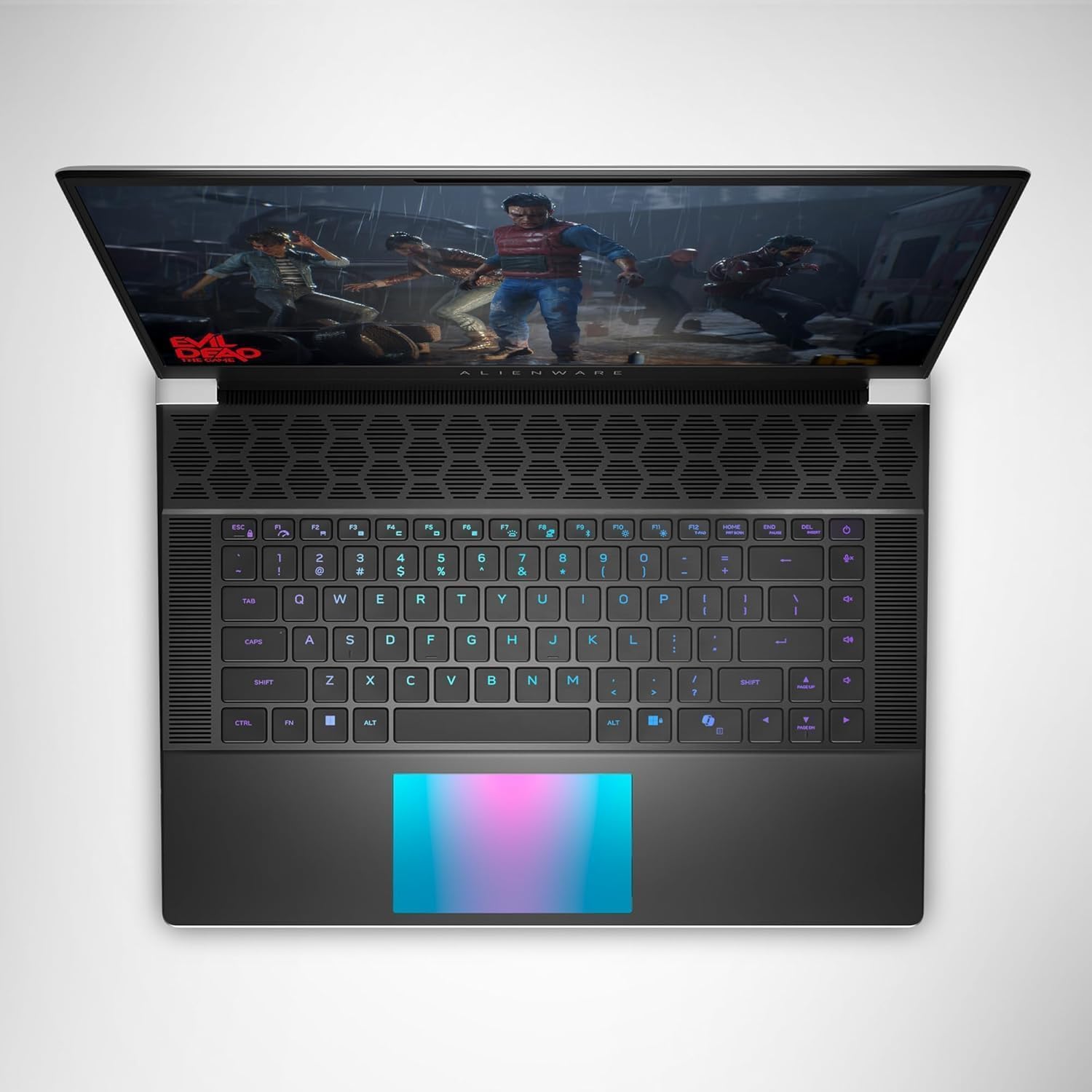
Figura 4: Sus view of the Alienware X16, highlighting the customizable RGB keyboard and touchpad.
Alienware Command Center
Utilize the Alienware Command Center software to customize your gaming experience. This application allows you to manage performance presets, monitor system vitals, and configure AlienFX lighting effects and combinations for a personalized setup.

Figure 5: Alienware Command Center interface for system control and customization.
Întreţinere
Sistem de racire
The Alienware X16 incorporates advanced Alienware Cryo-tech™ cooling technology, featuring six laser-welded flat end heat pipes. To ensure optimal performance and longevity, regularly check and clean the ventilation grilles to prevent dust accumulation, which can impede airflow.
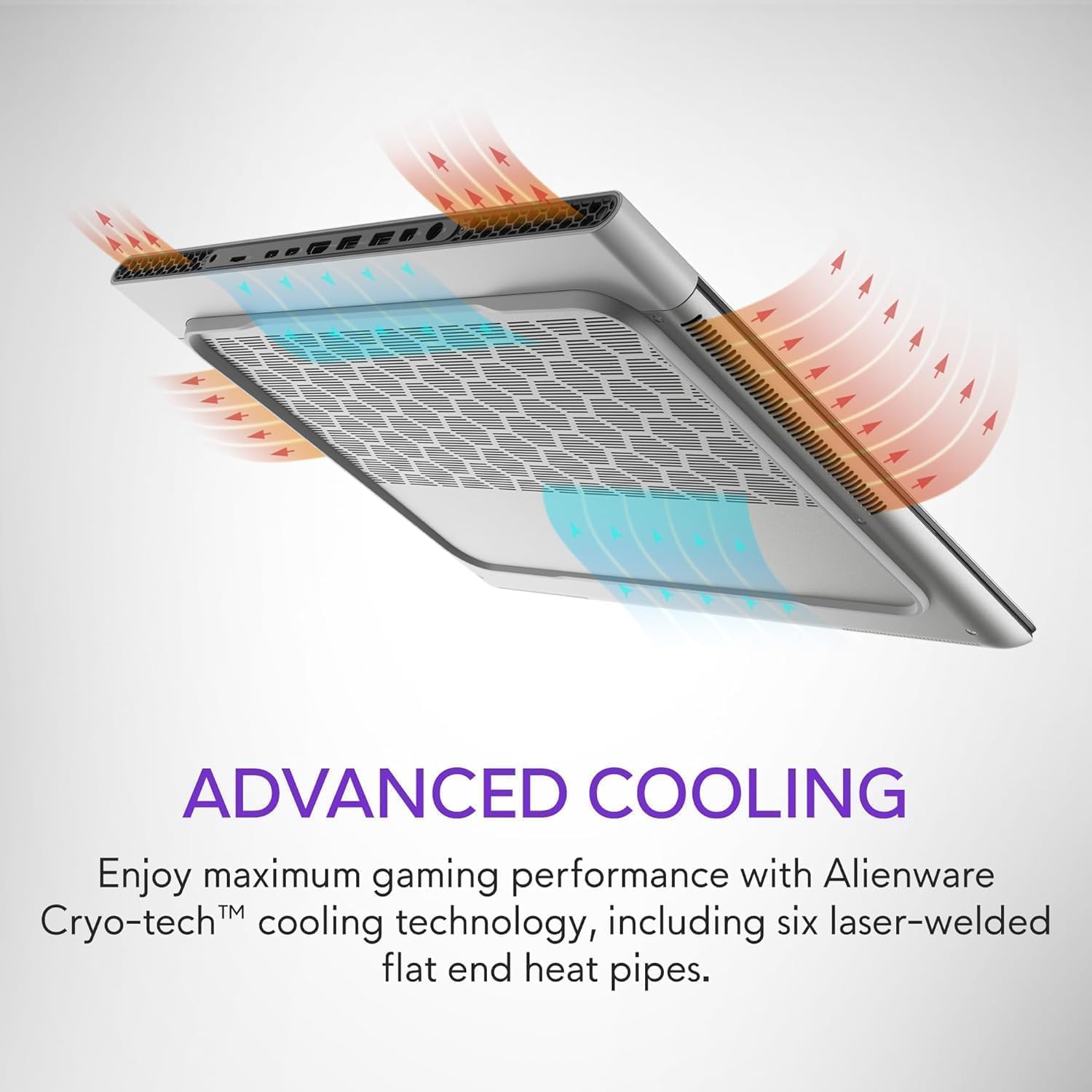
Figure 6: Illustration of the Alienware Cryo-tech™ advanced cooling system.
Îngrijire generală
- Keep the laptop on a flat, stable surface to ensure proper ventilation.
- Evitați expunerea laptopului la temperaturi extreme, lumina directă a soarelui sau umiditate ridicată.
- Clean the screen with a soft, lint-free cloth specifically designed for electronics.
- Use compressed air to clear dust from keyboard keys and ports.
Depanare
Probleme comune și soluții
| Problemă | Cauza posibila | Soluţie |
|---|---|---|
| Laptopul nu pornește. | No power, faulty adapter, or battery issue. | Ensure power adapter is securely connected to laptop and wall outlet. Check wall outlet with another device. Try a different power outlet. |
| Afișajul este gol sau pâlpâie. | Incorrect display settings, driver issue, or hardware problem. | Restart the laptop. Update graphics drivers. If using an external monitor, check cable connections. |
| Poor performance during gaming. | Overheating, outdated drivers, or background applications. | Ensure proper ventilation. Update graphics and chipset drivers. Close unnecessary background applications. Adjust power settings to high performance. |
| Probleme cu conexiunea Wi-Fi. | Driver issue, router problem, or interference. | Restart the laptop and router. Update wireless drivers. Check router settings. |
For more complex issues, refer to the official Alienware support website-ul sau contactați serviciul pentru clienți.
Specificații
| Componentă | Detaliu |
|---|---|
| Procesor | Intel® Core™ Ultra 9 processor 185H (24MB cache, 16 cores, 2.30 to 5.10 GHz P-Core) |
| Sistem de operare | Windows 11 Pro |
| Placa grafica | NVIDIA GeForce RTX 4090 16GB GDDR6 |
| Afişa | 16.0" QHD+ (2560 x 1600) 240Hz 3ms, 100% DCI-P3, ComfortView Plus, NVIDIA G-SYNC + Advanced Optimus |
| Memorie | 32GB, 2x16GB, LPDDR5X, 7467MT/s |
| Depozitare | 2 TB, M.2, PCIe NVMe, SSD |
| Tastatura | English US AlienFX RGB backlit (per-key) Alienware X Series keyboard |
| Fără fir | Intel Killer™ 1750 2x2 and Bluetooth 5.4 Wireless Card with Wifi 7 Ready |
| Camera foto | 1080p at 30fps, FHD HDR RGB+IR camera; Dual-array microphones |
| Audio | Tweeter speaker: 2W x 2; Woofer speaker: 3W x 4 |
| Porturi | 2 USB 3.2 Gen 1, 1 USB-C 3.2 Gen 2 (DP), 1 Thunderbolt 4 (PD, DP), 1 Headset, 1 HDMI 2.1, 1 microSD-card slot |
| Baterie | 6 Cell, 90 Wh |
| Dimensiuni (HxLxD) | 18.57 mm (0.73 inchi) x 364.81 mm (14.36 inchi) x 289.98 mm (11.41 inchi) |
| Greutate (minima) | 2.66 kg (5.86 lb) |
Garanție și suport
Your Alienware X16 Gaming Laptop comes with a standard manufacturer's warranty. For detailed warranty terms and conditions, please refer to the documentation included in the box or visit the official Alienware support website-ul.
Pentru asistență tehnică, descărcări de drivere sau asistență suplimentară, vă rugăm să vizitați Alienware Official Store or their dedicated support portal.


