1. Introducere
This user manual provides comprehensive instructions for the installation, operation, and maintenance of your COCOCAM AOV 4G LTE Security Camera. Please read this manual thoroughly before using the product to ensure proper functionality and safety.
1.1 Conținutul pachetului
- 1x COCOCAM AOV 4G LTE Security Camera
- 1x panou solar
- 1x Screw Package (for mounting)
- 1x cablu de date
- 1x Manual de instrucțiuni (acest document)
- 1x Suport panou solar
- 2x AA Batteries (pre-installed or included for initial setup)

Figure 1.1: COCOCAM AOV 4G LTE Security Camera and Solar Panel. The image displays the main camera unit with two antennas, a lens, and four LED lights, alongside a rectangular solar panel connected by a cable.
2. Informații de siguranță
- Ensure the camera and solar panel are installed securely to prevent falling.
- Nu expuneți camera la temperaturi extreme în afara intervalului său de funcționare.
- Țineți dispozitivul departe de câmpuri magnetice puternice.
- Nu încercați să dezasamblați sau să reparați singur camera. Contactați serviciul de asistență pentru asistență.
- Ensure all cables are properly connected and protected from environmental damage.
- This device is IP66 rated for water and dust resistance, but avoid submerging it in water.
3. Produs terminatview
3.1 Caracteristici cheie
- 24/7 Recording & Fast Alarm Trigger: Continuous recording with quick alarm activation.
- Intelligent Sound and Light Alarm: Customizable alarm areas with real-time notifications.
- 30 Meters Night Vision: Clear visibility in low-light conditions with white light and infrared options.
- AI Detection/Tracking: Human form detection and movement tracking up to 30 meters.
- Opțiuni flexibile de stocare: Supports TF card (up to 128GB) and cloud storage.
- Audio bidirecțional: Microfon și difuzor încorporate pentru comunicare.
- Long-lasting Battery with Solar Panel: 15000mAh rechargeable battery with 8W solar panel for continuous power.
- Rezistență la intemperii IP66: Designed for outdoor use, resistant to water and dust.
- 3MP High Definition Video: 2304*1296 resolution for clear footage.
- 355° Pan/90° Tilt: Wide area coverage with remote adjustable viewunghiuri de ing.
- Remote Monitoring and Mobile Compatibility: Access via COCOCAM app on Android/iOS devices.
- Conectivitate 4G LTE: Operates without Wi-Fi, includes a built-in SIM card with trial data.
4. Configurare
4.1 Montarea camerei și a panoului solar
The camera and solar panel can be mounted on walls or ceilings. Choose a location that provides optimal sunlight exposure for the solar panel and a clear view pentru cameră.
- Identify a suitable mounting surface.
- Use the provided screw package to secure the camera bracket and solar panel bracket.
- Attach the camera to its bracket and the solar panel to its bracket.
- Connect the solar panel cable to the camera's charging port. Ensure the connection is secure and waterproof.

Figure 4.1: Easy installation of the COCOCAM camera and solar panel. The image shows a person installing the camera and solar panel unit under an eave, demonstrating the ease of setup.

Figure 4.2: Self-sustaining power setup with solar panel and battery. This image illustrates the camera and solar panel mounted on a building, highlighting the 8W solar panel and 15000mAh rechargeable battery for continuous power.
4.2 Instalarea cartelei SIM și a cartelei de stocare
The camera comes with a built-in SIM card for initial use. You can also install an external SIM card or a TF (microSD) card for local storage.
- Locate the SIM card slot and TF card slot on the camera (refer to the product diagram in the quick start guide).
- Insert the TF card (up to 128GB) into the TF card slot with the contacts facing down.
- If using an external SIM card, insert it into the designated slot. Ensure it is properly seated.
- Close the protective cover to maintain IP66 rating.

Figure 4.3: 3G/4G LTE Connection without Wi-Fi. This image highlights the camera's ability to operate using 3G or 4G LTE networks, making it suitable for locations without Wi-Fi, such as farms, construction sites, or RVs.
4.4 Descărcarea aplicației și configurarea inițială
Download the COCOCAM app from your device's app store (Android or iOS).
- Caută "COCOCAM" in the Google Play Store or Apple App Store.
- Instalați aplicația și creați un cont.
- Urmați instrucțiunile din aplicație pentru a adăuga camera. De obicei, aceasta implică scanarea unui cod QR pe cameră sau introducerea manuală a ID-ului acesteia.
- Once connected, you can configure network settings, recording preferences, and alarm settings.

Figure 4.4: COCOCAM app for 24/7 continuous recording. This image shows a smartphone displaying the COCOCAM app interface, with the security camera mounted on a wall in the background, indicating continuous monitoring capabilities.
5. Instrucțiuni de utilizare
5.1 24/7 Recording and Alarm Features
The camera supports continuous recording. When an alarm is triggered, the camera quickly switches to full-frame recording.
- Înregistrare continuă: The camera records 2 seconds per frame during non-alarm periods.
- Fast Alarm Trigger: Upon detection, the camera initiates full-frame recording within 0.2 seconds.
- Customizable Alarm Areas: Definiți zone specifice în raza de acțiune a camerei view pentru detectarea mișcării.
- Intelligent Sound and Light Alarm: The camera can emit sound and light warnings upon detecting suspicious activity.
- Notificări în timp real: Receive instant alerts on your mobile device when an alarm is triggered.
5.2 Control PTZ (Panoramare, Înclinare, Zoom)
The camera offers extensive pan and tilt capabilities, allowing you to adjust the viewing angle remotely via the COCOCAM app.
- Tigaie: Rotiți camera pe orizontală până la 355°.
- Înclinare: Reglați camera pe verticală până la 90°.
- Zoom digital: Use the app to digitally zoom into the live feed or recorded footage.

Figure 5.1: 355° Pan and 90° Tilt with AI Tracking. This image illustrates the camera's wide range of motion and its ability to track subjects, with icons for two-way audio, AI detection, and AI tracking.
5.3 Detectarea și urmărirea prin inteligență artificială
The camera's advanced AI capabilities allow for precise detection and tracking of human forms and vehicles.
- Detectarea omului: Identifies human shapes, reducing false alarms from animals or swaying branches.
- Vehicle Recognition: Distinguishes vehicles for specific alerts.
- Urmărire AI: The camera can automatically follow detected subjects within its field of view până la 30 de metri.
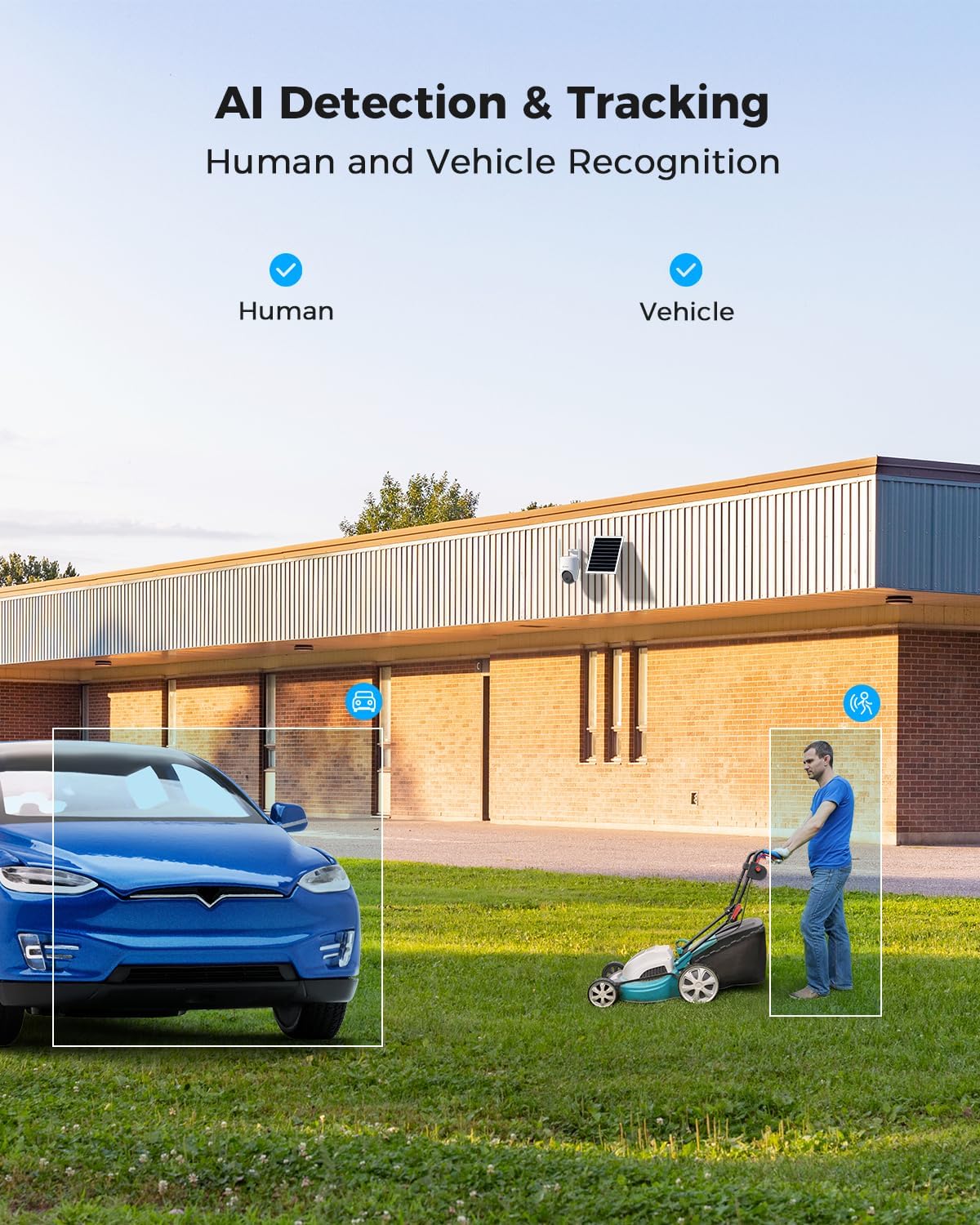
Figure 5.2: AI Detection & Tracking for Human and Vehicle Recognition. The image shows a security camera monitoring an outdoor area, with highlighted boxes indicating detected human and vehicle subjects, demonstrating its AI capabilities.
5.4 Sunet bidirecțional
Comunicați cu vizitatorii sau descurajați intrușii folosind microfonul și difuzorul încorporate.
- Access the two-way audio feature through the COCOCAM app.
- Vorbește în microfonul telefonului pentru a transmite sunetul prin difuzorul camerei.
- Listen to audio from the camera's surroundings through your phone.
5.5 Vedere nocturnă
The camera provides clear visibility up to 30 meters in complete darkness.
- Viziune de noapte în infraroșu: Automatically activates in low-light conditions for black and white video.
- Viziune nocturnă full-color: Utilizes white light LEDs to provide color video at night when activated or upon detection.

Figure 5.3: 30m Night Vision and 2K Full Color Night Vision. This image compares standard black and white night vision with the camera's full-color night vision capability, showing enhanced detail and color in low light.
6. Întreținere
6.1 Îngrijirea bateriei și a panoului solar
The integrated 15000mAh battery is continuously charged by the 8W solar panel. To ensure optimal performance:
- Asigurați-vă că panoul solar este poziționat astfel încât să primească maximum de lumină solară directă pe tot parcursul zilei.
- Regularly clean the surface of the solar panel to remove dust, dirt, or debris that may obstruct sunlight.
- Avoid placing the solar panel in shaded areas.

Figure 6.1: 8W Solar Panel for continuous power. This image focuses on the solar panel, highlighting its 8W power output and the 3-meter cable length for flexible installation.
6.2 Curățarea camerei
- Folosiți un moale, damp cloth to wipe the camera lens and body.
- Nu utilizați substanțe chimice dure sau produse de curățare abrazive.
- Ensure the camera is dry before prolonged exposure to the elements.
6.3 de actualizări de firmware
Periodically check the COCOCAM app for available firmware updates. Keeping your camera's firmware updated ensures optimal performance, new features, and security enhancements.
7. Depanare
| Problemă | Cauza posibila | Soluţie |
|---|---|---|
| Camera nu se conectează la aplicație. | Incorrect pairing process, weak 4G signal, camera not powered on. | Ensure camera is powered on. Re-attempt pairing process. Check 4G signal strength at installation location. |
| Calitate video slabă. | Dirty lens, low light conditions, weak 4G signal. | Clean the camera lens. Ensure adequate lighting or verify night vision is active. Check 4G signal strength. |
| Bateria nu se încarcă. | Solar panel obstructed, faulty connection, insufficient sunlight. | Ensure solar panel is clean and receives direct sunlight. Check cable connection between solar panel and camera. |
| AI detection not working or too many false alarms. | Incorrect sensitivity settings, detection area not configured. | Adjust AI detection sensitivity in the app. Configure specific detection zones to exclude irrelevant areas. |
| Probleme cu sunetul bidirecțional. | Microphone/speaker obstruction, app permissions, network delay. | Ensure nothing is blocking the camera's microphone or speaker. Check app permissions for microphone access. Verify stable 4G connection. |
8. Specificații
| Caracteristică | Detaliu |
|---|---|
| Numele modelului | AOV 4G Camera with 7x24 Recording |
| Numărul de model al articolului | ZY-Q6 |
| Marca | COCOCAM |
| Rezoluție captură video | 1440p (3MP, 2304*1296) |
| Interval Pan/Tilt | 355° Pan / 90° Tilt |
| Gama de vedere nocturnă | 30 Meters (Infrared & White Light) |
| Tehnologia de conectivitate | Wireless (4G LTE) |
| Sursa de alimentare | Battery Powered (15000mAh) with 8W Solar Panel |
| Opțiuni de stocare | Card TF (până la 128 GB), Stocare în cloud |
| Rezistență la intemperii | IP66 |
| Material | Acrilonitril Butadien Stiren (ABS) |
| Dimensiuni articol (L x l x H) | 20 x 15 x 12 cm |
| Greutatea articolului | 620 g |
| baterii | 2 baterii AA (incluse) |
9. Garanție și asistență
COCOCAM provides a garanție pe viață for this product, ensuring long-term reliability and customer satisfaction.
For technical support, troubleshooting assistance, or warranty claims, please contact COCOCAM customer service:
- Producător: COCOCAM
- Oficial Website: www.cococamtech.com
- E-mail: service@cococamtech.com
Please have your model number (ZY-Q6) and purchase information ready when contacting support.


