1. Introducere
This manual provides detailed instructions for the installation, operation, and maintenance of your ZUMIMALL ZS-GX2S 3MP Wireless Outdoor Security Camera. Please read this manual thoroughly before using the product to ensure proper functionality and safety.
The ZUMIMALL ZS-GX2S is a solar-powered, wireless outdoor security camera designed for comprehensive surveillance. It features 3MP resolution, 360° pan and tilt capabilities, AI detection, two-way audio, and IP66 weatherproofing, making it suitable for various outdoor environments.
2. Produs terminatview
2.1 Conținutul pachetului
Pachetul include următoarele articole:
- ZUMIMALL ZS-GX2S 3MP Wireless Outdoor Security Camera (2 units)
- Panou solar (2 unități)
- Suport de montare pentru cameră
- Suport de montare pentru panou solar
- Cablu de încărcare USB
- Screw Package (screws and wall anchors)
- Manual de instructiuni
- Tip Sticker ('Hey! YOU ARE ON CAMERA')
2.2 Componentele camerei
Familiarize yourself with the main parts of the camera:
- Obiectivul camerei: Captează video footage.
- Lumină albă: Oferă iluminare pentru vedere nocturnă colorată.
- Senzor PIR: Detectează mișcarea.
- Microfon: Capturează sunet pentru comunicare bidirecțională.
- Vorbitor: Emite sunet pentru comunicare bidirecțională și sirenă.
- Antena Wi-Fi: Enhances wireless connectivity.
- Indicator de mod: Afișează starea camerei.
- Tasta de resetare: Used to reset the camera.
- Tasta de pornire: Pornește/oprește camera.
- Slot pentru card SD: Pentru stocare video locală (acceptă până la 128 GB).
- Port de încărcare tip C: For connecting the solar panel or charging.

2.3 Caracteristici cheie
- 3MP Full Color Image: Delivers 2K resolution, 1.5 times sharper than standard 1080p, with 4X digital zoom.
- 360° View: Oferă rotație orizontală de 355° și verticală de 120° pentru o acoperire completă.
- Alimentat cu energie solară și 100% wireless: Equipped with a high-efficiency solar panel and large-capacity rechargeable battery for continuous operation.
- Conectivitate WiFi 2.4G: Features 4dBi dual antennas for stable wireless connection.
- Intelligent AI Detection: Advanced PIR sensor and AI algorithms identify persons, pets, vehicles, and parcels, reducing false alarms.
- Alerte în timp real: Sends instant notifications to your mobile app upon motion detection.
- Audio bidirecțional: Permite comunicarea în timp real prin intermediul camerei.
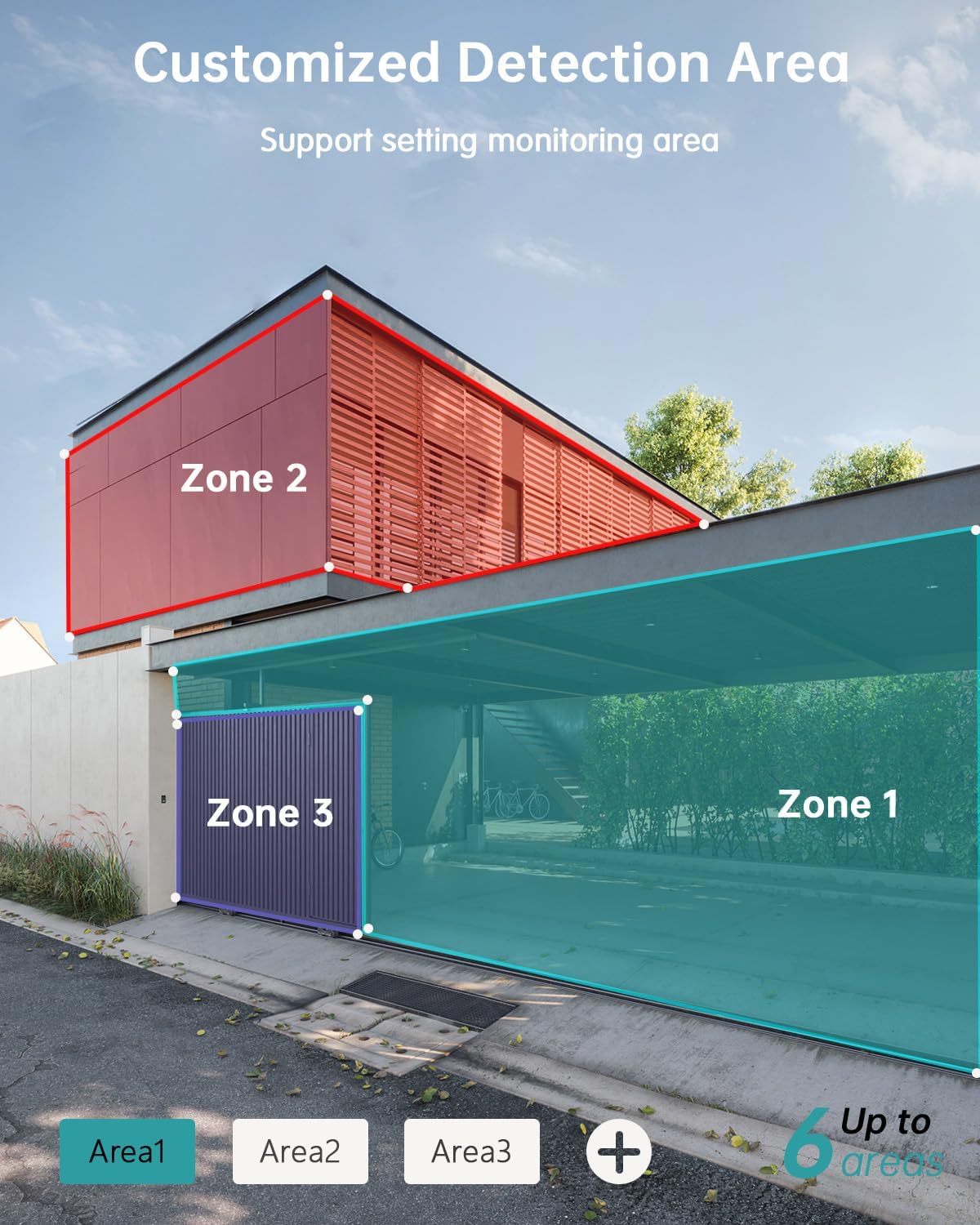
- Zone de detectare personalizabile: Set specific monitoring zones to focus on critical areas.
- Rezistență la intemperii IP66: Designed to withstand various weather conditions, including rain, wind, and snow.
- Opțiuni multiple de stocare: Supports local storage via Micro SD card (up to 128GB) and cloud storage.
- Funcționează cu Alexa: Integrate with Amazon Alexa for voice control and live view pe dispozitive compatibile.
3. Configurare
3.1 Instalare fizică
Before permanent installation, ensure the camera has a strong 2.4G Wi-Fi signal in the desired location. The camera can be mounted on various surfaces including wood, drywall, stucco, or even gutters using appropriate fasteners.
- Atașați baza de montare: Secure the camera's mounting base to your chosen surface using the provided screws and wall anchors.
- Conectați panoul solar: Attach the solar panel to its bracket and position it to receive maximum sunlight. Connect the solar panel's Type-C cable to the camera's charging port. Ensure the cable is neatly managed to prevent damage.
- Montați camera: Align the camera with the mounting base and slide it down until it locks securely.

3.2 Instalarea și asocierea aplicației
The ZUMIMALL app is required to operate your camera. Follow these steps to set up the app and pair your camera:
- Descărcați aplicația: Scan the QR code provided in the manual or on the product packaging, or search for 'ZUMIMALL' in your device's app store.
- Înregistrare Cont: Open the ZUMIMALL app and follow the on-screen instructions to register a new account or log in if you already have one.
- Adăugați dispozitiv: In the app, select 'Add Device' or the '+' icon. Follow the prompts to select your camera model.
- Pornirea camerei: Asigurați-vă că aveți camera pornită.
- Scanați codul QR: The app will display a QR code. Hold your camera's lens towards your phone screen to scan the QR code. You will hear a confirmation sound when successful.
- Conectați-vă la Wi-Fi: Follow the app's instructions to connect the camera to your 2.4G Wi-Fi network.
- Configurare finalizată: După conectare, puteți denumi camera și puteți începe să o utilizați.

4. Funcționare
4.1 În direct View și Redare
Access the live feed and review inregistrat footage directly from the ZUMIMALL app.
- Trăi View: Deschide aplicația și selectează camera pentru a view fluxul în timp real.
- Redare: Navigate to the 'History' or 'Cloud' section in the app to review evenimente înregistrate.

4.2 Detectarea mișcării și alertele
The camera's AI detection system identifies specific objects and sends alerts.
- Detectare AI: The camera can distinguish between persons, pets, vehicles, and parcels.
- Custom Areas: Set specific detection zones within the app to monitor areas of interest and reduce unnecessary alerts.
- Notificări în timp real: Receive instant alerts on your phone when motion is detected.

4.3 Sunet bidirecțional
Engage in real-time conversations through the camera using the app's two-way audio feature.
4.4 Control PTZ
Control the camera's pan (horizontal) and tilt (vertical) movements directly from the app to adjust your viewunghiul de ing.
- Tigaie: Rotație orizontală de 355°.
- Înclinare: Rotație verticală de 120°.

4.5 Opțiuni de stocare
Camera dvs. oferă soluții flexibile de stocare pentru înregistrări videotage.
- Card Micro SD: Introduceți un card Micro SD (până la 128 GB) în slotul desemnat pentru stocare locală.
- Stocare în cloud: ZUMIMALL offers cloud storage services for convenient access and backup of your recordings.
4.6 Integrare Alexa
The ZUMIMALL ZS-GX2S camera is compatible with Amazon Alexa. You can use voice commands to view fluxul live pe dispozitivele compatibile cu Alexa.
5. Întreținere
5.1 Battery and Solar Charging
The integrated solar panel is designed to keep your camera's battery charged, providing continuous operation.
- Ensure the solar panel is positioned in an area that receives direct sunlight for several hours daily.
- In periods of low sunlight or high usage, the camera's battery may require manual charging via the USB port.
5.2 Curățare
Curățarea regulată ajută la menținerea performanței optime.
- Ștergeți ușor obiectivul camerei și panoul solar cu o lavetă moale și damp cârpă pentru a îndepărta praful și resturile.
- Evitați utilizarea substanțelor chimice dure sau a materialelor abrazive care ar putea deteriora suprafața sau obiectivul camerei.
6. Depanare
If you encounter issues with your ZUMIMALL ZS-GX2S camera, consider the following common solutions:
- Fără putere: Ensure the solar panel is receiving adequate sunlight or manually charge the camera using the USB cable.
- Probleme de conexiune Wi-Fi: Verify your Wi-Fi network is 2.4Ghz. Check the camera's proximity to the router and ensure a strong signal. Restart your router and camera if necessary.
- Alarme false: Adjust the motion detection sensitivity settings in the app. Utilize the custom detection area feature to exclude irrelevant zones.
- No Recordings: Check if the Micro SD card is properly inserted and formatted. Ensure cloud storage is active if you are using that service.
- Calitate slabă a imaginii: Curățați obiectivul camerei. Asigurați-vă că nu există obstrucții în câmpul de acțiune al camerei. view.
- Probleme cu sistemul audio bidirecțional: Check the volume settings on your phone and in the app. Ensure there are no obstructions blocking the camera's microphone or speaker.
For further assistance, please refer to the ZUMIMALL app's help section or contact customer support.
7. Specificații
| Caracteristică | Detaliu |
|---|---|
| Numărul de model | ZS-GX2S |
| Rezoluţie | 3MP (2K) |
| Sursa de alimentare | Solar Powered (with rechargeable Lithium Ion battery) |
| Conectivitate | Wi-Fi 2.4G |
| Interval Pan/Tilt | 355° orizontală, 120° verticală |
| Lentila cu unghi larg | 130° |
| Vedere de noapte | 3MP Color Night Vision (with 2 IR and 2 white lights) |
| Zoom digital | 4X |
| Detectare AI | Person, Pet, Vehicle, Parcel |
| Audio | Audio bidirecțional |
| Depozitare | Card Micro SD (până la 128 GB), Stocare în cloud |
| Rezistență la intemperii | IP66 |
| Temperatura de operare | -4°F până la 120°F (-20°C până la 50°C) |
| Dispozitive compatibile | Smartphone, Amazon Alexa |
| Dimensiunile produsului | 13.7 x 7.4 x 5.4 inci |
| Greutatea articolului | 4.71 lire sterline |
8. Garanție și asistență
ZUMIMALL is committed to providing high-quality products and customer satisfaction. For warranty information, technical support, or any inquiries regarding your ZS-GX2S camera, please refer to the ZUMIMALL app's support section or visit the official ZUMIMALL website. You can also contact ZUMIMALL customer service directly for assistance.


