Introducere
This manual provides detailed instructions for setting up, operating, and maintaining your AJAZZ A3060 Wireless Keyboard and Mouse Combo. Please read this manual carefully before use to ensure optimal performance and longevity of your product.
Conținutul pachetului
- 1 x AJAZZ A3060 Wireless Keyboard
- 1 x AJAZZ A3060 Wireless Mouse
- 1 receptor USB 2.4G

Image: The AJAZZ A3060 wireless keyboard and mouse combo, shown with the compact USB receiver.
Înființat
1. Instalarea bateriei
- Pentru tastatură: Localizați compartimentul bateriilor pe partea inferioară a tastaturii. Introduceți două (2) baterii AAA, asigurându-vă că polaritatea este corectă.
- Pentru șoarece: Locate the battery compartment on the underside of the mouse. Insert one (1) AA battery, ensuring correct polarity.
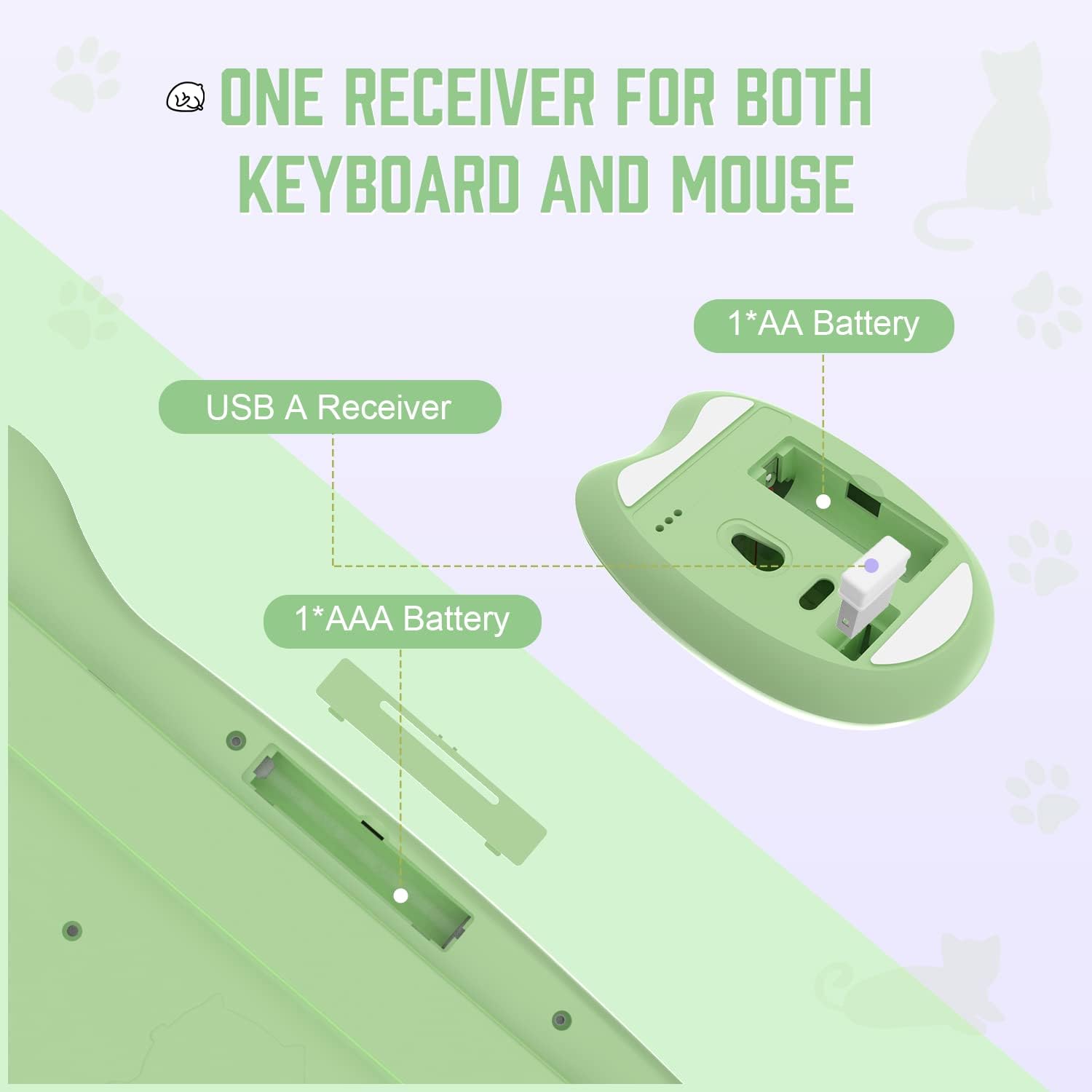
Image: Diagram illustrating the battery compartments for the keyboard (2x AAA) and mouse (1x AA), and the location of the USB receiver storage within the mouse.
2. Conectarea receptorului USB
- Scoateți receptorul USB din slotul său de stocare de pe partea inferioară a mouse-ului.
- Conectați receptorul USB la un port USB-A disponibil de pe computer sau de pe un dispozitiv compatibil.
- Ensure the mouse power switch (located on the underside) is in the 'ON' position.
- The keyboard and mouse should automatically connect to your device. No additional drivers are required.

Image: Visual guide demonstrating the six steps for connecting the wireless keyboard and mouse to a USB-A device, including receiver removal, plugging in, battery insertion, and power activation.
Instrucțiuni de operare
Funcțiile tastaturii
The AJAZZ A3060 keyboard features 84 keys with a retro round keycap design, providing a tactile and responsive typing experience. It includes dedicated media keys for enhanced control.
- Chei media: The function keys (F1-F12) have secondary media control functions. These can typically be accessed by pressing the 'Fn' key simultaneously with the desired F-key.
- Indicatoare luminoase: Located in the upper right corner of the keyboard. One light indicates uppercase/lowercase switching (Caps Lock), and the other indicates low battery or 2.4G connection status.

Image: An illustration of the AJAZZ A3060 keyboard highlighting the media key functions (F1-F12) and the indicator lights for Caps Lock and battery/connection status.
Funcțiile mouse-ului
The ergonomic cat-shaped mouse is designed for comfort and features adjustable DPI settings.
- Ajustare DPI: The mouse features a DPI button, typically located near the scroll wheel. Press this button to cycle through three adjustable DPI levels: 800, 1600, and 3200. This allows you to customize cursor sensitivity.
- Întrerupător: An ON/OFF switch is located on the underside of the mouse to conserve battery life when not in use.

Image: A visual representation of the AJAZZ A3060 mouse, highlighting its ergonomic design and the three adjustable DPI settings (800, 1600, 3200).
Modul de economisire a energiei
The combo is equipped with an intelligent power-saving feature. After a period of inactivity, the devices will automatically enter sleep mode to conserve battery. To wake them up, simply click any key on the keyboard or move/click the mouse.
A low battery indicator will alert you when it's time to replace the batteries.
Compatibilitate
The AJAZZ A3060 Wireless Keyboard and Mouse Combo offers broad compatibility with various operating systems and devices, ensuring versatile use.
- Sisteme de operare: Compatible with Windows XP, Windows 7, Windows 8, Windows 10, and macOS.
- Dispozitive: Suitable for use with PCs, laptops, Smart TVs, workstations, projectors, and tablets.

Imagine: Un pesteview showing the AJAZZ A3060 keyboard and mouse compatible with Smart TVs, PCs, Laptops, Macs, Workstations, and Projectors, and suitable for Windows operating systems.
Întreţinere
To ensure the longevity and optimal performance of your AJAZZ A3060 combo, follow these maintenance guidelines:
- curatenie: Folosiți o lavetă moale și uscată pentru a curăța suprafețele tastaturii și mouse-ului. Pentru murdăria persistentă, ștergeți ușor.amp Se poate folosi o cârpă, dar asigurați-vă că nu pătrunde umezeală în dispozitiv.
- Înlocuire baterie: Replace batteries promptly when the low battery indicator appears to avoid interruptions in use. Always use new, high-quality batteries of the specified type (AAA for keyboard, AA for mouse).
- Depozitare: When not in use for extended periods, turn off the mouse using its power switch and store the USB receiver in its designated slot to prevent loss.
- Evitați lichidele: Keep the devices away from liquids to prevent damage to internal components.
Depanare
- Fără conexiune/Nu răspunde:
- Asigurați-vă că receptorul USB este conectat corect la un port USB funcțional.
- Check if the mouse power switch is in the 'ON' position.
- Înlocuiți bateriile atât din tastatură, cât și din mouse cu unele noi.
- Încercați să conectați receptorul USB la un alt port USB al dispozitivului.
- Move the keyboard and mouse closer to the USB receiver (within 10 meters).
- Lagging/Delayed Response:
- Asigurați-vă că nu există alte dispozitive wireless de 2.4 GHz care cauzează interferențe în apropiere.
- Verificați nivelul bateriei și înlocuiți-o dacă este scăzută.
- Probleme de mișcare a cursorului mouse-ului:
- Curățați senzorul optic de pe partea inferioară a mouse-ului.
- Asigurați-vă că utilizați mouse-ul pe o suprafață adecvată (nu foarte reflectorizantă sau transparentă).
- Adjust the DPI setting to your preference.
Specificații
| Model | A3060 |
| Tip conexiune | Wireless 2.4 GHz (receptor USB) |
| wireless Range | Până la 10 metri (33 picioare) |
| Aspectul tastaturii | 84 Chei |
| Baterie tastatură | 2 x baterii AAA (nu sunt incluse) |
| Baterie mouse | 1 x baterii AA (nu sunt incluse) |
| Mouse DPI | 800 / 1600 / 3200 (Reglabil) |
| Dimensiunile tastaturii | Aproximativ. 13.6 in x 6 in x 1.1 in |
| Dimensiunile mouse-ului | Approx. 4.1 in x 2.7 in |
| Greutatea produsului | Approx. 730 grams (package weight) |
| Țara de origine | China |

Image: Detailed dimensions of the AJAZZ A3060 wireless keyboard and mouse, showing measurements in inches.
Garanție și suport
Pentru informații despre garanție și asistență tehnică, vă rugăm să consultați documentația furnizată odată cu achiziția sau să contactați direct distribuitorul/producătorul. Păstrați dovada achiziției pentru orice reclamații în garanție.


