Introducere
This manual provides detailed instructions for the setup, operation, and maintenance of your MageGee V560 Wireless Gaming Keyboard and Mouse Combo. Please read this manual thoroughly before use to ensure optimal performance and longevity of your device.

Image: The MageGee V560 Wireless Gaming Keyboard and Mouse Combo, featuring a blue, white, and purple color scheme, with the USB receiver visible.
Conținutul pachetului
Vă rugăm să verificați dacă toate articolele sunt prezente în colet:
- MageGee V560 Wireless Keyboard
- MageGee Wireless Mouse
- 2.4GHz USB Receiver (stored in mouse battery compartment)
- Cablu de încărcare USB-C
- Manual de utilizare

Image: Contents of the MageGee V560 package, including the keyboard, mouse, USB receiver, charging cable, and user manual.
Instrucțiuni de configurare
- Localizați receptorul USB: Open the battery cover of the wireless mouse. The 2.4GHz USB receiver is stored inside the compartment next to the mouse battery slot.
- Conectați receptorul: Conectați receptorul USB la un port USB disponibil de pe computer.
- Pornirea dispozitivelor: Ensure both the keyboard and mouse are powered on. The devices are plug-and-play and should connect automatically.
- Taxă inițială: For optimal performance, it is recommended to fully charge both the keyboard and mouse before first use. Use the provided USB-C charging cable.

Image: Illustration showing the 2-in-1 USB receiver connecting the keyboard and mouse wirelessly to a laptop.
Instrucțiuni de operare
Funcțiile tastaturii
- Controlul iluminării de fundal RGB:
- Presa FN + INS pentru a porni sau opri lumina de fundal.
- Presa FN + PgUp or FN + PgDn to adjust the 3-level backlight brightness.
- Presa FN + 1 / 2 / 3 / 4 / 5 to switch between different backlight modes. Note: Backlight settings are not saved after power off.
- Comenzi rapide multimedia: Utilizați FN cheie în combinație cu F1-F12 keys for quick access to multimedia functions such as volume control, media playback, and more.
- Design ergonomic: The keyboard features a stepped layout and foldable brackets at the bottom, allowing you to adjust the typing angle for comfort during extended use.
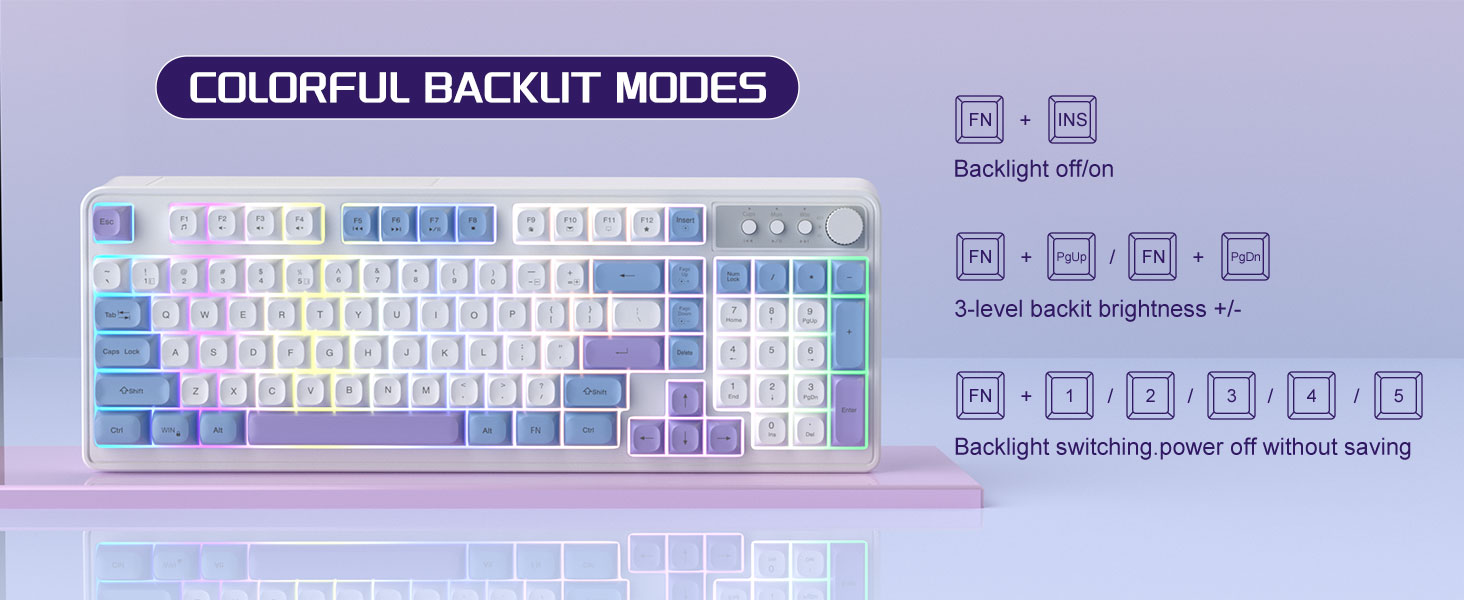
Image: The MageGee V560 keyboard displaying various colorful backlit modes, with instructions for controlling them.

Image: A visual representation of the 16 multimedia shortcuts available on the MageGee V560 keyboard, activated via the FN key.
Funcțiile mouse-ului
- Ajustare DPI: The mouse supports 6 levels of DPI adjustment (600-3200 DPI). Press the DPI button (usually located below the scroll wheel) to cycle through the sensitivity settings. Internal indicator lights will show the current DPI level.
- Breathing Backlight: The mouse features 7 dazzling color breathing backlights. This lighting is automatic and indicates mouse activity.

Image: The MageGee V560 mouse highlighting its DPI settings (1000, 1200, 1600 DPI) and showing the USB-C charging port.
Încărcare și durata de viață a bateriei
- Both the keyboard and mouse are rechargeable. Use the provided USB-C charging cable to charge them.
- Keyboard Standby Time: Până la 365 zile.
- Mouse Standby Time: Până la 270 zile.
- Funcția Auto-Sleep: The devices automatically enter sleep mode after a period of inactivity to conserve battery power and extend battery life.

Image: An illustration demonstrating the intelligent auto-sleep feature of the MageGee V560 combo, which conserves battery life.
Compatibilitate
The MageGee V560 Wireless Gaming Keyboard and Mouse Combo is compatible with the following operating systems:
- Win2000
- Câștigă XP
- Câștigă-MĂ
- Vista
- Win7
- Win8
- Win10
- Android
- Linux
- Mac OS
Depanare
Dacă întâmpinați probleme cu dispozitivul dumneavoastră MageGee V560, vă rugăm să consultați următoarele soluții comune:
- Dispozitivul nu se conectează:
- Asigurați-vă că receptorul USB este conectat corect la un port USB funcțional.
- Verificați dacă atât tastatura, cât și mouse-ul sunt pornite.
- Check the battery levels of both devices and charge if necessary.
- Încercați să conectați receptorul USB într-un alt port USB.
- Întârziere sau deconectare:
- Ensure the devices are within the 33 ft (10 meter) operating range of the USB receiver.
- Minimizați interferențele de la alte dispozitive wireless de 2.4 GHz (de exemplu, routere Wi-Fi, telefoane fără fir).
- Charge the devices to ensure sufficient power.
- Keys Not Registering / Mouse Not Responding:
- Recharge the keyboard and mouse.
- Asigurați-vă că receptorul USB este conectat corect.
- Reporniți computerul.
- Probleme cu iluminarea din spate:
- Asigurați-vă că tastatura este încărcată.
- Utilizare FN + INS to toggle the backlight.
- Ajustați luminozitatea cu FN + PagUp/PagDn.
Specificații
| Marca | MageGee |
| Model | V560 |
| Tehnologia de conectivitate | Wireless 2.4GHz |
| Caracteristici speciale | RGB lighting, rechargeable keyboard and mouse, ergonomic design |
| Dispozitive compatibile | Personal Computer (Win2000, Win XP, Win ME, Vista, Win7, Win8, Win10, Android, Linux, Mac OS) |
| Greutatea articolului | 1.87 lire sterline |
| Dimensiuni pachet | 16.61 x 9.21 x 1.73 inci |
| Producător | MAGEGEE |
Întreţinere
- curatenie: Folosiți o lavetă moale și uscată pentru a curăța tastatura și mouse-ul. Pentru murdăria persistentă, uscați ușor.amp se poate folosi o lavetă, asigurându-vă că nu pătrunde lichid în dispozitiv.
- Depozitare: Depozitați dispozitivele într-un loc răcoros și uscat, ferit de lumina directă a soarelui și de temperaturi extreme.
- Îngrijirea bateriei: Evitați descărcarea completă frecventă a bateriilor. Încărcați-le regulat pentru a menține starea de funcționare a acestora.
Garanție și suport
Acest produs vine cu un 1 an garanție de la data cumpărării.
For any questions or support needs, please contact MageGee customer service via Amazon email. We aim to respond within 12 hours and provide a satisfactory solution.


