1. Introducere
The Mastech MS5908A Circuit Analyzer is a professional-grade instrument designed for comprehensive electrical circuit testing. It provides accurate measurements for AC voltage, impedance, frequency, and performs critical RCD and GFCI tests, ensuring electrical safety and proper circuit functionality. This manual provides detailed instructions for the safe and effective use of your MS5908A.

Figura 1: Față view of the Mastech MS5908A Circuit Analyzer, showing the LCD display and control buttons.
2. Informații de siguranță
WARNING: Always read and understand all safety warnings and instructions before using this instrument. Failure to follow these instructions may result in electric shock, fire, or serious injury.
- Asigurați-vă că dispozitivul este potrivit pentru volumtage and current levels of the circuit being tested. The MS5908A is designed for 110V US plug systems.
- Nu utilizați dispozitivul dacă pare deteriorat sau funcționează anormal.
- Always wear appropriate personal protective equipment (PPE), such as insulated gloves and safety glasses, when working with electrical circuits.
- Do not operate the device in wet conditions or in explosive atmospheres.
- Verify the correct connection of the device before initiating any test.
- Keep hands and fingers away from live terminals.
- Only qualified personnel should perform electrical testing.
3. Ce se află în cutie
La deschiderea coletului, vă rugăm să verificați dacă toate articolele enumerate mai jos sunt prezente și în stare bună:
- 1 x Mastech MS5908A Circuit Analyzer
- 2 baterii LR44 (incluse)
- 1 x Power Cord / Carry Bag (as indicated in packaging information)
- 1 x certificat de calibrare
- 1 x Ghid de pornire rapidă
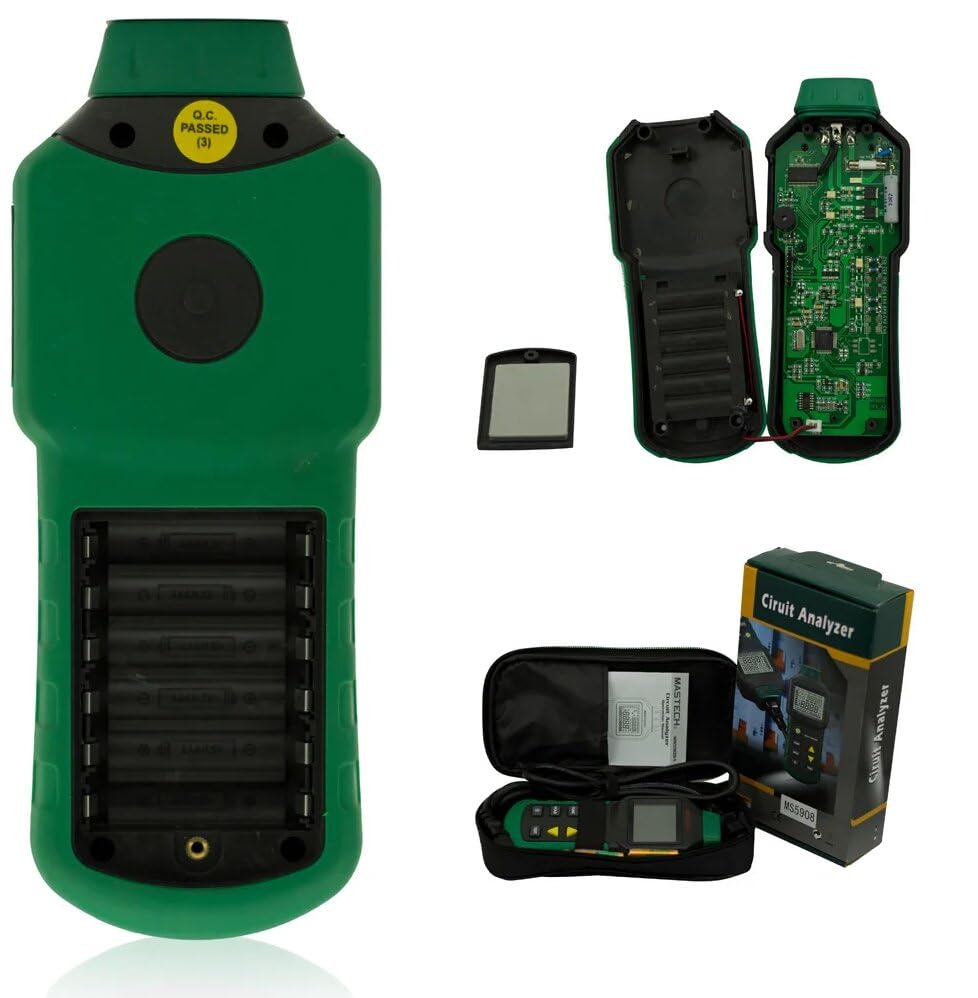
Figure 2: Contents of the Mastech MS5908A package, including the device, battery compartment, and carry case.

Figure 3: Diagram illustrating the packaging and included accessories for the MS5908A.
4. Configurare
4.1 Instalarea bateriei
- Locate the battery compartment on the back of the MS5908A unit.
- Deschideți capacul compartimentului bateriei.
- Insert the 2 LR44 batteries, ensuring correct polarity (+ and -).
- Închideți bine capacul compartimentului bateriei.
4.2 Pornirea inițială
Press the power button (usually marked with a circle and vertical line) to turn on the device. The LCD display should illuminate.
5. Instrucțiuni de utilizare
The MS5908A offers various testing functions accessible via its control buttons. Familiarize yourself with the display and button layout.
5.1 Funcționare generală
- Buton de alimentare: Pornește/Oprește dispozitivul.
- Buton FUNC: Cycles through different measurement modes (e.g., Voltage, Frequency, Impedance).
- Țineți butonul apasat: Îngheață citirea curentă de pe afișaj. Apăsați din nou pentru a elibera.
- Buton pentru iluminare de fundal: Toggles the display backlight ON/OFF for better visibility in low light conditions.
- Butonul TEST: Initiates specific tests like RCD or GFCI.
- Butoane săgeată (sus/jos): Used for navigation or adjusting parameters in certain modes.
5.2 Măsurarea AC Voltage (TRMS)
- Plug the MS5908A into the standard US wall socket (110V).
- Ensure the device is in AC Voltage measurement mode (use FUNC button if necessary).
- The display will show the True RMS AC Voltagcitirea.
5.3 Artificial Load Testing (Wire Drop Measurement)
The MS5908A (US plug version) supports artificial load testing at 12A, 15A, and 20A to measure wire drop.
- Plug the device into the circuit to be tested.
- Select the artificial load test mode using the FUNC button.
- Use the arrow buttons to select the desired load (12A, 15A, or 20A).
- Press the TEST button to initiate the load and measure the voltage picătură.
5.4 Measuring Phase Voltage, Neutral Wire, Voltage to Earth, and Frequency
The device can analyze various aspects of the electrical supply:
- Plug the MS5908A into the socket.
- Cycle through the FUNC button to display readings for:
- Faza Voltage (Live to Neutral)
- Neutral Wire Voltage (Neutral to Earth)
- Voltage to Earth (Live to Earth)
- Frecvență (Hz)
5.5 Measuring Phase (Live Wire), Neutral Wire, Earth Wire Conductor Impedance
- Plug the MS5908A into the socket.
- Select the impedance measurement mode using the FUNC button.
- The display will show the impedance values for Live, Neutral, and Earth conductors.
5.6 RCD (Residual Current Device) and GFCI (Ground Fault Circuit Interrupter) Testing
IMPORTANT: RCD/GFCI testing will trip the circuit breaker. Ensure all connected equipment is safely shut down or disconnected before performing this test.
- Plug the MS5908A into the RCD/GFCI protected socket.
- Select the RCD or GFCI test mode using the FUNC button.
- Press the TEST button. The device will simulate a fault condition.
- Observe if the RCD/GFCI trips within the specified time (e.g., 1ms~6.5S for RCD/GFCI Trip Time).
- The device will indicate if the test passed or failed.

Figure 4: The MS5908A Circuit Analyzer in use within a typical electrical testing environment.
6. Întreținere
- curatenie: Ștergeți dispozitivul cu o lavetă uscată și moale. Nu utilizați substanțe de curățare abrazive sau solvenți.
- Depozitare: Depozitați dispozitivul într-un loc răcoros și uscat, ferit de lumina directă a soarelui și de temperaturi extreme. Dacă îl depozitați pentru perioade lungi de timp, scoateți bateriile pentru a preveni scurgerile.
- Înlocuire baterie: Înlocuiți bateriile când pe afișaj apare indicatorul de baterie descărcată.
- Calibrare: Regular calibration by qualified service personnel is recommended to ensure continued accuracy.
7. Depanare
| Problemă | Cauza posibila | Soluţie |
|---|---|---|
| Dispozitivul nu pornește. | Baterii descărcate sau instalate incorect. | Verificați polaritatea bateriilor sau înlocuiți bateriile. |
| Citiri inexacte. | Poor connection, incorrect mode, or device needs calibration. | Ensure secure connection. Verify correct measurement mode. Consider professional calibration. |
| Afișajul este întunecat sau pâlpâie. | Baterie descărcată. | Înlocuiți bateriile. |
| RCD/GFCI test does not trip the circuit. | Faulty RCD/GFCI, or incorrect test procedure. | Ensure the circuit is indeed RCD/GFCI protected. Re-read operating instructions for RCD/GFCI test. If issue persists, the RCD/GFCI itself may be faulty and require professional inspection. |
8. Specificații
The following table details the technical specifications for the Mastech MS5908A Circuit Analyzer:

Figure 5: Detailed specifications for the MS5908A, including ranges, resolutions, and accuracies.
| Caracteristică | Detaliu |
|---|---|
| Numărul de model | GL-MS5908A |
| Sursa de alimentare | Battery Powered (2 LR44 batteries included) |
| Dimensiunile produsului | 6.3 x 3.54 x 1.97 inchi (160 x 90 x 50 mm) |
| Greutatea articolului | 1.1 lire (0.5 kilograme) |
| Culoare | Verde |
| Linia Voltage (MS5908A) | 85~135V |
| Peak Line Voltage (MS5908A) | 120~190V |
| Frecvența liniei | 45~65Hz |
| Impedance (Live-Neutral & Earth) | 0.00~3.00Ω (Resolution 0.01Ω, Accuracy ±(2.5%+2)) |
| Neutral-Ground Voltage | 0.0~10.0V (Resolution 0.1V, Accuracy ±(2.5%+2)) |
| Curent de declanșare a RCD | 30mA~37mA (Resolution 0.1mA, Accuracy ±(1.0%+2)) |
| Timp de călătorie RCD | 1ms~6.5S (Resolution 1mS, Accuracy ±(1.0%+2)) |
| Curent de declanșare GFCI | 6mA~9mA (Resolution 0.1mA, Accuracy ±(1.0%+2)) |
| Timp de călătorie GFCI | 1ms~6.5S (Resolution 1mS, Accuracy ±(1.0%+2)) |
| Voltage Drop Load Current | 12/15/20A |
| Oprire automată | Da |
| Reținere de date | Da |
| Afișaj baterie descărcată | Da |

Figure 6: Comparison of Mastech circuit analyzer models, including MS5908A and MS5908C.
9. Garanție și asistență
Mastech products are designed for reliability and performance. For warranty information, technical support, or service inquiries, please refer to the contact information provided in the Quick Start Guide included with your product or visit the official Mastech website-ul.
Pentru întrebări generale, puteți vizita și Magazinul Mastech pe Amazon.