Introducere
Thank you for choosing the Mastech MS8233D Digital Multimeter. This manual provides essential information for the safe and effective operation, maintenance, and troubleshooting of your device. Please read this manual thoroughly before use and keep it for future reference.
Informații de siguranță
AVERTISMENT: Pentru a evita electrocutarea sau vătămările corporale, citiți și înțelegeți toate informațiile de siguranță înainte de a utiliza acest produs.
- Asigurați-vă întotdeauna că multimetrul este în funcția și intervalul corect înainte de a efectua măsurători.
- Nu aplicați mai mult decât volumul nominaltage, as marked on the meter, between terminals or between any terminal and earth ground. The MS8233D has a Safety Rating of CATII 600V.
- Aveți grijă când lucrați cu voltagpeste 30V AC RMS, 42V peak sau 60V DC. Astfel de tensiunitagreprezintă un pericol de șoc.
- Țineți degetele în spatele barierelor sondei în timpul măsurătorilor.
- Do not use the meter if it is damaged or if the case is open. Inspect the meter and test leads before use.
- Înlocuiți bateria imediat ce apare indicatorul de baterie descărcată pentru a asigura citiri precise.
- Nu utilizați contorul în medii cu gaze, vapori sau praf exploziv.
Caracteristici cheie
The Mastech MS8233D Digital Multimeter offers a range of functionalities for various electrical measurements:
- Afişa: 2000 counts for precise readings.
- Gama: Auto and Manual Ranging capabilities.
- Test de diodă: Features a Diode Open Voltage de 1.5V.
- Test de continuitate: Audible buzzer for resistance less than 60Ω.
- Păstrarea datelor: Freezes the displayed reading for convenience.
- Oprire automată: Economisește durata de viață a bateriei.
- Vol. fără contacttage Detectare (NCV): For identifying live wires without direct contact.
- Masura maxima: Records the highest value measured.
- Iluminare de fundal a afișajului: Pentru vizibilitate în condiții de lumină scăzută.
- Afișaj baterie descărcată: Indicates when battery replacement is needed.
- Alimentare electrică: Operates on 1x 9V 6F22 Battery.
- Certificari: Conform RoHS.
- Evaluare de siguranță: CATII 600V.
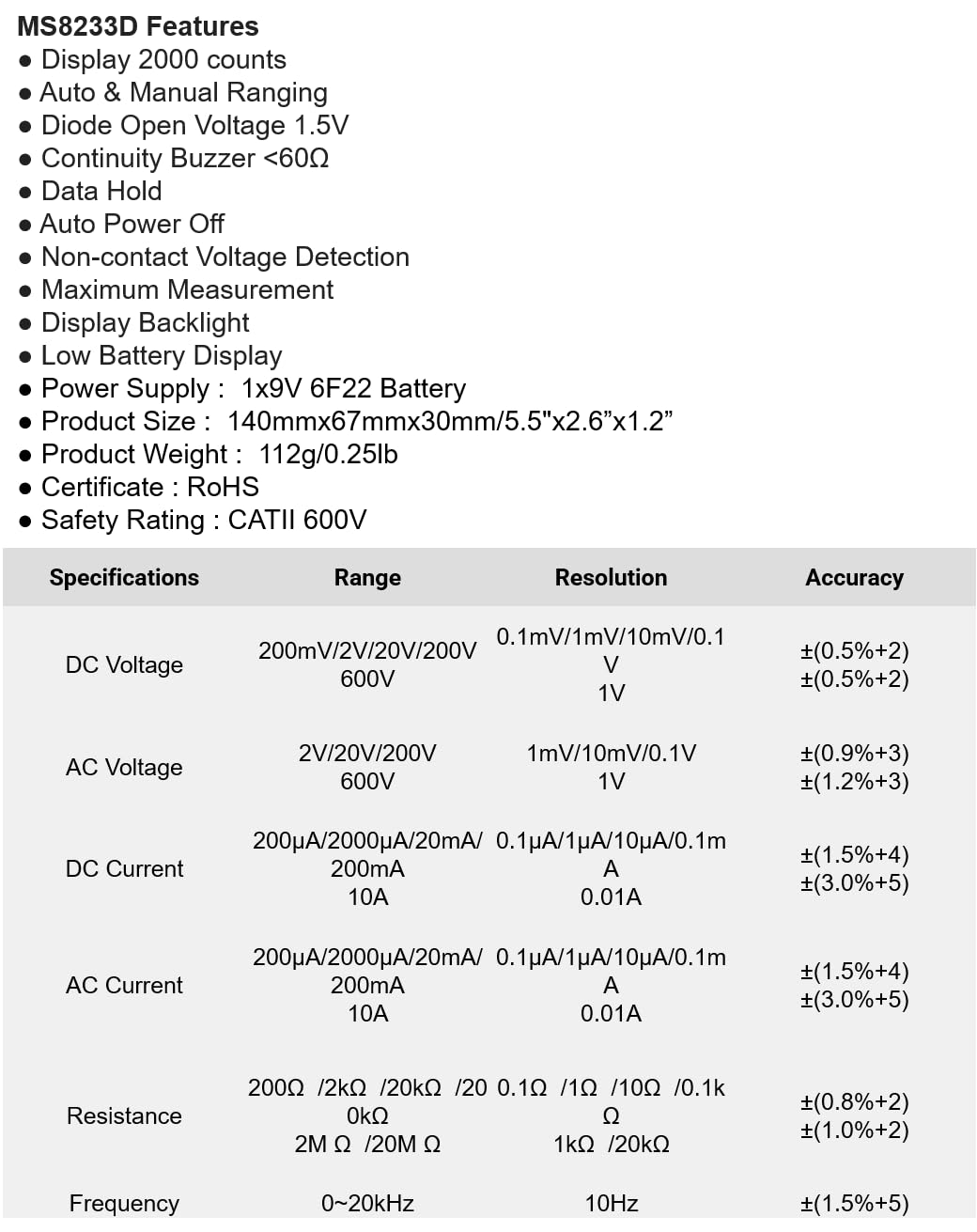
Figura 1: Față view of the Mastech MS8233D Digital Multimeter, highlighting the display, rotary function switch, and input terminals.
Produs terminatview și Componente
The MS8233D multimeter is designed for ease of use and durability. Familiarize yourself with its main parts:

Figura 2: Pesteview of the MS8233D Digital Multimeter, illustrating its physical dimensions, power supply, and typical applications in domestic, industrial, and electronics settings.
- Display LCD: Afișează valorile măsurate, unitățile de măsură și indicatorii de funcție.
- Comutator rotativ funcțional: Used to select the desired measurement function (e.g., ACV, DCV, Resistance, Diode, Continuity, Temperature, NCV).
- Mufe de intrare: Terminals for connecting test leads.
- mufă COM: Terminal de intrare comun (negativ) pentru toate măsurătorile.
- Mufă VΩmA: Terminal de intrare pozitiv pentru voltage, resistance, diode, continuity, and small current measurements.
- Jack de 10A: Positive input terminal for high current (up to 10A) measurements.
- Butoane funcționale: For features like Data Hold, Backlight, and Range selection.
Înființat
Instalarea bateriei
The MS8233D requires one 9V 6F22 battery for operation. To install or replace the battery:
- Ensure the multimeter is turned off and disconnect all test leads from the input terminals.
- Localizați capacul compartimentului bateriilor pe spatele contorului.
- Folosiți o șurubelniță pentru a slăbi șurubul (șuruburile) de pe capacul bateriei și a scoate capacul.
- Connect the new 9V battery to the battery clips, observing the correct polarity.
- Introduceți bateria în compartiment și puneți la loc capacul, fixându-l cu șurubul (șuruburile).
Nota: The meter includes a low battery indicator. Replace the battery promptly when this indicator appears to maintain measurement accuracy.
Instrucțiuni de operare
Before making any measurement, ensure the test leads are properly connected and the function switch is set to the desired range.
Măsurarea DC Voltage (DCV)
- Insert the red test lead into the VΩmA jack and the black test lead into the COM jack.
- Set the rotary switch to the desired DCV range (e.g., 200mV, 2V, 20V, 200V, 600V). If unsure, start with the highest range or use auto-ranging if available.
- Conectați sondele de testare la componenta sau circuitul care urmează să fie măsurat, respectând polaritatea.
- Citiți voltagValoarea de pe ecranul LCD.
Măsurarea AC Voltage (ACV)
- Insert the red test lead into the VΩmA jack and the black test lead into the COM jack.
- Set the rotary switch to the desired ACV range (e.g., 2V, 20V, 200V, 600V).
- Conectați sondele de testare la componenta sau circuitul care urmează să fie măsurat.
- Citiți voltagValoarea de pe ecranul LCD.
Measuring DC/AC Current (DCA/ACA)
ATENȚIE: Nu conectați niciodată contorul în paralel cu o priză de voltaj.tage source when measuring current. This can damage the meter and the circuit.
- For currents up to 200mA, insert the red test lead into the VΩmA jack. For currents up to 10A, insert the red test lead into the 10A jack. Insert the black test lead into the COM jack.
- Set the rotary switch to the desired DC or AC current range (e.g., 200µA, 2000µA, 20mA, 200mA, 10A).
- Deschideți circuitul unde urmează să se măsoare curentul și conectați contorul în serie cu sarcina.
- Citiți valoarea curentă pe afișajul LCD.
Measuring Resistance (Ω)
- Insert the red test lead into the VΩmA jack and the black test lead into the COM jack.
- Setați comutatorul rotativ la intervalul de rezistență dorit (de exemplu, 200Ω, 2kΩ, 20kΩ, 200kΩ, 2MΩ, 20MΩ).
- Asigurați-vă că circuitul sau componenta este dezactivată înainte de a măsura rezistența.
- Conectați sondele de testare la componentă.
- Citiți valoarea rezistenței pe afișajul LCD.
Testul diodei
- Insert the red test lead into the VΩmA jack and the black test lead into the COM jack.
- Set the rotary switch to the Diode symbol (usually shared with Continuity).
- Conectați sonda roșie la anod și sonda neagră la catodul diodei.
- Afișajul va afișa volumul înaintetagInversați sondele; afișajul ar trebui să afișeze „OL” (Buclă deschisă) pentru o diodă bună.
Test de continuitate
- Insert the red test lead into the VΩmA jack and the black test lead into the COM jack.
- Set the rotary switch to the Continuity symbol (usually shared with Diode).
- Conectați sondele de testare la circuit sau la componentă.
- Dacă rezistența este sub aproximativ 60Ω, va suna un buzer, indicând continuitatea. Afișajul va afișa și valoarea rezistenței.
Vol. Fără contacttage (NCV) Detectie
- Setați comutatorul rotativ la funcția NCV.
- Move the top part of the meter (NCV sensor area) close to the conductor suspected of having AC voltage.
- Contorul va emite un semnal sonor, iar indicatorul NCV se va aprinde dacă volumul AC estetage este detectat.
Funcția de păstrare a datelor
Apăsați butonul „HOLD” pentru a îngheța citirea curentă pe afișaj. Apăsați-l din nou pentru a elibera funcția de blocare și a relua măsurătorile în timp real.
Funcția de iluminare din spate
Press the 'LIGHT' button to turn on the display backlight. Press it again to turn it off. The backlight may automatically turn off after a short period to conserve battery.
Întreţinere
Curatenie
Ștergeți carcasa contorului cu reclamăamp o lavetă și un detergent blând. Nu utilizați abrazive sau solvenți. Asigurați-vă că aparatul de măsură este complet uscat înainte de utilizare.
Înlocuirea bateriei
Refer to the 'Battery Installation' section under 'Setup' for instructions on replacing the 9V battery. Always replace the battery when the low battery indicator is displayed to ensure accurate readings and proper operation.
Înlocuirea siguranței
The MS8233D is equipped with internal fuses to protect against overcurrent. If the current measurement function stops working, the fuse may need replacement. Fuse replacement should only be performed by qualified personnel. Use only fuses of the specified type and rating (e.g., F200mA/250V for mA range, F10A/250V for 10A range).
Depanare
| Problemă | Cauza posibila | Soluţie |
|---|---|---|
| Fără afișaj sau afișaj slab iluminat | Baterie descărcată sau descărcată | Înlocuiți bateria de 9V. |
| Citiri incorecte | Funcție/interval selectat incorect; conexiune slabă a cablurilor de testare; baterie descărcată | Verify function and range; check test lead connections; replace battery. |
| Măsurarea curentului nu funcționează | Siguranță arsă | Înlocuiți siguranța corespunzătoare (consultați secțiunea Întreținere). |
| Se afișează „OL” (Suprasarcină) | Measurement exceeds selected range; open circuit (for continuity/resistance) | Select a higher range; check for open circuit. |
| Fără bip de continuitate | Resistance too high; open circuit | Check for continuity; ensure resistance is below 60Ω. |
Specificații
The following table details the measurement ranges, resolutions, and accuracies for the Mastech MS8233D Digital Multimeter:

Figure 3: Comprehensive specifications for the MS8233D, outlining measurement capabilities and precision.
| Caracteristică | Caietul de sarcini |
|---|---|
| Afişa | 2000 conturi |
| DC Voltage | 200mV / 2V / 20V / 200V / 600V |
| AC Voltage | 2V / 20V / 200V / 600V |
| Curent DC | 200µA / 2000µA / 20mA / 200mA / 10A |
| Curent alternativ | 200µA / 2000µA / 20mA / 200mA / 10A |
| Rezistenţă | 200Ω / 2kΩ / 20kΩ / 200kΩ / 2MΩ / 20MΩ |
| Frecvenţă | 0-20kHz |
| Volum deschis diodătage | 1.5V |
| Continuitate Buzzer | <60Ω |
| Alimentare electrică | 1x baterie 9V 6F22 |
| Dimensiunile produsului | 140 mm x 67 mm x 30 mm (5.5" x 2.6" x 1.2") |
| Greutatea produsului | 112 g (0.25 lb) |
| Evaluare de siguranță | CATII 600V |
| Certificari | CE, RoHS |
Garanție și suport
For warranty information and technical support, please refer to the documentation provided with your purchase or contact the seller/manufacturer directly. Keep your purchase receipt as proof of purchase for any warranty claims.


