1. Introducere
Welcome to the user manual for your new SENTRY BT Pro Sq Headset with Active Noise Canceling. This manual provides essential information on setting up, operating, maintaining, and troubleshooting your headset to ensure optimal performance and longevity. Please read this manual thoroughly before using the product.
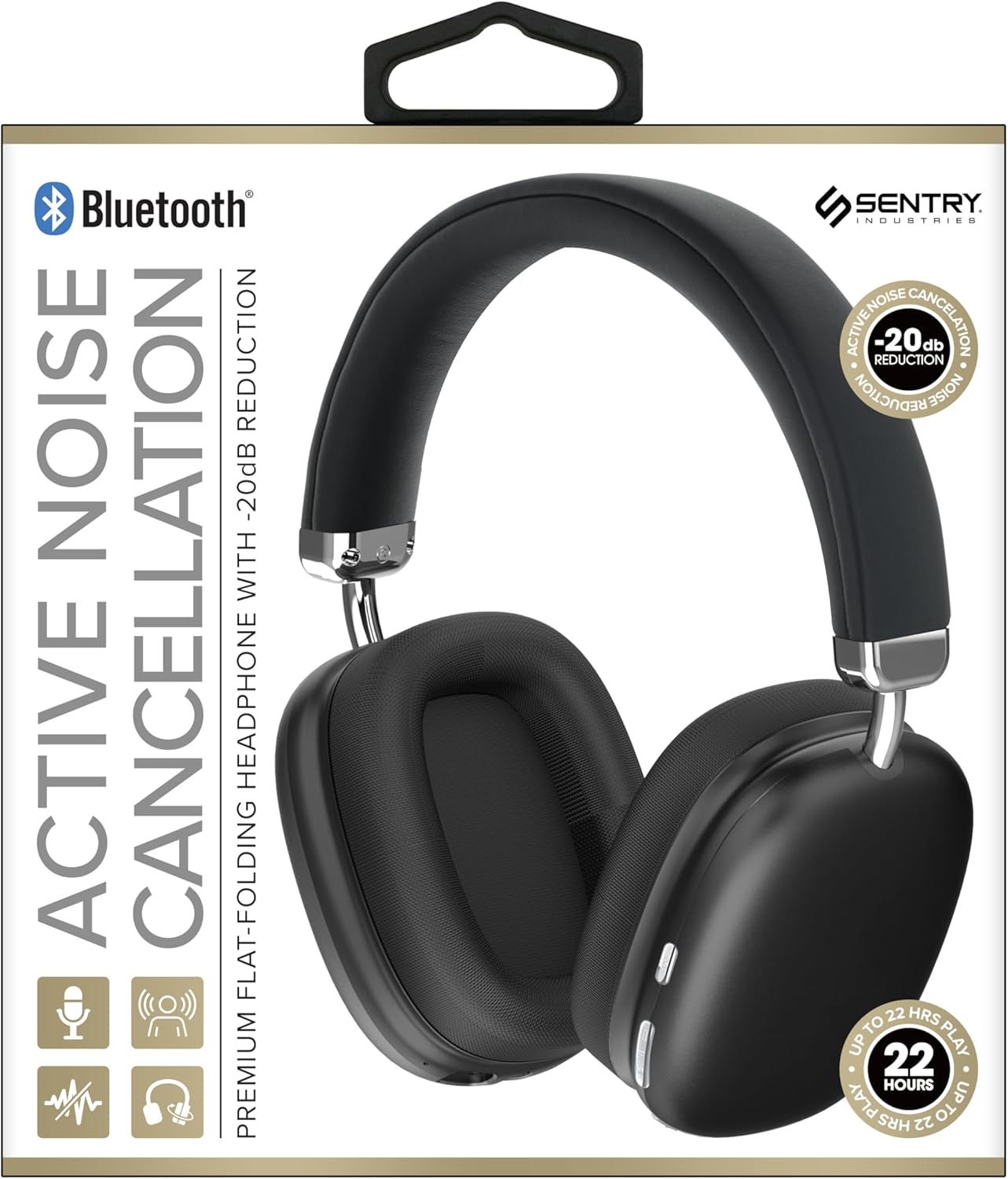
This image displays the SENTRY BT Pro Sq Headset in black, highlighting its over-ear design, adjustable headband, and the control buttons located on the earcups. The packaging indicates features such as Bluetooth connectivity, Active Noise Cancellation with -20dB reduction, and up to 22 hours of play time.
2. Informații importante privind siguranța
To ensure safe and proper operation, please observe the following guidelines:
- Nu expuneți setul cu cască la temperaturi extreme, umiditate sau substanțe corozive.
- Evitați să scăpați căștile sau să le supuneți la impacturi puternice.
- Nu dezasamblați și nu încercați să reparați singur căștile. Aceasta va anula garanția.
- Curățați setul cu cască doar cu o lavetă moale și uscată. Nu utilizați agenți de curățare lichizi.
- Ascultarea prelungită la niveluri ridicate ale volumului poate provoca afectarea auzului. Reglați volumul la un nivel sigur.
- Do not use the headset in situations where inability to hear ambient sounds could be dangerous (e.g., driving, cycling, walking in traffic).
3. Conținutul pachetului
Vă rugăm să verificați pachetul pentru următoarele articole:
- SENTRY BT Pro Sq Headset
- Cablu de încărcare USB
- Manual de utilizare
4. Produs terminatview
The SENTRY BT Pro Sq Headset features an over-ear design with soft ear pads for comfort and noise isolation. It includes an adjustable folding headband for portability. Key components include:
- Căști pentru urechi: House the audio drivers and provide passive noise isolation.
- Bandă pentru cap: Adjustable for a comfortable fit, designed to fold for compact storage.
- Butoane de control: Located on the earcups for power, volume, track control, and Active Noise Cancellation (ANC).
- Microfon: Încorporat pentru apeluri hands-free.
- Port de încărcare: Pentru conectarea cablului de încărcare USB.
Refer to the product image in the Introduction section for visual identification of these components.
5. Configurare
5.1 Încărcarea căștilor
- Conectați capătul mic al cablului de încărcare USB la portul de încărcare de pe căști.
- Conectați capătul mai mare al cablului de încărcare USB la un adaptor de alimentare USB (nu este inclus) sau la portul USB al unui computer.
- The LED indicator on the headset will illuminate to show charging status. It will change color or turn off when fully charged.
- O încărcare completă durează de obicei aproximativ 2-3 ore.
5.2 Împerecherea cu dispozitive Bluetooth
Before using the headset wirelessly, you must pair it with your Bluetooth-enabled device (smartphone, laptop, tablet, smart speaker, gaming console).
- Asigurați-vă că setul cu cască este complet încărcat.
- With the headset powered off, press and hold the Power button for approximately 5-7 seconds until the LED indicator flashes rapidly, indicating pairing mode.
- Pe dispozitivul Bluetooth, activați Bluetooth și căutați dispozitive noi.
- Select "SENTRY BT Pro Sq" (or similar name) from the list of available devices.
- Once paired, the LED indicator on the headset will stop flashing and may turn solid blue or off, depending on the model.
- Căștile vor încerca automat să se reconecteze la ultimul dispozitiv asociat atunci când sunt pornite.
6. Instrucțiuni de utilizare
6.1 Pornire/Oprire
- Pornire: Press and hold the Power button for 2-3 seconds. The LED indicator will light up.
- Oprire: Press and hold the Power button for 3-4 seconds. The LED indicator will turn off.
6.2 Anularea activă a zgomotului (ANC)
Căștile dispun de anulare activă a zgomotului pentru a reduce zgomotul ambiental.
- Activați ANC: Locate the ANC button (if separate) or press the designated control. The ANC indicator light will turn on.
- Dezactivați ANC: Apăsați din nou butonul ANC. Indicatorul luminos ANC se va stinge.
6.3 Media Control (Touch Control)
Control your audio playback directly from the headset:
- Redare/Pauză: Atingeți o singură dată butonul multifuncțional.
- Creșterea volumului: Tap the Volume Up button.
- Volum scăzut: Tap the Volume Down button.
- Următoarea piesă: Atingeți de două ori butonul multifuncțional.
- Pista anterioară: Atingeți de trei ori butonul multifuncțional.
6.4 Gestionarea apelurilor
Manage phone calls with the built-in microphone:
- Răspunde la apel: Single tap the multi-function button when a call comes in.
- Terminare apel: Single tap the multi-function button during a call.
- Respinge apelul: Press and hold the multi-function button for 2 seconds when a call comes in.
7. Întreținere și îngrijire
- curatenie: Ștergeți setul cu cască cu o lavetă moale, uscată și fără scame. Nu utilizați produse de curățare abrazive, alcool sau solvenți chimici.
- Depozitare: When not in use, store the headset in a cool, dry place, away from direct sunlight and extreme temperatures. Utilize the folding headband feature for compact storage.
- Îngrijirea bateriei: To preserve battery life, charge the headset regularly, even if not used for extended periods. Avoid fully discharging the battery frequently.
- Evitați apa: The headset is not waterproof. Keep it away from water and moisture.
8. Depanare
Dacă întâmpinați probleme cu setul cu cască, vă rugăm să consultați următoarele probleme și soluții frecvente:
| Problemă | Soluție posibilă |
|---|---|
| Căștile nu pornesc. | Ensure the headset is fully charged. Connect to a power source and allow it to charge for at least 30 minutes before attempting to power on again. |
| Nu se poate asocia cu dispozitivul Bluetooth. | Ensure the headset is in pairing mode (LED flashing rapidly). Make sure Bluetooth is enabled on your device and it is within range (10 meters). Try restarting both the headset and your device. |
| Niciun sunet de la căști. | Check the volume level on both the headset and your connected device. Ensure the headset is properly paired and connected. Try playing audio from a different application or device. |
| Anularea activă a zgomotului (ANC) nu este eficientă. | Ensure ANC is activated. Make sure the earcups are properly sealed around your ears. ANC is most effective against low-frequency, constant noise. |
| Microfonul nu funcționează. | Ensure the headset is connected and selected as the input device on your computer or smartphone. Check privacy settings on your device that might restrict microphone access. |
9. Specificații
| Caracteristică | Detaliu |
|---|---|
| Numele modelului | HPXBTA1000 |
| Tehnologia de conectivitate | Wireless (Bluetooth) |
| Controlul zgomotului | Anularea activă a zgomotului |
| Plasarea urechii | Peste ureche |
| Factor de formă | Peste ureche |
| Tip control | Control media, atingere |
| Gama de frecvente | 20 Hz până la 20,000 Hz |
| Tip de driver audio | Driver dinamic |
| Dispozitive compatibile | Smartphones, Laptops, Tablets, Smart Speakers, Gaming Consoles |
| Culoare | Negru |
| Greutatea articolului | 1.2 lire sterline |
| UPC | 080068501503 |
| Producător | SANTINELĂ |
10. Garanție și asistență
SENTRY products are designed and manufactured to the highest quality standards. For information regarding warranty coverage, technical support, or service inquiries, please refer to the warranty card included with your product or visit the official SENTRY website. Vă rugăm să păstrați dovada achiziției pentru reclamații în garanție.


