Introducere
Thank you for choosing the Reobiux Security Camera Outdoor with Dual Lens. This advanced security system is designed to provide comprehensive surveillance for your home or business, featuring 2.5K/6MP resolution, auto-tracking, human detection, color night vision, and two-way audio. This manual will guide you through the setup, operation, and maintenance of your new security cameras.

Image: Two Reobiux outdoor security cameras, showcasing their design and the accompanying mobile application interface.
Ce este în cutie
Vă rugăm să verificați cu atenție conținutul pachetului. Dacă lipsesc sau sunt deteriorate articolele, contactați serviciul de asistență pentru clienți.
- Reobiux Security Cameras (2 units)
- Manual de utilizare
- Pungă de instalare cu șuruburi
- Power Cables (10-foot)

Imagine: O reprezentare vizuală a tuturor articolelor incluse în pachetul produsului.
Produs terminatview
The Reobiux security camera features a unique dual-lens design for comprehensive coverage and advanced monitoring capabilities.

Image: Detailed diagram illustrating the fixed and rotating lenses, along with the 355° pan and 90° tilt functionality of the camera.
Componente cheie:
- Lentila fixa: Provides a stable view a unei zone primare.
- Lentilă rotativă: Offers broader coverage with 355° pan and 90° tilt capabilities.
- LED-uri cu infraroșu: For clear night vision in low light.
- Repere: For full-color night vision and alarm illumination.
- Microfon: Pentru intrare audio și comunicare bidirecțională.
- Vorbitor: Pentru ieșire audio și comunicare bidirecțională.
- antene: For stable Wi-Fi connectivity.
- Baza de montare: Pentru o instalare sigură.
Ghid de instalare
1. Descărcarea aplicației și înregistrarea contului
- Activați permisiunile: Ensure Bluetooth and 2.4GHz Wi-Fi are enabled on your smartphone.
- Descărcați aplicația: Scan the QR code below or search for "iCSee" in the App Store (iOS) or Google Play Store (Android).
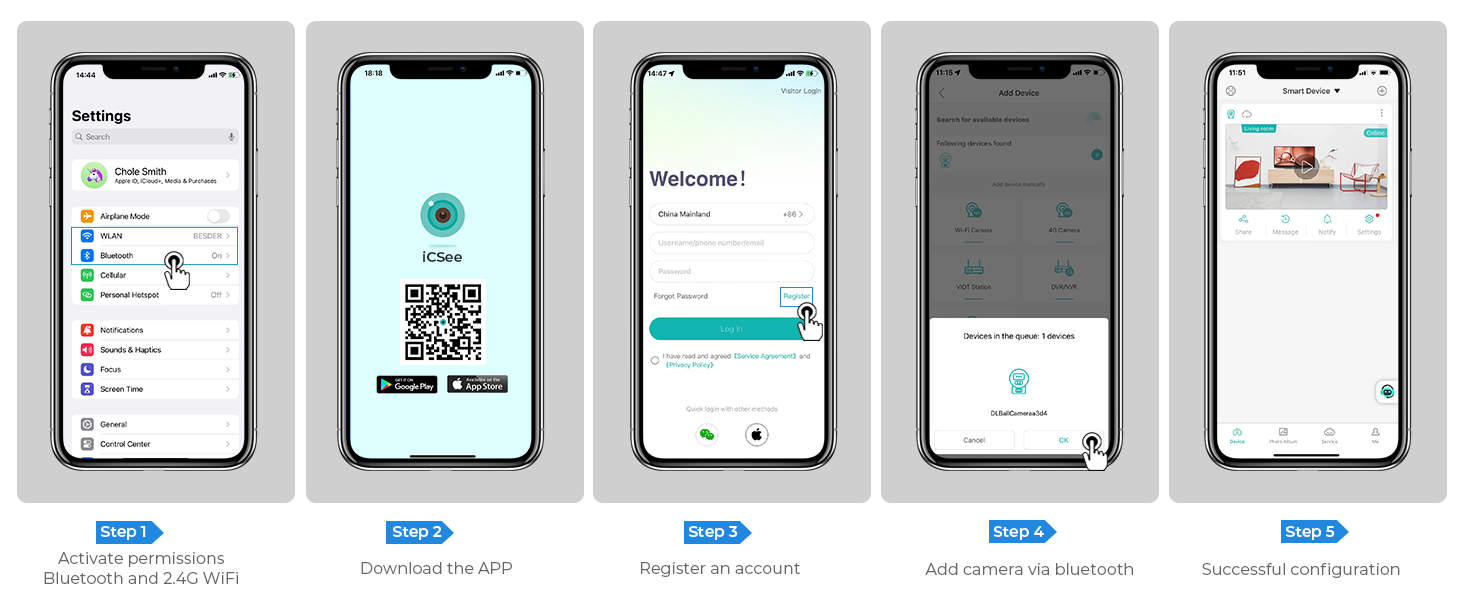
Image: Step-by-step guide for app download, account registration, and device configuration.
Alternatively, download the iCSee app directly from: http://d.xmeye.net/CSee
- Înregistrați un cont: Open the iCSee app and follow the on-screen instructions to register a new account.
- Adăugați camera prin Bluetooth: Once logged in, select "Add Device" and choose to add the camera via Bluetooth. The app will guide you through the pairing process.
- Successful Configuration: After successful pairing, your camera will be ready for use.
2. Alimentarea camerei
Connect the provided power cable to the camera's power input port and then plug it into a standard electrical outlet. The camera will power on and initiate its startup sequence.
3. Network Connection Options
- Conexiune Wi-Fi: The camera supports 2.4GHz Wi-Fi networks only. During app setup, select your Wi-Fi network and enter the password.
- Conexiune prin cablu Ethernet: For a more stable connection, you can connect the camera directly to your router using an Ethernet cable.
- Personal Hotspot: In situations where Wi-Fi is unavailable, the camera can also connect via a personal hotspot from your smartphone.
4. Montarea camerei
The camera is designed for both indoor and outdoor use and can be ceiling-mounted. Choose a location that provides optimal viewing angles and is within range of your Wi-Fi network or Ethernet connection.
- Marcați punctele de găurire: Use the mounting template (if provided) or the camera base to mark the drilling points on the desired surface.
- Găuri: Drill holes at the marked points. Insert wall anchors if mounting on drywall or masonry.
- Asigurați baza: Atașați baza de montare a camerei la suprafață folosind șuruburile furnizate.
- Atașați camera: Securely attach the camera unit to the mounted base.

Image: The camera installed outdoors, highlighting its robust IP66 waterproof design suitable for various weather conditions.
Instrucțiuni de operare
1. în direct View și Redare
Access the iCSee app to view trăi footage from your cameras. You can switch between the fixed and rotating lens views. The app also allows you to review inregistrat footage stored on the SD card or cloud.

Image: The dual-screen feature in the iCSee app, displaying simultaneous views from the fixed and rotating lenses.
2. Pan, Tilt, and Digital Zoom
Use the iCSee app to remotely control the rotating lens. You can pan the camera 355° horizontally and tilt it 90° vertically to cover a wide area. The camera also supports 5x digital zoom to view detalii.

Imagine: O imagine de sus view demonstrating the camera's extensive 355° pan and 90° tilt range, covering a large residential area.
3. Motion Tracking and Human Detection
The camera is equipped with advanced motion tracking. When human motion is detected, the rotating lens will automatically track the subject's movement. You will receive real-time alerts on your smartphone via the iCSee app, capturing images or video of the activity.

Image: The camera's alarm features, including real-time push notifications, siren, and light activation upon detecting suspicious activity.
4. Sunet bidirecțional
With the built-in microphone and speaker, you can communicate with visitors or deter intruders directly through the iCSee app from anywhere.

Image: Illustration of the two-way audio function, allowing communication with individuals near the camera.
5. Moduri de vedere nocturnă
The camera offers three night vision modes, selectable via the app, to ensure clear visibility up to 30 meters (98 feet) in various lighting conditions:
- Viziune nocturnă full-color: Utilizes built-in spotlights to provide vivid, full-color images even in complete darkness.
- Viziune de noapte în infraroșu: Uses infrared LEDs for clear black-and-white images in low-light conditions.
- Viziune inteligentă: Comută automat între modurile infraroșu și color în funcție de mișcarea detectată sau de condițiile de lumină.

Image: Visual comparison of infrared night vision and full-color night vision capabilities at night.
6. Opțiuni de stocare
- Card Micro SD: Supports up to 128GB micro SD card for local storage of recordings. (Card not included)
- Stocare în cloud: Optional cloud storage service available for secure, remote access to your video recordings.
7. Integrare Smart Home
The Reobiux camera is compatible with NVR systems for continuous recording and can be integrated with Amazon Alexa for convenient voice control.

Image: The camera's compatibility with smart home devices like Amazon Alexa for voice-controlled viewing.
Întreţinere
- curatenie: Ștergeți regulat obiectivul și corpul camerei cu o lavetă moale șiamp o lavetă pentru a îndepărta praful și murdăria. Nu utilizați substanțe chimice dure sau produse de curățare abrazive.
- Actualizări firmware: Verificați periodic aplicația iCSee pentru actualizări de firmware, pentru a asigura performanță și securitate optime.
- Alimentare electrică: Asigurați-vă că cablul de alimentare este conectat corect și nu este deteriorat.
- Conditii de mediu: While IP66 rated, avoid prolonged exposure to extreme temperatures outside the operating range (-20°C to 55°C) or direct high-pressure water jets.
Depanare
| Problemă | Cauza posibila | Soluţie |
|---|---|---|
| Camera este offline/Nu se poate conecta la Wi-Fi | Incorrect Wi-Fi password; Camera too far from router; 5GHz Wi-Fi network used; Network interference. |
|
| Calitate slabă a imaginii | Lentilă murdară; Iluminare insuficientă; Probleme cu lățimea de bandă a rețelei. |
|
| Detectarea mișcării nu funcționează | Sensibilitate de detectare prea mică; Zona de detectare nu este setată corect; Obstrucții în view. |
|
| Probleme audio bidirecționale | Microphone/speaker muted in app; Volume too low; Network latency. |
|
Specificații
| Caracteristică | Detaliu |
|---|---|
| Numărul de model | A9Q-2PCS |
| Rezoluție video | 2.5K/6MP (2048p) |
| Rezoluție statică efectivă | 3 MP |
| Lentile | Dual Lens (Fixed and Rotating) |
| Interval Pan/Tilt | Pan 355 °, înclinare 90 ° |
| Zoom digital | 5x |
| Gama de vedere nocturnă | Până la 30 metri (98 picioare) |
| Moduri de vedere nocturnă | Full-color, Infrared, Smart Vision |
| Conectivitate | 2.4GHz Wi-Fi, Ethernet, Bluetooth, ONVIF, RTSP |
| Opțiuni de stocare | Card Micro SD (până la 128 GB), Stocare în cloud |
| Audio | Sunet bidirecțional (microfon și difuzor încorporate) |
| Detectare | Human Detection, Motion Tracking |
| Alerte | Real-time App Notifications, Siren, Light Alarm |
| Rezistență la intemperii | IP66 rezistent la apa |
| Sursa de alimentare | Electric cu fir (12 volți, 3 wați) |
| Temperatura de operare | Până la 55°C |
| Dimensiuni (L x l x H) | 5.88 x 4.68 x 6.2 inci |
| Greutate | 2.75 lire sterline |
| Dispozitive compatibile | Smartphone, Tablet, Laptop, NVR Systems, Amazon Alexa |
| Metoda de control | Aplicația iCSee |
Garanție și suport
Reobiux provides dedicated customer support for its products. For any technical assistance, warranty claims, or inquiries, please contact our 24/7 online customer support team. Refer to your purchase documentation for specific warranty terms and conditions.

Image: Reobiux customer support representative ready to assist.


