1. Introducere
Thank you for choosing the VIMTAG Light Bulb Security Camera Model 847. This device is designed to provide reliable surveillance for your home, offering 2.5K/4MP high-definition video, pan/tilt functionality, night vision, two-way audio, and smart detection features. This manual will guide you through the setup, operation, and maintenance of your camera to ensure optimal performance.
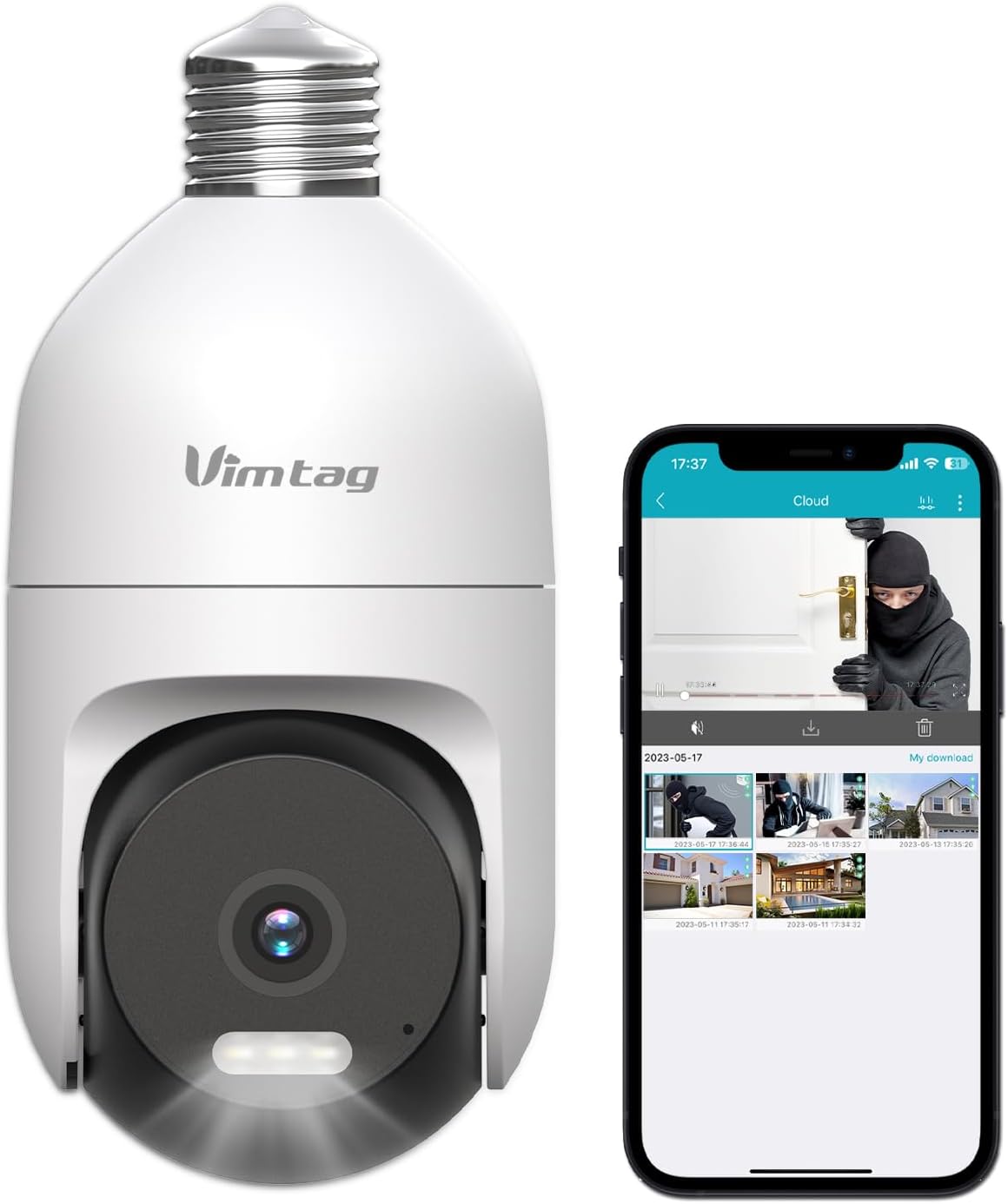
Imagine: VIM-ulTAG Light Bulb Security Camera Model 847, shown alongside a smartphone displaying its live feed.
2. Informații de siguranță
- Ensure the power is off before installing or removing the camera from a light socket.
- Install the camera in a standard E27/E26 light bulb socket.
- Nu expuneți camera la temperaturi extreme sau umiditate dincolo de raza sa de funcționare.
- Țineți camera departe de câmpuri magnetice puternice.
- Nu încercați să dezasamblați sau să reparați singur camera. Contactați serviciul de asistență pentru clienți pentru asistență.
- This camera is rated IP66 for weather resistance, suitable for outdoor use, but avoid submerging it in water.
3. Conținutul pachetului
VIM-ulTAG Light Bulb Security Camera package includes:
- VIMTAG Light Bulb Security Camera (Model 847)
- Manual de instrucțiuni (acest document)
Note: An SD card for local storage is not included and must be purchased separately if desired.
4. Produs terminatview
VIM-ulTAG Light Bulb Security Camera features a compact design that fits into a standard light bulb socket. Key components include:
- Obiectivul camerei: Captures 2.5K/4MP video.
- LED-uri cu infraroșu (IR): Pentru vedere nocturnă alb-negru.
- În centrul atenției: Provides color night vision and acts as a deterrent.
- Microfon: For audio input during two-way talk and sound detection.
- Vorbitor: For audio output during two-way talk and siren alarms.
- Slot pentru card Micro SD: Pentru stocare video locală (acceptă până la 512 GB).
- Buton de resetare: Used for factory reset (usually a small pinhole).
- E27/E26 Base: Standard light bulb screw-in base for power and mounting.
5. Configurare
5.1 Instalare fizică
- Oprire: Ensure the power to the light socket is turned off at the circuit breaker before installation.
- Înșurubați: Carefully screw the VIMTAG Light Bulb Camera into a standard E27/E26 light bulb socket. Ensure it is securely fastened.
- Pornire: Restore power to the light socket. The camera will power on and initiate its startup sequence.

Image: Illustration of screwing the camera into a light bulb socket.
5.2 Descărcarea aplicației și crearea contului
- Descărcați aplicația: Caută "Vimtag" in your smartphone's app store (iOS App Store or Google Play Store) and download the official VIMTAG aplicația.
- Înregistrare Cont: Open the app and follow the on-screen instructions to register a new account using your email address or phone number.

Image: A smartphone screen showing the VIMTAG app icon, indicating the app download step.
5.3 Camera Pairing and Wi-Fi Connection
- Adăugați dispozitiv: In the VIMTAG app, tap the "+" icon (usually in the top right or center) to add a new device.
- Selectați tipul camerei: Choose "Light Bulb Camera" from the list of device types.
- Follow In-App Prompts: The app will guide you through connecting the camera to your 2.4GHz Wi-Fi network. This typically involves scanning a QR code generated by the app with the camera lens or listening for an audio prompt.
- Confirmarea conexiunii: Once connected, the camera will indicate successful pairing (e.g., a voice prompt or LED indicator change), and its live feed will appear in the app.

Image: A smartphone screen showing the process of adding a new device, specifically selecting the light bulb camera.

Image: A smartphone displaying the live video feed from the VIMTAG camera after successful setup.
6. Operarea camerei
6.1 În direct View și control panoramic/înclinat
Once connected, open the VIMTAG app and select your camera to view the live feed. Use the on-screen controls to pan (horizontal 355°) and tilt (vertical 100°) the camera lens to adjust the viewing angle. The camera offers 8x digital zoom for closer inspection.

Image: Multiple devices (phone, tablet, laptop, desktop) displaying the live feed from the VIMTAG camera, illustrating multi-terminal viewing.
6.2 Sunet bidirecțional
The camera features a built-in microphone and speaker. Tap the microphone icon in the app to speak through the camera, and listen to audio from the camera's location. This allows for real-time communication with visitors or to deter intruders.

Image: A person speaking into a phone to communicate with a delivery person at the door via the VIMTAG camera's two-way audio.
6.3 Moduri de vedere nocturnă
The camera supports two night vision modes:
- Viziune de noapte IR: Defaults to black and white infrared vision in low light conditions.
- Color Night Vision with Spotlight: When the spotlight mode is activated (manually or via motion detection settings), the camera will switch to full-color night vision.
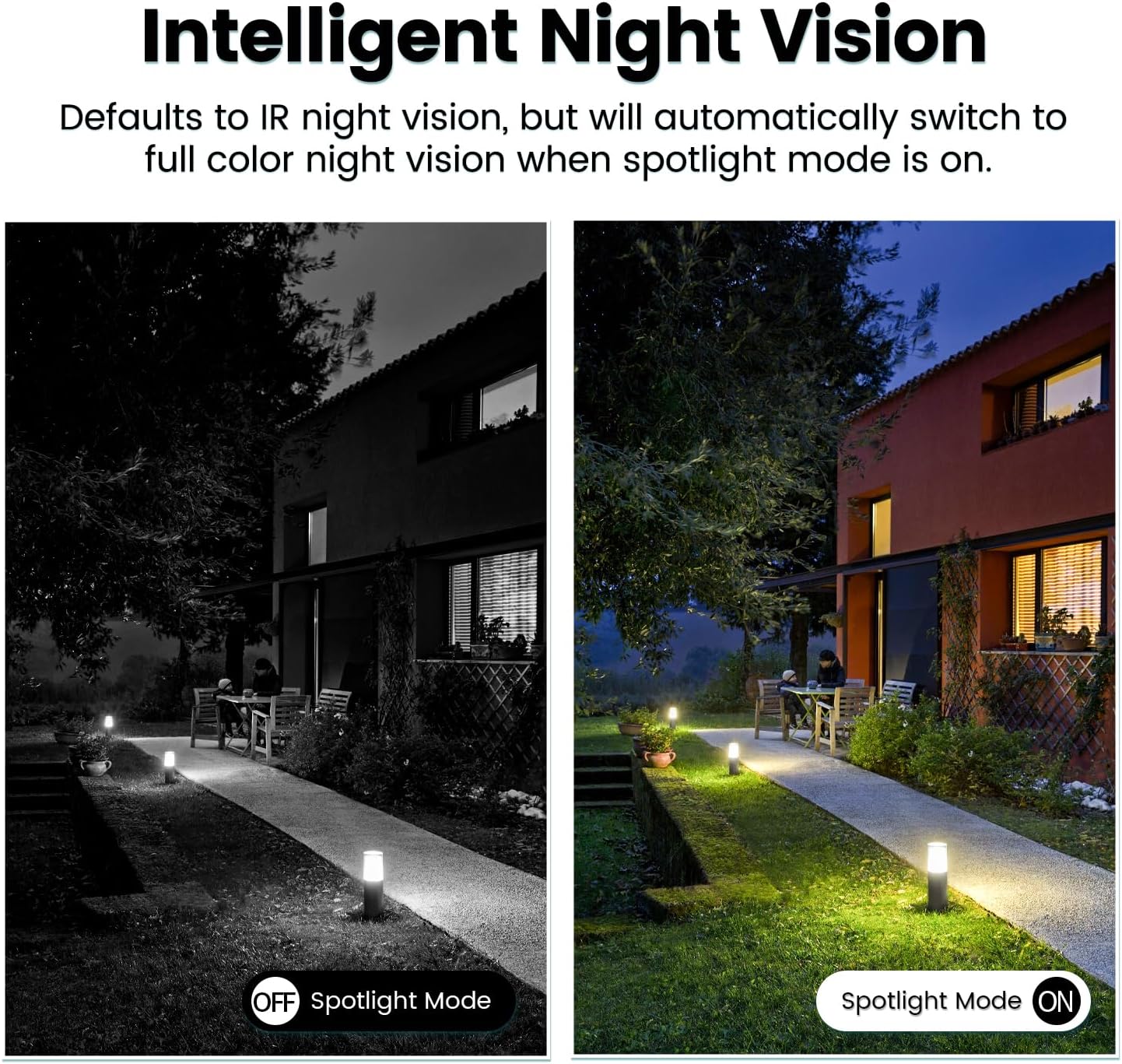
Image: Comparison of IR night vision (black and white, spotlight off) and color night vision (full color, spotlight on) from the VIMTAG aparat de fotografiat.
6.4 AI Human/Motion/Sound Detection and Alarms
Configure detection settings in the VIMTAG app. The camera can detect human shapes, general motion, and sounds. Upon detection, you will receive notifications on your phone, and the camera can trigger a siren alarm or activate its spotlight to deter unwanted activity.

Image: An illustration of the VIMTAG camera detecting an intruder, triggering a spotlight and sending an alert to a smartphone.

Image: A smartphone displaying a "Motion Detection Alert" notification from the VIMTAG aplicația.
6.5 Înregistrare și stocare video
Camera acceptă două opțiuni de stocare:
- Stocare locală: Insert a Micro SD card (up to 512GB, not included) into the camera's SD card slot for continuous 24/7 recording. Recorded footage can be accessed and managed through the VIMTAG aplicația.
- Stocare în cloud: An optional cloud storage service is available through the VIMTAG app for secure, encrypted video storage. Subscription details can be found within the app.
6.6 Integrare Alexa
VIM-ulTAG camera is compatible with Amazon Alexa. To integrate:
- Enable the VIMTAG skill in the Alexa app.
- Link your VIMTAG cont.
- Descoperiți dispozitivele.
You can then use voice commands such as, "Alexa, show me the [camera name]" to view the live feed on compatible Alexa-enabled devices with screens (e.g., Echo Show).

Image: A person interacting with an Amazon Echo Show to view the VIMTAG camera feed using voice commands.
7. Întreținere
- curatenie: Ștergeți ușor obiectivul și corpul camerei cu o cârpă moale și uscată. Nu utilizați substanțe chimice dure sau produse de curățare abrazive.
- Actualizări firmware: Verificați periodic VIM-ulTAG app for available firmware updates. Keeping your camera's firmware updated ensures optimal performance, security, and access to new features.
- Managementul cardului SD: Dacă utilizați un card SD, reîncărcați periodicview și faceți o copie de rezervă a alimentelor importantetage. Format the SD card through the app if you experience recording issues or to clear old data.
8. Depanare
| Problemă | Cauza posibila | Soluţie |
|---|---|---|
| Camera fails to power on. | No power to the light socket; camera not screwed in properly. | Check the light socket's power supply; ensure the camera is securely screwed in. |
| Nu se poate conecta la Wi-Fi. | Incorrect Wi-Fi password; camera too far from router; 5GHz Wi-Fi network used. | Verify Wi-Fi password; move camera closer to router; ensure you are connecting to a 2.4GHz Wi-Fi network. |
| Calitate video slabă. | Semnal Wi-Fi slab; lentilă murdară. | Improve Wi-Fi signal strength; clean the camera lens. |
| Detectarea mișcării nu funcționează. | Detection settings disabled or sensitivity too low; camera positioned incorrectly. | Check and adjust motion detection settings in the app; ensure camera has a clear view a zonei. |
| Cardul SD nu înregistrează. | SD card full or corrupted; incorrect recording settings. | Format the SD card via the app; check recording schedule and settings. Replace SD card if necessary. |
9. Specificații
| Caracteristică | Detaliu |
|---|---|
| Numele modelului | 847 |
| Rezoluție video | 2.5K / 4MP (1440p) |
| Interval Pan/Tilt | 355° orizontală, 100° verticală |
| Zoom digital | 8x |
| Vedere de noapte | IR Night Vision & Color Night Vision with LED Spotlight |
| Audio bidirecțional | Da (microfon și difuzor încorporate) |
| Detectare | AI Human, Motion, Sound Detection |
| Conectivitate | Wi-Fi de 2.4 GHz (IEEE 802.11b/g/n) |
| Opțiuni de stocare | Micro SD Card (up to 512GB), Cloud Storage (optional subscription) |
| Sursa de alimentare | Corded Electric (E27/E26 Light Bulb Socket) |
| Utilizare în interior/exterior | Yes (IP66 Weatherproof) |
| Dispozitive compatibile | iOS, Android, Mac, iPad, Windows, Amazon Alexa |
| Dimensiuni (L x l x H) | 3.07 x 3.07 x 5.31 inci |
| Greutatea articolului | 9.1 uncii |
| Frame Rate | 25 de cadre pe secundă |
| Codificare video | H.264/H.265 |
10. Garanție și asistență
VIMTAG products come with a standard manufacturer's warranty. For specific warranty terms and conditions, please refer to the warranty card included with your product or visit the official VIMTAG website. For technical support, troubleshooting assistance, or any product-related inquiries, please contact VIMTAG customer service through the VIMTAG app or their official website-ul.
Resurse online:
- VIMTAG Oficial Website: Visit the VIMTAG Magazin pe Amazon
- In-App Support: Access support features directly within the VIMTAG aplicație mobilă.


