1. Introducere
The TRIGKEY Key Mini N150 is a compact and efficient mini PC designed for various computing tasks, including office work, 4K video playback, web browsing, and educational use. It features an Intel Alder Lake N150 processor, DDR5 memory, and SSD storage, offering stable performance in a small form factor.
2. Ce se află în cutie
Verificați dacă toate articolele sunt prezente în colet:
- 1 x Mini PC TRIGKEY
- 1 x adaptor de alimentare
- 1 x cablu HDMI
- 1 x Manual de utilizare

This image displays the contents of the TRIGKEY Key Mini N150 package, including the mini PC unit, power adapter, HDMI cable, and the user manual.
3. Produs terminatview
3.1. External Features and Ports
The Key Mini N150 features a sleek and compact design, making it suitable for various environments. The front and rear panels provide essential connectivity options.

This image illustrates the front and rear interfaces of the mini PC. The front includes a power button, USB-C (data), and USB 3.2 ports. The rear panel features DC IN, two HDMI ports, multiple USB 3.2 ports, a 3.5mm audio jack, a CLR CMOS button, and a 2.5G LAN port.
3.2. Componente interne
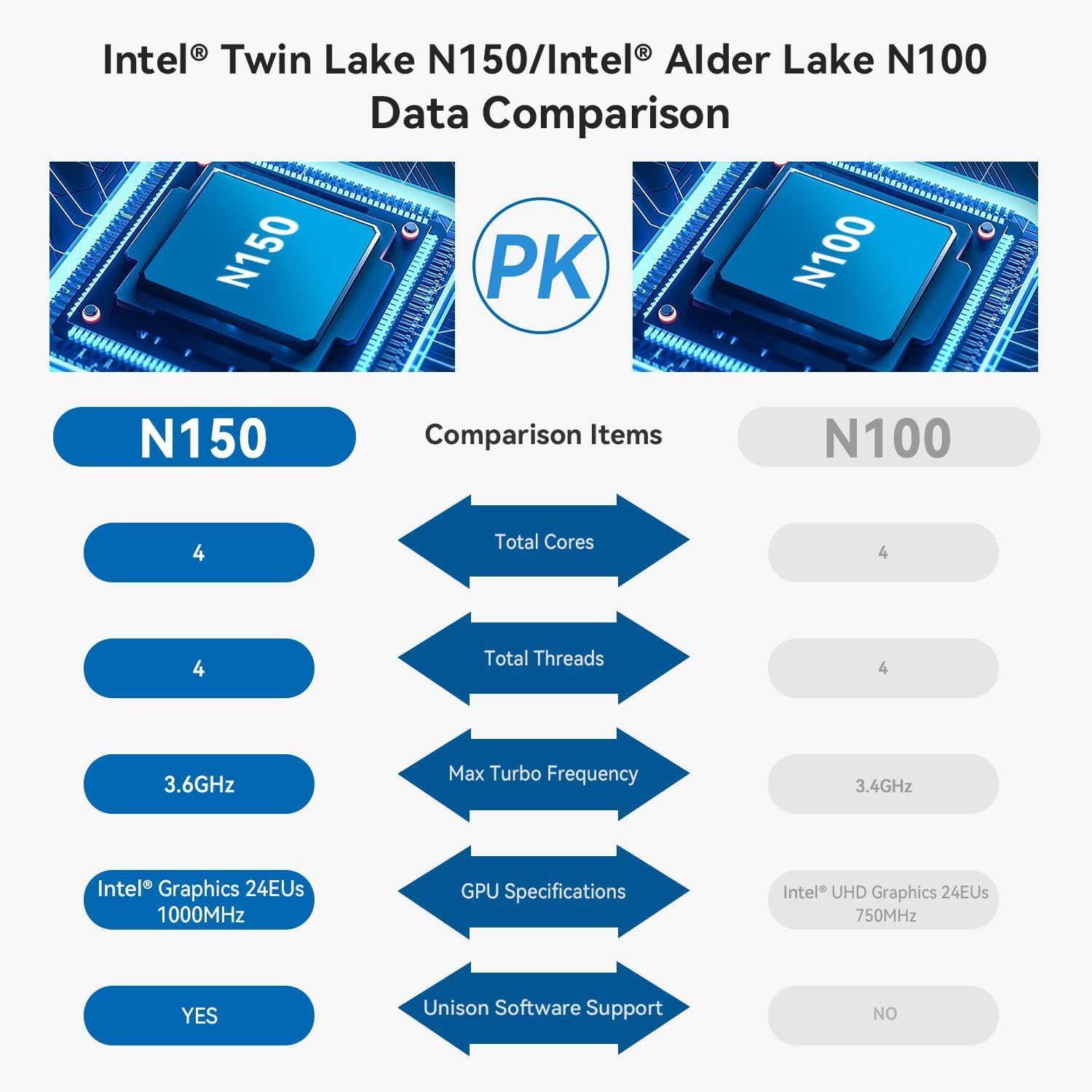
The mini PC is equipped with an Intel Twin Lake N150 Processor, 16GB DDR5 4800MHz RAM, and a 500GB SSD. It supports dual M.2 PCIe 3.0 SSDs for expanded storage.

Această imagine oferă o imagine internă view of the mini PC, highlighting the DDR5 SODIMM memory module and the two M.2 SSD slots, one M.2 PCIe 3.0 x4 and one M.2 PCIe 3.0 x1.
3.3. Sistem de răcire
An innovative airflow design with a dust filter ensures stable operation and quiet performance by efficiently dissipating heat.

This image shows the underside of the mini PC, illustrating the new airflow design with a visible cooling fan and dust filter, designed for stable and quiet operation.
3.4. Videoclipul produsului de mai susview
This official TRIGKEY video provides a visual overview of the Key Mini N150, showcasing its compact design, internal components, and key features like the Intel Twin Lake N150 processor and DDR5 memory.
4. Instrucțiuni de configurare
4.1. Conectarea perifericelor
- Conectați monitorul(ele): Use the provided HDMI cable to connect your monitor(s) to the HDMI ports on the rear of the mini PC. The device supports dual 4K@60Hz displays.
- Conectați tastatura și mouse-ul: Plug your USB keyboard and mouse into any available USB 3.2 ports.
- Conectare la rețea (opțional): For a wired connection, plug an Ethernet cable into the 2.5G LAN port. For wireless, ensure your Wi-Fi network is available during initial setup.
4.2. Pornire
- Conectați adaptorul de alimentare: Plug the power adapter into the DC IN port on the rear of the mini PC, then connect it to a power outlet.
- Pornire: Press the power button located on the front panel of the mini PC. The power indicator light will illuminate.
4.3. Initial Operating System Setup
Upon first boot, the operating system (WOS) will guide you through the initial setup process. Follow the on-screen instructions to configure language, region, network, and user accounts.
5. Instrucțiuni de utilizare
5.1. Operare de bază
- Pornire/Oprire: Press the power button to turn on the PC. To turn off, use the operating system's shutdown function. A short press of the power button can put the PC to sleep.
- Repornire: Folosește funcția de repornire a sistemului de operare.
5.2. Configurarea afișajului dual
The Key Mini N150 supports connecting two monitors simultaneously via its two HDMI ports for extended desktop or mirrored display modes. Configure display settings within your operating system.
5.3. Conectivitate la rețea
- Wired (2.5G LAN): Connect an Ethernet cable to the LAN port for high-speed internet access.
- Wireless (Wi-Fi 6): The integrated Intel AX101 Wi-Fi 6 module provides fast and stable wireless connectivity. Access Wi-Fi settings in your operating system to connect to available networks.
5.4. Dispozitive Bluetooth
The mini PC includes Bluetooth 5.2 for connecting wireless peripherals such as keyboards, mice, headphones, and speakers. Pair devices through the Bluetooth settings in your operating system.
5.5. Intel Unison App Integration
Utilize the Intel Unison App to seamlessly connect your PC with mobile devices. This allows for features such as viewing photo galleries, transferring files, extending your PC screen to a tablet, making/receiving phone calls, and managing notifications.
This image illustrates the capabilities of the Intel Unison App, enabling users to connect their PC and mobile devices for features like photo viewING, file transfer, screen extension, calls, and notifications.
6. Specificații
| Caracteristică | Caietul de sarcini |
|---|---|
| Procesor | Intel Alder Lake N150 (4C/4T, up to 3.6GHz) |
| Coprocesor grafic | Intel Graphics 24EUs 1000MHz |
| RAM | 16 GB DDR5 4800 MHz |
| Depozitare | 500GB SSD (supports dual M.2 PCIe 3.0 SSDs) |
| Rezoluția maximă a ecranului | 3840 x 2160 pixeli (4K) |
| Ieșire afișată | 2 x HDMI (Max 4K 60Hz) |
| Conectivitate wireless | WiFi 6 (Intel AX101), Bluetooth 5.2 |
| LAN | Ethernet de 2.5 Gbps |
| Porturi USB | 4 x USB 3.2 (10Gbps), 1 x USB-C (Data 10Gbps) |
| Jack audio | 1 x mufă audio de 3.5 mm |
| Sistem de operare | WOS |
| Greutatea articolului | 1.81 lire sterline |
| Dimensiuni | 6.06 x 5.98 x 3.03 inci |
| Culoare | Negru |
7. Întreținere
7.1. Curatenie
To maintain optimal performance and longevity, regularly clean the exterior of the mini PC with a soft, dry cloth. Ensure the ventilation openings are free from dust and obstructions. Do not use liquid cleaners directly on the device.
7.2. Extindere stocare
The Key Mini N150 supports dual M.2 PCIe 3.0 SSDs. To expand storage, you can install an additional M.2 2280 SSD in the available slot. Refer to the detailed instructions for opening the chassis and installing components if you are comfortable with hardware modifications. It is recommended to back up data before any hardware changes.
7.3. Actualizări software
Regularly update your operating system and drivers to ensure system stability, security, and optimal performance. Check for updates through your operating system's settings.
8. Depanare
8.1. Fără putere
- Asigurați-vă că adaptorul de alimentare este conectat corect atât la mini PC, cât și la o priză funcțională.
- Verificați dacă priza funcționează conectând un alt dispozitiv.
- Încercați un alt adaptor de alimentare, dacă este disponibil și compatibil.
8.2. Fără ieșire de afișare
- Check that the HDMI cable is securely connected to both the mini PC and the monitor.
- Asigurați-vă că monitorul este pornit și setat la sursa de intrare corectă (HDMI 1, HDMI 2 etc.).
- Testează cu un alt cablu HDMI sau monitor, dacă este posibil.
8.3. Probleme de conectivitate la rețea
- Cu fir: Verificați conexiunea cablului Ethernet. Verificați dacă routerul/modemul funcționează corect.
- Fără fir: Ensure Wi-Fi is enabled in the operating system. Check if the correct Wi-Fi network is selected and the password is entered correctly. Restart your router/modem.
8.4. System Unresponsive / Boot Issues
- Perform a hard shutdown by pressing and holding the power button for 5-10 seconds. Then restart the PC.
- CLR CMOS: If experiencing persistent boot issues or BIOS configuration problems, locate the CLR CMOS button on the rear panel. With the PC powered off and disconnected from power, press this button (often requires a paperclip) to reset BIOS settings to default. Reconnect power and attempt to boot.
9. Garanție și asistență
TRIGKEY provides comprehensive support for its products:
- Garantie: 1-year worry-free warranty.
- Suport tehnic: Suport tehnic pe viață.
- Serviciu clienți: 24-hour customer service.
For any questions or assistance, please contact TRIGKEY customer service. Refer to the official TRIGKEY website pentru cele mai recente informații de contact.


