Introducere
Thank you for choosing the seenda Ergonomic Mouse MOU-302. This vertical wireless mouse is designed to provide enhanced comfort and versatile connectivity for various computing environments. Please read this manual carefully to ensure proper setup and optimal performance of your device.

Image: The seenda Ergonomic Mouse MOU-302, showcasing its unique vertical design and purple and mint green color scheme.
Caracteristici cheie
- Confort ergonomic: Designed to allow the hand to grasp the mouse naturally, aligning the wrist and palm to relieve pressure and enhance comfort.
- Conectivitate versatilă: Connects to up to 3 devices via Bluetooth 5.0, Bluetooth 3.0, and 2.4G wireless technology. Seamless switching between devices with a single click.
- Funcționare silențioasă: Features 7 non-programmable buttons with options for noiseless and voiced clicks on the left and right buttons, suitable for various tasks.
- Reîncărcare convenabilă: Equipped with a built-in rechargeable 500mAh battery, offering up to 2 months of continuous use on a single charge. A Type-C charger is included.
- Enhanced Multimedia Control: Integrated volume control knob allows for easy pause, play, and volume adjustment directly from the mouse.
- Compatibilitate largă: Supports Windows, Android, Mac OS, and iOS, compatible with virtually all Bluetooth-enabled devices and those with USB ports.
Conținutul pachetului
Vă rugăm să verificați pachetul pentru următoarele articole:
- seenda Ergonomic Mouse MOU-302
- Receptor USB (2.4G)
- Cablu de încărcare USB-C
- Manual de utilizare
Produs terminatview
Familiarize yourself with the buttons and features of your seenda Ergonomic Mouse MOU-302.
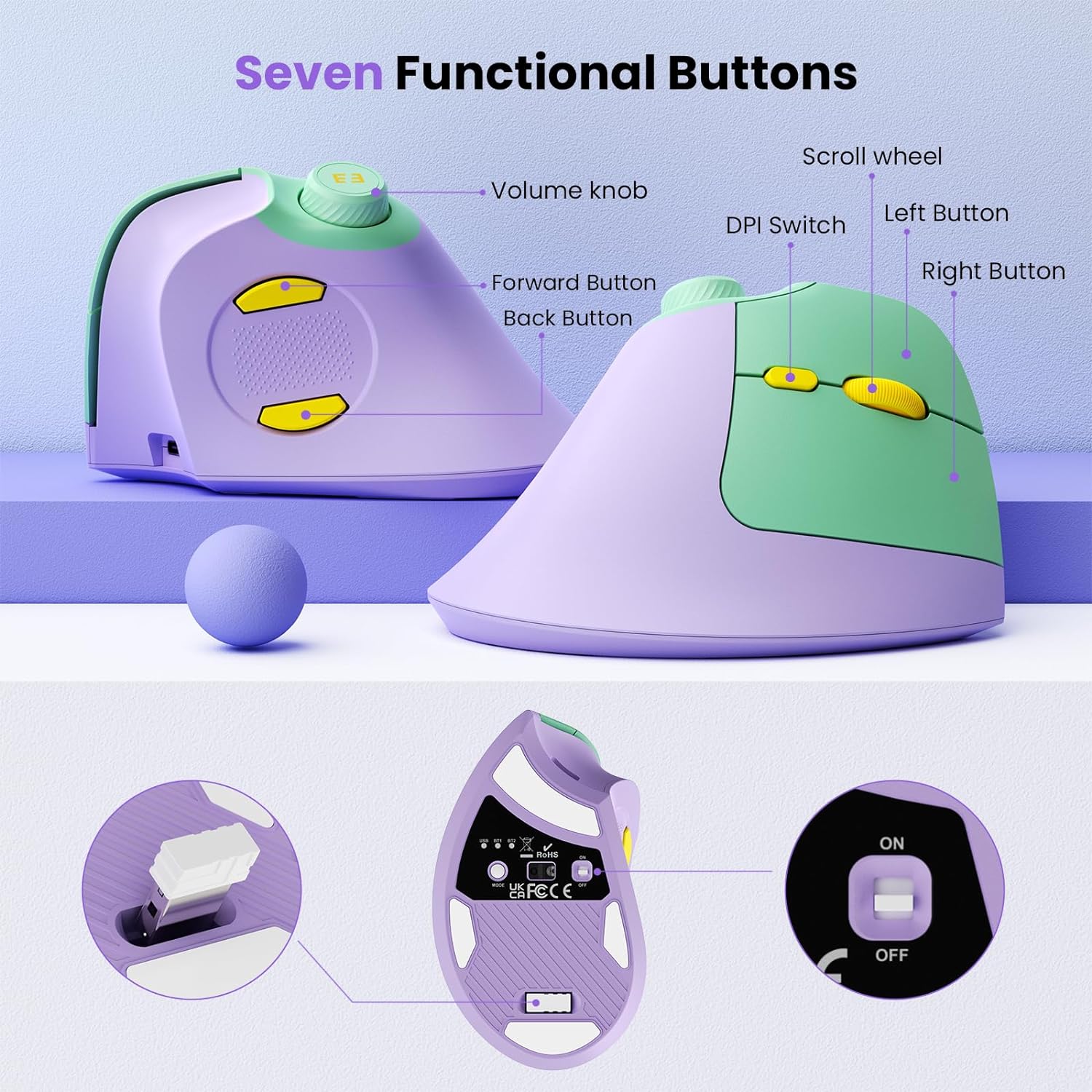
Image: Detailed diagram illustrating the seven functional buttons of the mouse, including the volume knob, scroll wheel, DPI switch, left/right buttons, and forward/back buttons.
- Buton de volum: Rotate to adjust volume, press to play/pause media.
- Rotiță de defilare: Pentru derulare verticală.
- Comutator DPI: Ajustează sensibilitatea mouse-ului (DPI).
- Butonul din stânga: Funcția standard de clic stânga.
- Butonul din dreapta: Funcția standard de clic dreapta.
- Buton înainte: Navighează înainte în web browsere sau file exploratori.
- Butonul Înapoi: Navighează înapoi în web browsere sau file exploratori.
- Buton de comutare a modului: Located on the bottom, cycles between USB 2.4G, Bluetooth 1, and Bluetooth 2 modes.
- Comutator pornire / oprire: Located on the bottom.
- Port de încărcare USB-C: Pentru reîncărcarea bateriei interne.
- Slot de stocare pentru receptor USB: Located on the bottom for convenient storage of the 2.4G USB receiver.
Instrucțiuni de configurare
1. Conexiune wireless 2.4G
- Take out the USB receiver from the storage slot at the bottom of the mouse.
- Conectați receptorul USB la un port USB disponibil de pe computer.
- Turn on the mouse using the ON/OFF switch located on the bottom.
- Press the Mode Switch button on the bottom until the "USB" indicator light is illuminated. The mouse should now be connected and ready for use.
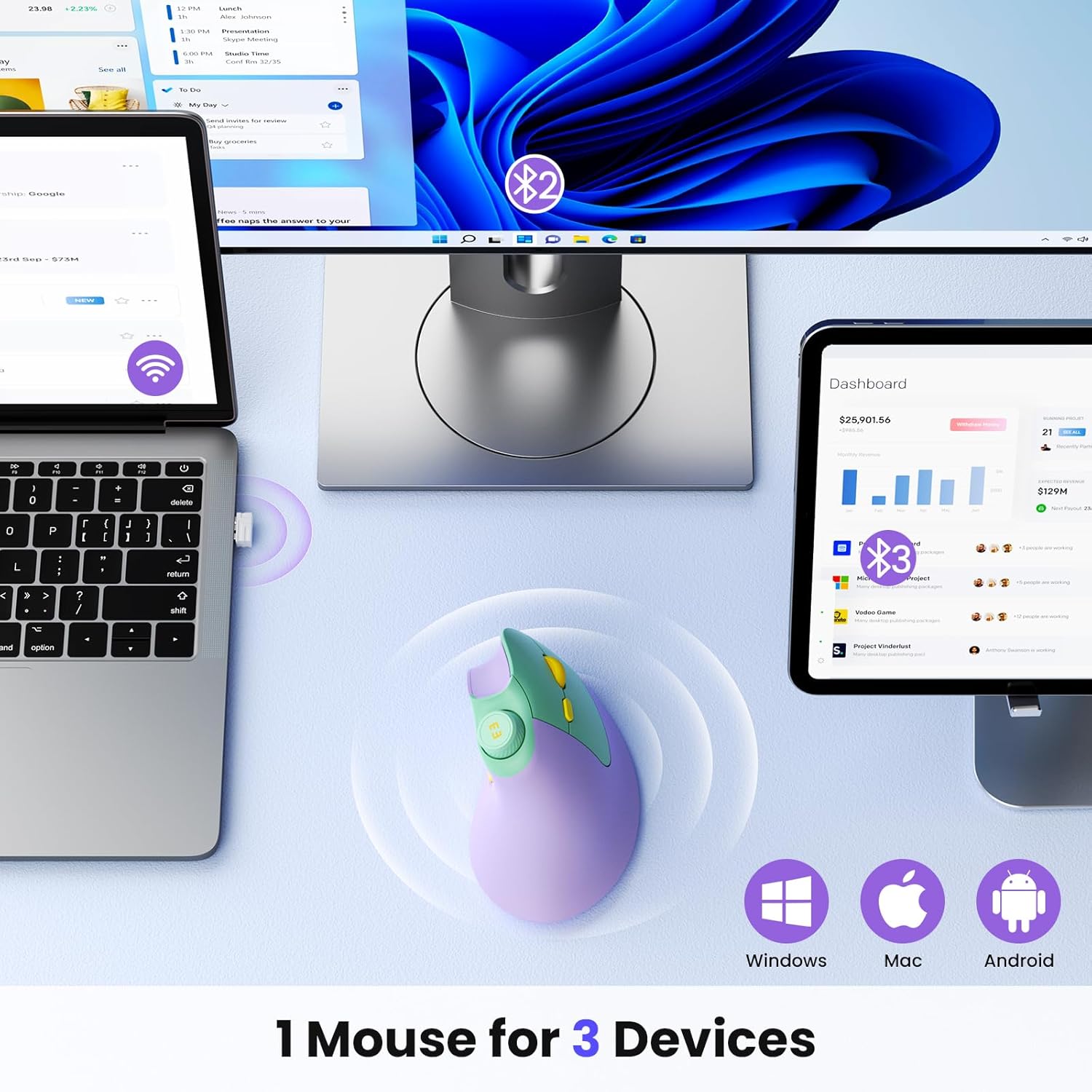
Image: Illustration demonstrating the multi-device connectivity of the mouse, including 2.4G USB and dual Bluetooth connections to a laptop, monitor, and tablet.
2. Conexiune Bluetooth (BT1 / BT2)
- Turn on the mouse using the ON/OFF switch located on the bottom.
- Press the Mode Switch button on the bottom to select either "BT1" or "BT2". The corresponding indicator light will flash slowly, indicating it's in pairing mode.
- Pe dispozitivul dvs. (computer, tabletă, smartphone), accesați setările Bluetooth și căutați dispozitive noi.
- Select "seenda MOU-302" from the list of available devices to pair.
- Once paired, the "BT1" or "BT2" indicator light will stop flashing and remain solid. The mouse is now connected.
- To connect to a second Bluetooth device, repeat steps 2-4, selecting the other Bluetooth channel (BT1 if you used BT2, or vice-versa).
Instrucțiuni de operare
Mâner ergonomic
Hold the mouse with your hand in a natural handshake position. This vertical orientation helps maintain a neutral wrist posture, reducing strain compared to traditional horizontal mice.
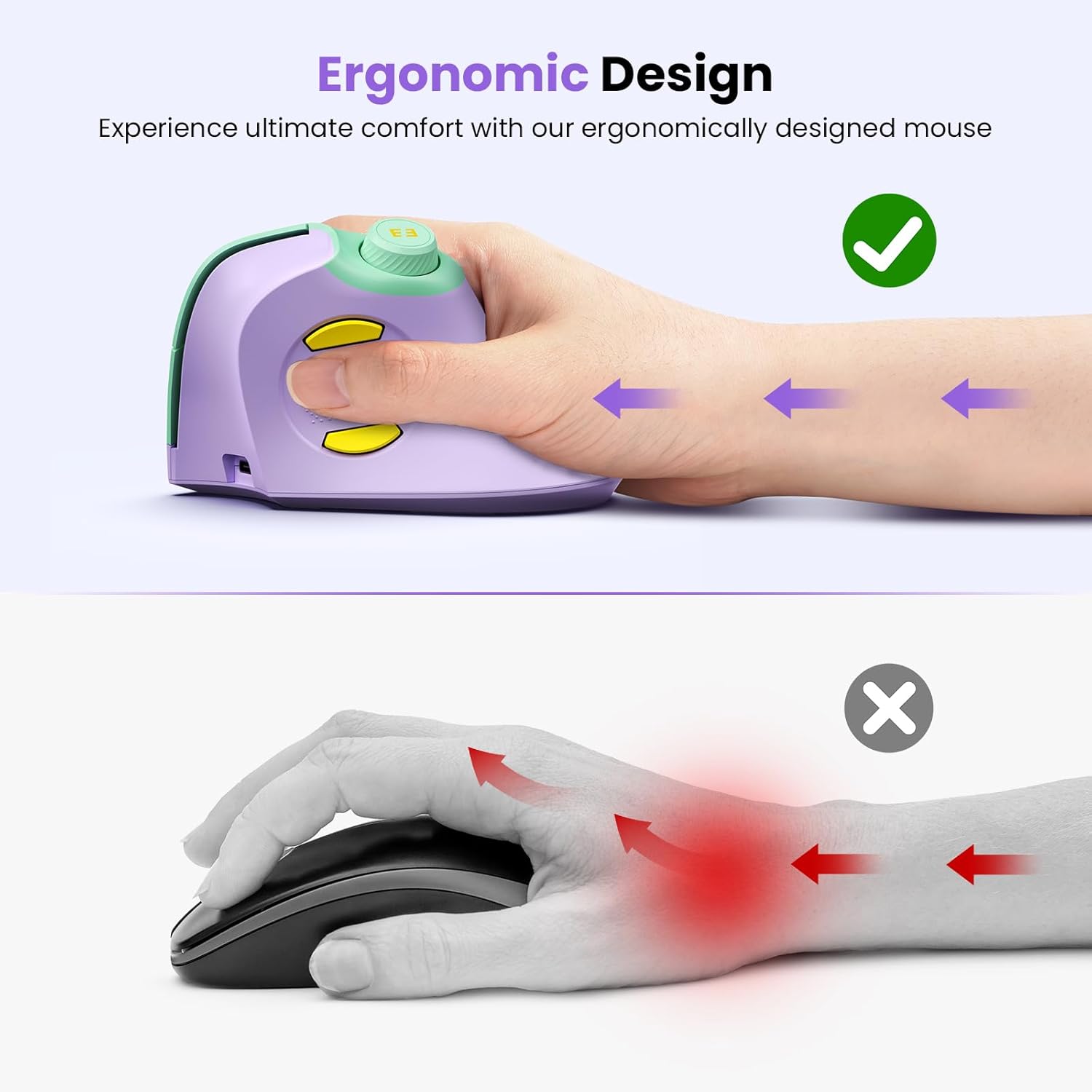
Image: A hand comfortably gripping the seenda ergonomic mouse, demonstrating the natural, vertical hand position that reduces wrist strain.
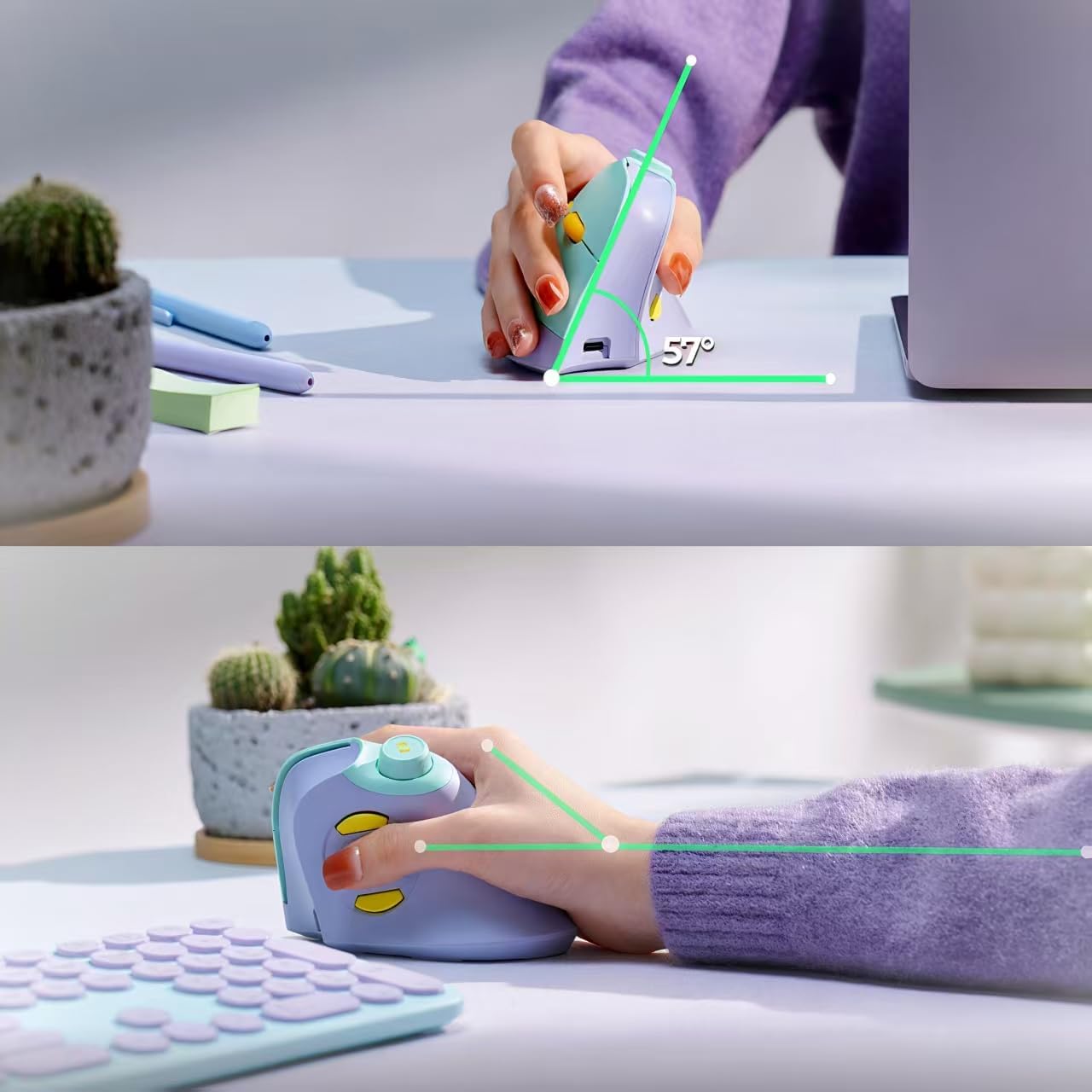
Imagine: O parte view of the mouse in use, highlighting its 57-degree ergonomic angle designed for optimal wrist comfort.
Funcțiile butoanelor
- Clic stânga/dreapta: Perform standard click actions. The mouse offers both noiseless and voiced click options for these buttons.
- Rotiță de defilare: Rotate to scroll up or down through documents and web pagini.
- Comutator DPI: Press to cycle through different DPI settings (mouse sensitivity). Adjust to your preference for cursor speed.
- Butoane Înainte/Înapoi: Use these buttons for quick navigation in web browsere sau file exploratori.
- Buton de volum:
- Rotiți în sensul acelor de ceasornic pentru a crește volumul.
- Rotiți în sens invers acelor de ceasornic pentru a reduce volumul.
- Press the knob to play or pause media playback.
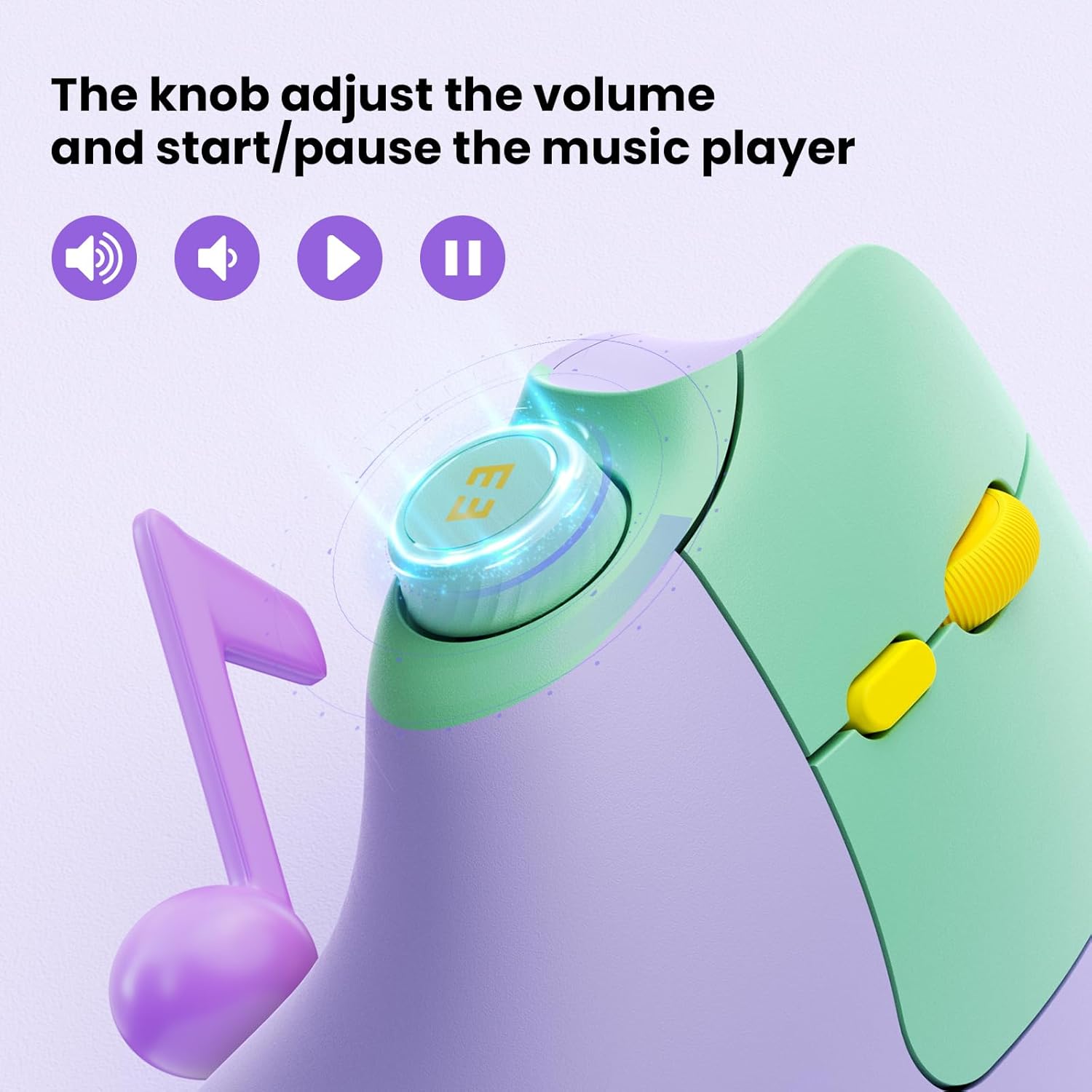
Imagine: Un prim-plan view of the mouse's volume knob, indicating its functions for adjusting volume and playing/pausing media.
Încărcarea mouse-ului
The seenda Ergonomic Mouse MOU-302 features a built-in 500mAh rechargeable battery.
- Locate the USB-C charging port on the front of the mouse.
- Connect the provided USB-C charging cable to the mouse.
- Plug the other end of the USB-C cable into a USB power source (e.g., computer USB port, wall adapter).
- The indicator light on the mouse will show charging status. Once fully charged, the light will change or turn off.
A full charge can provide up to 2 months of continuous usage. You can continue to use the mouse while it is charging.

Image: The seenda ergonomic mouse being charged via its USB-C port, highlighting the 500mAh rechargeable battery.
Compatibilitate
The seenda Ergonomic Mouse MOU-302 offers broad compatibility with various operating systems and devices:
- Sisteme de operare: Windows, Android, Mac OS, iOS.
- Dispozitive: Compatible with virtually all Bluetooth-enabled devices and those with available USB ports.
Întreţinere
- Clean the mouse regularly with a soft, dry cloth. Avoid using harsh chemicals or abrasive materials.
- Keep the optical sensor on the bottom of the mouse clean for accurate tracking.
- Store the USB receiver in its designated slot when not in use to prevent loss.
- Evitați expunerea mouse-ului la temperaturi extreme sau la lumina directă a soarelui.
Depanare
- Mouse-ul nu răspunde:
- Asigurați-vă că mouse-ul este pornit.
- Verificați nivelul bateriei și încărcați-o dacă este necesar.
- For 2.4G connection, ensure the USB receiver is securely plugged in and the mouse is in USB mode.
- For Bluetooth connection, ensure the mouse is in the correct BT1/BT2 mode and successfully paired with your device. Try re-pairing if necessary.
- Conexiune intermitentă:
- Move the mouse closer to the receiver/device.
- Evitați utilizarea mouse-ului pe suprafețe metalice, deoarece acestea pot interfera cu semnalele wireless.
- Ensure there are no other devices causing wireless interference.
- Mișcarea cursorului este neregulată:
- Curățați senzorul optic din partea inferioară a mouse-ului.
- Încercați să utilizați mouse-ul pe o altă suprafață sau pe un mouse pad.
- Adjust the DPI setting using the DPI switch.
Specificații
| Caracteristică | Detaliu |
|---|---|
| Numărul de model | MOU-302 |
| Tehnologia de conectivitate | Bluetooth (5.0, 3.0), 2.4G Wireless (USB) |
| Tehnologia de detectare a mișcării | Optic |
| Caracteristici speciale | Ergonomic Design, Volume Control Knob, Quiet Clicks |
| Baterie | 500mAh Rechargeable (1 C battery included) |
| Greutatea articolului | 5.9 uncii |
| Dimensiuni pachet | 5.16 x 3.23 x 3.11 inci |
Garanție și suport
For warranty information, technical support, or customer service inquiries, please refer to the contact details provided on the product packaging or visit the official seenda website-ul.


