Introducere
Welcome to the Kuephom Portable CD Player Boombox. This versatile device offers multiple audio playback options including CD, MP3, FM radio, Bluetooth, USB, and TF card support. Designed for both home and portable use, it features stereo speakers and a rechargeable battery for extended listening enjoyment. Please read this manual thoroughly to ensure proper operation and care of your new device.
Informații importante privind siguranța
- Avertizare: Nu expuneți acest aparat la ploaie sau umezeală.
- Atenţie: Pentru a preveni electrocutarea, nu deschidețiasing. Apelați la personal calificat pentru toate lucrările de service.
- Evitați amplasarea unității în apropierea surselor de căldură, cum ar fi calorifere, ghișee, sobe sau alte aparate care produc căldură.
- Utilizați numai atașamente/accesorii specificate de producător.
- Protejați cablul de alimentare pentru a nu fi călcat sau ciupit, în special la prize, prize și la punctul în care acestea ies din aparat.
- Deconectați acest aparat din priză în timpul furtunilor cu fulgere sau atunci când nu este utilizat pentru perioade lungi de timp.
- Nu blocați niciun orificiu de ventilație. Instalați conform instrucțiunilor producătorului.
- Asigurați o ventilație corespunzătoare în timpul funcționării unității.
- Nu introduceți obiecte străine în unitate.
- Țineți unitatea departe de câmpuri magnetice puternice.
- Aruncați bateriile în mod corespunzător, conform reglementărilor locale.
Conținutul pachetului
Vă rugăm să verificați dacă toate articolele sunt prezente:
- Kuephom Portable CD Player Boombox (Model W15)
- Cablu de încărcare USB
- Adaptor de alimentare
- Manual de utilizare
Produs terminatview
Familiarize yourself with the main components and controls of your CD player boombox.

Figura 1: Față View - This image displays the main unit with its top-loading CD compartment open, revealing a CD. The front panel features control buttons for playback (play/pause, skip), a mode button, an LCD screen showing track time, and a large rotary volume knob. Two speaker grilles are visible at the bottom.

Figura 2: Spate View - The rear of the boombox is shown, highlighting the extendable FM antenna. Below the antenna, from left to right, are the USB port, TF (Micro SD) card slot, DC 5V IN power input, and a headphone jack. The speaker grilles are also visible from this angle.
Comenzi și porturi:
- Buton Redare/Pauză (►▮▮): Apăsați pentru a reda sau a întrerupe redarea audio.
- Buton Derulare anterioară/înapoi (◀◀): Press to go to the previous track or rewind the current track.
- Buton Înainte/Derulare rapidă înainte (►►): Press to go to the next track or fast forward the current track.
- Butonul de mod (M): Press to switch between CD, FM Radio, Bluetooth, USB, and TF card modes.
- Repeat/Random Button (↺): Press to cycle through repeat modes (repeat one, repeat all) or enable random playback (shuffle).
- Volume Knob (MIN-MAX): Rotate to adjust the volume level. Also serves as the power on/off switch.
- Display LCD: Afișează modul curent, numărul piesei, ora și frecvența FM.
- Compartiment CD: Tavă de încărcare superioară pentru introducerea CD-urilor audio.
- Antena FM: Extendable antenna for improved FM radio reception.
- Port USB: Pentru redarea fișierelor MP3/WMA filede pe o unitate flash USB (până la 32 GB).
- Slot pentru carduri TF: Pentru redarea fișierelor MP3/WMA files from a TF (Micro SD) card (up to 32GB).
- DC 5V IN Port: Power input for charging the internal battery or operating the unit via the included power adapter.
- Headphone Jack (🎧): Pentru ascultare privată cu căști cu fir.
Înființat
1. Alimentarea unității
Your Kuephom CD player boombox comes with a built-in rechargeable Lithium Ion battery. Before first use, it is recommended to fully charge the battery.
- Connect the provided USB charging cable to the DC 5V IN port on the back of the unit.
- Connect the other end of the USB cable to the power adapter, and plug the adapter into a standard wall outlet.
- The LCD display will indicate charging status. Charging typically takes 3-4 hours for a full charge.
- Alternatively, the unit can be powered directly from the wall adapter without battery charge.

Figura 3: Opțiuni de încărcare - This image illustrates the versatility of charging the boombox. It can be charged using a standard wall charger, a car charger (via a USB car adapter, not included), or a portable power bank, making it convenient for both indoor and outdoor use.
2. Pornirea/Oprirea
To turn the unit on, rotate the Volume Knob clockwise from the MIN position. To turn off, rotate the Volume Knob counter-clockwise to the MIN position until it clicks.
Moduri de operare
Apăsați tasta Mod (M) button repeatedly to cycle through the available playback modes: CD, FM Radio, Bluetooth, USB, and TF Card.

Figure 4: 5 Play Modes - This graphic highlights the five primary playback modes of the Kuephom boombox: CD Player, Bluetooth, FM Radio, TF Card, and USB Input, emphasizing its multi-functional capabilities.
1. Redare CD
- Deschideți capacul compartimentului CD-ului ridicându-l ușor.
- Place an audio CD or MP3 CD onto the spindle, label side up.
- Închideți ferm capacul compartimentului CD-ului.
- Apăsați tasta Mod (M) apăsați butonul până când pe afișajul LCD apare „CD”.
- CD-ul va începe redarea automat. Dacă nu, apăsați butonul Redare/Pauză (►▮▮) buton.
- Utilizați Anterior (◀◀) şi Următorul (►►) butoane pentru a sări peste piese.
- Țineți apăsat butonul Anterior (◀◀) or Următorul (►►) buttons to fast forward or rewind.
- Apăsați tasta Repeat/Random (↺) button to cycle through repeat modes (Repeat One, Repeat All) or enable random (shuffle) playback.
2. Redare Bluetooth
- Apăsați tasta Mod (M) button until "BT" appears on the LCD display. The unit will enter Bluetooth pairing mode, indicated by a flashing "BT".
- Pe dispozitivul compatibil Bluetooth (de exemplu, smartphone, tabletă), activați Bluetooth și căutați dispozitivele disponibile.
- Select "Kuephom W15" from the list of devices.
- Once paired, "BT" will stop flashing and remain solid. You can now play audio from your device through the boombox.
- Use the playback controls on your connected device or the boombox's Redare/Pauză (►▮▮), Anterior (◀◀), și Următorul (►►) butoane pentru a controla redarea.

Figure 5: CD Player & Bluetooth Speaker Functionality - This image demonstrates the dual functionality of the device, showing it first as a standalone CD player and then as a Bluetooth speaker, with a smartphone successfully paired to it. This highlights its versatility for different audio sources.
3. Funcționare radio FM
- Extend the FM antenna on the back of the unit for optimal reception.
- Apăsați tasta Mod (M) apăsați butonul până când pe afișajul LCD apare „FM”.
- To auto-scan and save stations: Press and hold the Redare/Pauză (►▮▮) button. The unit will automatically scan for available FM stations and save them as presets (up to 30 stations).
- To tune to a saved preset station: Use the Anterior (◀◀) şi Următorul (►►) buttons to navigate through the saved presets.
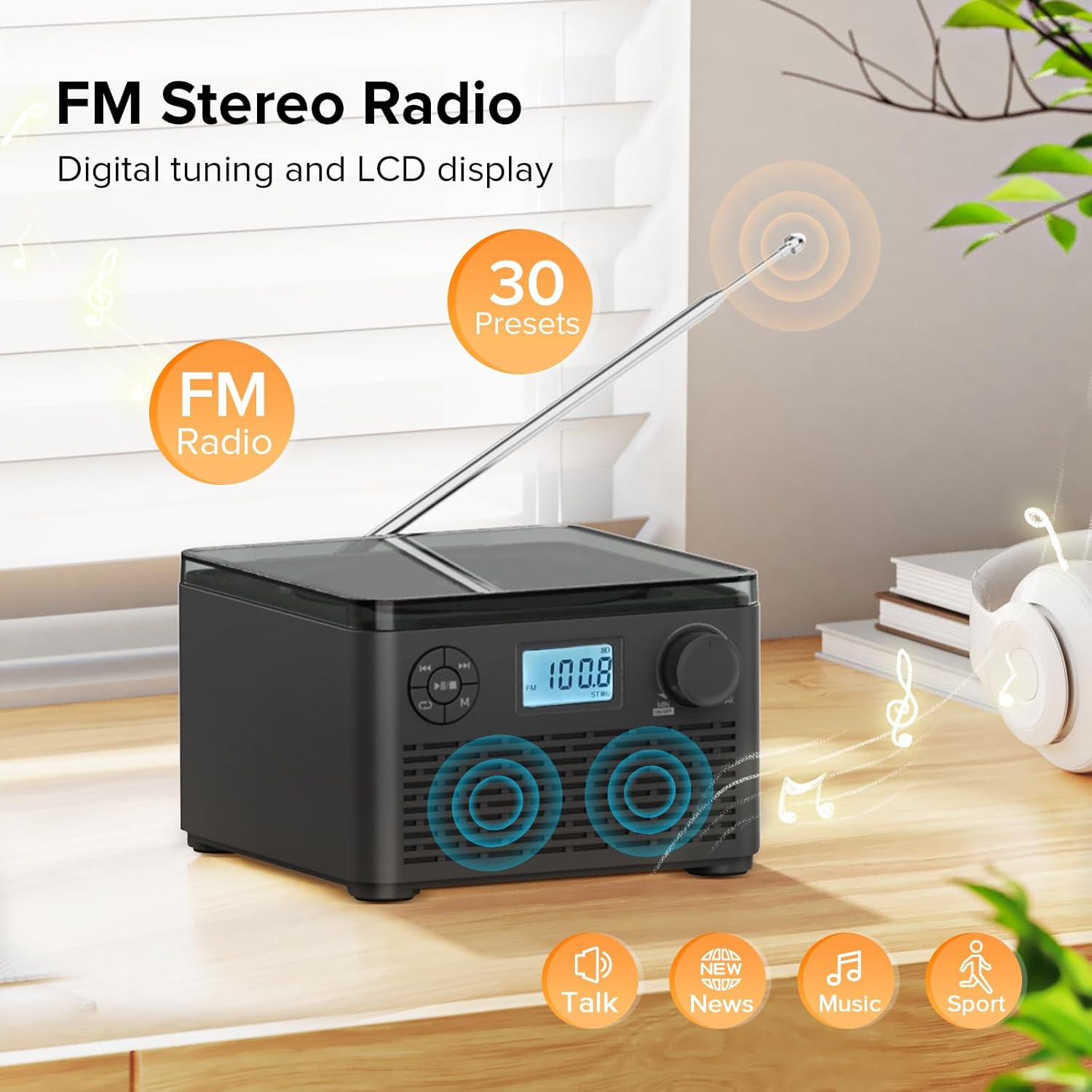
Figure 6: FM Stereo Radio - This image focuses on the FM radio feature, showing the digital display tuned to a frequency and indicating the availability of 30 presets. The extendable antenna is also visible, emphasizing its radio capabilities.
4. Redare de pe card USB/TF
The unit supports MP3 and WMA audio formats from USB flash drives and TF (Micro SD) cards up to 32GB.
- Insert a USB flash drive into the USB port or a TF card into the TF card slot on the back of the unit. Ensure the antenna is moved out of the way if necessary.
- Apăsați tasta Mod (M) button until "USB" or "TF" appears on the LCD display.
- Unitatea va detecta automat și va începe redarea sunetului filede pe dispozitivul de stocare introdus.
- Utilizați Redare/Pauză (►▮▮), Anterior (◀◀), și Următorul (►►) butoane pentru a controla redarea.
- Apăsați tasta Repeat/Random (↺) button to cycle through repeat modes or enable random playback.
5. Utilizarea căștilor
For private listening, connect standard 3.5mm headphones to the headphone jack on the back of the unit. The internal speakers will automatically mute when headphones are connected.
Întreținere și îngrijire
- curatenie: Folosiți o lavetă moale și uscată pentru a curăța exteriorul unității. Nu utilizați substanțe de curățare abrazive sau solvenți.
- Îngrijire CD: Manipulați CD-urile de margini. Păstrați-le curate și fără zgârieturi. Folosiți o lavetă moale, fără scame, pentru a șterge CD-urile din centru spre exterior.
- Depozitare: Când nu este utilizată pentru perioade lungi de timp, depozitați unitatea într-un loc răcoros și uscat, ferit de lumina directă a soarelui și de temperaturi extreme.
- Îngrijirea bateriei: To prolong battery life, avoid fully discharging the battery frequently. Recharge the unit regularly, even if not in constant use.
Depanare
| Problemă | Cauza posibila | Soluţie |
|---|---|---|
| Unitatea nu pornește. | Battery is depleted or power adapter is not connected properly. | Ensure the volume knob is rotated clockwise to turn on. Connect the power adapter and charge the unit. |
| CD-ul sare sau nu se redă. | CD-ul este murdar, zgâriat sau introdus incorect. | Clean the CD with a soft cloth. Ensure the CD is placed correctly in the compartment. Try a different CD. |
| Recepție radio FM slabă. | Antena nu este extinsă sau semnalul este slab. | Fully extend the FM antenna. Try repositioning the unit for better signal. |
| Dispozitivul Bluetooth nu se poate conecta. | Unit is not in pairing mode or device is too far. | Ensure the unit is in "BT" mode and flashing. Move your Bluetooth device closer to the boombox. Disconnect other Bluetooth devices. |
| Cardul USB/TF nu este recunoscut. | Neacceptat file format or card capacity. | Asigura files are MP3 or WMA format. Check that the card capacity is 32GB or less. Reinsert the card/drive. |
Specificații
- Model: W15
- Marca: Kuephom
- Dimensiuni produs (L x l x H): 6.3 x 6.3 x 4.2 inci
- Greutatea articolului: 1.9 lire sterline
- Putere de intrare: DC 5V
- Baterie: 1 baterie litiu-ion (inclusă)
- Timp de redare a bateriei: 6-10 hours (approx., varies with usage)
- Formate de disc acceptate: CD, CD-R, CD-RW, CD MP3
- Supported USB/TF Card Formats: MP3, WMA (up to 32GB)
- Interval de frecvență radio FM: 87.5 - 108 MHz
- Tip difuzor: Boxe stereo încorporate
- Jack pentru căști: 3.5mm
Garanție și suport
Kuephom products are designed and manufactured to the highest quality standards. For any questions, technical support, or warranty claims, please contact Kuephom customer service through the retailer where you purchased the product or visit the official Kuephom website pentru mai multe informații.
Vă rugăm să păstrați dovada achiziției în scopul garanției.


