Introducere
Thank you for choosing the ErGear Whole Piece Standing Desk. This electric computer workstation is designed to enhance your home office experience with its seamless design, spacious work area, and ergonomic adjustability. This manual provides essential information for assembly, operation, maintenance, and troubleshooting to ensure optimal performance and longevity of your desk.

Figure 1: ErGear Whole Piece Standing Desk in a typical setup.
Informații importante privind siguranța
Please read all instructions carefully before use. Failure to follow these instructions may result in injury or damage to the product.
- Do not place more than 176 lbs (79.8 kg) on the desk top to ensure stability and safety.
- Țineți copiii și animalele de companie departe de birou în timpul funcționării.
- Ensure all cables are properly managed to prevent entanglement during height adjustments.
- Do not disassemble or modify the desk's electrical components. Contact qualified personnel for repairs.
- Avoid placing liquids directly on the desk surface without protective coasters.
Configurare și asamblare
The ErGear Whole Piece Standing Desk is designed for hassle-free assembly. A detailed instruction manual and labeled hardware are included in the packaging to guide you through the process.
For comprehensive assembly steps, please refer to the official Installation Manual (PDF): Descărcați manualul de instalare
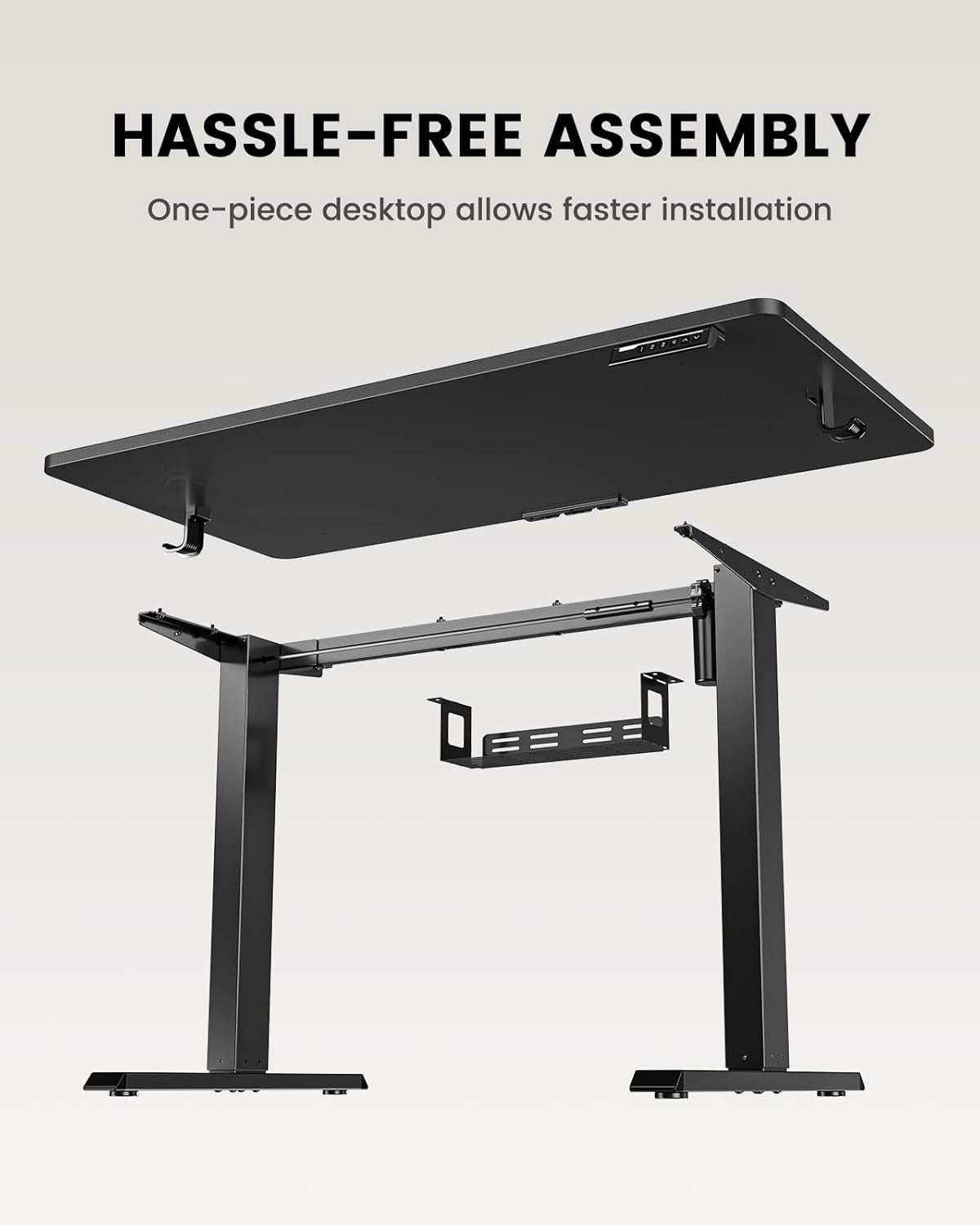
Figure 2: Components of the ErGear Standing Desk for assembly.
The one-piece desktop design simplifies installation compared to multi-piece desktops, allowing for quicker setup.
Instrucțiuni de operare
The ErGear standing desk offers smooth and quiet electric height adjustment, allowing you to effortlessly switch between sitting and standing positions.
Reglarea înălțimii
The desk smoothly adjusts from a minimum height of 27.9 inches to a maximum height of 46.9 inches. Use the up and down arrow buttons on the control panel to achieve your desired height.
Presetari de memorie
The control panel features three memory preset buttons. To save a preferred height:
- Reglați biroul la înălțimea dorită.
- Press the 'M' button (or similar memory set button) followed by one of the numbered preset buttons (1, 2, or 3).
- The height is now saved. To recall a saved height, simply press the corresponding numbered button.
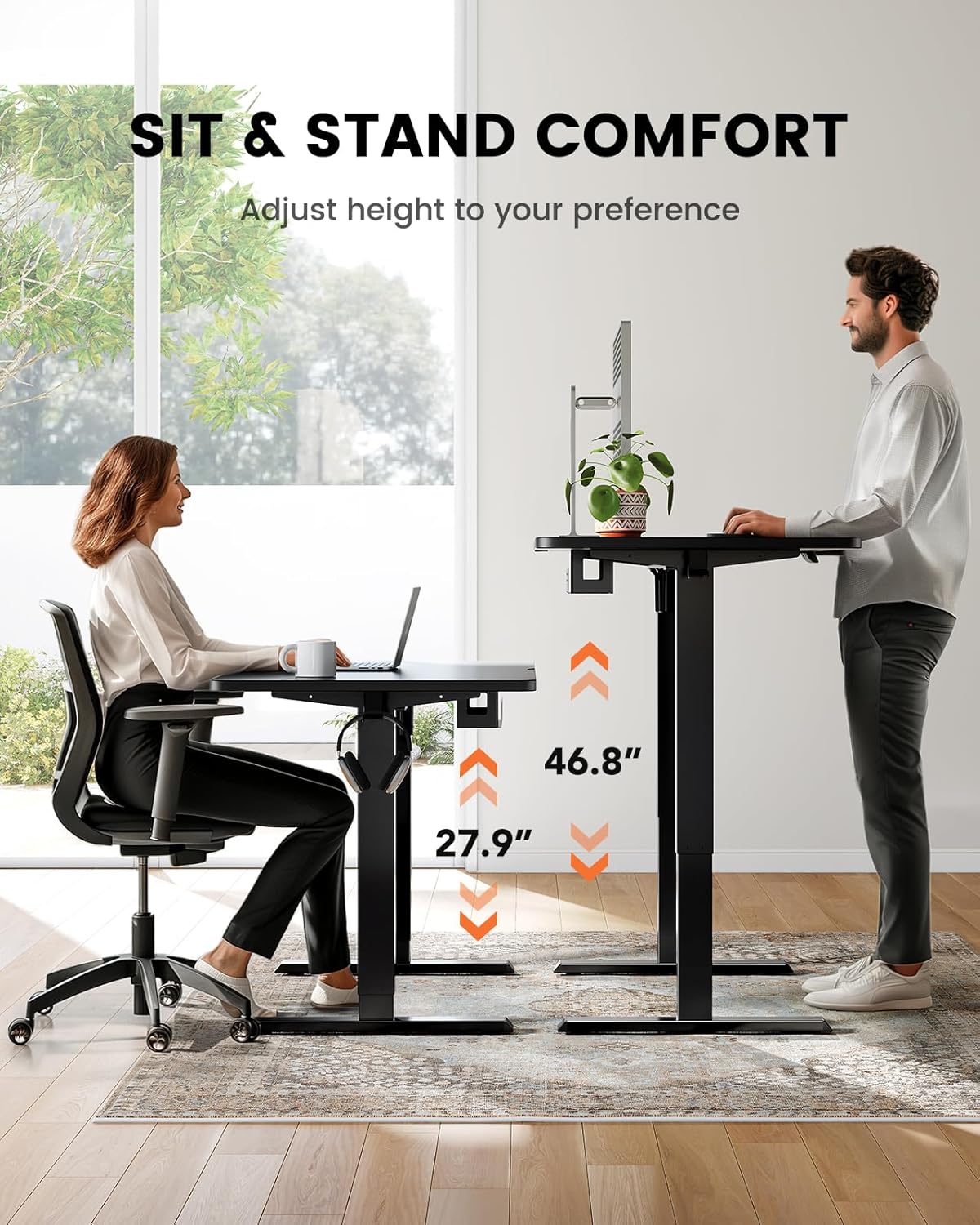
Figure 3: Sit and stand comfort with adjustable height.
Managementul cablurilor
A cable management tray is attached underneath the desktop to help keep your workspace organized and clutter-free. Utilize this tray to route and secure power cords and other cables.
Video: Official ErGear brand video demonstrating desk features and usage.
Întreținere și îngrijire
Pentru a asigura longevitatea și performanța optimă a biroului dumneavoastră ErGear, urmați aceste instrucțiuni simple de întreținere:
- curatenie: Ștergeți suprafața biroului cu un material moale, damp Evitați substanțele chimice dure sau produsele de curățare abrazive care ar putea deteriora finisajul.
- Organizare de cabluri: Periodically check and reorganize cables in the management tray to prevent tangles and ensure smooth operation.
- Îngrijirea motorului: The electric motor is designed for durability. Avoid overloading the desk beyond its maximum weight capacity (176 lbs / 79.8 kg) to prevent strain on the motor.
- Verificări regulate: Ensure all screws and connections remain tight. Re-tighten if necessary.
Depanare
If you encounter any issues with your ErGear standing desk, please refer to the following common troubleshooting tips. For more complex problems, contact customer support.
- Biroul nu se mișcă: Check if the power cord is securely plugged into both the desk and a working power outlet. Ensure no obstructions are blocking the desk's movement.
- Mișcare neuniformă: Verify that the desk is placed on a flat, level surface. Check for any loose connections in the frame or legs.
- Presetările memoriei nu funcționează: Re-program the memory presets following the steps in the 'Operating Instructions' section.
- Zgomote neobișnuite: A slight hum during operation is normal. If you hear grinding or loud noises, stop operation immediately and contact customer support.
Specificațiile produsului
| Caracteristică | Caietul de sarcini |
|---|---|
| Marca | ErGear |
| Numărul de model | EGESD64B |
| Dimensiunile produsului | 24" D x 48" L x 28" H |
| Culoare | Negru |
| Stil | Modern |
| Material de bază | Oţel inoxidabil |
| Tip material de sus | Bambus |
| Tip de finisare | Pictat |
| Tip de montare | Freestanding |
| Componente incluse | Tavă de gestionare a cablurilor |
| Inaltimea minima | 27.9 inchi |
| Înălțimea maximă | 46.9 inchi |
| Greutate maximă recomandată | 176 de lire sterline (79.8 kg) |
| Asamblare necesară | Da |
| Tip de garanție | Limitat |
Garanție și asistență pentru clienți
The ErGear Whole Piece Standing Desk comes with a Limited Warranty. For specific terms and conditions, please refer to the warranty information provided with your purchase or contact ErGear customer service.
If you have any questions about assembly, product selection, or require technical assistance, please do not hesitate to contact our U.S.-based customer support team. We are here to help.
Asistență clienți: Please refer to your product packaging or the official ErGear website for the most current contact information (phone, email, or live chat).


