Introducere
This manual provides comprehensive instructions for the installation, operation, and maintenance of your Ulecoce Keyless Entry Door Lock Deadbolt with Handle Set. Please read this manual thoroughly before installation and use to ensure proper function and safety.
Caracteristicile produsului
- Keyless Entry Deadbolt with Handle Set: Supports multiple access methods including 100 user codes, one-time codes, and 2 backup keys.
- Management inteligent al accesului: Features 3 administrators and 97 user codes. Allows generation and sharing of one-time, permanent, and scheduled codes. Ideal for homes, Airbnb, apartments, offices, and hotels.
- Auto-Lock Convenience: Customizable automatic locking within 10-30 seconds. Includes a one-touch lock function on the rear lock body for quick locking.
- Security Deadbolt: ANSI Grade 3 certified smart door lock cylinder made of zinc alloy. Powered by 4 AA batteries. IP54 weather resistance rating.
- Ușor de instalat: No extra drilling or locksmith required. Can be installed and programmed in approximately 15 minutes using a screwdriver. Compatible with both left and right-hand doors.

Figure 1: Multiple Convenient Unlocking Methods. This image illustrates the various ways to unlock the Ulecoce smart lock, including keypad code, one-touch locking, one-time codes, anti-peeping password, physical key, and door knob.
Conținutul pachetului
| Articol | Cantitate |
|---|---|
| Deadbolt Front Lock | 1 |
| Deadbolt Rear Lock | 1 |
| Door Knob Front | 1 |
| Door Knob Rear | 1 |
| Încuietoare de blocare | 2 |
| Cheie | 2 |
| Diagrama deschiderii găurilor | 1 |
| Installation Tutorial Card | 1 |
| Instrucţiuni | 1 |
| Mounting Plate Screws 1.46in/37mm (A) | 2 |
| Mounting Plate Screws 1.19in/30mm (B) | 3 |
| Mounting Plate Screws 0.24in/6mm (C) | 2 |
| Fixed Leg (D) | 2 |
| Silicone Ring (E) | 1 |
| Piese de schimb | 4 |
Specificații
- Marca: Ulecoce
- Nume model: U18R-B
- Tip blocare: Tastatura
- Material: Zinc
- Culoare: Negru Mat
- Dimensiuni articol (L x l x H): 2.6 x 0.39 x 4.78 inci
- Greutatea articolului: 3.34 lire sterline
- Tipul finisajului: Pictat
- Sursa de alimentare: 4 baterii AA (nu sunt incluse)
- Rezistenta la intemperii: IP54
- Gradul de securitate: ANSI grad 3
- Utilizări recomandate: Homes, Airbnb, Apartments, Offices, Hotels
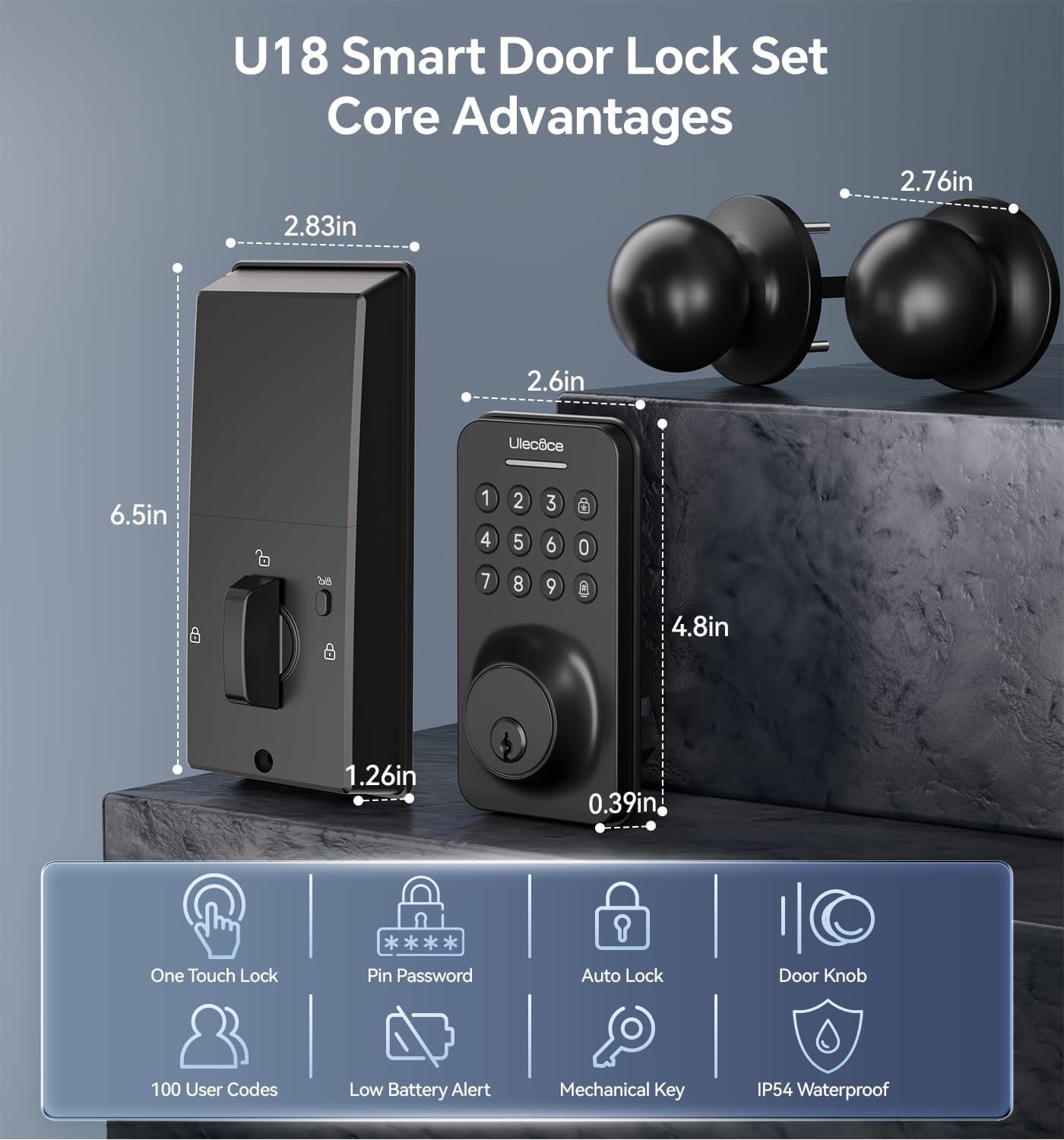
Figure 2: U18 Smart Door Lock Set Core Advantages and Dimensions. This image provides detailed measurements of the lock components and highlights key features like one-touch lock, pin password, auto lock, door knob, 100 user codes, low battery alert, mechanical key, and IP54 waterproof rating.
Ghid de instalare
The Ulecoce Keyless Entry Door Lock is designed for easy installation without the need for extra drilling. A screwdriver is the only tool required.
Door Compatibility Check
Asigurați-vă că ușa dumneavoastră îndeplinește următoarele specificații:
- Backset: 2-3/8 inches or 2-3/4 inches (60 or 70mm)
- Grosimea ușii: 1.31 inches to 2.16 inches (35-55mm)
- Diametrul gaurii: 2-1/8 inches (54mm) for the main lock body.

Figure 3: Easy Installation without Drilling. This image shows the required latch hole and door compatibility (single cylinder vs. mortise/integrated) and provides key measurements for backset and hole diameter.
Instalare pas cu pas
- Pregătiți ușa: Ensure the door is clean and the existing holes are clear.
- Instalați zăvorul: Introduceți zăvorul în marginea ușii și fixați-l cu șuruburi.
- Install the exterior keypad assembly: Route the cable through the door and align the keypad with the latch.
- Install the interior mounting plate: Secure the mounting plate to the exterior assembly using screws.
- Connect the cable and install the interior assembly: Connect the cable from the exterior unit to the interior unit. Secure the interior unit to the mounting plate.
- Install the door knob: Attach the handle set according to the provided diagram.
- Introduceți bateriile: Open the battery cover on the interior unit and insert 4 AA batteries (not included).
- Testați blocarea: Verify that the deadbolt extends and retracts smoothly.

Figure 4: Installed Ulecoce Keyless Entry Door Lock. This image displays the smart lock and handle set mounted on a white door, showcasinintegrarea sa estetică.
Configurare și programare
Before initial use, you will need to set up administrator codes and user codes.
Configurare inițială
- Setați codul de administrator: Follow the instructions on the Installation Tutorial Card to set your primary administrator code. This code is essential for managing other user codes.
- Adăugați coduri de utilizator: You can program up to 97 user codes. These can be permanent, one-time, or scheduled codes.

Figure 5: One-Time PIN Code Functionality. This image depicts a user sending a temporary access code via smartphone, highlighting the convenience of managing access remotely.
Anti-Peeping Password Feature
To enhance security, you can enter random digits before or after your actual passcode. The lock will still recognize the correct sequence within the longer string of numbers.

Figure 6: Anti-Peep Tactile Keypad. This image illustrates how the anti-peeping feature works, allowing users to input garbled numbers before and after the correct password to prevent code exposure.
Instrucțiuni de operare
Deblocarea Ușii
- Folosind un cod: Enter your programmed user code or administrator code on the keypad, then press the unlock button (usually a checkmark or lock icon).
- Using a Physical Key: Insert the backup key into the keyhole and turn to unlock.
Încuierea Ușii
- Blocare automată: The lock can be configured to automatically lock after a set period (10-30 seconds) once the door is closed.
- Blocare cu o singură atingere: Press the dedicated lock button on the interior unit to manually lock the deadbolt.
Întreţinere
- Înlocuire baterie: The lock is powered by 4 AA batteries. Replace them when the low battery indicator appears or when the lock's performance diminishes. Battery consumption may increase in colder temperatures.
- curatenie: Use a soft, dry cloth to clean the keypad and lock body. Avoid abrasive cleaners or solvents.
- Lubrifiere: Ungeți periodic mecanismul zăvorului cu un lubrifiant pe bază de silicon pentru a asigura o funcționare fără probleme.

Figure 7: U18 Zinc Alloy Lock Body and Internal Components. This image provides an exploded view of the lock, highlighting its robust zinc alloy construction and internal electronics, including the battery compartment.
Depanare
| Problemă | Cauza posibila | Soluţie |
|---|---|---|
| Încuietoarea nu răspunde la introducerea comenzilor de la tastatură. | Baterii descărcate; cod introdus greșit; tastatură defectă. | Replace batteries; re-enter code carefully; contact support if issue persists. |
| Zăvorul nu se extinde/retrage complet. | Misalignment during installation; obstruction in door frame; low batteries. | Check alignment of lock and strike plate; clear any obstructions; replace batteries. |
| Funcția de blocare automată nu funcționează. | Funcție dezactivată; setare incorectă a orei; problemă cu senzorul de ușă. | Ensure auto-lock is enabled and set correctly in programming; check door closure. |
| Screws loosen after use. | Normal wear and tear; insufficient tightening during installation. | Periodically re-tighten all mounting screws. |
Garanție și suport
Ulecoce is committed to providing peace of mind. We offer a 3 ani garanție pentru produs şi serviciul post-vânzare pe viață.
If you have any questions or concerns, please feel free to send us an email. Our customer support team is ready to assist you at any time, providing 24/7 email support and prompt responses to resolve your needs.
Pentru asistență, vă rugăm să vizitați Ulecoce Store on Amazon or contact customer service via email (details typically found on product packaging or official website-ul).


