Introducere
The BlackVue DR970X Box-2CH Plus is an advanced 2-channel dash camera system designed for comprehensive vehicle surveillance. It features a 4K Ultra High Definition front camera and a Full HD rear camera, both equipped with STARVIS sensors for superior low-light performance. Unique to this model is its separate "Box" recording unit, which enhances security and allows for a more discreet camera installation. This manual provides detailed instructions for installation, operation, and maintenance of your BlackVue dash cam system.

Imagine: Pesteview of the BlackVue DR970X Box-2CH Plus Dash Cam components and app interface.
Ce este în cutie
Carefully unpack the contents and verify that all items listed below are present. If any items are missing or damaged, please contact BlackVue customer support.

Image: All components included in the BlackVue DR970X Box-2CH Plus retail package.
- 1 x Main unit (Secure Box)
- 1 x Front camera
- 1 x Rear camera
- 1 x SOS button
- 1 x External GPS module
- 1 x Main unit cigarette lighter power cable
- 2 x Camera connection cables
- 1 x Main unit hardwiring power cable
- 1 x microSD card (64GB)
- 1 x cititor de carduri microSD
- 1 x Ghid de pornire rapidă
- 1 x Velcro strip
- 1 x Pry tool
- 1 x Main unit key
- 1 x cheie hexagonală
- Spare mount sticky pads
- Șuruburi
- 8 x Cleme de cablu
Configurare și instalare
Proper installation is crucial for optimal performance and security. The modular design allows for flexible placement of components.
1. Planning Component Placement
- Camera frontală: Mount on the windshield, ideally behind the rearview oglindă, pentru a asigura o vizibilitate clară view of the road ahead without obstructing driver visibility.
- Camera spate: Mount on the rear windshield, centered for a clear view of the vehicle's rear.
- Main Unit (Box): This unit houses the microSD card and main processor. It should be placed in a secure, discreet location, such as under a seat or in the glove compartment, to protect it from tampering and heat.
- GPS extern: Place on the dashboard or another location with a clear view of the sky for accurate GPS signal reception.
- Butonul SOS: Mount within easy reach of the driver for manual event triggering.
2. Power Connection Options
The DR970X Box-2CH Plus offers two primary power connection methods:
- Cablu de alimentare brichetă: For simple plug-and-play operation. Connects to your vehicle's 12V auxiliary power socket. The dash cam will power on and off with the vehicle's ignition.
- Hardwiring Power Cable: Recommended for utilizing the built-in Parking Mode feature. This cable connects directly to your vehicle's fuse panel. Professional installation is advised for hardwiring to ensure correct wiring and prevent electrical issues.
3. Gestionarea cablurilor
Use the included pry tool and cable clips to neatly tuck cables along the vehicle's headliner, A-pillars, and trim. This ensures a clean installation and prevents cables from interfering with driving.
Instrucțiuni de operare
Configurarea inițială și asocierea aplicațiilor
The BlackVue App is essential for managing your dash cam settings, viewing footage, and accessing cloud features.
- Download the BlackVue App from your smartphone's app store (iOS or Android).
- Porniți camera de bord.
- Open the BlackVue App and select "Connect to dashcam".
- Follow the on-screen prompts for seamless pairing. The default Wi-Fi password is typically found on a sticker on the main unit.
- Once connected, you can adjust settings, view trăi footage, and download recorded videos.

Image: Seamless pairing of the BlackVue dash cam with the BlackVue mobile application.
Moduri de înregistrare
- Înregistrare normală: Continuous loop recording while driving. Older files are overwritten as the microSD card fills up.
- Înregistrare eveniment: Triggered by impacts (G-sensor) or manually via the SOS button. These filesunt protejate împotriva suprascrierii.
- Mod parcare: Activates automatically when the vehicle's ignition is turned off (requires hardwiring). Records events based on motion detection or impacts, conserving power.
Cloud Features (Optional)
For full cloud functionality, an internet connection (via Wi-Fi hotspot or optional CM100G LTE module) is required.
- Telecomanda Live View: Monitor your vehicle in real-time from anywhere.
- Live Event Upload: Automatically back up event videos to the cloud.
- Notificări push: Receive alerts for detected impacts or motion in Parking Mode.
- Urmărire GPS: View your vehicle's real-time location and driving history.
Caracteristici cheie explicate
4K UHD Front & Full HD Rear Recording with STARVIS 2 Sensor
The front camera records in stunning 4K Ultra High Definition (3840x2160) at 30 frames per second, utilizing the advanced STARVIS 2 sensor for exceptional clarity and low-light performance. The rear camera captures Full HD (1920x1080) video at 30 frames per second with a STARVIS sensor, ensuring comprehensive coverage.

Image: Visual comparison highlighting the enhanced low-light performance of the STARVIS 2 sensor.
Separate Secure Box Unit
Unlike traditional dash cams, the DR970X Box-2CH Plus stores its microSD card and main processing unit in a separate "Box" unit. This allows the cameras themselves to be smaller and more discreet, while the main unit can be hidden in a secure location (e.g., glove compartment, under a seat), providing maximum stealth and security against tampering or theft of recorded footage.
Native Parking Mode with Battery Protection
When hardwired to your vehicle's fuse panel, the dash cam automatically switches to Parking Mode when the ignition is off. It monitors your vehicle for impacts and motion. The system includes built-in battery protection, automatically shutting down if your vehicle's battery voltage drops below a configurable threshold, preventing battery drain.
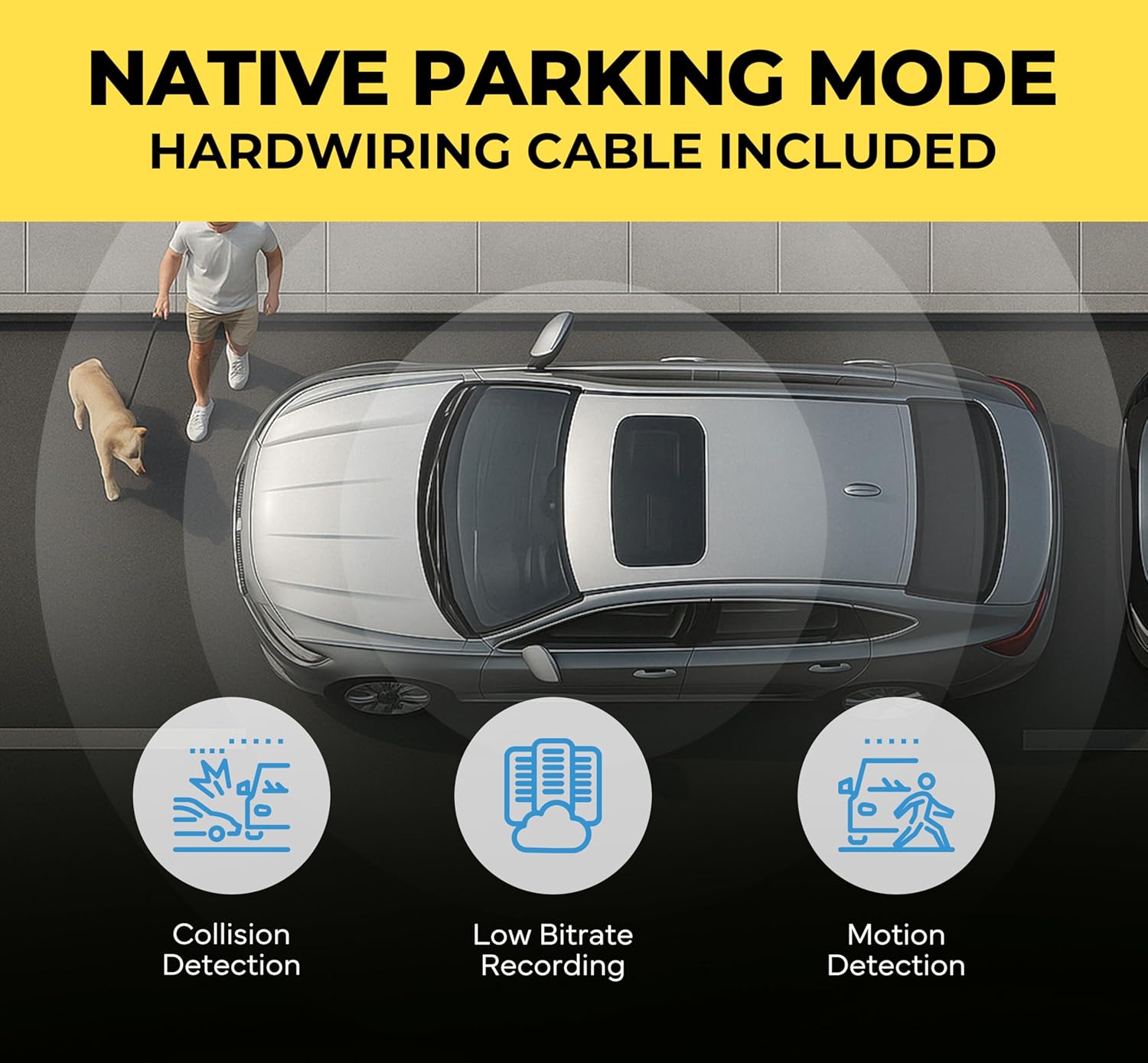
Image: Explanation of the Native Parking Mode capabilities, including various detection types.
Rezistență la căldură
By housing the main processor in the separate "Box" unit, which can be placed in a cooler location within the vehicle, the DR970X Box-2CH Plus mitigates overheating issues commonly found in dash cams where the processor is integrated into the front camera, especially in hot climates or direct sunlight.
5GHz Wi-Fi Connectivity
The integrated 5GHz Wi-Fi module enables faster file transfers to your smartphone via the BlackVue App, making it quicker to review and download large 4K video files.
Întreţinere
- Gestionarea cardurilor MicroSD: Periodically format the microSD card (e.g., once a month) using the BlackVue App or a computer to ensure optimal performance and prevent data corruption. Use only BlackVue-recommended microSD cards.
- Curățarea lentilelor: Gently clean the camera lenses with a soft, lint-free cloth to ensure clear video recordings. Avoid abrasive materials.
- Actualizări firmware: Regularly check for and install the latest firmware updates via the BlackVue App or BlackVue website. Firmware updates often include performance improvements and bug fixes.
- Verificarea cablului: Verificați periodic toate cablurile pentru a depista orice semne de uzură sau deteriorare.
Depanare
- Camera de bord nu pornește:
- - Check power cable connections. Ensure the cigarette lighter socket or fuse box connection is secure and receiving power.
- - If hardwired, verify the fuse is intact and the wiring is correct.
- Wi-Fi Connection Issues / App Cannot Connect:
- - Ensure the dash cam's Wi-Fi is enabled (check the main unit's status lights).
- - Verify you are connecting to the correct BlackVue Wi-Fi network (SSID) and using the correct password (found on the main unit's sticker).
- - Try restarting both the dash cam and your smartphone.
- - If issues persist after a firmware update, try resetting the dash cam to factory settings (refer to the quick start guide for instructions).
- Poor Video Quality / Unreadable License Plates:
- - Ensure the camera lenses are clean and free from smudges or dirt.
- - Verify that the recording resolution is set to the highest available (4K for front, Full HD for rear) in the BlackVue App settings.
- - Check the camera's mounting angle. The horizon should be roughly in the middle of the frame.
- Dash Cam Shuts Down in Hot Weather:
- - While the Box unit design helps with heat dissipation, extreme temperatures can still affect performance. Ensure the main unit is placed in the coolest possible location within the vehicle, away from direct sunlight.
- - Ensure proper ventilation around the main unit.
- Modul de parcare nu se activează:
- - Confirm the dash cam is hardwired to the vehicle's fuse panel, not just using the cigarette lighter adapter.
- - Check Parking Mode settings in the BlackVue App to ensure it's enabled and voltage cutoff/timer settings are appropriate for your vehicle's battery.
Specificații
| Caracteristică | Detaliu |
|---|---|
| Numele modelului | BlackVue DR970X Box-2CH Plus |
| Rezoluția camerei frontale | 4K Ultra HD (3840x2160) @ 30FPS |
| Senzorul camerei frontale | STARVIS 2 CMOS Sensor |
| Unghiul camerei frontale | 146-unghi larg |
| Rezoluția camerei din spate | Full HD (1920x1080) la 30 cadre pe secundă |
| Senzor camera spate | STARVIS CMOS Sensor |
| Unghiul camerei spate | 131-unghi larg |
| Conectivitate | Built-in 5GHz Wi-Fi, GPS, Optional LTE via CM100GLTE module |
| Depozitare | microSD card (up to 512GB supported, 64GB included) |
| Mod parcare | Native with built-in voltage monitor (requires hardwiring) |
| Metoda de control | BlackVue App |
| Dimensiunile produsului | 6.3 x 10.2 x 4.3 cm (unitatea principală) |
| Greutatea articolului | 3.14 lire sterline |
| Culoare | Negru |
| Producător | Pittasoft |
| Prima dată disponibilă | 10 februarie 2024 |
Garanție și suport
The BlackVue DR970X Box-2CH Plus comes with a 2 ani garanție producător de la data achiziției. Această garanție acoperă defectele de materiale și de fabricație în condiții normale de utilizare.
For technical support, warranty claims, or further assistance, please visit the official BlackVue website-ul lor web sau contactați departamentul de asistență pentru clienți. Păstrați dovada achiziției pentru validarea garanției.
Official BlackVue Store: BlackVue Amazon Store


