1. Introducere
This user manual provides detailed instructions for the setup, operation, maintenance, and troubleshooting of your GEEKOM Mini IT12 Mini PC. Please read this manual thoroughly before using the device to ensure proper functionality and longevity.
2. Ce se află în cutie
Upon opening your GEEKOM Mini IT12 package, you should find the following items:
- 1 x GEEKOM Mini IT12 Mini PC
- 1 x cablu HDMI
- 1 x VESA Mount
- 1 x adaptor de alimentare
- 1 x Ghid de utilizare (acest document)
Video: Unboxing GEEKOM Mini IT12. This video demonstrates the unboxing process and shows all included components.

Imagine: The GEEKOM Mini IT12 shown with its VESA mount, demonstrating its compact size and mounting capability.
3. Produs terminatview
The GEEKOM Mini IT12 is a compact yet powerful mini PC designed for various computing needs. It features a robust processor, ample memory, and versatile connectivity options.
3.1 Panoul frontal
Imagine: Detaliat view of the front and rear ports on the GEEKOM Mini IT12.
- Cititor de carduri SD: Pentru citirea și scrierea datelor pe carduri SD.
- Porturi USB 3.2 Gen 2 (x2): Porturi de transfer de date de mare viteză.
- Mufă pentru căști de 3.5 mm: Pentru ieșire audio către căști sau difuzoare.
- Buton de alimentare: Pentru a porni/opri dispozitivul.
3.2 Panoul din spate
- mufă DC: Power input for the Mini PC.
- Porturi USB 4 (x2): High-speed data transfer and display output, supporting up to 8K resolution.
- 2.5GbE LAN Port: Pentru conexiune la rețea prin cablu de mare viteză.
- USB 3.2 Gen 2 Port (x1): Port de transfer de date de mare viteză.
- Port USB 2.0 (x1): Port USB standard pentru periferice.
- Porturi HDMI 2.0 (x2): For connecting to displays, supporting up to 4K resolution.
4. Configurare
Follow these steps to set up your GEEKOM Mini IT12 Mini PC:
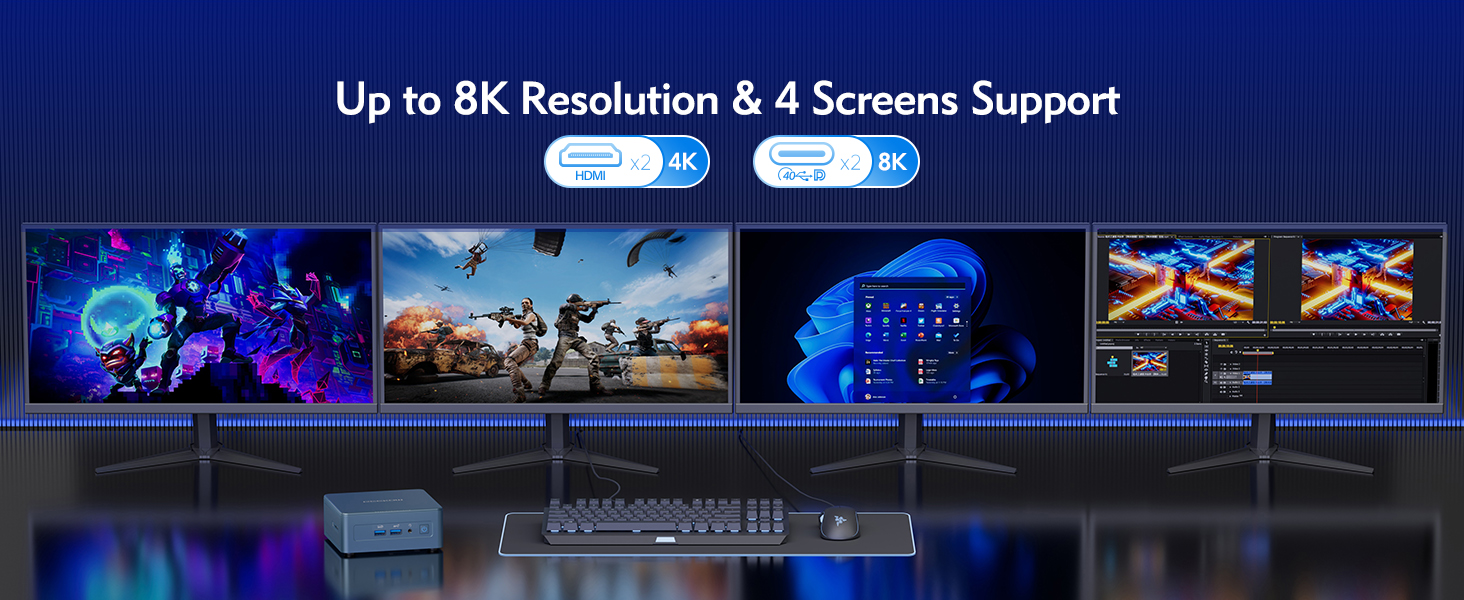
- Conectarea la un afișaj: Use an HDMI cable to connect the Mini IT12 to your monitor or TV. The device supports up to four displays simultaneously via its HDMI and USB4 ports.
- Conectați periferice: Conectați tastatura, mouse-ul și orice alte dispozitive USB la porturile USB disponibile.
- Conectați-vă la rețea: For wired internet, connect an Ethernet cable to the 2.5GbE LAN port. For wireless internet, the device supports Wi-Fi 6E.
- Conectare alimentare: Plug the power adapter into the DC Jack on the rear panel, then plug the adapter into a power outlet.
- Pornire: Press the power button on the front panel to turn on the Mini PC.
5. Operare
The GEEKOM Mini IT12 comes pre-installed with Windows 11 Pro, offering a familiar and user-friendly operating environment.
5.1 Pornirea inițială și configurarea Windows
On the first boot, you will be guided through the Windows 11 Pro setup process. Follow the on-screen instructions to configure your language, region, network, and user account settings.
5.2 Multi-Display Support
The Mini IT12 supports up to four displays simultaneously, allowing for enhanced productivity and immersive experiences. Connect your displays to the available HDMI 2.0 ports and USB4 ports. You can configure display settings within Windows 11 Pro (Right-click on desktop > Display settings).

Imagine: The GEEKOM Mini IT12 demonstrating its capability to support four screens simultaneously for enhanced productivity.
5.3 Conectivitate fără fir
The Mini IT12 is equipped with Wi-Fi 6E and Bluetooth 5.2 for fast and reliable wireless connections. Connect to your wireless network via Windows settings and pair Bluetooth devices as needed.

Imagine: Illustration of the GEEKOM Mini IT12's powerful Wi-Fi 6E and Bluetooth 5.2 capabilities, ideal for wireless peripherals and fast internet.
6. Întreținere și upgrade
The GEEKOM Mini IT12 offers options for memory and storage expansion to enhance its performance and capacity.
6.1 Expanding RAM
The Mini IT12 supports dual-channel DDR4 SODIMM memory, expandable up to 64GB. Refer to the video below for detailed instructions on how to expand the RAM.
Video: How to expand RAM in GEEKOM Mini IT12. This video guides you through the process of installing additional RAM modules.
6.2 Installing an SSD
The Mini IT12 includes an M.2 2280 PCIe Gen 4 x4 SSD slot, expandable up to 2TB, and an M.2 2242 SATA SSD slot, expandable up to 1TB. Follow the video instructions for SSD installation.
Video: How to install an SSD in GEEKOM Mini IT12. This video demonstrates the steps for adding an SSD to your Mini PC.
6.3 Installing a Hard Disk Drive (HDD)
The Mini IT12 also features a 2.5" SATA HDD (7mm) slot, expandable up to 2TB. Watch the video below for guidance on HDD installation.
Video: How to install an HDD in GEEKOM Mini IT12. This video provides instructions for installing a hard disk drive.
7. Depanare
If you encounter issues with your GEEKOM Mini IT12, try the following common troubleshooting steps:
- Fără putere: Asigurați-vă că adaptorul de alimentare este conectat corect atât la Mini PC, cât și la o priză funcțională. Încercați o altă priză sau un alt adaptor de alimentare, dacă este disponibil.
- Fără afișare: Check all HDMI/USB4 cable connections to your monitor. Ensure the monitor is powered on and set to the correct input source.
- Fără conexiune internet: For wired connections, verify the Ethernet cable is properly connected. For Wi-Fi, check your router and ensure Wi-Fi is enabled in Windows settings.
- Performanță lentă: Close unnecessary applications. Check for background updates. Consider upgrading RAM or storage if performance issues persist.
- Periferic nedetectat: Try connecting the peripheral to a different USB port. Ensure drivers are up to date.
Pentru asistență suplimentară, vă rugăm să consultați secțiunea Garanție și asistență.
8. Specificații
Below are the key specifications for the GEEKOM Mini IT12 Mini PC:
| Caracteristică | Caietul de sarcini |
|---|---|
| Procesor | 12th Gen Intel Core i7-12650H (10 Cores/16 Threads, up to 4.7GHz) |
| Grafică | Intel Iris Xe Graphics eligible |
| RAM | 32GB DDR4 RAM (Dual-channel, expandable up to 64GB) |
| Depozitare | 1TB PCIe Gen 4 SSD (expandable up to 2TB), M.2 2242 SATA SSD slot (expandable up to 1TB), 2.5" SATA HDD slot (expandable up to 2TB) |
| Sistem de operare | Windows 11 Pro |
| Ieșire video | 2x HDMI 2.0 (4K), 2x USB4 (8K) - Supports up to 4 displays |
| Conectivitate wireless | Wi-Fi 6E, Bluetooth 5.2 |
| LAN | Port LAN 2.5GbE |
| Porturi | 2x USB4, 3x USB 3.2 Gen 2, 1x USB 2.0, 2x HDMI 2.0, 1x SD Card Reader, 1x 3.5mm Headphone Jack, 1x DC Jack |
| Dimensiuni | 4.6 x 4.4 x 1.79 inci |
| Greutate | 1.4 lire sterline |

Imagine: Un pesteview of the GEEKOM Mini IT12 highlighting its core specifications and features.
9. Garanție și asistență
Your GEEKOM Mini IT12 Mini PC is covered by a manufacturer's warranty. For specific warranty terms and conditions, please refer to the warranty card included in your product packaging or visit the official GEEKOM website-ul.
For technical support, troubleshooting assistance, or service inquiries, please contact GEEKOM customer support through their official channels. You can typically find contact information on the GEEKOM website or in the included user guide.
Resurse online:
- GEEKOM Official Website: www.geekompc.com
- E-mail de asistență pentru clienți: support@geekompc.com


