1. Introducere
This manual provides comprehensive instructions for the TIMBOOTECH Wireless HDMI Transmitter and 2 Receivers. This device allows for wireless transmission of HDMI signals from a source device to multiple display units, supporting high-definition video and audio.
2. Conținutul pachetului
Verificați dacă toate articolele enumerate mai jos sunt incluse în pachetul dumneavoastră:
- 1x Wireless HDMI Transmitter
- 2x Wireless HDMI Receivers
- 3x cabluri HDMI
- 3x cabluri de încărcare USB-C
- 2x Mini/Micro HDMI Adapters
- 1x Manual de utilizare

Image: All components included in the TIMBOOTECH Wireless HDMI Transmitter and 2 Receivers package.
3. Produs terminatview
The TIMBOOTECH Wireless HDMI system consists of a transmitter (TX) and multiple receivers (RX). It operates on a 5.8G chip for stable, low-latency transmission.
3.1 Caracteristici cheie
- Real-Time Sharing: Supports sharing to 2 TVs and up to 6 mobile devices simultaneously.
- Rezoluție înaltă: 4K input decoding and 1080P@60Hz output for clear visuals.
- Plug and Play: Pre-paired units require no Wi-Fi or Bluetooth setup.
- Suport pentru mai multe receptoare: One transmitter can connect to up to 8 receivers or touchscreens.
- Funcționalitatea aplicației: Use a dedicated app to turn iOS/Android devices into wireless monitors.
- Interval extins: Transmits up to 165ft (50m) with minimal delay.
- Compatibilitate largă: Works with various devices including laptops, PCs, cameras, and game consoles.

Image: The TIMBOOTECH Wireless HDMI Transmitter (TX) and Receivers (RX).
4. Instrucțiuni de configurare
The devices are pre-paired at the factory for a plug-and-play experience. Follow these steps for initial setup:
4.1 Conexiune de bază
- Conectați transmițătorul (TX): Plug the HDMI end of the transmitter into the HDMI output port of your source device (e.g., laptop, PC, camera). Connect a USB-C charging cable to the transmitter and a power source (e.g., USB port on your device or a USB power adapter).
- Conectarea receptorului (RX): For each receiver, plug its HDMI end into an HDMI input port on your display device (e.g., TV, monitor, projector). Connect a USB-C charging cable to the receiver and a power source.
- Pornire: Ensure both the transmitter and all receivers are powered on.
- Automatic Mirroring: Wait approximately 5 seconds for the screen to automatically mirror from the source device to the displays.

Image: Visual guide for connecting the transmitter and receivers to source and display devices.
4.2 Re-pairing or Adding Multiple Receivers
If the connection is abnormal or you wish to add more receivers (up to 8 total), follow these steps:
- Connect and Power TX: Connect the TX (Transmitter) to your HDMI output device and ensure it is powered.
- Connect and Power RX: Connect the RX (Receiver) to your HDMI input device and ensure it is powered.
- Inițiază împerecherea: Long press the RX button for 5 seconds, then press the TX button for 10 seconds. Wait for the devices to pair.
- Verificați conexiunea: After successful pairing, the screen should display the mirrored content.

Image: Visual steps for re-pairing or adding additional receivers.
5. Instrucțiuni de utilizare
5.1 Afișaj multi-ecran
The system supports displaying content from one transmitter to multiple receivers simultaneously, allowing for multi-screen setups in various environments.
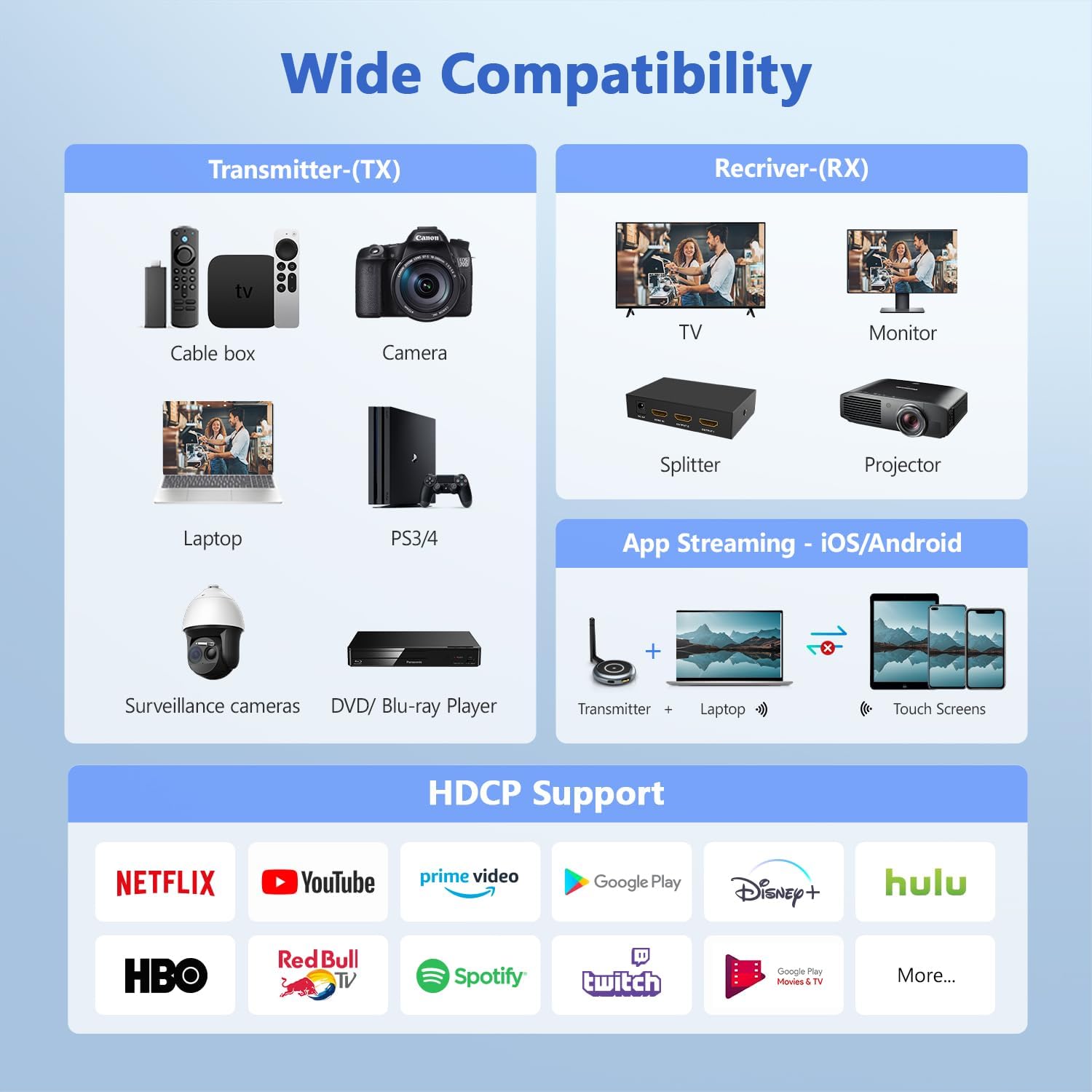
Image: A laptop transmitting to four separate display screens.
5.2 App Functionality (iOS/Android)
Utilize the dedicated app to extend your display to iOS or Android mobile devices. This feature is ideal for monitoring camera feeds or sharing content with nearby users.
- Connect TX: Connect the transmitter to your HDMI output device and power it.
- Instalează aplicația: Download and install the "TuTuLink" app on your iOS/Android device.
- Conectați-vă la Wi-Fi: Open the app, connect to the Wi-Fi hotspot broadcast by the transmitter (SSID and password usually provided on the screen or manual).
- Începeți redarea în flux: Open the app again, and it should automatically sync and display the content.

Image: Guide for using the TuTuLink app to mirror content to mobile devices.
5.3 Adjusting Wireless Channels
In environments with heavy Wi-Fi traffic, you can adjust the wireless channel via the app for optimal performance and signal stability.

Image: Adjusting wireless channels via the app for improved signal.
6. Compatibilitate
The TIMBOOTECH Wireless HDMI system offers broad compatibility with various devices and supports HDCP.
6.1 Compatible Source Devices (Transmitter - TX)
- Laptop-uri
- PC-uri
- Cameras (DSLR, Surveillance)
- Playere Blu-ray
- Set-top Boxes / Cable Boxes / Fire TV Stick
- Game Consoles (PS3/4, PS5)
6.2 Compatible Display Devices (Receiver - RX)
- televizoare
- Monitoare
- Proiectoare
- Splittere HDMI
- iOS/Android Touch Screens (via App)
6.3 Model Compatibility Note
This system is compatible only with the latest TIMBOOTECH receiver models (ASIN: B0DNF72YK1 for blue interface version, B0CSFS69XF for black interface version).

Imagine: Pesteview of compatible devices for both transmitter and receiver, including app functionality.
7. Depanare
Dacă întâmpinați probleme, vă rugăm să consultați următoarele soluții comune:
- No Signal/Connection:
- Ensure both transmitter and receivers are properly powered via their USB-C cables.
- Verify HDMI cables are securely connected to both source and display devices.
- Perform the re-pairing process (Section 4.2) if devices are not connecting automatically.
- Check if the HDMI input on your display is set to the correct port.
- Intermittent Signal/Poor Quality:
- Ensure there are no major physical obstructions (walls, large furniture) between the transmitter and receivers.
- Adjust the wireless channel via the TuTuLink app to avoid interference from other Wi-Fi networks (Section 5.3).
- Ensure devices are within the recommended 165ft (50m) transmission range.
- Verificați dacă există interferențe electromagnetice puternice de la alte dispozitive electronice.
- Probleme de sincronizare audio/video:
- Restart both the transmitter and receivers.
- Asigurați-vă că toate cablurile sunt bine conectate.
- Probleme de conectare la aplicație:
- Ensure your mobile device is connected to the correct Wi-Fi hotspot broadcast by the transmitter.
- Verify the Wi-Fi password (usually provided on the screen or manual).
- Restart the app and the transmitter.
Video: Official TIMBOOTECH video demonstrating smooth and stable wireless HDMI to multiple screens, highlighting the product's functionality.
8. Specificații
| Caracteristică | Detaliu |
|---|---|
| Marca | TIMBOOTECH |
| Numărul de model | G70 |
| Tehnologia de conectivitate | Wireless (5.8G) |
| Rezolutie de intrare | Până la 4K |
| Rezoluție de ieșire | 1080P @ 60Hz |
| Interval de transmisie | Până la 165 de picioare (50 m) |
| Latența | Low (approx. 0.1s) |
| Multi-Receiver Support | Up to 8 receivers/touchscreens |
| Suport HDCP | Da |
| Greutatea articolului | 7 uncii |
| Dimensiunile produsului | 1.97 x 1.57 x 1.18 inci |
9. Garanție și asistență
TIMBOOTECH offers 24/7 support for a worry-free experience. Please contact customer service for any issues.
- Sprijin: 24/7 customer support is available.
- Garanția de rambursare a banilor: 30-day money-back return and refund guarantee.
- Garantie: 1-year free replacement.
Video: Official TIMBOOTECH video demonstrating the RScreen App for touchscreen devices, showcasing additional features and support.


