1. Introducere
This manual provides detailed instructions for the installation, operation, and maintenance of your WESECUU Light Bulb Security Camera Model 8050. Please read this manual thoroughly before using the product to ensure proper function and safety.

Image 1.1: WESECUU Light Bulb Security Camera Model 8050 (Two Pack) and smartphone interface.
2. Informații de siguranță
- Asigurați-vă că sursa de alimentare este deconectată înainte de instalare sau întreținere.
- The camera is designed for E27 light sockets (100V~240V). Use only with compatible sockets.
- Avoid exposing the camera to extreme temperatures, humidity, or direct water spray. While rated IP65 for outdoor use, proper placement is crucial to prevent water ingress into the socket.
- Nu încercați să dezasamblați sau să reparați singur camera. Contactați serviciul de asistență pentru clienți pentru asistență.
- A nu se lăsa la îndemâna copiilor.
3. Conținutul pachetului
Verificați dacă toate articolele sunt prezente în colet:
- WESECUU Light Bulb Security Camera(s)
- E27 Light Socket Adapter
- Manual de instrucțiuni (acest document)
4. Produs terminatview
The WESECUU Light Bulb Security Camera Model 8050 offers comprehensive surveillance features in a discreet light bulb form factor. Key features include:
- 2K FHD Resolution: Oferă un videoclip clar și detaliattage.
- WiFi dublă bandă: Supports both 2.4GHz and 5GHz wireless networks for flexible connectivity.
- Acoperire 360°: Pan 355° and Tilt 90° for a wide viewzona de ing.
- Vedere de noapte color: Equipped with floodlights and IR lights for clear, colored images in low-light conditions.
- Discuție în două sensuri: Microfon și difuzor încorporate pentru comunicare în timp real.
- Detectare inteligentă a oamenilor: Reduces false alarms by focusing on human shapes.
- Urmărirea mișcării: Automatically follows detected objects.
- Înregistrare 24/7: Supports cloud storage and local TF card storage (up to 128GB, not included).
- Compatibilitate Alexa: Integrate with Amazon Alexa for voice control and viewing.


Imaginea 4.1: Diverse views of the WESECUU Light Bulb Security Camera.
5. Instrucțiuni de configurare
5.1 Instalare fizică
- Oprire: Ensure the power to the light socket is turned off at the circuit breaker before beginning installation.
- Înșurubați: Carefully screw the WESECUU Light Bulb Security Camera into a standard E27 light socket. If your existing socket is not E27, use the provided E27 light socket adapter.
- Pornire: Restore power to the light socket. The camera will power on and initiate its self-test.

Image 5.1: Easy installation into an E27 light socket.
5.2 Descărcarea aplicației și conectarea
- Descărcați aplicația: Caută the 'Eseecloud' app in your smartphone's app store (iOS or Android) and download it.
- Înregistrare Cont: Open the Eseecloud app and follow the on-screen instructions to register a new account or log in if you already have one.
- Adăugați dispozitiv: În aplicație, atinge pictograma „+” pentru a adăuga un dispozitiv nou.
- Bluetooth Quick Connection: Enable Bluetooth on your smartphone. The app will guide you through the Bluetooth quick connection process to detect and pair with the camera.
- Configurare WiFi: Select your 2.4GHz or 5GHz WiFi network and enter the password. Ensure your phone is connected to the same WiFi network during this step.
- Finalizare: După conectare, puteți denumi camera și puteți începe să transmiteți live-ul viewing.

Image 5.2: The camera supports both 2.4GHz and 5GHz WiFi networks.
6. Instrucțiuni de utilizare
6.1 În direct View și Redare
- Open the Eseecloud app and select your camera from the device list to access the live view.
- Use the playback function to review inregistrat footage from your cloud storage or TF card.
6.2 Controlul Panoramic, Tilt și Zoom (PTZ)
The camera offers a 355° horizontal pan and 90° vertical tilt. Use the controls within the Eseecloud app to adjust the camera's viewunghiul de ing.

Image 6.1: Camera demonstrating auto-tracking and PTZ capabilities.
6.3 Conversație bidirecțională
Pentru a utiliza funcția de convorbire bidirecțională, atingeți pictograma microfonului în modul live. view interface of the Eseecloud app. You can speak through your phone, and your voice will be projected through the camera's speaker. Similarly, you can hear audio from the camera's location through your phone.

Image 6.2: Illustration of the two-way voice communication feature.
6.4 Detectarea mișcării și alertele
- Activare detectare: In the app settings, enable motion detection and smart human detection. This will filter alerts to primarily notify you of human presence.
- Alerte: When motion or a human is detected, the camera will send real-time notifications to your smartphone.
- Urmărirea mișcării: If enabled, the camera will automatically track the detected object within its field of view.
- Sirenă: An audible siren can be activated via the app to deter intruders.

Image 6.3: Human detection and real-time alert functionality.
6.5 Vedere nocturnă
The camera automatically switches between day and night vision modes. It utilizes six floodlights and six IR lights to provide clear, colored images even in complete darkness.
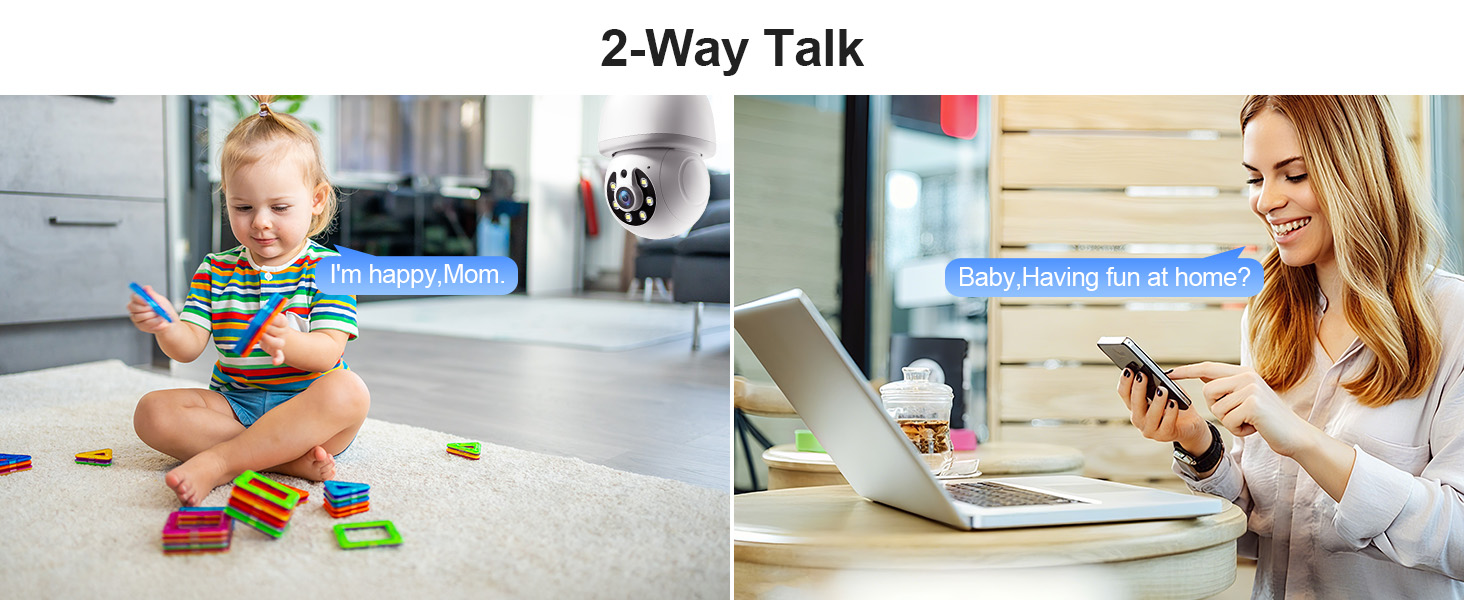
Image 6.4: Comparison of infrared and 2K full-color night vision.
6.6 Înregistrare și stocare
The camera supports continuous 24/7 recording. You have two storage options:
- Stocare în cloud: Subscribe to the Eseecloud app's cloud storage service for remote access to your recordings.
- Stocare card TF: Insert a TF (microSD) card (up to 128GB, not included) into the camera's slot for local recording.

Image 6.5: 24/7 recording options with cloud and SD card storage.
6.7 Integrare Alexa
The WESECUU camera is compatible with Amazon Alexa. To connect:
- Deschide aplicația Alexa pe smartphone-ul tău.
- Go to 'Skills & Games' and search for 'Eseecloud'.
- Enable the Eseecloud skill and link your Eseecloud account.
- Discover devices. You can then use voice commands like "Alexa, show me the [camera name]" on compatible Alexa devices with screens.

Image 6.6: Camera integration with Amazon Alexa.
6.8 Patrol Guard Mode
The Patrol Guard mode allows you to set multiple distinct viewpoints (presets). The camera will automatically cycle through these preset positions at custom intervals, providing continuous monitoring of different areas.

Image 6.7: Visualization of the Patrol Guard mode with multiple presets.
7. Întreținere
- curatenie: Ștergeți ușor obiectivul și corpul camerei cu o cârpă moale și uscată. Nu utilizați substanțe chimice dure sau produse de curățare abrazive.
- Actualizări firmware: Regularly check the Eseecloud app for available firmware updates to ensure optimal performance and security.
- Depozitare: Dacă depozitați camera pentru o perioadă lungă de timp, deconectați-o de la alimentare și depozitați-o într-un loc răcoros și uscat.
8. Depanare
| Problemă | Cauza posibila | Soluţie |
|---|---|---|
| Camera nu se conectează la WiFi | Incorrect WiFi password; camera too far from router; incorrect WiFi band selected. | Verify WiFi password. Move camera closer to router. Ensure you are connecting to a 2.4GHz or 5GHz network as supported. Restart camera and router. |
| Calitate slabă a imaginii | Lentilă murdară; iluminare insuficientă; probleme cu lățimea de bandă a rețelei. | Clean the camera lens. Ensure adequate lighting for optimal color night vision. Check your internet speed. |
| Fără alerte de detectare a mișcării | Motion detection disabled; sensitivity too low; app notifications blocked. | Enable motion detection and human detection in the app. Adjust sensitivity settings. Check your phone's notification settings for the Eseecloud app. |
| Convorbirea în două sensuri nu funcționează | Microphone/speaker permissions not granted; volume too low. | Check app permissions on your phone. Adjust volume settings in the app and on your phone. |
| TF card not recording | TF card full or corrupted; not inserted correctly. | Format the TF card in the app. Reinsert the TF card. Replace with a new TF card if corrupted. |
9. Specificații
| Caracteristică | Caietul de sarcini |
|---|---|
| Numele modelului | 8050 |
| Utilizare în interior/exterior | Indoor, Outdoor (IP65 rated) |
| Rezoluție captură video | 2K (3 MP Maximum WebRezoluția imaginii camerei) |
| Tehnologia de conectivitate | Wireless (Wi-Fi 2.4G/5G) |
| Sursa de alimentare | Corded Electric (E27 light socket, 100V~240V) |
| Tip controler | Amazon Alexa |
| Tip de montare | Montare pe tavan |
| Caracteristici speciale | 2-Way Audio, Image Sensor, Color Night Vision, Human Detection, Motion Tracking |
| Opțiuni de stocare | Cloud Storage, TF Card (up to 128GB, not included) |
| Dimensiunile produsului | 1 x 1 x 1 inci |
| Greutatea articolului | 1.1 lire sterline |
10. Asistență pentru clienți
For technical assistance, troubleshooting not covered in this manual, or warranty inquiries, please contact WESECUU customer support through the contact information provided with your purchase or on the official WESECUU website-ul.


