1. Introducere
Thank you for choosing the iJoy Disney Lilo & Stitch Expressions Bluetooth Over-Ear Headphones. These wireless headphones are designed to provide a comfortable audio experience with the added charm of Lilo & Stitch designs. This manual will guide you through the setup, operation, and maintenance of your new headphones.

Image: iJoy Disney Lilo & Stitch Bluetooth Over-Ear Headphones.
2. Produs terminatview
Caracteristici cheie:
- Conexiune wireless Bluetooth: Enjoy audio without tangled cords.
- Microfon încorporat: For clear communication during calls.
- Indicatoare LED: Provide battery and connection status.
- Design pliabil: Pentru portabilitate și depozitare ușoară.
- Micro SD Card Plug-in: Redați muzică direct de pe un card Micro SD.
- Built-in Radio Receiver: Ascultă posturile tale de radio preferate.
- Aux Cable Included: Option for wired listening when battery is low or Bluetooth is not available.
Ce este în cutie:
- iJoy Disney Lilo & Stitch Expressions Bluetooth Over-Ear Headphones
- Carcasă de protecție
- Cablu de încărcare (USB)
- Auxiliary Audio Cable with Microphone
3. Configurare
3.1 Încărcarea căștilor
Before initial use, fully charge your headphones. Connect the provided USB charging cable to the charging port on the headphones and to a compatible USB power source. The LED indicator will show charging status and turn off or change color when fully charged. A full charge provides approximately 15 hours of playtime.

Image: Headphones highlighting 15 hours of playtime.
3.2 Asociere Bluetooth
- Asigurați-vă că căștile sunt oprite.
- Apăsați și țineți apăsat butonul de pornire/oprire până când indicatorul LED clipește în albastru și roșu, indicând modul de asociere.
- Pe dispozitivul dvs. (smartphone, tabletă etc.), activați Bluetooth și căutați dispozitivele disponibile.
- Select "iJoy Stitch Headphones" (or similar name) from the list.
- Odată conectat, indicatorul LED va afișa de obicei o lumină albastră continuă sau va clipi lent în albastru.

Image: Headphones demonstrating universal compatibility with Apple and Android devices.
4. Instrucțiuni de utilizare
4.1 Controale asupraview
The headphone controls are located on the ear cup. Refer to the diagram below for button functions:
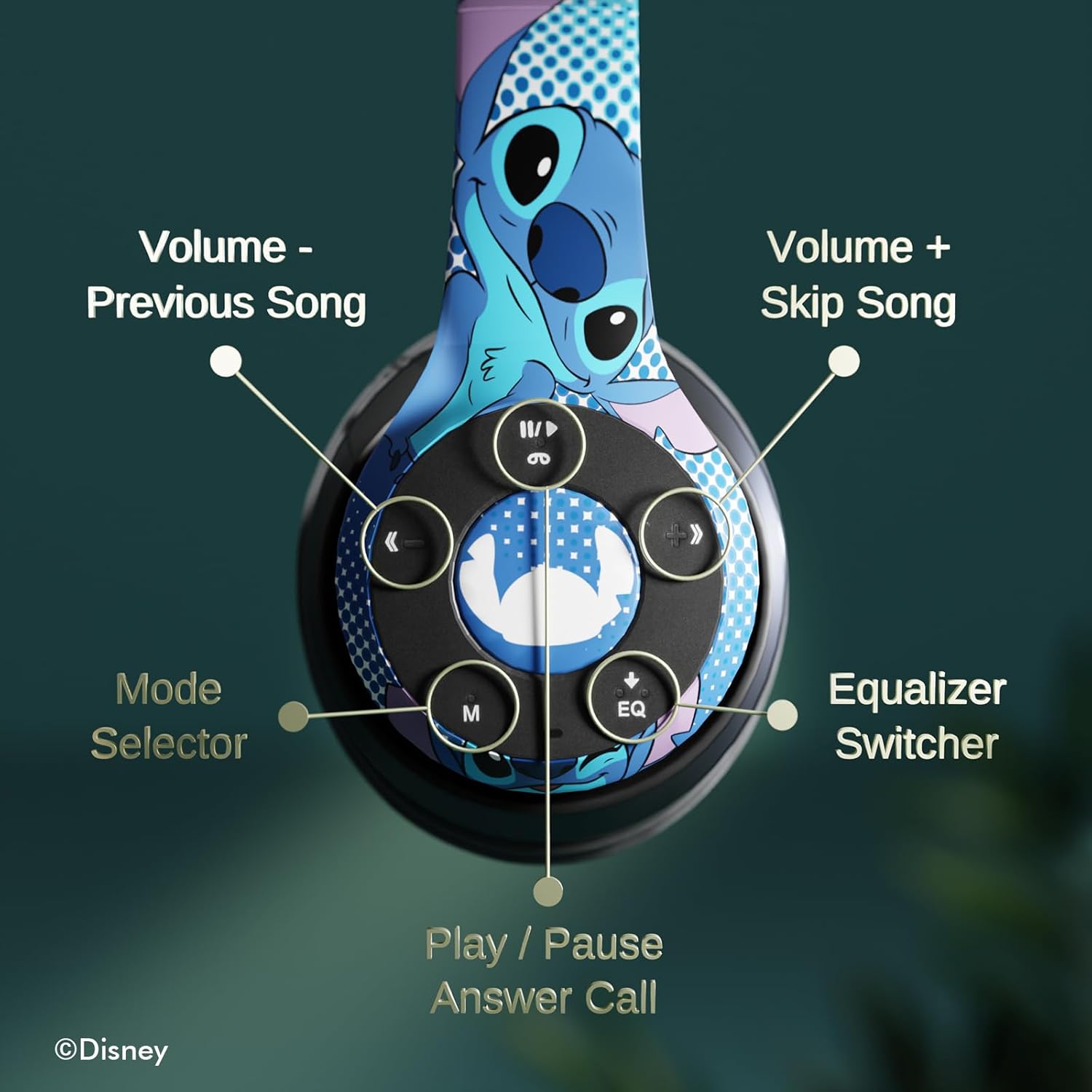
Imagine: Detaliată view of the headphone controls, including Volume -, Previous Song, Volume +, Skip Song, Mode Selector, Equalizer Switcher, and Play/Pause/Answer Call buttons.
- Play/Pause/Answer Call Button: Press once to play/pause music or answer/end a call. Press and hold to reject a call.
- Volume + / Skip Song Button: Press once for Volume Up. Press and hold to skip to the next song.
- Buton Volum - / Melodia anterioară: Press once for Volume Down. Press and hold to go to the previous song.
- Selector de mod (M): Press to switch between Bluetooth, Micro SD card, and FM Radio modes.
- Comutator egalizator (EQ): Apăsați pentru a parcurge diferitele presetări ale egalizatorului.
4.2 Efectuarea și primirea apelurilor
With the built-in microphone, you can make and receive calls when connected via Bluetooth:
- Răspundeți/Terminați apelul: Press the Play/Pause/Answer Call button once.
- Respinge apelul: Press and hold the Play/Pause/Answer Call button.
4.3 Redarea muzicii
- Mod Bluetooth: After pairing, music from your connected device will play through the headphones. Use the controls to manage playback.
- Modul card Micro SD: Insert a Micro SD card with MP3 files into the designated slot. Press the 'M' button to switch to Micro SD card mode. The headphones will automatically begin playing music from the card.
4.4 Modul radio FM
Press the 'M' button to switch to FM Radio mode. Use the Volume +/- buttons to scan for stations or adjust volume.
5. Întreținere
- curatenie: Folosiți o lavetă moale și uscată pentru a curăța căștile. Nu utilizați substanțe chimice dure sau materiale abrazive.
- Depozitare: When not in use, store the headphones in the provided protective case. The foldable design allows for compact storage.
- Evitați umezeala: Nu lăsați căștile să intre în contact cu apă și umiditate excesivă.
- Temperatură: Evitați expunerea căștilor la temperaturi extreme.

Image: Headphones demonstrating their foldable design for easy storage.
6. Depanare
| Problemă | Soluție posibilă |
|---|---|
| Căștile nu se pornesc. | Asigurați-vă că sunt complet încărcate căștile. |
| Nu se poate realiza asocierea cu dispozitivul. | Asigurați-vă căștile sunt în modul de asociere (LED-ul albastru/roșu clipește). Dezactivați și activați Bluetooth pe dispozitiv. Apropiați-vă de dispozitiv. |
| Nici un sunet. | Check volume levels on both headphones and connected device. Ensure headphones are correctly paired. Try using the auxiliary cable. |
| Calitate slabă a sunetului. | Move closer to the connected device to avoid interference. Check audio source quality. |
| Microfonul nu funcționează. | Ensure headphones are properly connected. Check microphone settings on your device. |
7. Specificații
| Caracteristică | Detaliu |
|---|---|
| Numele modelului | Disney Lilo & Stitch Expressions |
| Numărul de model | DS20137 |
| Tehnologia de conectivitate | Wireless (Bluetooth) |
| Tehnologia comunicațiilor fără fir | Bluetooth |
| Versiune Bluetooth | 4.0 |
| Gama Bluetooth | 10 metri |
| Plasarea urechii | Peste ureche |
| Factor de formă | Peste ureche |
| Controlul zgomotului | Izolarea sunetului |
| Tip control | Control volum, atingere |
| Caracteristici speciale | Receptor radio încorporat, bandă de susținere pliabilă și reglabilă, card Micro SD insertabil, microfon inclus |
| Dispozitive compatibile | Bluetooth-enabled devices (e.g. smartphones, tablets, laptops) |
| Material | Memory Foam, Plastic |
| Greutatea articolului | 0.29 kilograme (10.2 uncii) |
| baterii | 1 baterie cu litiu polimer (inclusă) |
| Dimensiuni pachet | 8.78 x 6.26 x 3.62 inci |
| UPC | 810116712489 |
8. Videoclip oficial al produsului
Video: O prezentare video oficială a produsuluiasing the Disney Lilo & Stitch Bluetooth Headphones, highlighting their features and design.
9. Garanție și asistență
For warranty information and customer support, please refer to the documentation included with your product or visit the official iJoy website-ul. Păstrați chitanța de achiziție pentru cererile de garanție.


