Introducere
Welcome to the user manual for your new Amazon Fire TV Stick HD. This guide provides detailed instructions on how to set up, operate, maintain, and troubleshoot your device, ensuring you get the most out of its streaming and smart home capabilities.

Image: The Amazon Fire TV Stick HD and its accompanying Alexa Voice Remote. The stick is compact and plugs directly into an HDMI port, while the remote features dedicated buttons for navigation, voice control, and popular streaming services.
Ce este în cutie
Upon unboxing your Fire TV Stick HD, you should find the following components:
- Fire TV Stick HD device
- Alexa Voice Remote
- Cablu de alimentare și adaptor de alimentare
- Extender HDMI
- 2 AAA batteries (for the remote)
- Ghid de pornire rapidă

Image: The retail packaging for the Amazon Fire TV Stick HD, showing the device, remote, and box. This illustrates all the items included in the product package.
Ghid de instalare
Follow these steps to set up your Fire TV Stick HD:
- Conectați stick-ul Fire TV: Plug the Fire TV Stick HD directly into an available HDMI port on your high-definition television. If space is limited or for better Wi-Fi reception, use the included HDMI extender.
- Pornire: Connect the power cable to the Fire TV Stick and then plug the power adapter into a wall outlet.
- Introduceți bateriile în telecomandă: Open the battery compartment on the back of the Alexa Voice Remote and insert the two AAA batteries, ensuring correct polarity.
- Selectați intrarea HDMI: Turn on your TV and select the correct HDMI input source where the Fire TV Stick is connected.
- Urmați instrucțiunile de pe ecran: The Fire TV Stick will guide you through the initial setup process, including connecting to your Wi-Fi network and logging into your Amazon account.
- Pair Remote (if necessary): If your remote does not automatically pair, press and hold the Home button on the remote for 10 seconds until it pairs with your Fire TV Stick.
Operating Your Fire TV Stick HD
Control vocal cu Alexa
The Alexa Voice Remote allows you to control your Fire TV Stick using voice commands. Press and hold the microphone button on the remote, then speak your command. You can search for content, launch apps, control playback, and more.

Image: The Alexa Voice Remote, highlighting its voice control button and dedicated app buttons for services like Prime Video and Netflix. This remote simplifies content discovery and access.
Conținut în flux
Access a vast library of movies, TV shows, and live TV from various streaming services. The Fire TV Stick HD supports Full HD (1080p) resolution for a clear viewexperiență.
- Filme și emisiuni TV: Stream from popular services like Netflix, Prime Video, Disney+, Vix, and many more. Subscription fees may apply for certain services.
- Conținut gratuit: Enjoy over 50,000 free movies and TV episodes from ad-supported streaming apps such as Vix, Tubi, and Pluto TV.
- Muzică: Listen to millions of songs from Amazon Music, Spotify, Pandora, and other music streaming platforms.
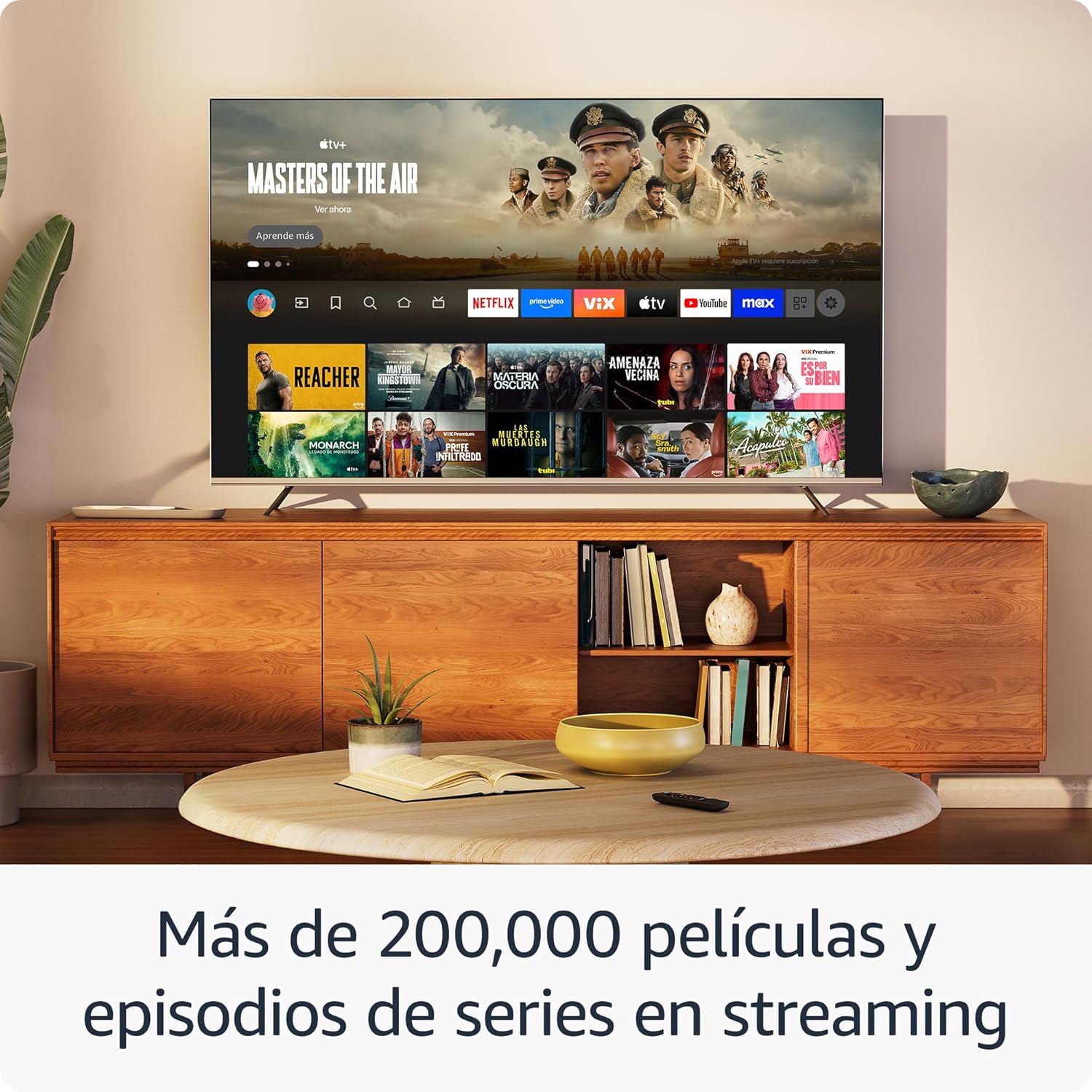
Imagine: O prezentare pe ecranul unui televizorasing the Fire TV interface with various streaming applications like Netflix, Prime Video, and Disney+. This demonstrates the wide range of entertainment options available.

Image: A visual comparison illustrating the difference in picture quality between Standard Definition (SD), High Definition (HD), and 4K resolution. The Fire TV Stick HD delivers content in crisp HD.
Control Smart Home
Use your Fire TV Stick HD and Alexa Voice Remote to control compatible smart home devices. You can ask Alexa to check the weather, dim lights, view live camera feeds, and more.

Image: A television screen displaying the smart home control dashboard, showing icons for thermostat, smart camera, and light. This illustrates how the Fire TV Stick can integrate with and manage smart home devices.
Întreţinere
To ensure the longevity and optimal performance of your Fire TV Stick HD:
- curatenie: Gently wipe the device and remote with a soft, dry, lint-free cloth. Avoid using liquid cleaners or aerosols.
- Mediu: Keep the device in a well-ventilated area, away from direct sunlight, heat sources, and moisture.
- Actualizări de software: The device automatically receives software security updates. Ensure your device is connected to the internet to receive these updates.
Depanare
If you encounter issues with your Fire TV Stick HD, try the following solutions:
- Fără alimentare/Fără afișaj:
- Ensure the power cable is securely connected to both the Fire TV Stick and the power adapter, and the adapter is plugged into a working wall outlet.
- Verify your TV is on the correct HDMI input channel.
- Încearcă un alt port HDMI pe televizor.
- Telecomanda nu răspunde:
- Înlocuiți bateriile AAA din telecomandă.
- Reconectați telecomanda apăsând și ținând apăsat butonul Acasă timp de 10 secunde.
- Asigurați-vă că nu există obstacole între telecomandă și Fire TV Stick.
- Probleme de conectivitate Wi-Fi:
- Reporniți routerul și modemul Wi-Fi.
- Go to Settings > Network on your Fire TV Stick and try reconnecting to your Wi-Fi network.
- Ensure your Fire TV Stick is within range of your Wi-Fi router.
- Partial Incompatibility with Roku TVs (as reported by some users):
- Some Roku TV models may not automatically switch to the Fire TV Stick's HDMI input upon power-on. You may need to manually select the HDMI input using your Roku TV's remote.
Specificații
| Caracteristică | Caietul de sarcini |
|---|---|
| Dimensions (Stick) | 86 x 30 x 13 mm (3.4” x 1.2” x 0.5”) |
| Weight (Stick) | 32.0 g (1.1 oz) |
| Procesor | Quad-Core 1.7 GHz |
| Stocare internă | 8 GB |
| Conectivitate Wi-Fi | Dual-band, dual-antenna Wi-Fi (MIMO) compatible with 802.11a/b/g/n/ac |
| Bluetooth | Bluetooth 5.0 and Bluetooth Low Energy |
| Compatibilitate vocală | Alexa Voice Remote (included) or free Fire TV app |
| Controlul dispozitivelor IR | Controls TV, soundbar, AV receiver (power, volume) via included Alexa Voice Remote |
| Stocare în cloud | Stocare gratuită în cloud pentru conținutul digital achiziționat de la Amazon |
| Porturi | HDMI output; Micro USB for power only |
| Suport audio | Dolby encoded audio (AC-3, E-AC-3) HDMI pass-through |
| Formate video | HDR10, HDR10+, HLG, H.265, H.264, Vp9 |
| Rezoluție de ieșire | 1080p and 720p up to 60 fps |
| Cerințe de sistem | HD TV with HDMI input, Wi-Fi internet connection, power outlet |
| Televizoare compatibile | HD TVs with HDMI and 1080p or 720p at 60/50 Hz capability |
| Caracteristici de accesibilitate | VoceView screen reader, Closed Captions (not for all content) |
| Dimensiuni la distanță | 38.68 x 141.3 x 17.6 mm |
| Greutate la distanță | 45 g (fara baterii) |
| Baterii la distanță | 2 baterii AAA (incluse) |
| Compatibilitate la distanță | Fire TV Stick HD, Fire TV Stick 4K (1st Gen and later) |
Garanție și suport
Your Amazon Fire TV Stick HD comes with a Garanție limitată de 1 an and included service. For detailed terms and conditions regarding the use of your Fire TV Stick, please refer to the official Amazon website-ul.
Actualizări de securitate software: This device is guaranteed to receive software security updates for at least four years after it is no longer available for purchase as a new unit on Amazon websites. For more information on your specific device's updates, you can check your Amazon account's "Manage Your Content and Devices" section.
For further assistance or support, please visit the official Amazon support pages or contact Amazon customer service.


