1. Introducere
Thank you for choosing the ATTACK SHARK Ajazz AK820 Mechanical Keyboard. This 75% TKL keyboard is designed for gaming and productivity, featuring hot-swappable switches, customizable RGB backlighting, and a convenient multi-function knob. This manual provides detailed instructions for setup, operation, maintenance, and troubleshooting to ensure optimal performance and longevity of your keyboard.
2. Caracteristici cheie
- 75% Layout (82 Keys): Compact design retaining essential arrow and function keys, optimizing desk space. Features N-key rollover for simultaneous key presses.
- Multi-Function Metal Knob: Allows independent control of volume level and mute function. Compatible with Mac and Windows operating systems.
- Gasket Mounted Design: Coupled with a Flex-cut PC plate and 5 layers of sound insulation (Poron sandwich cotton, IXPE under-axis pad, PET premium sound pad, bottom cotton, bottom silicone) to maximally reduce noise and provide a softer, more elastic typing feel.
- Hot-Swappable Mechanical Sea Salt Switches: High-quality PCB supports 3/5-pin hot-swap, allowing easy switch replacement without soldering. Pre-lubed Sea Salt Linear switches offer a smooth and pleasing typing experience with a 50 million keystroke lifespan.
- Iluminare de fundal RGB: South-facing LEDs with 1.6M RGB. Offers 20 lighting effects changeable via "FN+|" and customizable via driver software. Double-shot PBT keycaps provide superior shine-through.
3. Conținutul pachetului
- ATTACK SHARK Ajazz AK820 Mechanical Keyboard
- Cablu USB-C
- 2-in-1 Keycap/Switch Puller

Image 1: The ATTACK SHARK Ajazz AK820 Mechanical Keyboard and its included USB-C cable.

Imaginea 2: O suprapunereview highlighting the 82-key layout and key features like Knob Design, Gasket Mount, PBT Keycaps, RGB, 75% Layout, and Hot Swap capability.
4. Ghid de instalare
4.1 Conectarea tastaturii
- Localizați portul USB-C pe spatele sau pe lateralul tastaturii.
- Conectați un capăt al cablului USB-C furnizat la tastatură.
- Connect the other end of the USB-C cable to an available USB port on your computer (Laptop or PC).
- The keyboard is plug-and-play and should be automatically recognized by your operating system (Windows/Mac).

Image 3: The keyboard displaying its RGB backlighting, illustrating the 16.8 million colors and FN key combinations for controlling lighting modes.
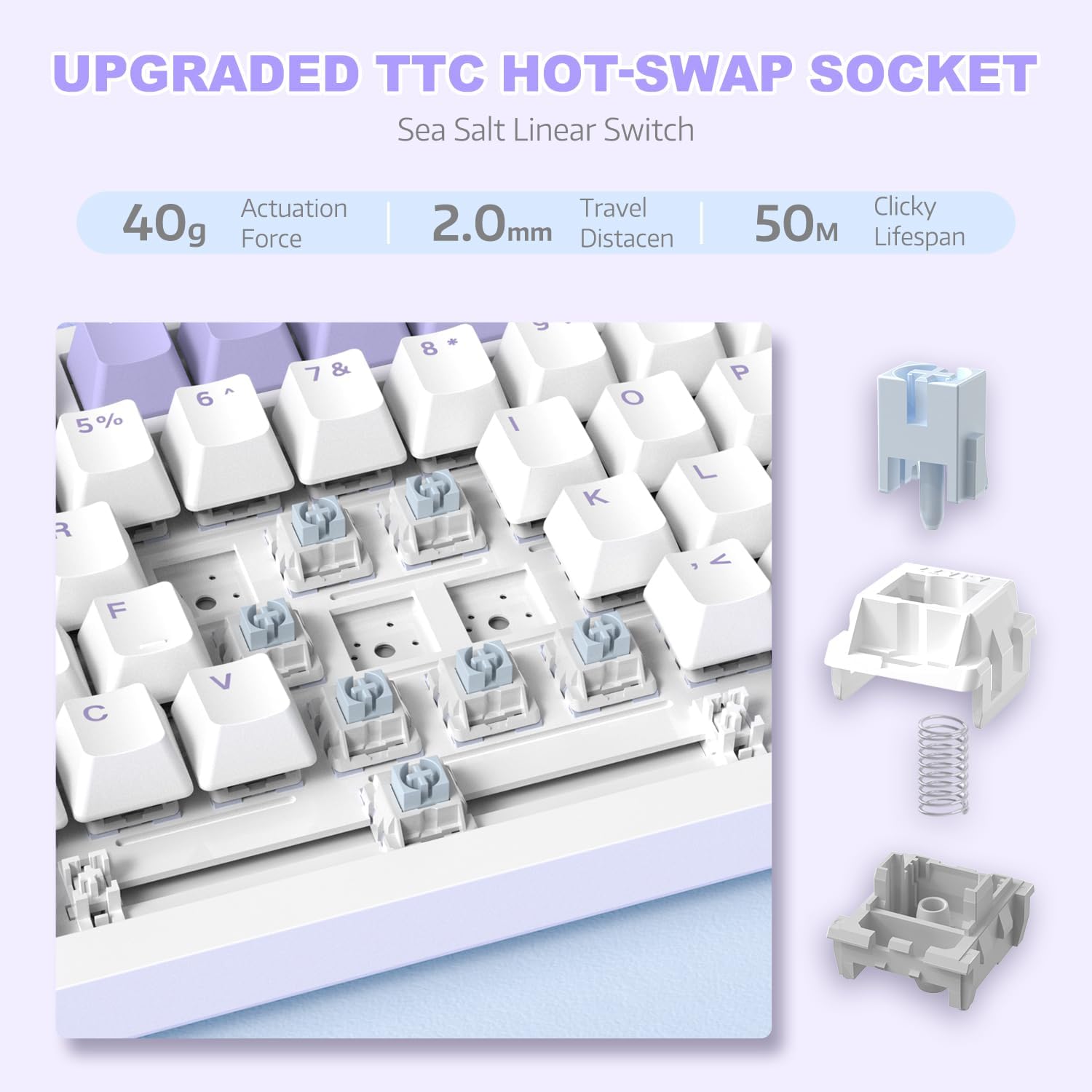
Imaginea 4: O imagine detaliată view of the hot-swappable switch socket, demonstrating how switches can be easily removed and replaced.
5. Instrucțiuni de utilizare
5.1 Multi-Function Knob Control
The metal knob located on the top right of the keyboard provides convenient multimedia control:
- Turn Clockwise: Măriți volumul.
- Turn Counter-clockwise: Scade volumul.
- Apăsați în jos: Activare/dezactivare sunet.

Image 5: The multimedia knob, illustrating its functions for adjusting volume and muting audio.
Controlul iluminării de fundal RGB 5.2
The keyboard features vibrant RGB backlighting with multiple effects. Use the following key combinations to control the lighting:
- FN + | (Backslash): Comutați prin 20 efecte de iluminare diferite.
- FN + X: Turn RGB backlighting ON/OFF.
- Refer to the included quick guide for additional lighting customization options or download the dedicated driver software for advanced control.
5.3 Hot-Swapping Switches and Keycaps
The AK820 supports hot-swapping, allowing you to change mechanical switches and keycaps without soldering.
- Îndepărtarea capacelor tastelor: Use the keycap puller tool to gently grip the keycap and pull upwards until it detaches from the switch.
- Scoaterea comutatoarelor: Use the switch puller (the other end of the 2-in-1 tool) to grip the top and bottom clips of the switch. Gently pull upwards until the switch detaches from the PCB.
- Instalarea comutatoarelor: Align the pins of the new 3-pin or 5-pin mechanical switch with the holes on the PCB. Press down firmly until the switch clicks into place. Ensure pins are not bent.
- Instalarea tastelor: Align the cross-stem of the keycap with the stem of the switch and press down firmly until it is seated.

Image 6: Highlighting the durable PBT keycaps, known for their oil and wear resistance.
5.4 Compatibilitatea sistemului de operare
The keyboard is compatible with both Windows and Mac operating systems. No special drivers are typically required for basic functionality.

Image 7: Visual representation of the keyboard's compatibility with both Mac and Windows operating systems.
6. Întreținere
6.1 Curățarea tastaturii
- Deconectați tastatura de la computer înainte de curățare.
- Folosește o recipient cu aer comprimat pentru a îndepărta praful și resturile dintre capacele tastelor.
- For surface cleaning, use a soft, lint-free cloth lightly dampClătiți cu apă sau o soluție de curățare blândă. Evitați umiditatea excesivă.
- Nu pulverizați soluții de curățare direct pe tastatură.
6.2 Îngrijirea tastelor și a comutatoarelor
- When removing keycaps or switches, do so gently to avoid damaging the components.
- Store spare keycaps and switches in a clean, dry place.

Image 8: An exploded diagram illustrating the multi-layer noise reduction installation, including PORON sandwich cotton, IXPE switch pads, PET voice actor pdd, bottom cotton, and bottom silicone.
7. Depanare
7.1 Tastatura nu răspunde
- Asigurați-vă că este conectat corect cablul USB-C atât la tastatură, cât și la computer.
- Încercați să conectați tastatura la un alt port USB al computerului.
- Testați tastatura pe un alt computer pentru a exclude o problemă specifică computerului.
- Reporniți computerul.
7.2 RGB Backlighting Not Working/Incorrect
- Presa FN + X to ensure the RGB is turned on.
- Presa FN + | (Backslash) pentru a comuta între diferite moduri de iluminare.
- If using custom settings, ensure the driver software is installed and configured correctly.
7.3 Keys Not Registering (Anti-Ghosting)
The AK820 features N-key rollover (NKRO) to prevent ghosting. If specific keys are not registering:
- Ensure the keycap and switch are properly seated. Gently press down on the keycap to ensure it's fully attached.
- If a specific switch is faulty, use the hot-swap feature to replace it with a new one.

Image 9: Illustration of the 82-key anti-ghosting feature, demonstrating the ability to register multiple simultaneous key presses.
7.4 Video Demonstration: AK820 Keyboard Overview
Videoclip 1: Un oficial terminatview of the AK820 75% Wired RGB Gasket Mechanical Keyboard, demonstrating its features including the volume knob, hot-swappable switches, and RGB lighting effects.
8. Specificații
| Caracteristică | Detaliu |
|---|---|
| Numărul de model | AK820 |
| Dimensiunile produsului | 12.87 x 5.35 x 1.57 inci |
| Greutatea articolului | 2.05 lire sterline |
| Producător | ATACA RECHINUL |
| Tehnologia de conectivitate | Cu fir (USB-C) |
| Descrierea tastaturii | Jocuri |
| Numărul de chei | 82 |
| Tip comutator | Sea Salt Linear Switch (Hot-Swappable) |
| Material Keycap | PBT |
| Iluminare din spate | RGB (LED-uri orientate spre sud) |
| Caracteristici speciale | 5 Layers of sound insulation cotton, CNC Metal Knob, Hot-Swappable |
| Dispozitive compatibile | Laptop, PC (Windows, Mac) |
9. Garanție și asistență
Pentru informații despre garanție și asistență tehnică, vă rugăm să consultați pagina oficială ATTACK SHARK. website-ul lor web sau contactați direct serviciul lor de asistență pentru clienți. Păstrați bonul fiscal ca dovadă a achiziției pentru orice reclamații în garanție.
Producător: ATACA RECHINUL
Data primului disponibil: 15 decembrie 2023


