Introducere
The Logitech K585 Multi-Device Slim Wireless Keyboard is designed for seamless multi-tasking across various devices. This manual provides comprehensive instructions for setting up, operating, maintaining, and troubleshooting your keyboard to ensure optimal performance and longevity.

The Logitech K585 keyboard, showcasing its slim design and rose color, with a built-in cradle for devices.
Ce este în cutie
Verificați dacă toate componentele sunt prezente în pachet:
- Tastatură fără fir subțire cu mai multe dispozitive Logitech K585
- 2 AAA batteries (pre-installed or separate)
- Logitech Unifying USB receiver
- User documentation (this manual)

An illustration of the items included in the product packaging: the K585 keyboard and two AAA batteries.
Înființat
1. Instalarea bateriei
The keyboard requires two AAA batteries for operation. If not pre-installed, open the battery compartment located on the top edge of the keyboard, insert the batteries, and close the compartment. The Unifying USB receiver is also stored in this compartment.
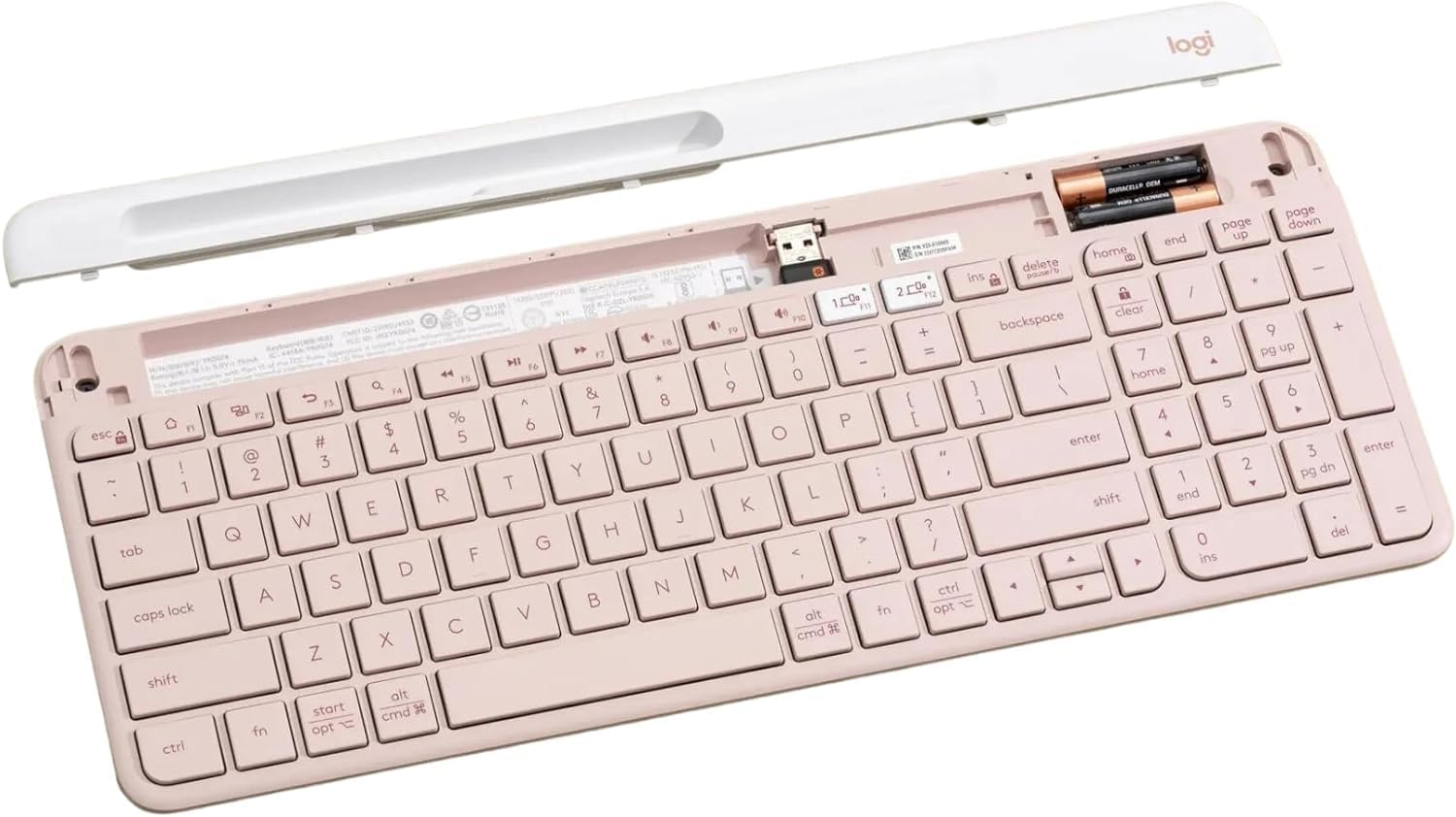
Internul view of the keyboard, highlighting the battery slots and the dedicated storage for the USB receiver.
2. Connecting via USB Receiver
- Remove the Unifying USB receiver from the battery compartment.
- Conectați receptorul USB la un port USB disponibil de pe computer.
- Turn on the keyboard using the power switch located on the right side.
- Tastatura ar trebui să se conecteze automat la dispozitivul dvs.
3. Conectarea prin Bluetooth
The K585 keyboard supports Bluetooth Low Energy (BLE) for wireless connection.
- Asigurați-vă că tastatura este pornită.
- Press and hold one of the Easy-Switch keys (1 or 2) for three seconds until the LED light above the key starts blinking rapidly. This indicates pairing mode.
- On your device (computer, tablet, smartphone), go to Bluetooth settings and select
Documente conexe - K585 ROSE

Ghid de configurare a tastaturii multi-dispozitiv Logitech K585
Ghid complet de configurare pentru tastatura wireless subțire multi-dispozitiv Logitech K585. Aflați cum să instalați bateriile, să vă conectați prin receptor USB sau Bluetooth, să asociați cu mai multe dispozitive și să selectați configurațiile sistemului de operare.
Manual de utilizare pentru tastatură Bluetooth cu mai multe dispozitive Logitech K480
Un ghid complet pentru configurarea, conectarea și depanarea tastaturii Bluetooth multi-dispozitiv Logitech K480, pentru o funcționare fără probleme cu computere, tablete și smartphone-uri pe diverse sisteme de operare.
Logitech K780 Multi-Device Keyboard: Features, Setup, and Connectivity Guide
Explore the Logitech K780 Multi-Device Keyboard. This guide covers its features, how to connect to computers, phones, and tablets via Bluetooth Smart or Unifying receiver, and enhanced functions for various operating systems.
Tastatură multi-dispozitiv Logitech K780: Caracteristici, conectivitate și ghid de configurare
Descoperiți tastatura multi-dispozitiv Logitech K780, o tastatură versatilă concepută pentru comutarea fără probleme între computere, smartphone-uri și tablete. Acest ghid detaliază caracteristicile sale, opțiunile de conectivitate duală (Bluetooth Smart și Unifying Receiver), funcțiile îmbunătățite și instrucțiunile de configurare pentru diverse sisteme de operare.
Tastiera Logitech K780 Multi-Device: Funzionalità, Connettività e Layout
Guida completa alla tastiera Logitech K780 Multi-Device, che copre le sue funzionalità, come collegarla a più dispositivi tramite Bluetooth Smart e Unifying, funzioni ottimizzate e doppio layout per diversi sistemi operativi.
Logitech K780 Multi-Device Keyboard: Seamless Connectivity for All Your Devices
Explore the Logitech K780 Multi-Device Keyboard. Learn how to connect and use this versatile keyboard with your computer, tablet, and smartphone via Unifying or Bluetooth Smart for enhanced productivity. Discover its features, setup, and multi-device pairing.