1. Introducere
Welcome to the user manual for your MESWAO MES-B3 15.6-inch Android 13 Tablet. This document provides essential information for setting up, operating, maintaining, and troubleshooting your device. The MES-B3 tablet features a large 15.6-inch IPS HD display, an Octa-Core processor, 6GB RAM, 128GB internal storage (expandable), and a 12000mAh battery, designed for a versatile user experience.

Figure 1: MESWAO MES-B3 Tablet Overview
2. Informații de siguranță
Please read all safety instructions carefully before using your tablet to prevent injury or damage to the device. Keep this manual for future reference.
- Siguranța bateriei: Do not attempt to replace the battery yourself. Do not expose the tablet to extreme temperatures, direct sunlight, or fire. Do not puncture, drop, or disassemble the battery.
- Apă și umiditate: This tablet is not waterproof. Avoid exposing it to water, rain, or high humidity.
- curatenie: Use a soft, dry cloth to clean the tablet. Do not use liquid cleaners or aerosols.
- Manipulare: Avoid dropping the tablet or subjecting it to strong impacts.
- Protecția auzului: When using headphones, set the volume to a moderate level to avoid hearing damage.
3. Conținutul pachetului
Verificați dacă toate articolele sunt prezente în colet:
- MESWAO MES-B3 15.6-inch Android 13 Tablet
- Adaptor de alimentare
- Cablu USB-C
- Manual de utilizare (acest document)
4. Dispozitiv terminatview
Familiarize yourself with the physical components of your MESWAO MES-B3 tablet.

Figure 2: Buttons and Connectors
- Buton de alimentare: Press and hold to turn the tablet on or off. Press briefly to turn the screen on or off.
- Butoane de volum: Reglați volumul audio.
- Camera frontală: Pentru apeluri video și selfie-uri (5MP).
- Rear Camera with Flashlight: Pentru realizarea de fotografii și videoclipuri (13MP).
- Port de tip C: For charging the tablet and connecting to a computer.
- Slot pentru carduri TF: Insert a MicroSD card to expand storage.
- Difuzoare stereo: Furnizați ieșire audio.
5. Configurare
5.1 Încărcarea tabletei
Before first use, fully charge your tablet. Connect the USB-C cable to the tablet's Type-C port and the other end to the power adapter. Plug the adapter into a wall outlet. The battery indicator on the screen will show charging status.
5.2 Pornire/Oprire
- Pentru a porni: Press and hold the Power Button until the MESWAO logo appears.
- Pentru a opri: Press and hold the Power Button until the power options appear, then select 'Power off'.
- Pentru a reporni: Press and hold the Power Button until the power options appear, then select 'Restart'.
5.3 Expertul de configurare inițială
La prima pornire, tableta vă va ghida prin procesul inițial de configurare:
- Selectați limba preferată.
- Conectați-vă la o rețea Wi-Fi.
- Conectați-vă cu contul dvs. Google sau creați unul nou.
- Review și acceptați termenii și condițiile.
- Configurați blocarea ecranului (PIN, model, parolă).
5.4 Introducerea unui card MicroSD
To expand the tablet's storage, you can insert a MicroSD card (up to 256GB, as per some product information, though 1TB is also mentioned in images, please verify with product packaging for exact maximum). Locate the TF card slot on the side of the tablet. Gently insert the MicroSD card with the gold contacts facing down until it clicks into place.

Figure 3: Storage Expansion with MicroSD Card
6. Utilizarea tabletei
6.1 Navigare de bază
The MESWAO MES-B3 runs on Android 13, offering an intuitive touch interface.
- Robinet: Selectați un element sau deschideți o aplicație.
- Beţivan: Navigate through screens, scroll lists, or dismiss notifications.
- Ciupire pentru zoom: Măriți sau micșorați conținutul de pe ecran.
- Ecranul principal: Access your apps and widgets. Swipe down from the top for notifications and quick settings.
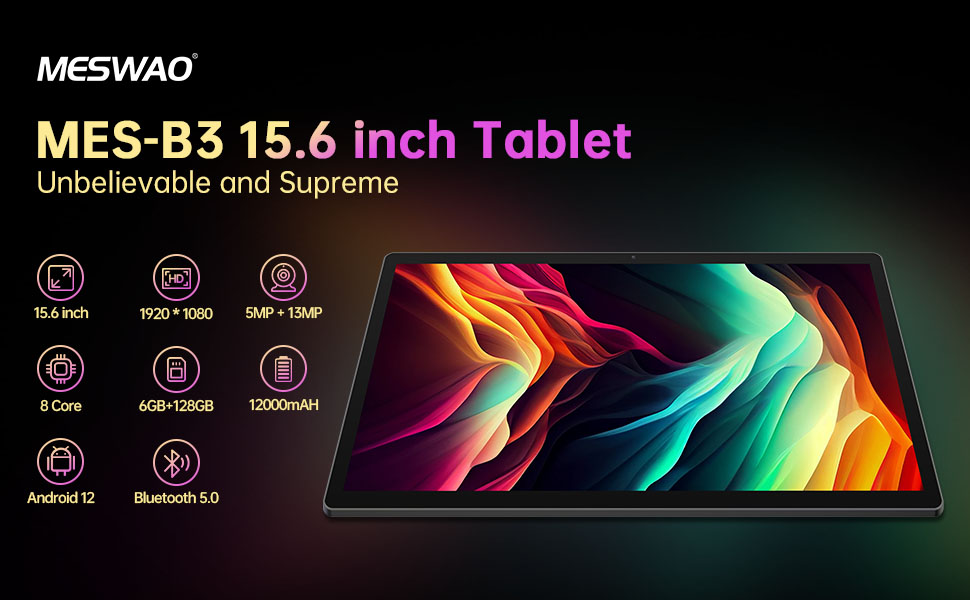
Figura 4: Interfața Android 13
6.2 Conexiune Wi-Fi
- Du-te la Setări > Rețea și internet > Internet.
- Activați Wi-Fi.
- Selectați rețeaua dorită din listă și introduceți parola dacă vi se solicită.
6.3 Asociere Bluetooth
The tablet supports Bluetooth 5.0 for connecting wireless accessories.
- Du-te la Setări > Dispozitive conectate > Preferințe de conexiune > Bluetooth.
- Activați Bluetooth.
- Asigurați-vă că dispozitivul Bluetooth este în modul de asociere.
- Select your device from the 'Available devices' list and follow on-screen prompts to pair.
6.4 Gestionarea aplicațiilor
- Instalați aplicații: Deschide aplicația Magazin Google Play, caută aplicația dorită și atinge „Instalare”.
- Dezinstalați aplicațiile: Apăsați și mențineți apăsată pictograma unei aplicații de pe ecranul de pornire sau din sertarul de aplicații, apoi trageți-o la „Dezinstalare” sau selectați „Informații despre aplicație” și alegeți „Dezinstalare”.
- Manage Apps: Du-te la Setări > Aplicații la view, force stop, or clear data for installed applications.
6.5 Setări de afișare
Personalizați-vă viewexperiență:
- Du-te la Setări > Afişa.
- Regla Nivel de luminozitate.
- Set Timeout ecran (sleep duration).
- Schimba Dimensiunea fontului şi Dimensiunea afișajului.
- Permite Tema întunecată pentru reducerea oboselii ochilor.
6.6 Managementul bateriei
The MES-B3 features a 12000mAh battery for extended use.

Figura 5: Durată extinsă de viață a bateriei
- Du-te la Setări > Baterie la view usage and optimize settings.
- Permite Economizor baterie mod pentru a prelungi durata de viață a bateriei atunci când este nevoie.
- Închideți aplicațiile neutilizate care rulează în fundal.
- Reduceți luminozitatea ecranului.
7. Întreținere
7.1 Curățare
- Folosiți o lavetă moale, fără scame, pentru a șterge ușor ecranul și carcasa.
- Pentru pete persistente, ușor dampClătiți laveta cu apă sau cu un produs de curățare a ecranelor special conceput pentru electronice.
- Avoid using abrasive materials, alcohol, or chemical solvents.
7.2 Depozitare
- Depozitați comprimatul într-un loc răcoros și uscat, ferit de lumina directă a soarelui și de temperaturi extreme.
- If storing for an extended period, ensure the battery is charged to about 50% to prolong its lifespan.
7.3 Actualizări de software
Verificați periodic dacă există actualizări de software pentru a asigura performanță și securitate optime.
- Du-te la Setări > Sistem > Actualizare de sistem.
- The tablet will check for available updates. Follow the on-screen instructions to download and install any updates.
8. Depanare
Iată soluții pentru problemele comune pe care le-ați putea întâmpina:
| Problemă | Soluţie |
|---|---|
| Tableta nu pornește | Ensure the tablet is charged. Connect it to the charger for at least 30 minutes, then try powering it on again. |
| Probleme de conexiune Wi-Fi | Restart your Wi-Fi router and the tablet. Go to Settings > Network & internet > Internet, forget the network, and reconnect. |
| Performanță lentă | Close unused apps. Clear cache for frequently used apps (Settings > Apps > [App Name] > Storage & cache > Clear cache). Restart the tablet. |
| Bateria se descarcă rapid | Reduce screen brightness. Disable Wi-Fi/Bluetooth when not in use. Close background apps. Check battery usage in Settings > Battery to identify power-hungry apps. |
| Aplicațiile se blochează sau se blochează | Force stop the app (Settings > Apps > [App Name] > Force stop). Clear the app's cache. If the problem persists, uninstall and reinstall the app. |
9. Specificații
Detailed technical specifications for the MESWAO MES-B3 tablet:

Figure 6: Key Features and Specifications
| Caracteristică | Caietul de sarcini |
|---|---|
| Marca | MESWAO |
| Numărul de model | MES-B3 |
| Sistem de operare | Android 13 |
| Procesor | MediaTek Octa-Core (MTK6789) |
| RAM | 6 GB |
| Stocare internă | 128 GB |
| Stocare extensibilă | Up to 256 GB (via TF/MicroSD card) |
| Dimensiunea ecranului | 15.6 inchi |
| Rezoluția ecranului | 1920 x 1080 pixeli (IPS HD) |
| Cameră frontală | 5 MP |
| Camera spate | 13 MP |
| Capacitatea bateriei | 12000 mAh |
| Durata de viață a bateriei | Approximately 10 hours (usage dependent) |
| Conectivitate | Bluetooth 5.0, Wi-Fi (802.11ac, 2.4G/5G) |
| Porturi | USB Type-C, TF Card Slot |
| Culoare | Gri |
| Dimensiuni (L x l x H) | 36.85 x 22.25 x 0.93 cm |
| Greutate | 1.1 kilograme |
10. Garanție și asistență
Your MESWAO MES-B3 tablet is covered by a standard manufacturer's warranty. Please refer to the warranty card included in your package for specific terms and conditions, including warranty duration and coverage details.
For technical support, troubleshooting assistance beyond this manual, or warranty claims, please contact MESWAO customer service through the retailer where you purchased the product or visit the official MESWAO website pentru informații de contact.


