1. Produs terminatview
The Imou Ranger Dual 8MP (5MP+3MP) Indoor WiFi Security Camera offers comprehensive surveillance with its innovative dual-lens design. It combines a fixed lens for continuous monitoring of critical areas and a 360° pan-tilt lens for broader coverage. Equipped with advanced AI detection and automatic tracking, this camera provides reliable indoor security.
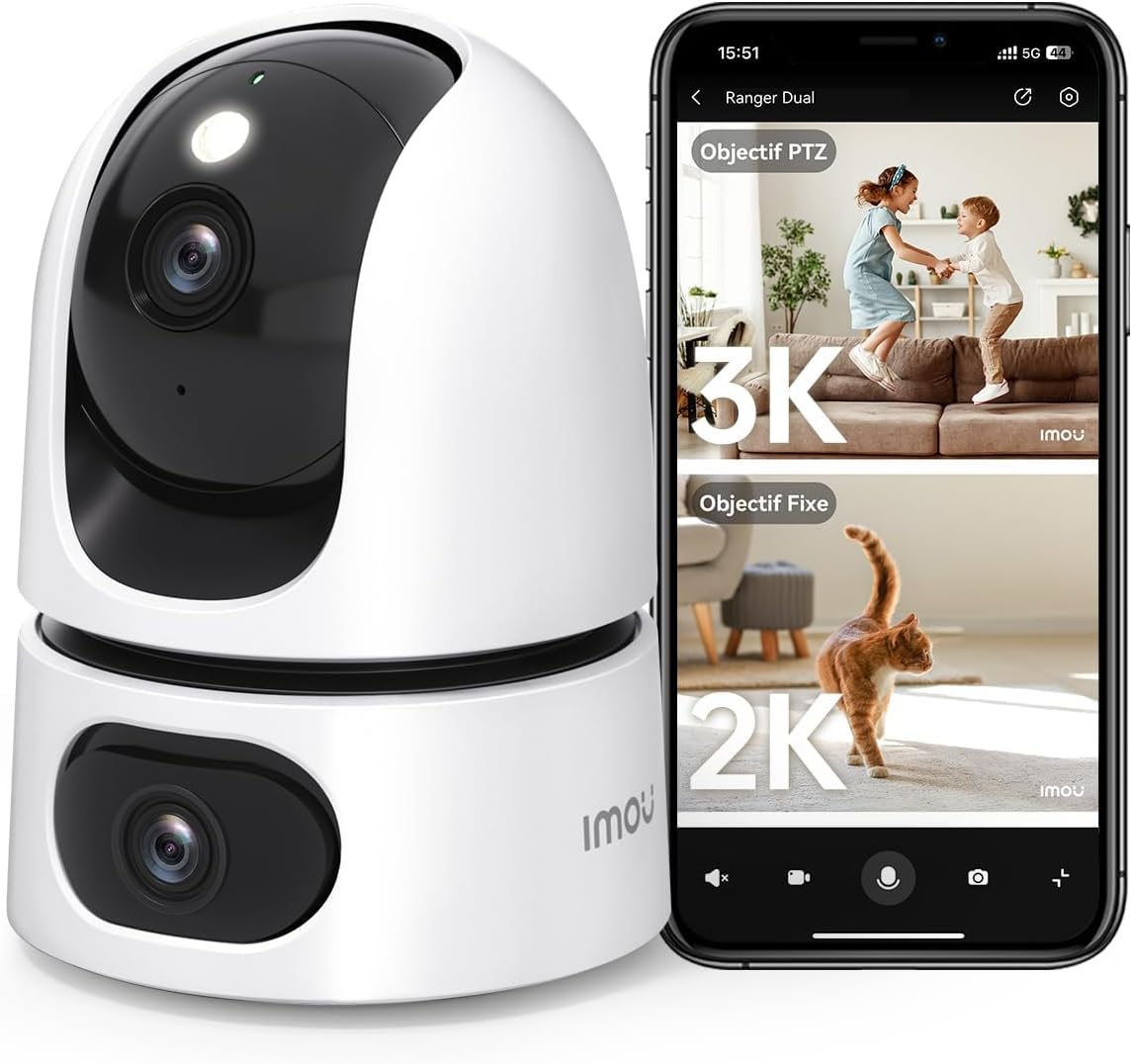
Image: The Imou Ranger Dual 8MP camera shown alongside a smartphone displaying its dual-view interface, with a 3K PTZ view and a 2K fixed view.
Caracteristici cheie:
- Sistem cu două lentile: Features a fixed lens for static monitoring and a 360° pan-tilt lens for dynamic area coverage, eliminating blind spots.
- AI Detection & Auto Tracking: Accurately detects humans, pets, and abnormal sounds, reducing false alarms. The camera automatically tracks detected movement.
- 8MP Ultra HD & Color Night Vision: Combines a 3MP fixed lens and a 5MP pan-tilt lens for a total 8MP resolution. Offers up to 15 meters of clear color night vision.
- Two-Way Audio & Alarms: Built-in microphone and speaker enable clear two-way communication. Sound and light alarms can deter unwanted visitors.
- Modul de confidențialitate: Physically conceals the camera lens with a single tap in the app to ensure privacy.
- Depozitare flexibilă: Supports Micro SD card (up to 256GB, not included), NVR, Cloud storage, RTSP, and Onvif.
- Integrare Smart Home: Compatible with Amazon Alexa for voice control and live view.

Image: An illustration of the Imou Ranger Dual camera highlighting its two lenses and their respective fields of view, emphasizing no blind spots.
2. Conținutul pachetului
Vă rugăm să verificați pachetul pentru următoarele articole:
- Imou Ranger Dual 8MP Camera
- Adaptor de alimentare
- Placa de montare
- Șuruburi de montare și dibluri de perete
- Ghid de pornire rapidă
- Harta poziției de instalare
3. Ghid de instalare
3.1 Configurare inițială
- Pornire: Connect the camera to a power outlet using the provided power adapter. The camera will power on and its indicator light will flash.
- Descărcați aplicația Imou Life: Caută 'Imou Life' in your mobile app store (App Store for iOS or Google Play Store for Android) and download the application.
- Creează cont: Open the Imou Life app and follow the on-screen instructions to create a new account or log in to an existing one.
- Adăugați dispozitiv: Tap the '+' icon in the top right corner of the app to add your camera. Scan the QR code located on the camera or its packaging.
- Conectați-vă la Wi-Fi: Follow the app's instructions to connect the camera to your 2.4GHz Wi-Fi network. Ensure your Wi-Fi password is correct.
- Plasare: Position the camera in your desired indoor location. It can be placed on a flat surface or mounted to a wall/ceiling using the included mounting plate and screws.
3.2 Instrucțiuni de montare
For optimal performance, choose a location that provides a clear view din zona pe care doriți să o monitorizați și se află în raza de acțiune a semnalului Wi-Fi.
- Selectați locația: Identify a suitable indoor wall or ceiling for mounting.
- Marcați punctele de găurire: Use the provided installation position map to mark the screw holes on the surface.
- Găuri: Drill holes at the marked positions and insert the wall plugs if necessary.
- Atașați placa de montare: Secure the mounting plate to the wall/ceiling using the screws.
- Atașați camera: Aliniați camera cu placa de montare și rotiți-o pentru a o fixa în poziție.
4. Instrucțiuni de utilizare
The Imou Ranger Dual camera is controlled primarily through the Imou Life mobile application.
4.1 În direct View & Redare
- Open the Imou Life app and select your camera from the device list to access the live view.
- You can switch between the fixed lens view and the pan-tilt lens view.
- Use the on-screen controls to pan (horizontal) and tilt (vertical) the movable lens.
- Acces înregistrat footage via the playback function, available if a Micro SD card or cloud storage is active.

Image: A smartphone screen showing four simultaneous live camera feeds, demonstrating the multi-view capacitatea.
4.2 AI Detection & Tracking
- Activare detectare: In the app settings, navigate to 'Detection Settings' to enable Human Detection, Pet Detection, and Abnormal Sound Detection.
- Reglați sensibilitatea: Customize detection sensitivity levels to minimize false alarms.
- Urmărire automată: When enabled, the pan-tilt lens will automatically follow detected human or pet movement within its field of view.
- Notificări: Receive instant alerts on your smartphone when an event is detected.

Image: An image illustrating the camera's AI detection capabilities, showing a child and a dog with detection boxes around them, indicating auto-tracking.
4.3 Sunet bidirecțional
- În timpul live view, atinge pictograma microfonului din aplicație pentru a vorbi prin difuzorul camerei.
- The camera's built-in microphone will pick up audio from the camera's location.
4.4 Modul de confidențialitate
- To activate Privacy Mode, tap the designated icon in the Imou Life app. The camera lens will physically rotate downwards, blocking its view and ensuring privacy.
- Tap the icon again to deactivate Privacy Mode.

Image: The Imou Ranger Dual camera with its lens rotating downwards, indicating the activation of privacy mode.
5. Întreținere
5.1 Curățare
- Asigurați-vă că aparatul foto este oprit înainte de curățare.
- Folosiți o lavetă moale și uscată pentru a șterge corpul camerei.
- For the lens, use a lens cleaning cloth specifically designed for optical surfaces. Avoid abrasive materials or harsh chemicals.
5.2 de actualizări de firmware
- Regularly check for firmware updates through the Imou Life app. Updates often include performance improvements and security enhancements.
- Follow the in-app instructions to perform firmware updates. Ensure the camera remains powered on and connected to Wi-Fi during the update process.
6. Depanare
6.1 Cameră Offline
- Verificați puterea: Ensure the camera is properly connected to a power source and the adapter is functioning.
- Verificați Wi-Fi: Verify your Wi-Fi network is active and the camera is within range. Restart your router if necessary.
- Adăugați din nou dispozitivul: If issues persist, try removing the device from the Imou Life app and re-adding it.
6.2 Calitate slabă a imaginii
- Curățați lentila: Gently clean the camera lens with a soft, dry cloth.
- Verificați rețeaua: Ensure a stable internet connection for optimal streaming quality.
- Iluminat: Adjust camera placement to avoid direct glare or insufficient lighting.
6.3 Alarme false
- Reglați sensibilitatea: In the app's detection settings, reduce the sensitivity for human, pet, or sound detection.
- Zone de detectare: Configure specific detection zones to monitor only relevant areas and exclude high-traffic zones.
7. Specificații
| Caracteristică | Detaliu |
|---|---|
| Marca | Imou |
| Numele modelului | Ranger Dual 8MP |
| Numărul de model | IPC-S2XP-8M0WED |
| Rezoluţie | 8MP (3MP Fixed Lens + 5MP Pan-Tilt Lens) |
| Tehnologia fără fir | Wifi |
| Voltage | 5 volți |
| Gama de vedere nocturnă | 10 metri |
| Caracteristici speciale | Two-way audio, Dual lens, Human/pet detection, Privacy protection, Night vision |
| Utilizare | Securitate interioară |
| Dispozitive compatibile | Smartphone |
| Sursa de alimentare | Cablu electric |
| Tip de montare | Suport de montare pe perete |
| Material | Plastic |
| Dimensiuni pachet | 19.6 x 10 x 10 cm |
| Greutatea pachetului | 470 de grame |
8. Garanție și asistență
For detailed warranty information, please refer to the warranty card included with your product or visit the official Imou website. For technical support, frequently asked questions, and further assistance, please utilize the 'Help' section within the Imou Life application or visit the Imou support portal online.


