1. Introducere
This manual provides essential information for the safe and effective use of your Qubo Smart Air Purifier Q200. Please read it thoroughly before operating the device and retain it for future reference.
The Qubo Smart Air Purifier Q200 is designed to improve indoor air quality by removing pollutants and allergens. It features a 4-layer True HEPA H13 filter, smart app control, and voice control capabilities.
2. Ce se află în cutie
- Air purifier with Power Cord
- Air Purifier Filter (1N)
- Ghid de pornire rapidă (1N)
3. Produs terminatview
The Qubo Smart Air Purifier Q200 is engineered to provide clean air for spaces up to 200 sq. ft. It incorporates advanced filtration technology and smart features for convenient operation.

Figure 1: Qubo Smart Air Purifier Q200
Caracteristici cheie:
- 4-Layer True HEPA H13 Filter: Captures 99.99% of allergens and pollutants, including particles as small as PM0.1.
- Aplicație inteligentă și control vocal: Manage settings and monitor air quality remotely via the Qubo app or voice commands with Alexa/Google Assistant.
- QSensAI Technology: Automatically detects PM2.5 levels and adjusts operation as needed, optimizing energy consumption.
- Quiet Night Mode: Operates silently with a turned-off display for undisturbed sleep.
- 9000 Hours Filter Life: Long-lasting filter with real-time life tracking through the Qubo app.

Figure 2: Illustration of the 4-layer filtration system, including pre-filter, True HEPA H13, activated carbon, and silver nano particle coating.
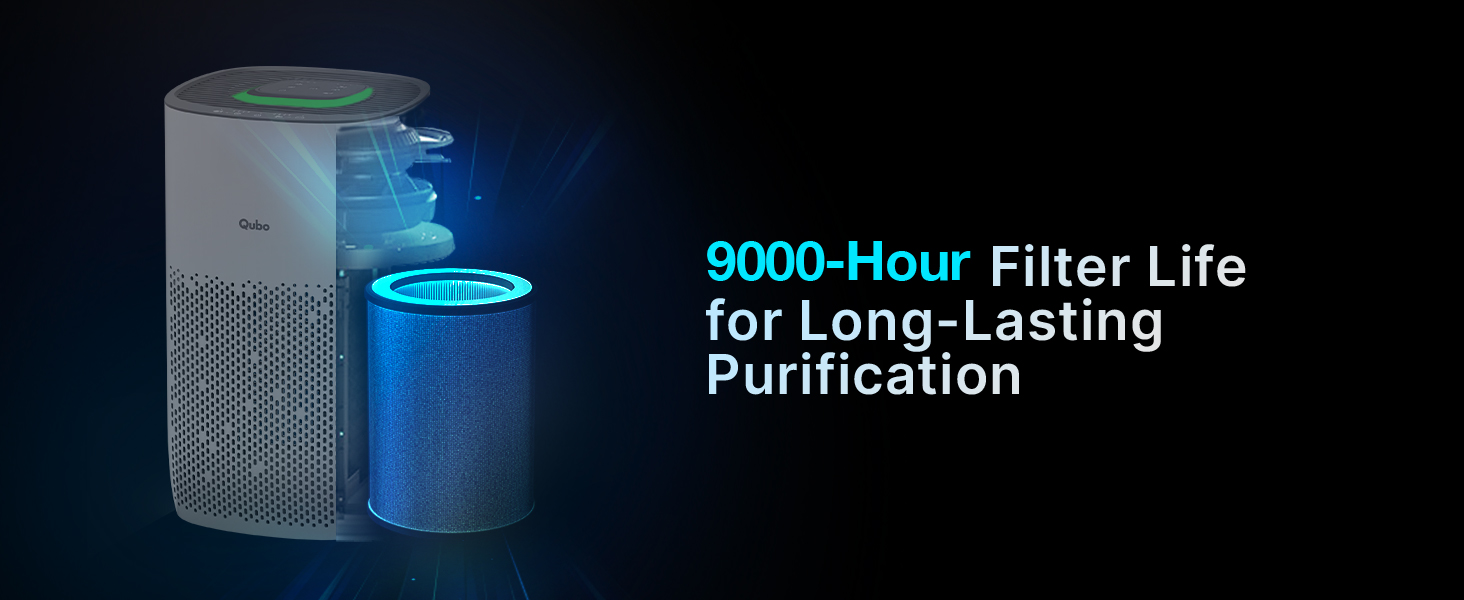
Figure 3: Detailed diagram showing each layer of the 4-layer filtration system and the pollutants they target, such as dust, pollen, pet fur, cigarette smoke, PM2.5, cooking smells, pet odor, bacteria, and viruses.

Figure 4: Visual representation of the air purifier actively removing airborne pollen and fine dust particles from the environment.
Video 1: Demonstration of the Qubo Smart Air Purifier's effectiveness in reducing AQI levels when exposed to fog, dry ice, and talcum powder, showing a rapid drop from high pollution levels to clean air.
4. Configurare
- Despacheta: Carefully remove the air purifier and all accessories from the packaging.
- Instalarea filtrului: Ensure the filter is correctly installed and any protective packaging is removed. Refer to the filter replacement section for detailed instructions if needed.
- Plasare: Place the air purifier on a flat, stable surface, ensuring adequate clearance (at least 20 cm) from walls or furniture for optimal airflow.
- Conexiune de alimentare: Conectați cablul de alimentare la o priză electrică adecvată.
- Pornire inițială: Press the power button to turn on the device. The display will show the current PM2.5 level.
5. Instrucțiuni de utilizare
Panou de control:
The top panel of the air purifier features touch controls for various functions.
Moduri de operare:
- QSensAI Mode: Utilizes an inbuilt AI to track PM2.5 levels and automatically runs the purifier only when necessary, conserving energy.
- Mod auto: Automatically adjusts fan speed based on real-time air quality to maintain optimal purification.
- Modul manual: Allows users to select desired fan speeds (High, Medium, Low) for customized purification.
- Modul de somn: Provides super silent air purification with the display turned off to ensure an undisturbed sleeping environment.

Figure 5: QSensAI mode interface within the Qubo app, showing automatic operation based on ambient air quality.
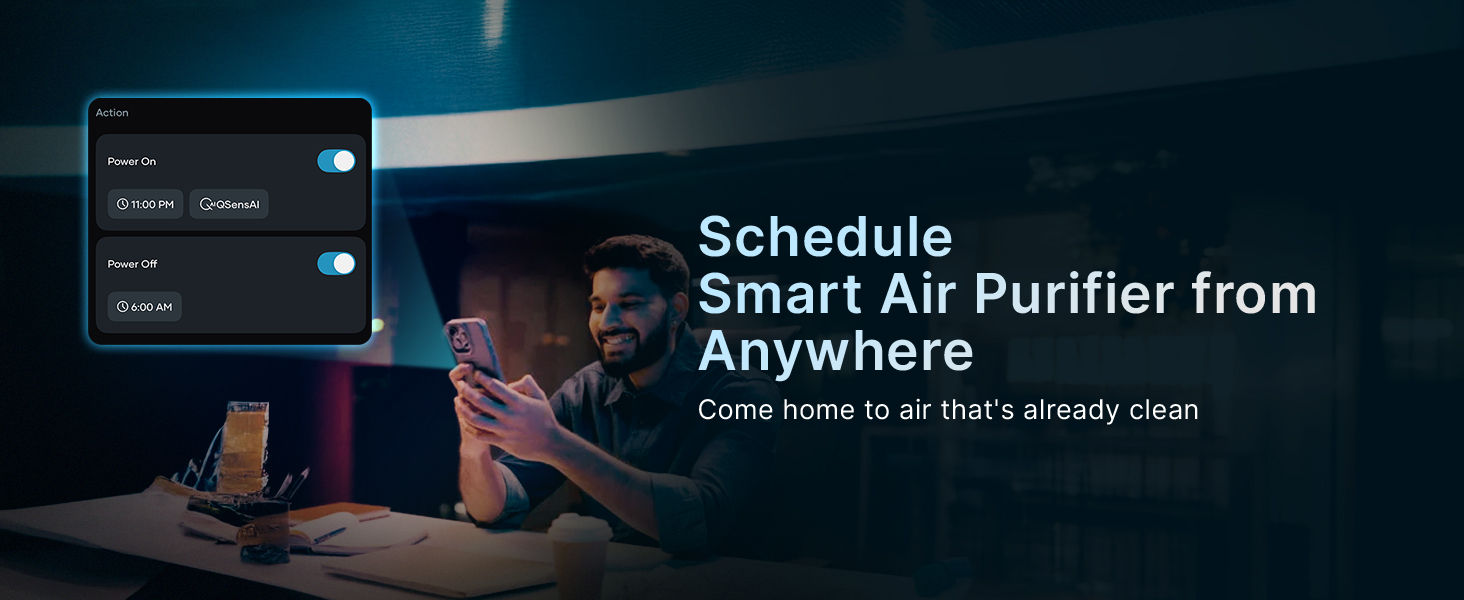
Figure 6: Auto mode interface in the Qubo app, illustrating how the device adapts to the environment by adjusting fan speed.
Figure 7: Manual mode interface in the Qubo app, providing control over fan speed settings.
Figure 8: Sleep mode interface in the Qubo app, designed for quiet operation during rest.
Control inteligent al aplicației:
Download the Qubo app to remotely monitor your air quality, control the purifier, set schedules, and track filter life.

Figure 9: The Qubo app interface showing various control options for the air purifier, including modes, filter life, schedules, and air quality insights.
Video 2: O pre-view of the Qubo Home App interface, demonstrating how to monitor and control various smart home devices, including the air purifier.
Control vocal:
The Qubo Smart Air Purifier Q200 supports hands-free voice control via Amazon Alexa and Google Assistant devices.
- Turn the purifier on/off.
- Set a routine or timer.
- Selectați un mod.

Figure 10: The Qubo Smart Air Purifier being controlled via voice command using an Amazon Alexa device.
Video 3: Demonstration of voice control functionality for the Qubo Smart Air Purifier using Alexa, showing the device activating upon command.
6. Întreținere
Înlocuirea filtrului:
The Qubo Smart Air Purifier Q200 filter has a life of approximately 9000 hours. The Qubo app provides real-time tracking of filter life and sends replacement reminders.
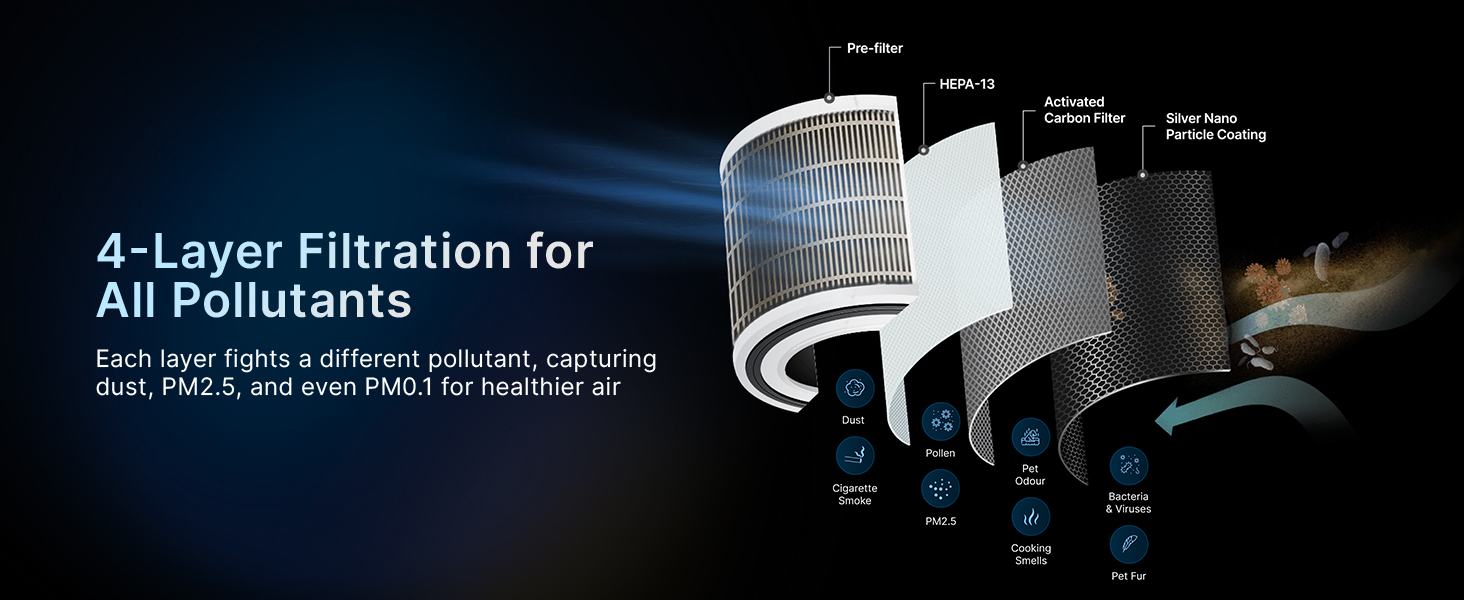
Figure 11: Illustration highlighting the 9000-hour filter life for long-lasting air purification.

Figure 12: The Qubo app displaying the real-time remaining filter life, indicating 100% life remaining and 9000 total hours.
Pentru a înlocui filtrul:
- Deconectați purificatorul de aer de la priză.
- Open the filter compartment (refer to the device diagram for location).
- Scoateți filtrul vechi și aruncați-l în mod corespunzător.
- Insert the new filter, ensuring it is correctly oriented.
- Close the filter compartment and plug the air purifier back in.
- Reset the filter life indicator via the Qubo app or device controls if necessary.
curatenie:
- Ștergeți exteriorul purificatorului de aer cu o lavetă moale și uscată.
- Nu utilizați agenți de curățare abrazivi sau solvenți.
- Regularly clean the pre-filter (if removable and washable) according to instructions to maintain efficiency.
7. Depanare
| Problemă | Cauza posibila | Soluţie |
|---|---|---|
| Dispozitivul nu pornește | Fără alimentare | Verificați conexiunea cablului de alimentare și priza de perete. |
| Purificare proastă a aerului | Filtru înfundat | Replace the filter. Ensure proper placement and clearance. |
| Probleme de conectare la aplicație | Problemă de conectivitate Wi-Fi | Ensure the device is within Wi-Fi range. Restart the device and router. Re-pair the device with the app. |
| Zgomot neobișnuit | Obstruction in fan/filter | Turn off and unplug the device. Check for any foreign objects or improperly installed filter. |
8. Specificații
- Marca: Qubo
- Model: Q200
- Culoare: Alb
- Dimensiuni produs: 20.3A x 31.2L x 20.3Î centimetri
- Acoperire suprafață: 200 de picioare pătrate
- Dimensiunea de retenție a particulelor: 0.1 microni
- Tipul controlerului: Amazon Alexa, Qubo App
- Caracteristica speciala: App & Voice Control, Energy Saving
- Greutatea articolului: 10 g
- Componente incluse: Air purifier with Power Cord, Air Purifier Filter 1N, QSG Card 1N
9. Garanție și asistență
The Qubo Smart Air Purifier Q200 comes with a 1 ani garanție.
For technical assistance, troubleshooting, or warranty claims, please contact the manufacturer:
- Producător: Hero Electronix Pvt Ltd
- Toll-free helpline number: 9319095757


