1. Introducere
Thank you for choosing the Maxcom FW58 Vanad Pro Smartwatch. This manual provides essential information for setting up, operating, and maintaining your device. The FW58 Vanad Pro is designed to enhance your daily life by offering comprehensive health monitoring, seamless communication, and robust activity tracking capabilities. Its lightweight design and customizable features make it an ideal companion for both busy individuals and active sports enthusiasts.
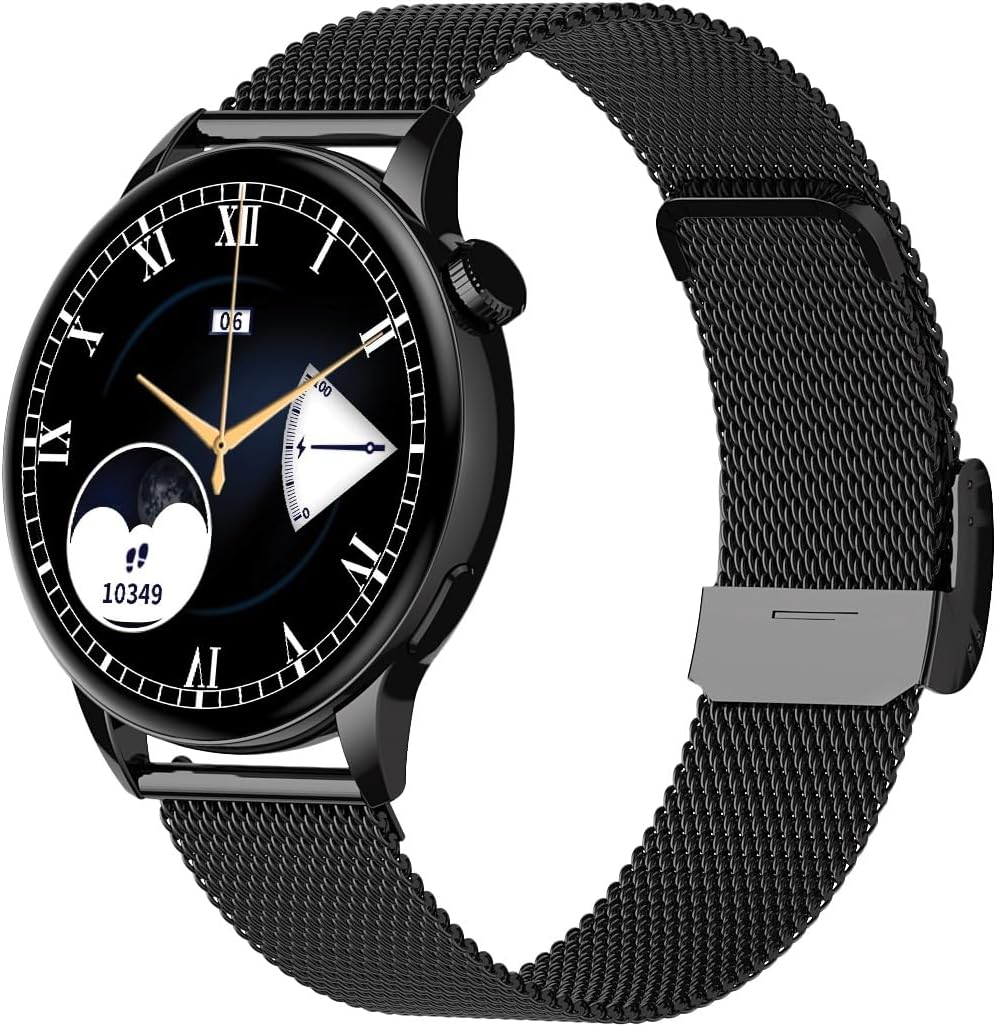
Image 1.1: Maxcom FW58 Vanad Pro Smartwatch, showcasing its elegant design with a black mesh strap and a classic watch face.
2. Configurare
2.1. Conținutul pachetului
Înainte de a începe, vă rugăm să vă asigurați că toate articolele sunt prezente în colet:
- Maxcom FW58 Vanad Pro Smartwatch
- Cablu magnetic de încărcare
- Curea suplimentară din silicon
- Manual de utilizare (acest document)
2.2. Încărcarea ceasului inteligent
Pentru performanțe optime, încărcați complet ceasul inteligent înainte de prima utilizare.
- Connect the magnetic charging cable to the charging contacts on the back of the smartwatch. Ensure the pins align correctly.
- Conectați capătul USB al cablului la un adaptor de alimentare USB standard (se recomandă 5V/1A) sau la portul USB al unui computer.
- Afișajul ceasului va indica starea de încărcare. O încărcare completă durează de obicei aproximativ 2 ore.

Imaginea 2.1: Spate view of the Maxcom FW58 Smartwatch, highlighting the optical sensor for health monitoring and the magnetic charging contacts.
2.3. Împerecherea cu smartphone-ul
To unlock all features, pair your smartwatch with the dedicated Maxcom smartwatch application on your smartphone.
- Download the official Maxcom smartwatch application from your smartphone's app store (e.g., Google Play Store or Apple App Store). Caută "Maxcom Smartwatch" or refer to the QR code in the quick start guide if provided.
- Asigurați-vă că Bluetooth este activat pe smartphone-ul dvs.
- Open the Maxcom app and follow the on-screen instructions to add a new device.
- Select "FW58" from the list of available devices. Confirm the pairing request on both your phone and the smartwatch.
3. Utilizarea ceasului inteligent
3.1. Navigare de bază
The Maxcom FW58 features a responsive touchscreen and a side button/crown for navigation.
- Touch screen: Glisați stânga/dreapta, în sus/jos pentru a naviga prin meniuri și funcții. Atingeți pentru a selecta.
- Buton lateral/Coroană: Press to wake the screen, return to the home screen, or access the app menu. Rotate the crown (if applicable) to scroll through lists or adjust settings.

Imaginea 3.1: Vedere lateralăfile of the Maxcom FW58 Smartwatch, illustrating the physical crown and button for intuitive control and navigation.
3.2. Caracteristici de comunicare
- Efectuarea/Primirea apelurilor: Once paired, you can answer incoming calls directly from your smartwatch. You can also initiate calls from your watch's call log or contacts (synced via the app).
- Notificări: Receive real-time notifications for SMS messages, app alerts, emails, social media updates, and news directly on your wrist. Manage notification settings through the Maxcom app.
3.3. Monitorizarea stării de sănătate
The smartwatch provides various health metrics to help you monitor your well-being.
- Ritmul cardiac: Continuous or on-demand heart rate monitoring.
- Tensiunea arterială: Measure your blood pressure (for reference only, not a medical device).
- Oxigenul din sânge (SpO2): Monitorizați-vă nivelul de saturație a oxigenului din sânge.
- Urmărirea somnului: Automatically monitors your sleep patterns, including deep sleep, light sleep, and awake times.
3.4. Monitorizarea activității și moduri sportive
Urmărește-ți activitatea zilnică și antrenamentele specifice.
- Activitate zilnică: Records steps taken, calories burned, and distance traveled (mileage).
- Moduri sportive: Select from various sports modes such as fitness, hiking, running, badminton, cycling, and football to track specific workout data.
3.5. Control muzical
Control music playback on your connected smartphone directly from your smartwatch. Play, pause, skip tracks, and adjust volume without needing to access your phone.
3.6. Personalizare
Personalize your smartwatch experience.
- Vizionați fețele: Choose from over 100 pre-installed watch face models or download more via the Maxcom app to match your style or mood.
- Stil meniu: Customize the layout and appearance of your smartwatch menu.
- Înlocuirea curelei: Easily change between the included mesh and silicone straps to suit different occasions or activities.

Image 3.2: A digital watch face on the Maxcom FW58 Smartwatch, showing steps and heart rate data.

Image 3.3: The Maxcom FW58 Smartwatch showcasing a dynamic and colorful digital watch face option.
4. Întreținere
4.1. Cleaning the Smartwatch
Regular cleaning helps maintain the device's appearance and functionality.
- Ștergeți ecranul și carcasa cu o lavetă moale, fără scame.
- Pentru pete persistente, ușor dampClătiți cârpa cu apă. Evitați utilizarea substanțelor chimice dure sau a materialelor abrazive.
- Curățați regulat zona senzorului de pe spatele ceasului pentru a asigura citiri precise.
4.2. Îngrijirea bateriei
Pentru a prelungi durata de viață a bateriei:
- Evitați temperaturile extreme.
- Nu lăsați ceasul complet descărcat pentru perioade lungi de timp.
- Charge the device using only the provided charging cable.
4.3. Rezistență la apă (IP67)
The Maxcom FW58 Vanad Pro Smartwatch is rated IP67, meaning it is protected against dust ingress and can withstand immersion in water up to 1 meter for up to 30 minutes. While it is suitable for daily use and splashes, it is not recommended for swimming, diving, or high-pressure water activities.
5. Depanare
Dacă întâmpinați probleme cu ceasul dvs. inteligent, încercați următoarele soluții:
| Problemă | Soluţie |
|---|---|
| Ceasul nu pornește | Ensure the watch is fully charged. Press and hold the side button for 5-10 seconds. |
| Nu se poate conecta cu smartphone-ul | Ensure Bluetooth is on. Restart both the watch and phone. Clear app cache/data. Try pairing again. |
| Citiri inexacte de sănătate | Ensure the watch is worn snugly on your wrist. Clean the sensor area. Remain still during measurements. |
| Notificări nu au primit | Check app notification permissions on your phone. Ensure the watch is connected via Bluetooth. Verify notification settings within the Maxcom app. |
5.1. Resetare din fabrică
If problems persist, you may need to perform a factory reset. This will erase all data on the smartwatch and restore it to its original settings. Navigate to 'Settings' on your smartwatch, then look for 'System' or 'Reset' options.
6. Specificații
| Caracteristică | Detaliu |
|---|---|
| Numărul de model | FW58 |
| Dimensiunea afișajului | 1.5 inci |
| Durata de viață a bateriei | 6-10 days (intensive use) |
| Greutate | 46 g |
| Dimensiunile carcasei | 44 x 38 x 10 mm |
| Dimensiunea curelei | 255 x 20 mm |
| Rezistenta la apa | IP67 (pana la 1 metru timp de 30 de minute) |
| Conectivitate | Bluetooth |
| Curele incluse | Mesh and Silicone |
7. Garanție și asistență
7.1. Informații despre garanție
Maxcom products are manufactured to the highest quality standards. For detailed warranty terms and conditions, please refer to the warranty card included with your purchase or visit the official Maxcom webPăstrați dovada achiziției pentru reclamații în garanție.
7.2. Asistență pentru clienți
If you require further assistance or have questions not covered in this manual, please contact Maxcom customer support:
- Website: Visit the official Maxcom support website for FAQs, software updates, and contact forms.
- E-mail/Telefon: Refer to the contact information provided on the Maxcom website-ul sau ambalajul produsului dumneavoastră.


