1. Introducere
This manual provides detailed instructions for the operation and maintenance of the LAUNCH CRP129E Plus OBD2 Scanner. Please read this manual thoroughly before using the device to ensure proper and safe operation. The CRP129E Plus is a comprehensive diagnostic tool designed for automotive professionals and enthusiasts, offering full system diagnostics and various service reset functions.
2. Produs terminatview
2.1. Componentele dispozitivului
The LAUNCH CRP129E Plus features a user-friendly interface with a 5-inch touchscreen and physical buttons for navigation.

Imaginea 2.1: The LAUNCH CRP129E Plus OBD2 Scanner and its protective carrying case.
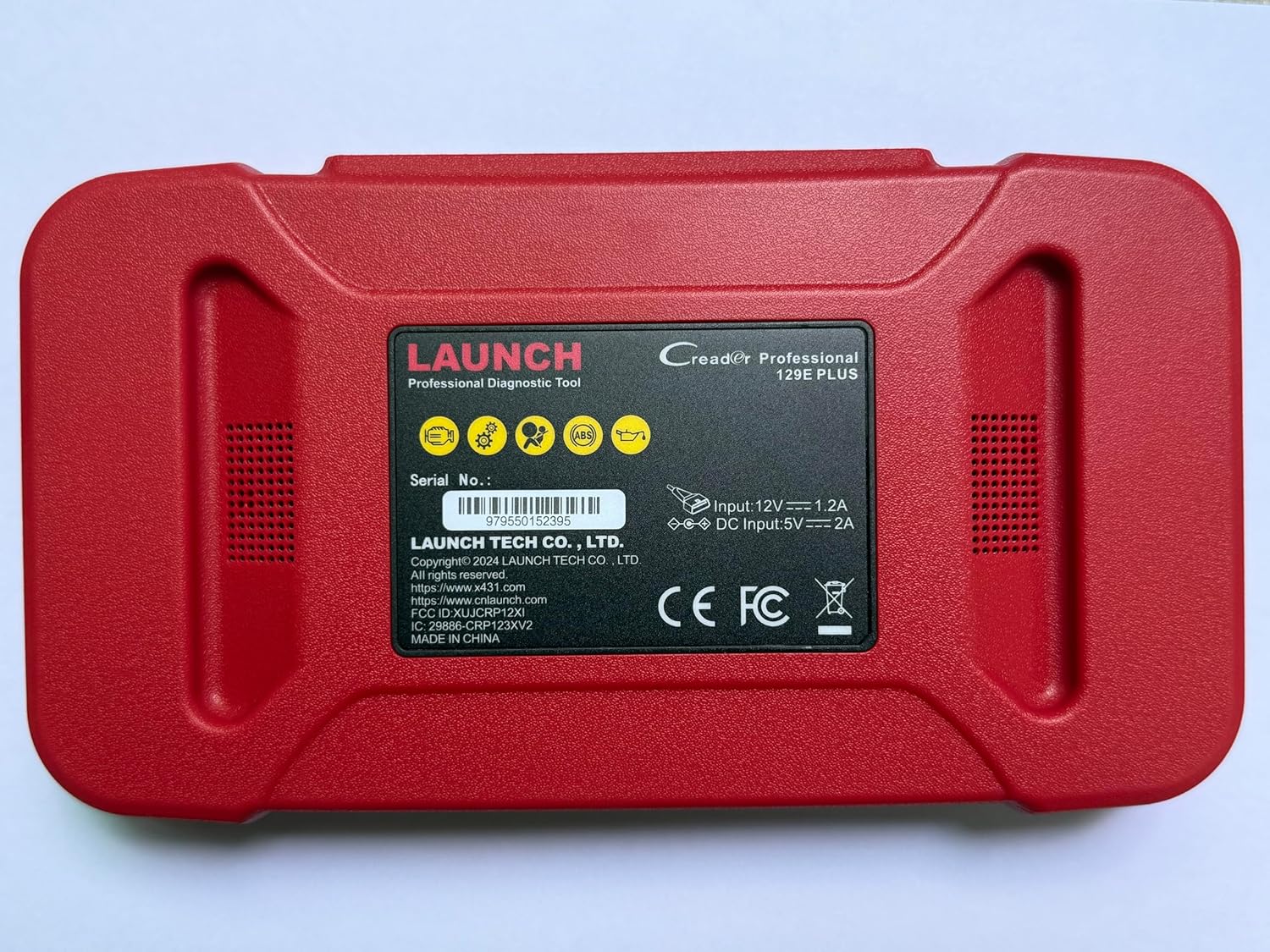
Imaginea 2.2: Spate view of the CRP129E Plus, displaying input voltage, current specifications, and serial number (e.g., 979550152395).
2.2. Conținutul pachetului
La despachetare, verificați dacă sunt prezente toate articolele enumerate mai jos:
- CRP129E PLUS OBD2 Scanner (x1)
- OBDII Cable (x1)
- 5V DC Charging Cable (x1)
- Manual de utilizare (x1)
- Ghid de pornire rapidă (x1)
- Geantă de transport (x1)

Imaginea 2.3: Visual representation of the CRP129E Plus package contents.
3. Configurare și utilizare inițială
3.1. Încărcarea dispozitivului
Before first use, ensure the device is fully charged using the provided 5V DC charging cable. Connect the cable to the device and a suitable power source.
3.2. Pornire/Oprire
- Pornire: Apăsați și mențineți apăsat butonul de pornire până când ecranul se aprinde.
- Oprire: Press and hold the power button, then select "Power Off" from the options.
3.3. Conectarea la vehicul
Locate the vehicle's OBDII port, typically under the dashboard on the driver's side. Connect the provided OBDII cable from the CRP129E Plus to the vehicle's OBDII port. Ensure the vehicle's ignition is in the ON position (engine off or running, depending on the diagnostic task).
3.4. Wi-Fi Connection and Updates
The CRP129E Plus supports one-click Wi-Fi updates. Connect the device to a stable Wi-Fi network to download the latest software and vehicle data. Regular updates ensure compatibility with new vehicle models and improved diagnostic functions.
- Din meniul principal, atingeți „Setări”.
- Select "WLAN" and connect to an available network.
- Return to the main menu and tap "Upgrade".
- Select the desired software updates and tap "Update".

Imaginea 3.1: The device interface showing options for updates, DTC lookup, live data stream, and battery test.
4. Instrucțiuni de utilizare
4.1. Scanare automată VIN
The device can automatically identify vehicle information. After connecting to the vehicle, select "Diagnose" and the device will attempt an Auto VIN scan to quickly identify the vehicle's make, model, and year.

Imaginea 4.1: Visual representation of the Auto VIN scan process and systems covered by diagnosis.
4.2. Diagnosticare completă a sistemului
The CRP129E Plus can access and diagnose all available vehicle systems. This includes, but is not limited to, Engine, ABS, SRS, SAS, TCM, TPMS, Body, Chassis, Powertrain, Fuel System, and Lighting System.
- Din meniul principal, selectați „Diagnosticare”.
- Choose "Health Report" or select specific systems for diagnosis.
- The device will scan for Diagnostic Trouble Codes (DTCs) and display results.
- You can read fault codes, clear fault codes, and view fluxuri de date în direct.

Imaginea 4.2: Pesteview of the comprehensive system diagnostic capabilities.
4.3. Funcții OBD2
The device supports all 10 modes of OBDII testing for emissions-related issues.
- Citire/Ștergere DTC-uri: Recuperarea și ștergerea codurilor de eroare de diagnosticare.
- Flux de date în direct: View real-time data from the vehicle's sensors.
- Disponibilitate I / M: Verificați starea monitoarelor legate de emisii.
- Înghețați datele cadru: View o instantanee a stării vehiculului atunci când a fost setat un cod de eroare.
- Test senzor O2: Preluați rezultatele testelor de monitorizare a senzorului de O2.
- Test monitor de bord: Obțineți rezultate pentru componentele sistemului de propulsie legate de emisii.
- Testul sistemului EVAP: Initiate a test of the evaporative emission system.
- Informații despre vehicul: Obțineți numărul de identificare al vehiculului (VIN), ID-ul calibrării și numărul de verificare a calibrării (CVN).
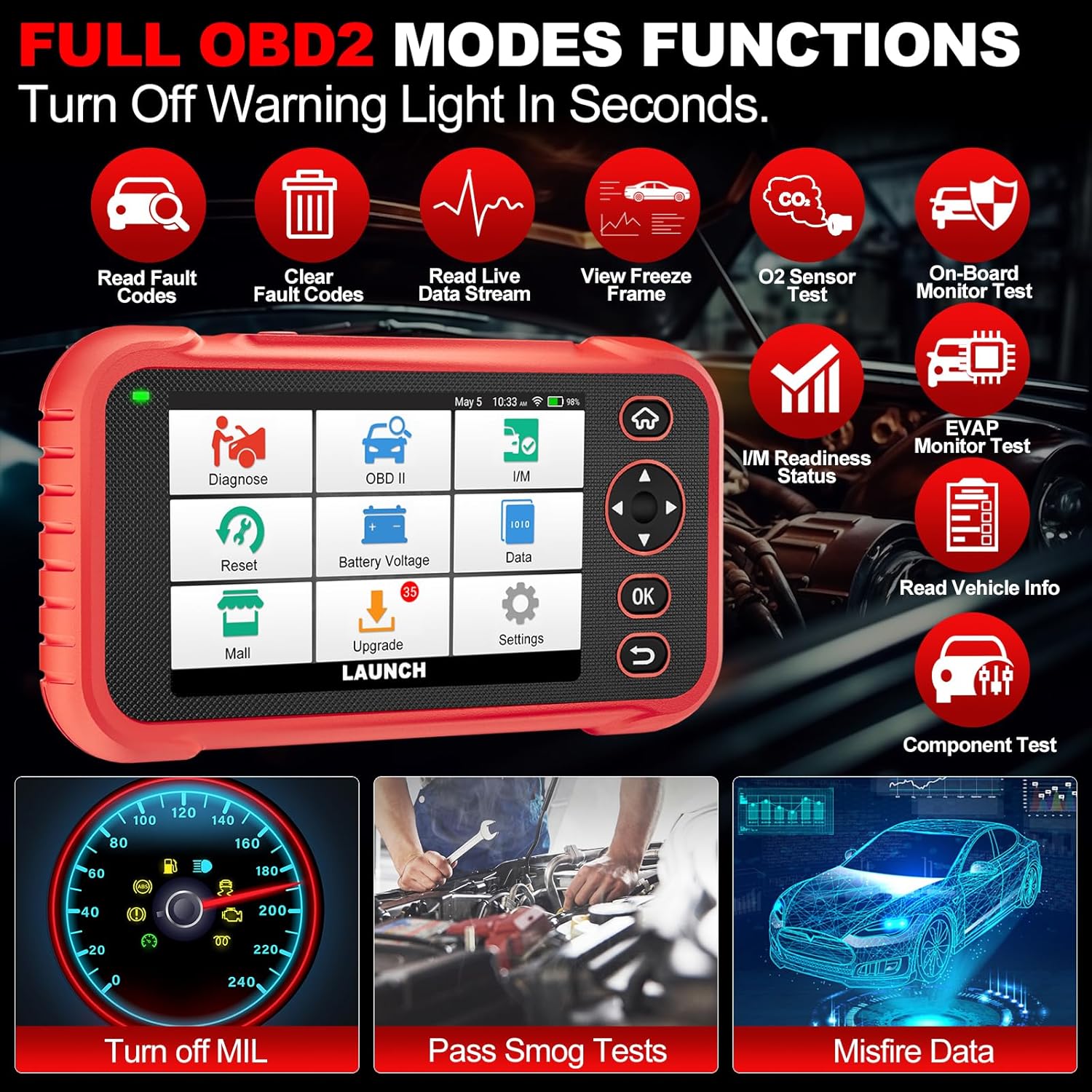
Imaginea 4.3: Main menu options for OBD2 functions.
4.4. Service Reset Functions
The CRP129E Plus offers 12+ essential service reset functions for common maintenance tasks.
- Resetare ulei: Resetează sistemul de monitorizare a duratei de viață a uleiului după un schimb de ulei.
- Adaptarea clapetei de accelerație: Inițializează actuatoarele clapetei de accelerație la starea implicită.
- Resetare Adblue: Resets the urea after the diesel exhaust fluid (AdBlue) is replaced or refilled.
- Headlamp Potrivire: Calibrates the adaptive front lighting system.
- Resetare TPMS: Resetează senzorii sistemului de monitorizare a presiunii în anvelope.
- Resetare SAS: Calibrează senzorul de unghi de direcție.
- Potrivirea bateriei (resetare BMS): Registers new battery replacement.
- Resetare A/F: Adjusts air/fuel ratio parameters.
- Regenerarea DPF-ului: Elimină particulele din filtrul DPF.
- Codarea injectoarelor: Codifică noile numere de injectoare către ECU.
- Resetare EPB: Resets the electronic parking brake pads after replacement.
- Sângerare ABS: Performs bleeding of the brake system.

Imaginea 4.4: Pesteview of available service reset functions.
4.5. Live Data Graphing and Recording
The device can display live data streams in merged quadrant graphs, allowing for comprehensive analysis of up to four parameters simultaneously. Data can also be recorded and played back for further review.

Imaginea 4.5: Example of 4-in-1 live data graphing and diagnostic report generation.
4.6. Vol. baterietage Test
Monitorizați volumul bateriei vehicululuitage in real-time to assess its status and identify potential issues.

Imaginea 4.6: Volumul baterieitage test interface and other diagnostic support features.
5. Întreținere
- curatenie: Folosiți o lavetă moale și uscată pentru curățarea dispozitivului. Evitați substanțele de curățare abrazive sau solvenții.
- Depozitare: Store the device in its carrying case in a cool, dry place when not in use.
- Actualizări de software: Regularly check for and install software updates via Wi-Fi to ensure optimal performance and vehicle compatibility.
- Îngrijirea bateriei: Avoid fully discharging the battery frequently. Charge the device regularly, even if not in active use, to maintain battery health.
6. Depanare
| Problemă | Cauza posibila | Soluţie |
|---|---|---|
| Dispozitivul nu pornește. | Baterie descărcată; buton de pornire defect. | Încărcați dispozitivul timp de cel puțin 30 de minute. Dacă problema persistă, contactați asistența. |
| Eroare de comunicare cu vehiculul. | Loose OBDII connection; vehicle ignition off; incompatible vehicle protocol. | Ensure cable is securely connected. Turn ignition to ON. Verify vehicle compatibility. |
| Unable to update software. | No Wi-Fi connection; unstable internet; insufficient storage. | Check Wi-Fi connection. Ensure stable internet. Free up storage if necessary. |
| Ecranul nu răspunde. | Eroare software; daune fizice. | Restart the device. If issue persists, contact support. |
7. Specificații
- Model: CRP129E PLUS
- Sistem de operare: Android 7.0
- Afişa: Ecran tactil de 5 inci
- Memorie: 16 GB
- Baterie: 6100mAh
- Conectivitate: Wifi
- Dimensiuni: 7.09 x 6.3 x 2.36 inci
- Greutatea articolului: 2.27 lire sterline
- Protocoale acceptate: OBDII/EOBD
- Acoperirea vehiculului: Over 85 brands (1996-2025)
- UPC: 884508007774

Imaginea 7.1: Summary of key hardware and software specifications.

Imaginea 7.2: Extensive vehicle brand coverage and multi-language support.
8. Garanție și asistență
The LAUNCH CRP129E Plus comes with a manufacturer's warranty. Please refer to the official LAUNCH webconsultați site-ul sau documentația de achiziție pentru termenii și condițiile specifice de garanție.
- Garantie: 5 Years (as per product information)
- Return/Replace Policy: 90 Days (as per product information)
- Suport tehnic: 24/7 technical support is available. For assistance, please contact LAUNCH customer service.
- Feedback online: The device supports online feedback for quick resolution of diagnostic issues.
For further assistance or to provide feedback, please visit the official LAUNCH support channels.


